

The average B2B sales rep spends roughly 30% of their week on activities that could lead to revenue. The rest disappears into CRM updates, follow-up emails that take longer to write than the meeting they reference, report assembly for leadership, and the scheduling back-and-forth that somehow eats 45 minutes out of every day. For Canadian B2B companies running longer sales cycles with multiple decision-makers on every deal, that admin load is even heavier because there are more touchpoints to track and more data to log across a pipeline that can stretch for months.
Automated sales processes handle some of that workload without adding headcount by giving your reps back the hours that got buried under admin so those hours can go toward the conversations and relationship work that closes deals. The technology behind business automation has improved considerably in the last two years, particularly for Canadian B2B companies running Dynamics 365 where Copilot AI and Power Automate now handle tasks that used to require manual effort from every rep on the team every single day.
The automated sales processes that make the biggest difference for Canadian B2B sales teams are the ones that handle the repetitive work your reps do between conversations, and the compound effect of removing that work across an entire sales team over a full quarter is where the ROI becomes impossible to ignore.
Canadian B2B companies running Dynamics 365 have an advantage here because the automation connects natively to Outlook, Teams, and Power BI without third-party connectors holding the pieces together. That means the automated processes your team builds inside the CRM extend into the tools they already use every day instead of existing in a separate system nobody remembers to check.
Automated sales processes work when they're built around how your team sells
Gestisoft helps Canadian B2B companies configure CRM automation that fits their sales process instead of forcing their team into generic workflows.
 Book a free consultation
1. Automated sales processes for lead capture and assignment
When a prospect fills out a contact form or downloads a resource from your website, the clock starts. Research consistently shows that responding to a new lead within the first five minutes dramatically increases the likelihood of a meaningful conversation. If your leads land in an inbox and wait for someone to notice them, you're handing that advantage to whichever competitor responds first. Automated sales processes for lead capture eliminate that delay by creating a lead record in the CRM the moment the form is submitted and routing it to the right rep based on the rules your team defines.
The assignment rules should match how your sales team is structured, for example territory, product line, account size, or round-robin distribution for balanced workloads. For Canadian B2B companies with reps covering different provinces or serving different industry verticals, the routing logic needs to reflect that complexity rather than dumping every lead into a general queue that someone sorts manually over their morning coffee. Sales planning software that connects lead assignment to the broader outreach and follow-up process means your reps know exactly what to do with a new lead the moment it arrives instead of deciding on the fly.
For Canadian B2B companies using Dynamics 365, this automation runs through Power Automate. A web form submission triggers lead creation in the CRM, the assignment rules route the record, and the rep receives a notification in Teams or Outlook with the lead details and a suggested first action. The whole sequence fires in seconds and the rep can be on the phone with the prospect before they've finished browsing your website.
2. Automated sales processes for lead scoring and qualification
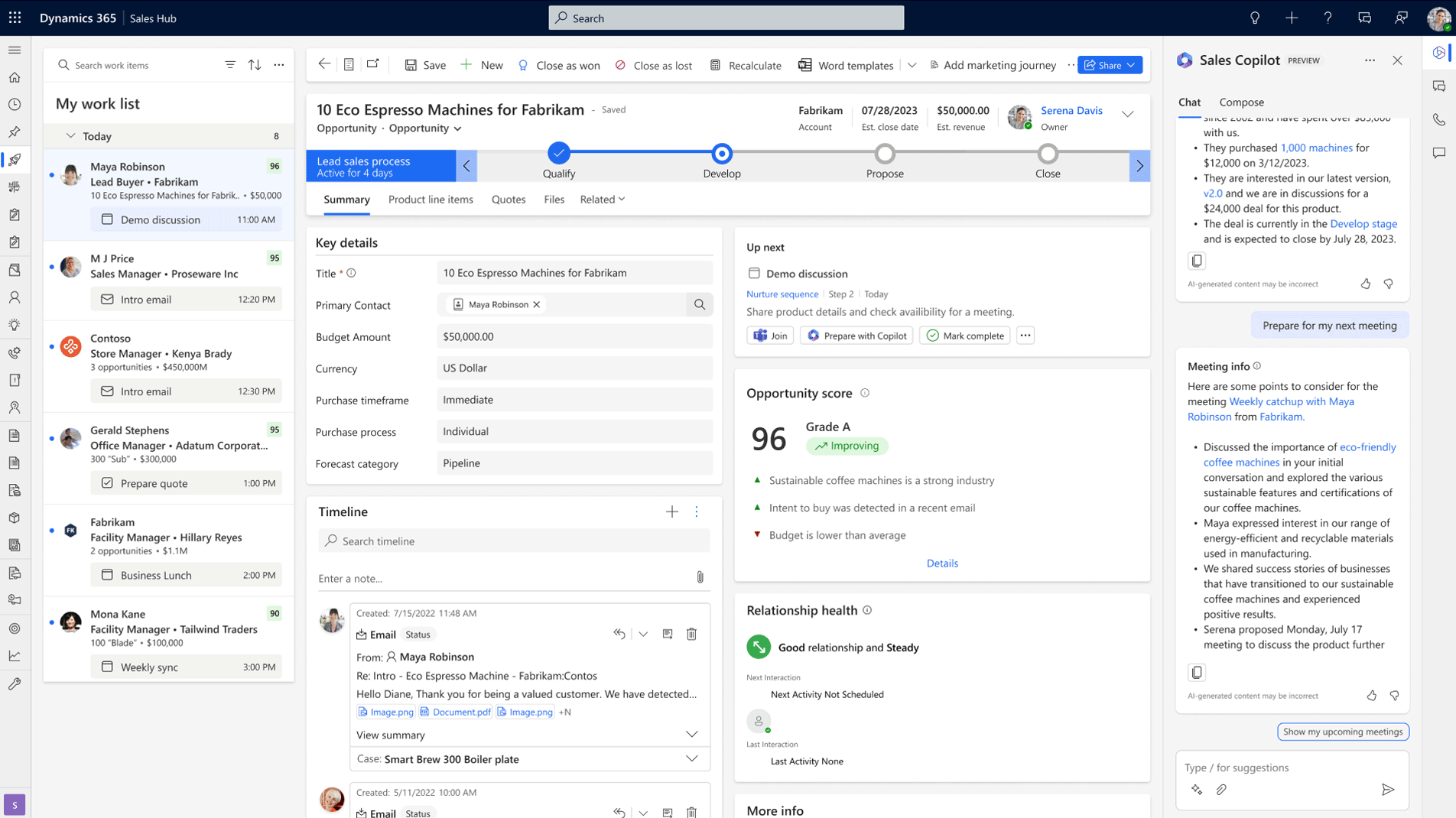
Not every lead that enters your pipeline deserves a rep's time on the same day it arrives. Some are ready to buy and some are browsing, and your team's ability to tell the difference without manually reviewing every record is what automated lead scoring provides. The CRM evaluates incoming leads against criteria your business defines and assigns a score that tells your reps which prospects deserve immediate attention and which should enter a nurture sequence until they're closer to a buying decision.
Dynamics 365 handles this through predictive lead scoring powered by AI that learns from your historical data. The model identifies which lead characteristics have correlated with closed deals in your pipeline over time and scores new leads accordingly. Your reps open their CRM dashboard in the morning and see prospects ranked by probability of conversion instead of sorted by the order they happened to arrive. Understanding the difference between a lead and an opportunity in Dynamics 365 becomes practical at this stage because the automated sales process needs to know when a scored lead should convert to an opportunity record and trigger a different set of actions for the assigned rep.
The qualification automation that follows scoring is where the real time savings compound. When a lead crosses a threshold score the CRM automatically updates the lead status and creates a task for the assigned rep with context about why the score is high. When a lead falls below the threshold it enters an automated nurture sequence that keeps your company visible without consuming any rep time. Your pipeline stays focused on the prospects with real potential and your reps stop spending mornings manually triaging a list of names they know nothing about.
3. Automated sales processes for follow-up sequences
Missed follow-ups are the most expensive leak in any B2B sales pipeline. A rep has a strong discovery call, promises to send additional information, gets pulled into another deal, and three days later the prospect still hasn't heard from them. That silence costs revenue and it happens far more often than most sales leaders realize because nobody tracks the follow-ups that didn't happen.
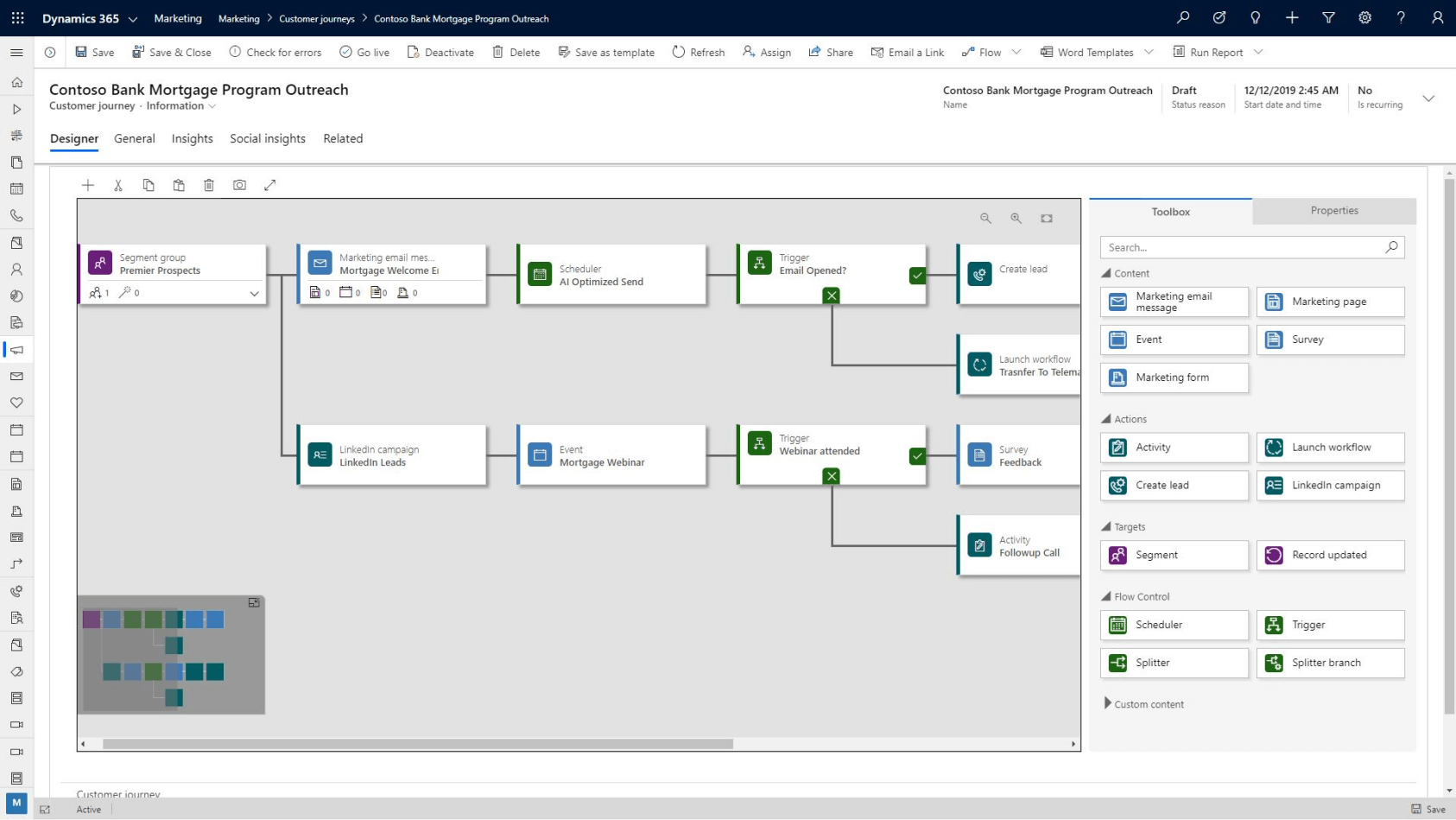
Automated sales processes for follow-up sequences remove the dependency on human memory entirely. Email sequences trigger based on pipeline activity so when a prospect moves to the discovery stage they receive a relevant case study without the rep lifting a finger. When a deal sits at the proposal stage for longer than your average cycle length for that stage the rep gets a task reminding them to check in. The sequences run on rules your team defines and the follow-up happens regardless of how busy the week gets.
“Before, we were working with an application called Planner, but it was disorganized. We forgot tasks and didn't always call customers back.”
Copilot for Sales adds a layer that generic automation can't match. Copilot drafts follow-up emails using context from previous conversations and suggests timing based on engagement patterns. The rep reviews and adjusts the draft instead of starting from a blank compose window every time, which cuts the time per follow-up from fifteen minutes to under two. A Microsoft Copilot consultant can configure how these AI-powered sequences behave inside your specific Dynamics 365 environment so the outputs match your team's tone and your buyers' expectations.
For Canadian B2B companies serving clients in Quebec, automated follow-up sequences should include bilingual email templates that send in the recipient's preferred language. Dynamics 365 supports this configuration so francophone prospects receive French communications and anglophone prospects receive English without the rep manually switching templates for every send.
4. Automated sales processes for pipeline management
Your pipeline needs constant maintenance and when reps handle that maintenance manually the data always lags behind reality. Opportunities that went cold months ago continue to inflate the forecast because nobody marked them as lost, and close dates pass without anyone adjusting them until the pipeline becomes a wish list instead of a planning tool. The longer that housekeeping gets deferred the wider the distance grows between what your leadership sees on screen and what's happening on the ground.
Automated sales processes for pipeline management handle the housekeeping that reps deprioritize when the week gets busy. A completed meeting can trigger an automatic stage advancement if the meeting type matches a progression rule in the CRM. Deals that sit at a stage longer than your average cycle length get flagged as at-risk with a task created for the rep or their manager automatically. The system does the chasing so your sales manager doesn't have to spend every Friday afternoon auditing the pipeline manually.
“With a CRM like Dynamics 365, I can easily identify where each contact is in the process and prioritize the necessary actions. This allows me to manage my time optimally and ensure personalized follow-up for each potential customer.”
Read the full case study here.
Dynamics 365 sales accelerator takes this further by creating guided selling sequences that tell your reps what to do next based on where each deal sits in the pipeline. Instead of relying on reps to remember the right sequence of actions for every deal they're managing simultaneously, the automated sales process walks them through it. Sales opportunity management software that handles complex B2B deals with multiple contacts at the same account benefits from this guided approach because the number of moving parts per deal is high enough that even experienced reps lose track during busy weeks.
Automated sales processes built around your pipeline keep your forecast honest and your reps focused
Gestisoft configures Dynamics 365 automation to match how your Canadian B2B team moves deals from first contact to close.
 Book a free consultation
5. Automated sales processes for meeting scheduling and activity logging
Meeting scheduling through Dynamics 365 integrates with Outlook calendars so your reps can send a booking link and let the prospect pick a time that works without the back-and-forth email chain that somehow turns a simple calendar hold into a four-day conversation. The meeting appears on both calendars with the CRM record automatically updated, and the rep's time stays focused on preparation instead of coordination.
Activity logging after meetings is where Copilot AI delivers the most visible time savings for Canadian B2B sales teams. Copilot generates meeting summaries from Teams calls, pulls out action items, and logs everything against the deal record in the CRM automatically. Compare that to the 15 to 20 minutes a rep typically spends writing notes after a call, or the more common outcome where no notes get logged at all because the next meeting started immediately. A sales dashboard that surfaces team activity and deal progression for your sales manager becomes dramatically more useful when the activity data feeding it is complete, and automated logging is what makes that completeness possible without relying on your reps to do it manually at the end of every day.
6. Automated sales processes for reporting and forecasting
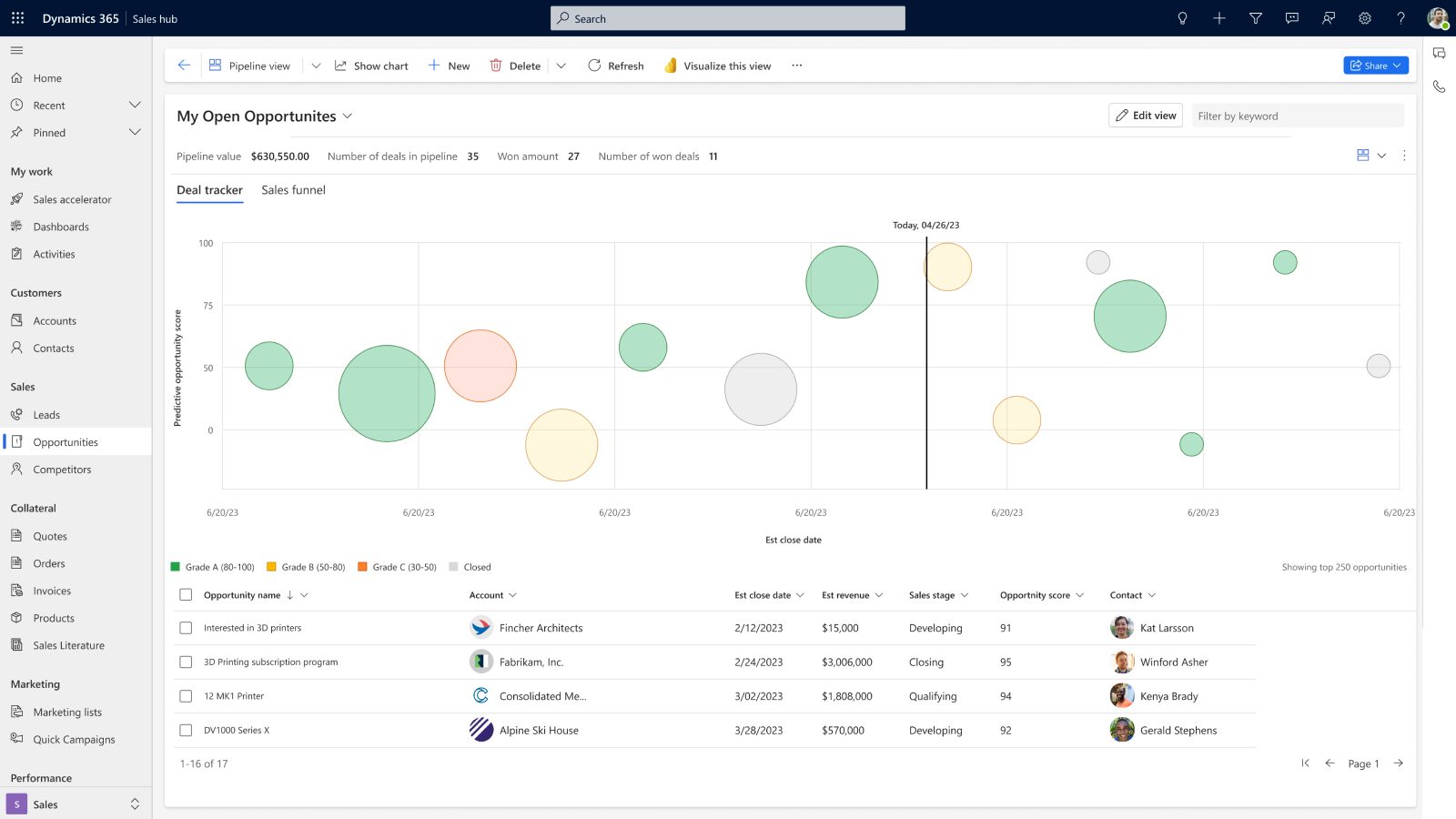
The Monday morning pipeline meeting in most Canadian B2B companies depends on numbers that someone spent an hour assembling from a CRM export and a spreadsheet. By the time the report is formatted and presentable the data is already a day old and the conversation starts with caveats about what might have changed since the numbers were pulled. Automated sales processes for reporting eliminate that ritual entirely by connecting embedded Power BI sales dashboards inside Dynamics 365 that pull live data from the CRM and present it in visual formats your leadership can read without assistance. The best sales management software delivers this reporting as a standard capability, and a sales performance dashboard built on Power BI takes it further by adding the drill-down and cross-filtering depth that built-in CRM dashboards weren't designed to provide.
“Thanks to the CRM reports, we can easily output sales projections and track our performance in real time. This helps us make strategic decisions based on concrete data.”
AI-powered forecasting in Dynamics 365 adds another dimension that manual reporting can't replicate. The model analyses historical win rates, current pipeline velocity, and rep activity patterns to produce a forecast that accounts for the likelihood of each deal closing within the forecast window. Your leadership gets a confidence-weighted number instead of the optimistic total that most pipeline reports produce when they simply add up the deal values at each stage. Automated report distribution means those forecasts land in leadership inboxes on the schedule they prefer without anyone compiling or sending them manually.
7. Automated sales processes for proposal and quote generation
Building proposals manually is one of the slowest steps in any B2B sales cycle because reps end up pulling product details from one system, pricing from another, and customer information from a third before they can even start assembling the document. Automated sales processes for quote generation pull all of that into a single workflow inside the CRM. The rep selects the products, the system generates the quote with the correct pricing and terms, and the document is ready for review in minutes. Approval routing handles the internal step that typically stalls proposals by sending quotes that exceed discount thresholds or fall outside standard terms to the appropriate manager automatically with a notification that needs a single click to approve or return with comments.
For Canadian B2B companies serving clients across both official languages, Dynamics 365 supports bilingual document templates so proposals to francophone clients generate in French and anglophone clients receive English without the rep maintaining separate template sets or manually swapping content before every send. That bilingual capability extends across the entire quote workflow from the product descriptions through to the terms and conditions, which means your Quebec-based clients receive a fully French proposal that looks like it was built for them specifically rather than translated from an English original after the fact.
8. Automated sales processes for post-sale follow-up and retention
The most overlooked automated sales processes in any B2B company are the ones that should fire after the deal closes. The rep moves to the next opportunity and the relationship that took months to build enters a dead zone where nobody is proactively maintaining it until the renewal comes due or a support issue forces the conversation. For Canadian B2B companies where customer relationships drive referrals and expansion revenue, that dead zone is expensive because the customers you've already won represent the highest-probability revenue in your forecast. Canadian B2B companies that haven't configured post-sale automation often discover this problem during a CRM migration when the audit reveals that customer retention was never built into the original system at all.
Automated post-sale workflows prevent that by triggering a welcome sequence when a deal closes that introduces the customer to their account manager and sets expectations for onboarding. Milestone check-ins are sent automatically at intervals your team defines to make sure the customer is seeing value from what they purchased. Renewal reminders trigger well before contract end so the conversation starts while the relationship is strong rather than in the final week when the customer has already been evaluating alternatives. A CRM expert who structures the system to support both new business and retention workflows can configure these sequences so they run alongside your sales pipeline without competing for your team's attention. Understanding how CRM systems support different business functions beyond the sales team puts this post-sale automation into a broader context for Canadian B2B companies that want the CRM working across the full customer lifecycle.
Automated sales processes should cover your full pipeline from lead capture to customer retention
Gestisoft configures Dynamics 365 automation across the entire sales cycle so your Canadian B2B team spends more time selling and less time on admin.
 Book a free consultation
How Gestisoft builds automated sales processes for Canadian B2B companies
Gestisoft implements Dynamics 365 across the full Microsoft stack, so when your automated sales processes need to connect the CRM to Outlook, Teams, Power Automate, and Power BI the whole build stays under one roof. Most Dynamics 365 partners can configure what happens inside the CRM but fewer can build automation that spans the full ecosystem, and that's where the time savings come from for Canadian B2B sales teams.
Gestisoft has configured automated sales processes for Canadian B2B companies ranging from ten-person sales teams running their first CRM to mid-market organizations with 50 reps across multiple provinces and product lines. The scale changes the complexity but the principle stays the same. Every automation rule traces back to something your team does manually today that the CRM can handle better and faster.
Gestisoft has been implementing Dynamics 365 long enough to know which automation rules deliver value immediately and which ones need a few weeks of real use before the configuration is right. The patterns behind underperforming automation tend to repeat across businesses even when the industries look completely different, and that experience means your team isn't the test case for an approach someone is trying for the first time.
The automated sales processes Gestisoft configures are built to evolve as your business does because the team that built them stays involved as your sales process matures and your requirements change. Canadian B2B companies that work with Gestisoft on automation tend to expand the scope over time because once the first round starts saving hours the team immediately spots the next area where manual work is slowing them down. That ongoing evolution is where the real ROI accumulates.
-
Automated sales processes use CRM software and workflow tools to handle repetitive tasks across the sales cycle. Lead capture, assignment, scoring, follow-up sequences, pipeline management, reporting, quote generation, and post-sale follow-ups can all run on rules and triggers your team defines. The goal is to give reps more time for the conversations and deal progression that close revenue by removing the admin work that sits between them.
Explore more
- CRM specialist: what they do and how to hire the right one in Canada
- CRM software consultant: how to evaluate one for your Canadian business
- HubSpot competitors: alternatives for Canadian businesses
- CRM implementation consultant: what to expect from the engagement
- Copilot consultants: what Canadian businesses should look for
Liked what you just read? Sharing is caring.

May 29, 2026 by Shelley Sunjka by Shelley Sunjka Copywriter & Marketing Strategist
Armed with a psychology degree and an irrational obsession with okapis, I've spent the last decade helping bold brands tell better stories. I believe the best writing bends grammar rules on purpose and makes people feel something. When I'm not deep in words or nerding out on buyer behaviour, I'm probably convincing my kids that impromptu kitchen dance parties are totally normal.
