Every CRM vendor claims to do everything. Pipeline management, marketing automation, customer service, reporting, AI insights, and the rest of the long list. That would be useful if it were true, but in practice the CRM systems worth evaluating tend to be the ones with a clear point of view about what they're best at. The platforms that try to be everything end up being mediocre at most things, and the platforms built around a specific problem are often great at solving that problem for the businesses that need it.
The 12 examples of CRM systems below are organised by the business problem they solve rather than ranked against each other. Each entry covers what the platform does well, the type of business it suits, and where it's likely to fall short. The goal is to make the evaluation easier by giving you a clearer sense of which category of CRM matches your situation before you start booking demos.
The CRM your competitor swears by might be completely wrong for how your team operates. Matching the right platform to your business problem is the decision that determines whether the CRM becomes infrastructure your team relies on or an expensive piece of software sitting in the background.
The right CRM system starts with understanding how your business operates
Gestisoft helps Canadian companies evaluate and implement CRM systems configured around their teams and processes.
 Free discovery call
Examples of CRM systems built for managing a sales pipeline
Sales pipeline management is where most businesses start their CRM search, and for good reason. Deal tracking, pipeline visibility, and accurate forecasting are the fundamentals every B2B sales team needs from a CRM before anything else becomes worth considering. The platforms below are the three worth evaluating if your primary problem is understanding where deals stand and what's going to close this quarter. Each one takes a different approach to the same core job, which is why matching them to your team size and sales process matters more than picking the "best" one.
1. Microsoft Dynamics 365 Sales

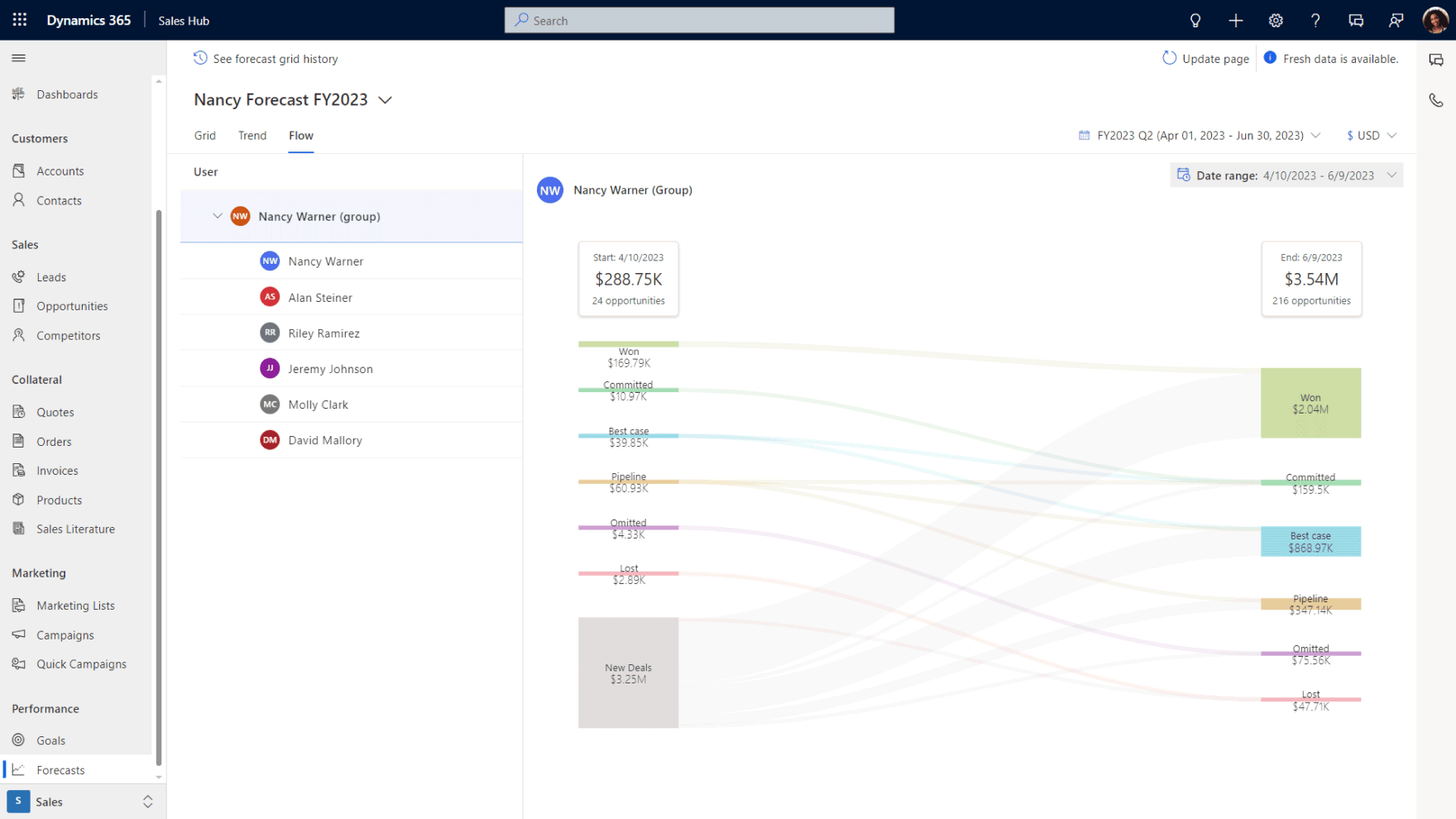
What it does: Dynamics 365 Sales handles pipeline management, lead scoring, forecasting, and activity tracking with AI-driven insights through Copilot. It lives natively inside the Microsoft ecosystem, which means if your team already works in Outlook and Teams, there's no separate login or third-party connector to maintain.
Who it suits: Dynamics 365 Sales is built for B2B companies with structured sales processes, particularly those who also need their CRM connected to financial or operational data through Business Central. The platform scales from mid-market to enterprise without forcing a business to switch platforms as it grows, which matters for companies building for the long term rather than solving today's problem.
Where to watch out: Microsoft Dynamics 365 Sales is not the right fit for a five-person team that just needs basic contact tracking. The power is in the configuration, which means the CRM implementation consultant matters as much as the platform itself. A strong Microsoft partner makes the difference between a Dynamics 365 setup your team uses daily and one that underperforms because the defaults were never fine-tuned. Businesses weighing their options often start by looking at Dynamics 365 Sales Professional before deciding whether they need the full Enterprise tier.

What it does: Salesforce Sales Cloud covers pipeline management, lead and opportunity tracking, forecasting, and workflow automation, backed by one of the largest app marketplaces in the CRM market. It's the most customisable platform on this list, which is both its biggest strength and the source of most of its complications.
Who it suits: Salesforce works best for larger organisations that have the budget and internal resources to invest in configuration and ongoing admin. Companies with a dedicated Salesforce administrator get the most out of the platform, because the flexibility that makes it powerful also requires someone to manage it properly over time.
Where to watch out: Complexity and cost escalate quickly once you move past the basic tiers. Customisations built up over the years can create dependency on specialised consultants who understand your specific Salesforce instance. Integration with non-Salesforce tools often requires middleware, which adds another layer to maintain and another place where data sync can break down.
3. Pipedrive

What it does: Pipedrive offers visual pipeline management with activity-based selling, email tracking, and straightforward automation. The platform was designed around the idea that a CRM should be built for salespeople and the interface reflects that philosophy clearly throughout.
Who it suits: It’s built for small to mid-sized sales teams that want something lightweight and adoption-friendly. It's particularly strong for teams that have been avoiding CRM altogether because all the Pipedrive competitors they looked at felt too heavy or too complicated to roll out without a dedicated admin.
Where to watch out: Pipedrive has limited depth in reporting and analytics compared to enterprise platforms. If your business needs a CRM connected to ERP, customer service, or field operations, Pipedrive will cover sales pipeline management well in the short term, but you'll outgrow it as the business adds complexity.

Examples of CRM systems designed for marketing and lead generation
Marketing-focused CRM systems live at the top of the funnel. They handle the work of capturing leads, nurturing them through campaigns, scoring readiness, and handing qualified prospects over to sales once they're ready for a conversation. The examples of CRM systems in this category feed directly into your sales CRM rather than sitting in a separate silo, because marketing data that never reaches the sales team is data that doesn't drive revenue.
4. HubSpot

What it does: HubSpot covers lead capture forms, email marketing, landing pages, campaign tracking, and lead scoring, along with a built-in blogging platform for content marketing. The free tier is one of the most generous in the market, which is why HubSpot has become a common starting point for businesses that want to get something running quickly without a large upfront investment.
Who it suits: HubSpot works best for small to mid-sized businesses that want marketing and sales in one platform without a heavy implementation project. It's particularly strong for companies early in their CRM journey who need something they can start using within the same week they sign up.
Where to watch out: The free and starter tiers are limited once a business scales, and costs jump significantly at the Professional and Enterprise levels. Reporting depth and customisation don't match what enterprise-grade platforms offer, and integration with ERP or operational systems is restricted compared to what some Hubspot competitors deliver natively.
5. ActiveCampaign

What it does: ActiveCampaign offers email marketing automation, a CRM with pipeline management, lead scoring, site tracking, and SMS marketing. The platform is known for sophisticated automation workflows that are relatively straightforward to set up, which makes it popular with businesses that want marketing automation without a dedicated marketing ops team.
Who it suits: ActiveCampaign is built for businesses where the primary CRM need is marketing automation and lead nurture rather than complex sales pipeline management. It works particularly well when email is the primary sales channel and the sales process itself is relatively light-touch.
Where to watch out: The CRM functionality is clearly secondary to the marketing automation in ActiveCampaign. If your sales team needs robust pipeline management, reliable forecasting, or deep reporting, the platform won't cover those needs on its own, and you'll end up pairing it with something else to handle the sales side.
Examples of CRM systems focused on customer service and retention
Acquiring a new customer costs five to seven times more than keeping an existing one, which is why examples of CRM systems built around the post-sale relationship deserve as much attention as the ones focused on new business.
These platforms handle support tickets, case resolution, SLA tracking, and customer satisfaction. For B2B companies where retention drives recurring revenue, the service side of the CRM often matters more than the pipeline side once the initial contract is signed.
6. Microsoft Dynamics 365 Customer Service

What it does: Dynamics 365 Customer Service covers case management, SLA tracking, knowledge base functionality, and omnichannel support across email, chat, and phone, with AI-powered suggestions delivered through Copilot. Because it lives in the same Dynamics 365 environment as the sales module, customer service agents can see the full history of a client relationship rather than just the support ticket in front of them.
Who it suits: Dynamics 365 Customer Service works best for businesses that want sales and service teams working from the same customer record. It's particularly strong for B2B companies where the relationship doesn't end at the sale and ongoing support is part of the value proposition that wins the renewal.
Where to watch out: The same caveat applies here. The platform rewards proper configuration, and out-of-the-box defaults won't deliver the full value without a partner who understands your service workflows. A Microsoft consultant with service expertise is particularly valuable because customer service processes vary far more widely than sales processes do between businesses.
7. Zendesk

What it does: Zendesk offers ticketing, help desk management, live chat, a knowledge base, and customer satisfaction surveys, backed by one of the most recognised brands in customer support software. The platform is particularly strong on self-service portal options, which reduces the volume of support requests that actually reach an agent.
Who it suits: Zendesk is built for companies where customer support is high-volume and ticket-based. It works particularly well for SaaS companies and businesses dealing with a large number of incoming support requests that need to be tracked and resolved efficiently.
Where to watch out: Zendesk is a support tool rather than a full CRM, which matters once a business needs more than ticket management. If you need pipeline management, marketing automation, or financial data connected to your customer records, you'll end up running Zendesk alongside additional platforms, which means another integration to maintain and another data silo to reconcile.
Your CRM system should connect sales, service, and operations in one place
Gestisoft implements Dynamics 365 so your customer data, financial data, and operational data live in the same environment instead of separate silos.
 Free discovery call
Examples of CRM systems that connect your front and back office
This is the category most businesses don't think about until they're already running two disconnected systems and reconciling data between them by hand. The examples of CRM systems below solve that problem by putting customer-facing and back-office data on one platform.
8. Microsoft Dynamics 365 (CRM + Business Central)

What it does: Dynamics 365 paired with Business Central connects sales pipeline data with financial reporting, inventory management, purchasing, and operations on one platform. When your sales team closes a deal, the order flows into finance without a handoff spreadsheet. When your service team schedules a site visit, they can see whether the customer has an outstanding invoice before the technician gets on the road.
Who it suits: This combination works best for Canadian B2B companies that need one source of truth across sales, service, finance, and operations. It's particularly strong for manufacturers, distributors, and professional services firms where the front office and the back office are tightly linked and data has to flow between them constantly.
Where to watch out: This is a larger implementation scope than a standalone CRM and requires a partner who understands both CRM and ERP well enough to configure the connection around your business processes. The partner selection is the single most important decision in the project, because a badly connected CRM-ERP implementation is worse than two well-configured standalone systems.

What it does: NetSuite CRM offers lead management, opportunity tracking, and forecasting built directly into the NetSuite ERP platform. The concept is similar to Dynamics 365 paired with Business Central in that it connects customer data with financial and operational data in the same environment.
Who it suits: NetSuite CRM is built for mid-market to enterprise businesses already running NetSuite ERP who want to add CRM capabilities within the same environment rather than integrating a separate system from outside.
Where to watch out: NetSuite is a significant investment. The platform is powerful, but the licensing model and implementation costs can be prohibitive for smaller businesses that don't need everything the full ERP delivers. Canadian-specific support and bilingual capability depend heavily on which implementation partner you work with rather than being built into the platform itself.

Examples of CRM systems built for specific industries
Some industries have compliance requirements and operational structures that don't fit neatly into a standard CRM template, which is where purpose-built platforms earn their place. The examples of CRM systems below are built for specific sectors, which means less customisation work upfront, faster adoption, and fewer workarounds once the system is live.
10. Legio by Gestisoft (regulatory bodies and professional associations)

What it does: Legio is membership management software that handles compliance tracking, renewal automation, disciplinary case management, and continuing education tracking, with bilingual member portals built in. The platform runs on Microsoft Dynamics 365 and Power Platform and is built specifically for Canadian regulatory bodies and professional associations.
Who it suits: Legio is designed for organisations managing licensed professionals with annual compliance obligations, government oversight, and complex member lifecycle processes. That includes professional orders, regulatory bodies, and industry associations operating across Canada.
Why it's different: Most CRM platforms would require months of customisation to handle what Legio does natively. Compliance tracking, practice monitoring, and bilingual portals aren't bolt-ons added after implementation. They're core to how the platform is structured from day one.

What it does: Clio offers client intake, matter management, time tracking, billing, trust accounting, and document management, built specifically around how law firms manage client relationships from first contact through to final invoice.
Who it suits: Clio works for law firms and legal practices that need CRM functionality tied to case management, compliance with trust accounting rules, and client communication tracking. It's strong in the Canadian market with Canadian data hosting built in.
Where to watch out: Clio is purpose-built for legal, which means it's irrelevant if you're not a law firm. It's included here as one of the examples of CRM systems to show how deeply an industry-specific CRM can go compared to configuring a general platform for the same workflows.
12. Civio (municipalities and citizen services)

What it does: Civio is a citizen request management platform built on Microsoft Dynamics 365 and Power Platform. It handles 311 service requests, complaint management, case routing, and citizen self-service portals, with a centralized view that connects city agents, field teams, and residents across every channel. The platform includes intelligent routing that assigns cases based on location and context and geo-data integration so field teams can see where requests are coming from and dispatch efficiently.
Who it suits: Civio is designed for Canadian municipalities and city governments managing citizen service requests at scale. It works particularly well for mid-sized cities where 311 call volumes have outgrown manual processes but budget constraints make enterprise government software impractical. The platform suits cities looking to give residents a self-service portal while giving internal teams a unified view of every open request.
Why it's different: A generic CRM can be forced into handling citizen requests but the configuration work required is significant and the result rarely fits how municipal operations run. Civio handles the specific workflows cities need and omnichannel case management, as core platform functionality rather than features added on after implementation. The pricing is also structured for the municipal budget reality rather than enterprise SaaS, which helps mid-sized cities where every line item in the budget gets scrutinised.
How to narrow down examples of CRM systems to the right fit for your business
Twelve examples of CRM systems is a lot to evaluate, and the temptation after reading a list like this is to build a spreadsheet comparing features across every option. That approach rarely produces a good decision because feature comparison charts reward the platforms that do the most rather than the ones that do the right things for your specific business. A better starting point is the business problem itself.
What your team already uses is the second filter worth taking seriously. A CRM that lives inside your existing tech stack will outperform a better-featured platform that requires your team to change how they work every day. For Canadian businesses already running Microsoft 365, that usually tips the balance toward Dynamics 365 because the adoption curve is far shorter when reps can work from Outlook and Teams without a separate login.
Cost is where most businesses go wrong because they anchor on the per-seat licence fee and miss everything else. The platform itself is maybe 40% of what determines whether a CRM delivers value. The remaining 60% is implementation quality, configuration decisions, training, and the ongoing support that keeps the system relevant as your business changes. A CRM software consultant who understands your industry is usually worth more than the licensing difference between two similar platforms.
The final question worth asking is where your business will be in two years rather than where it is today. A lightweight CRM that's cheap to start often costs more in the long run when you outgrow it and have to migrate everything to a different platform. Choosing something you can grow into tends to be a better decision than choosing something you'll replace.
Choosing a CRM system is only half the decision
Gestisoft configures Dynamics 365 for Canadian businesses across both CRM and ERP on one platform.
 Free discovery call
How Gestisoft helps Canadian businesses choose and implement between these examples of CRM systems
Plenty of Canadian B2B businesses realise their situation touches more than one category. They need pipeline management and customer service tracking and operational data connected to their CRM. That's where most evaluations stall, because stitching three separate tools together creates exactly the kind of disconnected system a CRM was supposed to replace in the first place.
Gestisoft is one of very few Canadian Microsoft partners that works across both Dynamics 365 CRM and ERP. That scope changes the evaluation of examples of CRM systems from the first conversation. Instead of looking at your sales pipeline in isolation, Gestisoft looks at how your customer data connects to finance, operations, and service, and designs a CRM implementation that handles all of it on one connected platform rather than three platforms held together with middleware.
PIPEDA and Quebec's Law 25 are baked into how Gestisoft configures every Canadian CRM engagement, which means data residency and privacy decisions happen during implementation rather than getting patched in after someone raises a compliance question six months later. For businesses with teams in Quebec, the bilingual team handles onboarding and ongoing support in both official languages natively rather than translating English-first materials after the fact.
Every client gets a dedicated Customer Success Manager who stays involved well past go-live. That relationship is where the long-term value shows up, because a CRM configured perfectly on launch day still drifts out of relevance within eighteen months if nobody is actively refining it as the business grows. The CSM makes sure the platform evolves alongside your sales process and your team’s needs rather than slowly becoming the thing nobody wants to open.
-
The main examples of CRM systems fall into categories based on the business problem they solve, for example sales pipeline management, marketing and lead generation, customer service and retention, and platforms that connect CRM with ERP for front-to-back-office visibility. Some examples of CRM systems are also built for specific industries with specialised workflows, like Legio for regulatory bodies or Clio for law firms.
Liked what you just read? Sharing is caring.

April 20, 2026 by Shelley Sunjka by Shelley Sunjka Copywriter & Marketing Strategist
Armed with a psychology degree and an irrational obsession with okapis, I've spent the last decade helping bold brands tell better stories. I believe the best writing bends grammar rules on purpose and makes people feel something. When I'm not deep in words or nerding out on buyer behaviour, I'm probably convincing my kids that impromptu kitchen dance parties are totally normal.


