A sales dashboard helps businesses turn scattered sales data into clear decisions. Most companies already collect plenty of sales information, but it’s spread across CRM records, spreadsheets, reports, and email updates. A well-designed sales dashboard brings together the KPIs, pipeline metrics, and sales performance indicators that leadership needs to understand what’s happening in the pipeline.
Sales leaders need quick answers to simple questions.
→ Are we on track to hit revenue targets?
→ Which deals are likely to close this quarter?
→ Where are opportunities getting stuck?
For growing B2B organisations in Canada, that kind of visibility becomes more valuable as teams expand and pipelines become harder to track manually. Leadership needs a reliable way to understand performance and identify where revenue opportunities are developing or slowing down so they can make decisions with confidence based on real data.
What is a sales dashboard?
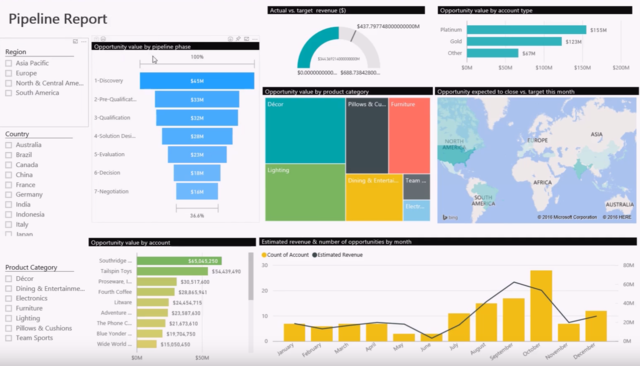
A sales dashboard is a visual interface that displays key sales metrics in a single view so teams can monitor performance and track progress toward revenue targets. Instead of reviewing multiple reports or exporting CRM data into spreadsheets, a dashboard presents the most important information through charts, tables, and other indicators that update as new data enters the system.
Most modern sales dashboards are connected directly to a CRM platform. This allows the dashboard to pull live information from opportunities, accounts, activities, and forecasts without requiring manual updates.
When designed properly, a sales dashboard becomes the central view of a sales organisation’s performance. Instead of searching through multiple systems to understand what’s happening, leaders can review one screen to see where attention is needed and where revenue is likely to come from next.
Build a sales dashboard that reflects how your team sells
Our CRM specialists can help you design dashboards in Microsoft Dynamics 365 that give leadership the insight they need to manage pipeline and forecasting with confidence.
 Free discovery call
What should a sales dashboard track?
A sales dashboard should focus on the metrics that show how revenue is developing across the pipeline, so sales leaders understand whether the organisation is on track to meet its targets.
The most effective sales dashboards track a combination of pipeline visibility, sales performance, and forecasting indicators. Let’s look at some of the key KPIs your sales dashboard should track:
Pipeline health
Pipeline health shows whether the sales team has enough opportunities in progress to support the revenue targets. This typically includes total pipeline value, the number of active opportunities, and how deals are distributed across each stage of the sales process.
Revenue and quota progress
Revenue tracking shows how current performance compares to sales targets. Sales leaders often review this metric to understand whether the team is on pace to meet monthly, quarterly, or annual goals. Many dashboards display revenue progress alongside quota attainment so leadership can quickly see whether current activity supports the organisation’s growth objectives.
Sales activity
Sales activity metrics measure the work taking place across the sales team. This can include calls, meetings, demos, follow-ups, and other actions that move opportunities forward. Tracking activity helps sales managers understand whether there is enough engagement with prospects and customers.
Win rate and conversion rate
Win rate shows the percentage of opportunities that successfully close. Conversion rates track how deals progress between stages of the sales process. These metrics help sales leaders identify whether opportunities are being qualified correctly and whether the sales process is effectively guiding prospects toward a purchase decision.
Average deal size
Average deal size measures the typical value of closed opportunities. This metric helps organisations estimate how much pipeline is needed to reach revenue targets. Changes in deal size can also reveal shifts in customer behaviour or pricing strategy.
Sales cycle length
Sales cycle length measures how long it typically takes for an opportunity to move from first engagement to closed deal. When the cycle becomes longer than expected, it may indicate issues with qualification or decision processes within customer organisations.
Forecast accuracy
Forecast accuracy compares predicted revenue against actual closed revenue. When forecasting improves, leadership can plan hiring, marketing investment, and expansion strategies with greater confidence.
Open opportunities and stalled deals
A good sales dashboard also highlights opportunities that have stopped progressing. Deals that remain inactive for long periods can distort forecasting and create false confidence in pipeline health.
What makes a great sales dashboard?
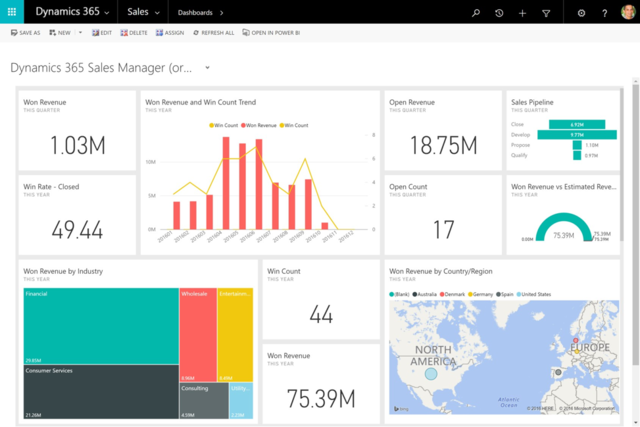
A great sales dashboard should be easy to scan, visually clear, and focused on the metrics that support decisions rather than cluttering the screen with too much data.
Use this checklist when evaluating or building a sales dashboard.
- Clean and simple layout that allows users to understand performance at a glance without navigating multiple screens.
- Only relevant metrics that focus on indicators directly connected to revenue performance and pipeline health.
- Role-specific views so sales representatives, managers, and leadership each see the metrics that support their responsibilities.
- Live or frequently refreshed data so teams can rely on the dashboard during pipeline reviews and forecasting discussions.
- Clear visual hierarchy that highlights the most important metrics while keeping supporting information accessible.
- Drill-down capability that allows users to move from summary metrics to the opportunities or accounts behind the numbers.
- Integration with the CRM system so the dashboard reflects the same data across the sales organisation.
- Easy adoption by the team so the dashboard becomes a regular reference point during meetings and daily sales activity.
Which sales dashboard KPIs matter most for each role?
Different teams rely on a sales dashboard for different reasons.
Designing dashboards around these different perspectives ensures that each group can quickly find the information that supports their decisions.
Sales dashboard KPIs for sales reps
Sales representatives use a sales dashboard to prioritise their daily work and understand where their opportunities stand.
Common KPIs include open opportunities, deal stage progression, upcoming follow-ups, and quota progress. These metrics help sales reps focus on the deals most likely to move forward while keeping their activity aligned with revenue targets.
Sales dashboard KPIs for sales managers
Sales managers rely on dashboards to monitor pipeline health and support their teams during pipeline reviews.
Key metrics often include pipeline value, win rates, stage conversion rates, and sales activity across the team. These indicators help managers identify stalled opportunities and ensure the team maintains enough pipeline coverage to meet future targets.
Sales dashboard KPIs for leadership teams
Leadership teams use a sales dashboard to understand how current pipeline activity connects to overall business performance.
Important metrics often include total revenue, forecasted revenue, quota attainment, pipeline coverage, and average deal size. These indicators help leadership evaluate whether the organisation is positioned to meet growth objectives and where strategic adjustments may be required.
Sales dashboard examples by role and use case
Different roles rely on different views of the same data depending on the decisions they need to make. Because of this, most organisations create multiple dashboards that serve different operational purposes. Each type of sales dashboard highlights a specific set of metrics that support how sales teams operate.
Sales manager dashboard
A sales manager dashboard provides a working view of the sales pipeline so managers can monitor deal progression and support the team during pipeline reviews.
This dashboard usually tracks metrics such as total pipeline value, opportunities by stage, win rate, and sales activity across the team. Managers often review these indicators during weekly pipeline meetings to understand whether deals are progressing as expected or whether opportunities have slowed down. By reviewing the dashboard regularly, managers can intervene earlier and help maintain momentum across the pipeline.
Sales pipeline dashboard
A sales pipeline dashboard focuses on the structure and health of active opportunities across the sales process.
This view typically shows how opportunities are distributed across each stage, the total value of the pipeline, and how long deals remain in each stage. The goal is to provide a clear picture of how sales opportunities are progressing toward closed revenue. If too many deals remain stuck in early stages or if pipeline coverage becomes thin, the dashboard reveals the problem quickly.
Sales forecasting dashboard
A sales forecasting dashboard focuses on the relationship between the current pipeline and future revenue expectations.
This dashboard usually compares forecasted revenue against sales targets while showing the opportunities expected to close within a given period. It may also highlight deal probability and historical conversion patterns to improve forecast accuracy.
Leadership teams rely on this view when planning hiring, budgeting, and resource allocation. If forecasts consistently diverge from actual results, the dashboard helps reveal where the forecasting process needs improvement.
Executive sales dashboard
An executive sales dashboard provides a high-level view of revenue performance across the organisation.
Instead of focusing on individual deals or activity metrics, this dashboard summarises the most important indicators tied to company growth. Common metrics include revenue progress against targets, forecasted revenue, pipeline coverage, and average deal size.
Executives use this view to understand whether the sales organisation is on track to meet strategic goals. The dashboard helps leadership evaluate overall performance without needing to analyse individual opportunities in detail.
Sales rep dashboard
A sales representative dashboard focuses on the opportunities and tasks that require attention during the workday.
This dashboard usually displays open opportunities, upcoming activities, quota progress, and deals approaching critical stages in the sales process. It allows representatives to prioritise which accounts require immediate action.
When organised effectively, the dashboard becomes a daily working view of the sales pipeline. Representatives can quickly see which deals need follow-up and where progress is developing.

How to build a sales dashboard that supports growth
Building a sales dashboard that supports growth requires a structured approach that connects sales metrics to the decisions leadership needs to make.
Here’s how to do that:
- Start with the sales process so the dashboard reflects how opportunities move from initial contact to closed revenue.
- Select metrics that support decision making rather than displaying every available activity or performance indicator.
- Connect the dashboard directly to CRM data so metrics update automatically as deals progress through the pipeline.
- Design the layout for the people using it so managers, sales representatives, and leadership can interpret performance quickly.
- Test the dashboard during real sales meetings to confirm it helps teams identify risks and opportunities quickly.
- Adjust the dashboard over time as the sales process evolves and new performance indicators become relevant.
Turn your sales data into a dashboard your team can use
Designing a sales dashboard that reflects your pipeline, forecasting process, and CRM data requires the right structure from the start.
 Free discovery call
Can a sales dashboard improve forecasting and sales opportunity management?
Forecasting problems usually come from inconsistent opportunity management. A well-structured sales dashboard helps address this by introducing consistent reference points during forecasting discussions. Instead of reviewing individual deals in isolation, leadership can evaluate how the entire pipeline behaves over time. This makes it easier to detect patterns such as stages where deals frequently stall or periods when pipeline coverage begins to weaken.
Dashboards also make it easier to challenge unrealistic forecasts. When expected revenue is compared against historical conversion patterns and current pipeline coverage, overly optimistic projections become easier to identify. This allows teams to focus attention on opportunities that are viable rather than relying on outdated pipeline assumptions.
For this to work, the underlying CRM data must be accurate. Opportunity stages, expected close dates, and activity records all influence how the dashboard interprets pipeline health. When CRM discipline is strong, the dashboard becomes a reliable tool for forecasting and sales opportunity management rather than a simple reporting screen.
How to align your sales dashboard with company goals and revenue targets
The first step is aligning dashboard metrics with the revenue model of the business. If the organisation depends on large enterprise deals, the dashboard should highlight pipeline value, deal progression, and expected close dates. If revenue depends on recurring subscriptions, metrics such as recurring revenue, renewal rates, and expansion opportunities become more relevant.
Sales performance should also connect directly to company targets. Leadership needs to see how current pipeline coverage compares with upcoming revenue goals so they can determine whether additional opportunities need to enter the pipeline.
Another important step is removing vanity metrics that look impressive but do not influence revenue. High activity levels may appear positive, but if those activities do not convert into qualified opportunities or closed deals, they provide little strategic value.
Alignment also depends on shared definitions across departments. Sales, marketing, and leadership must agree on how metrics such as qualified leads, opportunity stages, and forecast probability are defined. Without consistent definitions, dashboards can produce conflicting interpretations of the same data.
What tools can help you build a sales dashboard?
Several types of tools can be used to build a sales dashboard depending on the size of the organisation and the complexity of the sales process. Early-stage teams may rely on spreadsheets, while larger organisations typically build dashboards directly inside their CRM or through dedicated analytics platforms.
The right tool depends on where sales data already lives and how often teams need to review pipeline performance.
Spreadsheet templates for early-stage teams
Smaller organisations sometimes begin with spreadsheet-based dashboards using tools such as Excel or Google Sheets. These dashboards allow teams to track basic pipeline metrics and revenue progress without investing in dedicated analytics software. While spreadsheets can work in the early stages of a sales organisation, they often become difficult to maintain as pipelines grow and forecasting becomes more complex.
CRM dashboards
Most modern CRM systems include built-in dashboard capabilities that allow sales teams to visualise pipeline metrics, revenue progress, and opportunity data. Because CRM platforms store information about accounts, opportunities, and activities, dashboards built inside the CRM often provide the most reliable view of the sales pipeline. Managers can review performance directly within the system used to manage deals, which reduces the need for manual reporting.
Business intelligence tools
Some organisations use business intelligence platforms to build more advanced dashboards that combine data from multiple systems. These tools can integrate CRM data with marketing, finance, or operational data to create broader performance views. BI dashboards can be useful for leadership teams that want deeper analysis or more customised reporting across departments.
How much can you save with Dynamics 365 Sales?
Download our free Excel ROI calculator to find out how much savings you can make when you implement Dynamics 365 CRM today.

Why Microsoft Dynamics 365 Sales is a strong option for growing businesses
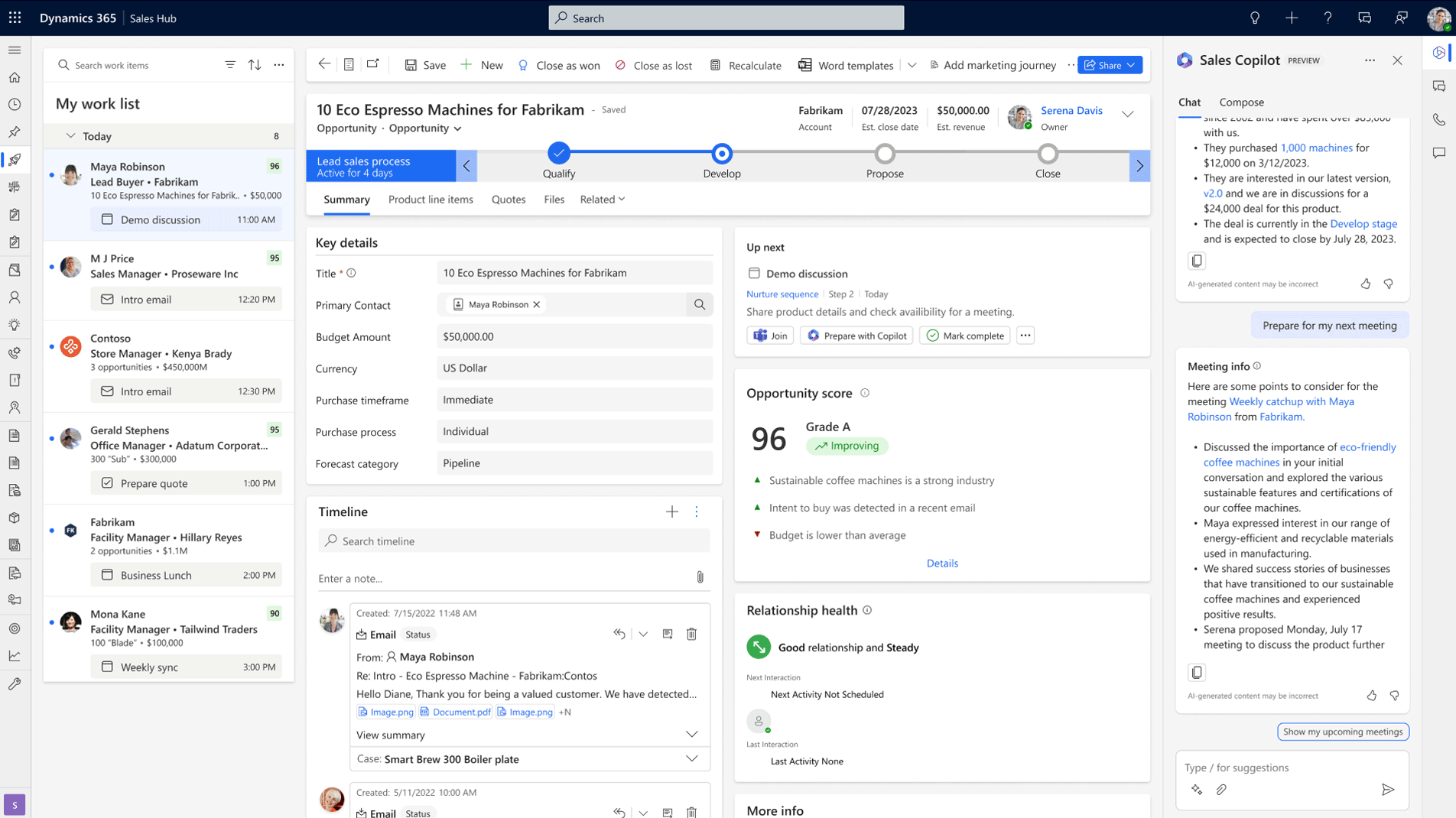
Microsoft Dynamics 365 Sales provides built-in dashboard capabilities that connect directly to the CRM data used to manage opportunities and customer relationships. This allows organisations to create dashboards that update automatically as deals move through the pipeline.
Because Dynamics 365 integrates with the wider Microsoft ecosystem, sales dashboards can also connect with tools such as Power BI to create more advanced visualisations when deeper analysis is required. For growing B2B organisations, this combination allows leadership to maintain a clear view of pipeline performance while scaling their reporting capabilities over time.
Best practices for implementing a sales dashboard
The following practices help ensure a sales dashboard continues to support forecasting, pipeline management and revenue planning after implementation:
- Start with clean CRM data so the dashboard reflects accurate opportunity stages, activities, and expected close dates.
- Define clear ownership so someone is responsible for maintaining dashboard structure and monitoring data quality.
- Focus on the metrics that influence revenue rather than displaying large collections of disconnected performance indicators.
- Tailor dashboards to different roles so sales representatives, managers, and leadership each see the information relevant to their decisions.
- Train the team to use the dashboard during pipeline reviews and forecasting discussions so it becomes part of everyday sales operations.
- Review dashboard usefulness regularly so the metrics continue to reflect how the sales process evolves over time.
- Work with a CRM specialist when dashboards become difficult to maintain so reporting structure and data integrity remain reliable as the organisation grows.
When to work with a CRM expert to set up your sales dashboard
Many organisations attempt to build sales dashboards internally, especially when CRM platforms already include reporting tools. Over time, however, dashboards can become difficult to maintain if data standards are inconsistent or reporting structures are unclear.
When this happens, working with a CRM expert can help restore clarity. You may benefit from expert support when:
- Dashboards produce inconsistent results and different reports show conflicting versions of the same pipeline data.
- Sales forecasts regularly miss revenue targets because the underlying pipeline data is difficult to interpret.
- CRM data quality has declined and opportunity stages, activities, or close dates are not maintained consistently.
- Leadership cannot get clear answers about pipeline health during forecasting or planning discussions.
- Teams begin creating parallel spreadsheets or manual reports because the existing dashboards no longer provide the visibility they need.
When these situations occur, it often indicates that the dashboard structure or CRM reporting model needs adjustment.
For organisations using Microsoft Dynamics 365, this often involves configuring dashboards that pull directly from opportunity data, pipeline stages, and forecasting models so the information presented reflects how the sales team operates.
Get clarity from your sales dashboard
Our CRM experts help businesses structure Dynamics 365 dashboards that give leadership a clear view of pipeline performance and revenue forecasts.
 Free discovery call
Why businesses choose Gestisoft to build their sales dashboard in Dynamics 365
Many companies can technically build dashboards inside Microsoft Dynamics 365. What they often lack is the guidance needed to turn those dashboards into tools that leadership can depend on.
Businesses choose Gestisoft because our team focuses on the practical side of CRM adoption. Instead of simply configuring reports, Gestisoft works closely with sales leadership to understand how the organisation reviews pipeline performance, how forecasting discussions take place, and what information decision-makers need to see quickly.
Gestisoft consultants help structure Dynamics 365 so dashboards answer real operational questions, giving leadership greater confidence when reviewing pipeline performance and revenue projections.
CRM dashboards often need to evolve as sales teams grow, territories change, or revenue models shift. Gestisoft provides ongoing customer support so the sales dashboard continues to reflect the business as it develops.
By combining CRM expertise with long-term client support, Gestisoft helps organisations build Dynamics 365 dashboards that leadership can trust and sales teams will actually use.
If you’ve reached a point in your sales process where you think it’s time to build a sales dashboard, contact the Gestisoft team to find out how that might look for your organisation.
-
The key difference between a sales report and a sales dashboard is how the information is used. Reports typically analyse past performance in detail. A sales dashboard focuses on visibility. It shows the current state of the pipeline so teams can make decisions while deals are still in motion.
Liked what you just read? Sharing is caring.

March 12, 2026 by Shelley Sunjka by Shelley Sunjka Copywriter & Marketing Strategist
Armed with a psychology degree and an irrational obsession with okapis, I've spent the last decade helping bold brands tell better stories. I believe the best writing bends grammar rules on purpose and makes people feel something. When I'm not deep in words or nerding out on buyer behaviour, I'm probably convincing my kids that impromptu kitchen dance parties are totally normal.


