
A well-configured CRM dashboard is sales manager utopia. Everything your team needs to know about pipeline health and deal risk is sitting on one screen before the Monday meeting starts, and nobody had to build a spreadsheet to get it there. The manager opens the CRM, sees where things stand, and spends the meeting coaching reps and forecasting confidently instead of figuring out what happened last week.
Most B2B companies never get anywhere close to that. The dashboard gets set up during implementation with whatever defaults the platform ships with, and from that point forward it displays data without connecting any of it to the decisions the team needs to make. The charts populate, someone says "that looks fine," and the sales manager goes back to maintaining her own tracking spreadsheet because the dashboard doesn't answer the questions she's responsible for answering.
The gap between those two versions of a CRM dashboard has almost nothing to do with the software. Dynamics 365, Salesforce, HubSpot can all produce dashboards that look the part. What determines whether yours becomes the centre of how your team operates or another tab nobody opens is whether anyone configured it around your sales process and the specific decisions each role needs to make on a weekly basis.
For Canadian B2B companies investing in a CRM, the dashboard deserves more attention than it usually gets during implementation because it's the layer where good data and clean pipeline structure either becomes visible to the people who need to see it or stays buried inside a system only the admin ever looks at properly.
Your CRM dashboard should drive business decisions
Gestisoft configures your dashboard around how your team operates so the data on screen connects to the decisions that move your business forward.
 Free discovery call
Most CRM dashboard problems start before anyone opens the software
The instinct when a CRM dashboard isn't working is to change the layout, swap in different charts, and add a couple of widgets. It feels productive because the screen looks different afterwards, but in most cases the dashboard isn't the problem.
That’s because a dashboard reflects whatever is underneath it. No amount of dashboard redesign fixes data that wasn't captured properly or a pipeline structure that was set up during a rushed implementation and never revisited.
This is why the best CRM dashboard projects don't start in the dashboard builder. They start with a hard look at what's feeding the dashboard in the first place.
- Is the data clean enough to be trusted?
- Do the pipeline stages reflect how your team sells today?
- Are reps using the CRM as a daily tool or updating it in a batch before the Monday meeting because their manager asked them to?
The answers to those questions determine whether your dashboard has a chance of being useful or whether you built it on top of a foundation that can't support them.
A dashboard built on a poorly implemented CRM is just a pretty picture of the dysfunction underneath. Getting the foundation right first is what separates dashboards that drive behaviour from ones that get ignored.

6 types of CRM dashboard and when your business needs each one
Not every CRM dashboard serves the same purpose, and treating them as interchangeable is one of the reasons so many end up ignored. A sales manager tracking weekly pipeline movement needs a completely different view from a VP assessing quarterly forecast accuracy or a service lead monitoring case resolution times.
The six types below cover the most common dashboard configurations for B2B companies, and the important thing to note is that you probably don't need all six on day one. Start with the ones that match the decisions your team is making right now and add others as the business grows into them.
1. CRM dashboard for sales pipeline
This is the one most people picture when they hear "CRM dashboard," and for good reason. Your sales manager lives and dies by pipeline visibility. The sales dashboard shows deals by stage, total pipeline value, movement since last week, and how long deals have been sitting in each stage.
That last metric is the one most defaults leave out and the one that tells you the most about pipeline health, because a deal that's been in the proposal stage for six weeks without movement is a very different situation from one that arrived there yesterday.
The sales manager is the primary user here, but the data feeds upward. When pipeline dashboards are configured properly, leadership can see coverage against targets without requesting a separate report.
2. CRM dashboard for sales activity
Activity dashboards answer a question pipeline dashboards don't and that’s “is the team doing the work that fills the pipeline in the first place?” It tracks calls made, emails sent, meetings booked, and follow-ups completed. The raw numbers on their own are useful, but the real value shows up when activity connects to outcomes.
A rep logging forty calls a week with zero meetings booked is a coaching conversation, whereas a rep logging fifteen calls that consistently convert into qualified meetings is doing something worth replicating.
Sales managers use this daily. For B2B companies with longer sales cycles, the activity CRM dashboard is often the earliest indicator of whether the quarter is going to land well or fall short, because pipeline gaps that show up in week ten started with activity gaps in week two.
3. CRM dashboard for sales forecasting
Forecasting is where dashboards earn or lose the trust of the executive team. A forecast dashboard pulls weighted pipeline data, historical conversion rates, and deal velocity together into a projected revenue number. When that number is reliable, leadership can make hiring and capacity decisions with confidence.
The users here are sales leadership and the executive team. The configuration that separates a useful forecast CRM dashboard from a decorative one is whether the deal stages and probability weightings reflect how your business converts in practice rather than generic percentages someone left in place during setup.
4. CRM dashboard for customer service
For B2B companies where the relationship extends well beyond the initial sale, the customer service dashboard is just as important as the pipeline view. Open cases, average resolution time, SLA compliance, and customer satisfaction trends all live here. The service lead uses it to manage team workload and spot patterns before they become retention problems.
Where this dashboard gets interesting for B2B is when it connects to the sales record. A customer with three open support tickets and a renewal coming up in sixty days is a conversation your account manager needs to have before the renewal date. That connection between service data and sales data is something most standalone dashboards can't deliver because the data lives in separate systems.
5. CRM dashboard for marketing performance
Marketing dashboards in a CRM track how campaigns feed the pipeline. Lead source, campaign attribution, conversion rates from marketing qualified to sales qualified, and cost per lead. For B2B companies where marketing and sales often operate from different datasets, a dashboard that ties marketing spend to pipeline outcomes bridges a gap that causes friction in many organisations.
The marketing team and sales leadership share this view, and the most useful configuration shows the handoff point clearly so both teams can see where leads enter the pipeline and what happens to them after marketing passes them across.
6. CRM dashboard for executive/revenue
This is the view your CEO or VP opens when they want a single screen that tells them whether the business is on track. It shows revenue against target, pipeline coverage, win rate trends, and average deal size over time. It's the least granular dashboard and intentionally so, because the decisions at this level are strategic rather than tactical.
The executive dashboard works best when it pulls from sales, service, and financial data together, which means it benefits most from a CRM connected to your ERP. A pipeline number without margin context tells the executive team how much revenue might be coming but a pipeline number with margin data tells them how much profit might be coming. That second version drives better decisions.
A CRM dashboard configured around your sales process changes everything
Gestisoft implements Dynamics 365 dashboards that connect pipeline, activity, and forecasting data to the decisions your team makes every day.
 Free discovery call
What a CRM dashboard should track and why most defaults miss the point
The temptation with a CRM dashboard is to track everything the platform makes available. The list of possible metrics is long, and most default dashboards lean into that by cramming as many of them onto one screen as possible. It looks comprehensive but in practice it means nobody is looking at any of them closely because the screen is too busy to process in the two minutes your manager has between meetings.
The question that fixes this is "what decision does this metric help someone make?"
A deal velocity number is interesting in a report. It becomes useful when your sales manager can see that deals in the proposal stage are taking twice as long as they did last quarter, because that's a specific problem she can dig into during her next round of one-on-ones. Pipeline coverage against the projected targets becomes operational when your VP can see it in real time and start adjusting resource allocation before the quarter gets away from the team.
Role-based configuration is the concept that separates dashboards people open every morning from ones that collect dust. Each view is built around the specific decisions that role is responsible for, using only the metrics that inform those decisions. Everything else stays out of the way, which is the part most implementations get wrong because removing widgets from a dashboard feels like losing information rather than gaining clarity.
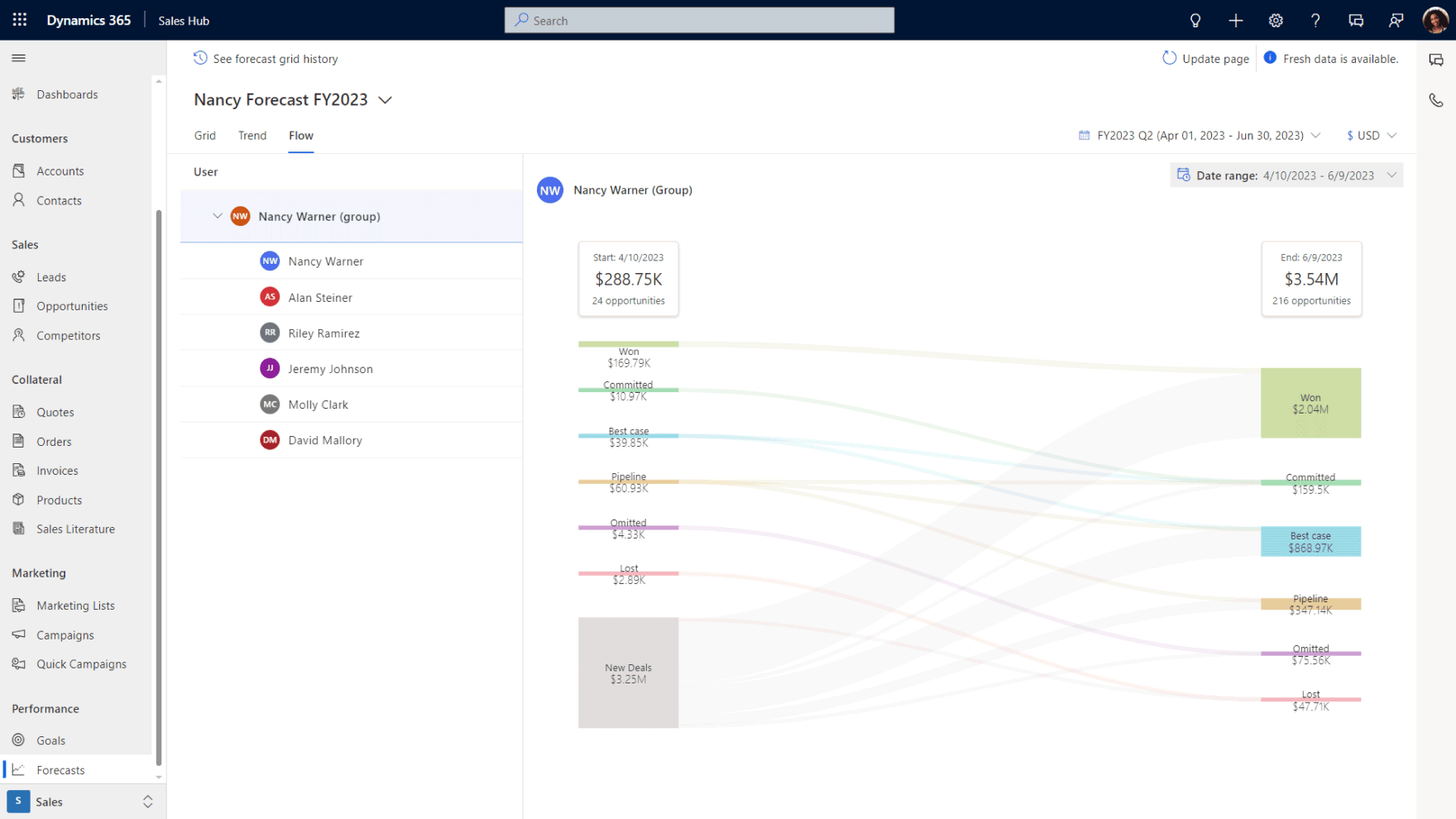
How to build a CRM dashboard your team will use every day
These steps work whether you're building a dashboard for the first time or working with a CRM specialist.
Step 1. Audit your current data quality before touching the dashboard
Open your CRM and look at the last fifty deals. Check whether they have complete contact information with accurate deal values, and whether any have been sitting in the same stage for longer than your average sales cycle. This audit tells you whether the data underneath your CRM dashboard can support meaningful reporting or whether you need to clean house first.
Step 2. Define the decisions each role needs the CRM dashboard to support
Sit down with your sales manager, your VP, and anyone else who will use the dashboard regularly. Don't ask what metrics they want. Ask what decisions they make every week and what information they need to make those decisions with confidence. Your sales manager might say she needs to know which deals are at risk and which reps need coaching. Your VP might say he needs to know whether the quarter is on track without scheduling a meeting to find out. Those conversations produce a dashboard spec that's grounded in how your business runs rather than what the software happens to offer.
Step 3. Configure views around your sales process
This is where the CRM dashboard goes from concept to something your team recognises as their own. Deal stages should match how your team sells, not the generic labels the CRM shipped with. If your process includes a technical discovery phase or a procurement approval step, those need to be visible in the pipeline view. Probability weightings should reflect your historical conversion rates rather than the round numbers someone guessed at during setup. The closer the dashboard mirrors your real sales process, the more likely your team is to trust what it shows them.
Step 4. Strip out everything that doesn't earn its place on screen
This step feels counterintuitive because removing things from a CRM dashboard feels like losing visibility but the opposite is true. A dashboard with eight widgets where every one of them connects to a decision your team makes this week will get used daily. A dashboard with twenty-five widgets where most of them display interesting-but-not-actionable data will get glanced at occasionally and relied on never. Be aggressive about removing metrics that don't connect to the decisions you defined in step two. You can always add them back if someone misses them.
Step 5. Test with your actual team before going live
Put the CRM dashboard in front of the people who will use it and ask them to walk you through what they see. Not in a training session format where someone presents the dashboard and asks if there are questions. In a working session where the manager looks at the screen and tries to answer the questions she'd normally answer with her spreadsheet. If she can do it in under sixty seconds, the dashboard is earning its place. If she squints, clicks around, and says "I think this means..." then something needs reconfiguring before you roll it out to the wider team.
Step 6. Schedule a quarterly review cycle
Your business changes. New products get added, the team grows, the sales process evolves, reporting requirements shift. A CRM dashboard configured perfectly for how the business operated six months ago can drift out of relevance without anyone making a conscious decision to stop using it. Set a quarterly review where you check whether the views still match the decisions each role is making, whether the data quality has held up, and whether new needs have emerged that the current configuration doesn't cover. This is the step that separates dashboards that stay useful from ones that peak on launch day and slowly fade into background noise.
A CRM dashboard built around your business performs differently
Gestisoft builds dashboards that reflect your sales process from day one.
 Free discovery call
How a CRM dashboard works inside Microsoft Dynamics 365
Every CRM platform can produce a dashboard. The difference with Dynamics 365 is how deeply the dashboard connects to the rest of your business.
Start with Power BI, because it's the single biggest technical differentiator for a dashboard inside Dynamics 365. Power BI is Microsoft's business intelligence layer, and it integrates natively with Dynamics 365 rather than requiring a third-party reporting tool bolted on from outside. In practice, that means your sales manager can see pipeline data next to margin data in one view without leaving the CRM. Your VP can see forecast confidence alongside revenue performance without exporting anything into a separate analytics platform. The reporting lives inside the environment your team already works in, which means it gets used rather than bookmarked and forgotten.
For B2B companies also running Business Central on the ERP side, the CRM dashboard gains a dimension that standalone CRM platforms can't replicate. Sales data and financial data live in the same environment, so the dashboard can show deal profitability, outstanding receivables against a client account, and pipeline value weighted by actual margin rather than revenue alone. That's the view most leadership teams want but rarely get because their CRM and their accounting system exist in separate worlds that require manual reconciliation to bring together.
The six CRM dashboard types covered earlier all live natively inside Dynamics 365 on one platform. Pipeline, activity, forecasting, service, marketing, and executive views are configured within the same environment rather than stitched together from separate tools with separate logins and separate data.
For Canadian B2B companies evaluating CRM options, that consolidation changes the economics of dashboard configuration significantly because you're building views on top of one connected dataset rather than trying to pull coherent reporting out of four different systems.

How Gestisoft builds a CRM dashboard around the way your team operates
A CRM dashboard only performs when it's configured around the decisions your team makes. That configuration work is what Gestisoft does, and the way they approach it is different from how most CRM partners handle dashboard setup.
When you partner with Gestisoft as your CRM implementation consultant we don’t start in the dashboard builder. We start in a room with your sales manager, your VP, and whoever else will rely on the dashboard to run their part of the business. The conversation is about what each person needs to see, what decisions they're responsible for, and where the current setup is failing them. Those answers become the dashboard spec, and the configuration that follows reflects your sales process and your reporting needs rather than a template someone reuses across every client.
Where this gets particularly valuable for Canadian B2B companies is the CRM-ERP connection. Most CRM partners configure the sales pipeline dashboards and stop there because they don't have ERP expertise. As a Microsoft consultant Gestisoft works across both Dynamics 365 CRM and Business Central, which means the dashboard they build can pull financial data alongside pipeline data in the same view. Your executive team sees margin-weighted pipeline instead of raw revenue numbers, and that changes the quality of every forecast conversation from that point forward.
The dashboards also don't stay frozen at whatever was configured on launch day. Gestisoft assigns a dedicated Customer Success Manager to every client, and part of that ongoing relationship is a quarterly review cycle. As the business evolves or leadership starts asking different questions of the data, the CSM works with your team to refine the views so your dashboard stays relevant rather than drifting into the background.
Talk to Gestisoft about building a CRM dashboard your team will open every morning.
-
A dashboard should track the metrics that connect to specific decisions your team makes every week. For sales managers, that usually means pipeline by stage, deals at risk, team activity connected to outcomes, and forecast against target. For executives, it means revenue trends, conversion rates, and pipeline coverage. The metrics that don't inform a decision shouldn't be on the dashboard at all.
Liked what you just read? Sharing is caring.

April 16, 2026 by Shelley Sunjka by Shelley Sunjka Copywriter & Marketing Strategist
Armed with a psychology degree and an irrational obsession with okapis, I've spent the last decade helping bold brands tell better stories. I believe the best writing bends grammar rules on purpose and makes people feel something. When I'm not deep in words or nerding out on buyer behaviour, I'm probably convincing my kids that impromptu kitchen dance parties are totally normal.


