

A Dynamics 365 upgrade is one of those decisions that feels optional right up until the moment it isn't. The legacy system has been running for years and your team knows how to use it, which makes the upgrade easy to postpone. Then one morning somebody needs something from the CRM that the platform simply cannot do, and the conversation changes from "we should probably look into this" to "we need a plan”.
The CRM technically still runs but it runs behind the rest of the business, never quite keeping pace, and every quarter widens the distance between what your team needs and what the platform can deliver.
For Canadian B2B companies operating on older versions of Dynamics CRM, Dynamics AX, or Dynamics NAV, the Dynamics upgrade tends to follow that exact trajectory. The platform served the company well for years but the organization's requirements moved past what it can deliver, and the workarounds your team built to compensate have become more expensive than the upgrade itself.
Over 80% of Dynamics 365 deployments since launch have gone to the cloud, and the features Microsoft builds exclusively for cloud release grow with every update wave. For Canadian businesses still running legacy versions, the Dynamics 365 upgrade becomes a question of how much the delay is costing you in staff time and missed platform capabilities.
A Dynamics 365 upgrade starts with understanding what your current system can and can't do for you
Gestisoft helps Canadian businesses assess their legacy Dynamics environment and build an upgrade plan that fits their timeline and budget.
 Book a free consultation
What counts as a Dynamics 365 upgrade in 2026
The term "Dynamics 365 upgrade" covers several different paths depending on where your business is starting from, and understanding which path applies to you changes the scope, timeline, and budget of the project considerably.
If your business runs Dynamics CRM 2013, 2015, or 2016, the upgrade means moving to Dynamics 365 Sales, Customer Service, or another Customer Engagement module in the cloud. Your data migrates and your customizations get evaluated individually. Some get rebuilt for the new platform, others get replaced by native Dynamics 365 features that didn't exist when your version was deployed. For businesses weighing up the Dynamics 365 on premise vs cloud decision alongside the upgrade, the two conversations are closely connected because the upgrade destination for most Canadian businesses is cloud.
If your business runs Dynamics NAV, the upgrade path goes to Dynamics 365 Business Central. Dynamics AX leads to Dynamics 365 Finance and Supply Chain Management. Dynamics GP is being phased out entirely with no new feature development, and the upgrade target is Business Central.
There's also a category of Dynamics 365 upgrade that applies to businesses already on an early cloud version. If your tenant was deployed several years ago with minimal configuration and hasn't kept pace with new feature releases, an upgrade engagement brings the platform current by activating capabilities your team has been paying for but never used. Copilot AI, sales accelerator, and embedded Power BI dashboards may all be available under your existing licence but dormant because nobody configured them. The Dynamics 365 modules available after the upgrade span CRM and ERP under one platform, which means the business capabilities your team gains access to extend well beyond what the legacy version covered.
What Canadian businesses lose by delaying a Dynamics 365 upgrade
The cost of delaying a Dynamics 365 upgrade doesn't appear on any invoice, which is why it's so easy to keep postponing. But the losses accumulate in ways that become visible when you look at where your team spends their time and what your platform can't do for them.
Copilot AI is cloud-only
Copilot generates email drafts for sales reps based on conversation context, which means a follow-up that used to take ten minutes to write takes less than one. Meeting summaries get pulled directly from Teams conversations with action items attached, so nothing discussed in a client call gets lost between the meeting and the CRM record. None of this is available on legacy Dynamics CRM versions. Understanding how Copilot for Sales transforms the sales process gives a concrete picture of what your reps are doing manually that their competitors on cloud Dynamics 365 have automated. For Canadian businesses considering how to activate these capabilities after the upgrade, a Microsoft Copilot consultant can map Copilot features to your team's daily workflows.
Power Platform connectivity barely exists on legacy versions
Power BI embedded dashboards, Power Automate workflow triggers, and Copilot Studio agents all connect natively to cloud Dynamics 365. Legacy CRM versions have limited or no access to these tools. The sales manager who wants a live pipeline dashboard on their phone and the executive who needs a weekly revenue forecast without someone building it in Excel are both waiting for a Dynamics 365 upgrade to get what they need.
Security updates and support are narrowing
Microsoft has already ended mainstream support for Dynamics CRM 2016 and earlier. Extended support continues for some versions but provides only security patches, with no feature updates or bug fixes. Running business-critical operations on software approaching the end of extended support introduces risk that cyber insurers and enterprise clients are increasingly flagging during qualification processes.
Canadian data residency and compliance
Legacy on-premise Dynamics CRM versions store data on your own servers, which means your business carries the full burden of PIPEDA compliance documentation and security auditing. A Dynamics 365 upgrade to Azure Canada with data centres in Toronto and Quebec City provides documented data residency and inherits Microsoft's compliance certifications. For Canadian businesses working with enterprise clients who require compliance verification, the upgrade simplifies that conversation considerably. Understanding how Canadian CRM platforms handle data residency puts these requirements in a broader context.
How to plan a Dynamics 365 upgrade for a Canadian B2B company
The Dynamics 365 upgrade process follows a predictable structure when it's planned properly. The businesses that run into trouble are the ones that skip steps early and pay for it later.
Audit your current environment first
Document every customization, integration, workflow, and report your team relies on. Identify what was built years ago and is still in active use versus what was configured once and nobody touches anymore. This audit determines the complexity and cost of your Dynamics 365 upgrade. Businesses with heavily customized legacy instances face a longer upgrade path than those running closer to standard configurations.
Decide what carries forward and what gets rebuilt
Some legacy customizations solved problems that Dynamics 365 now handles natively. A custom lead scoring workflow you built in 2016 can likely be replaced by Dynamics 365's built-in AI lead scoring and a manual approval process running through email can become a Power Automate flow. The Dynamics 365 upgrade is the opportunity to retire workarounds your team built because the old platform couldn't do what they needed.
Clean your data before you move it
CRM Migration is the single best opportunity to audit your database before a Dynamics 365 upgrade. Duplicate contacts, orphaned accounts, and outdated pipeline stages that nobody uses but nobody deleted all need attention before the migration runs. Moving dirty data into a new system means the new system starts unreliable, and your team forms negative opinions about the platform before they've had a fair chance to use it properly.
Plan the upgrade in phases if the scope is large
For Canadian businesses with multiple departments running on legacy Dynamics, upgrading everything simultaneously introduces unnecessary risk. Starting with one department builds organizational confidence, surfaces issues in a controlled environment, and creates internal champions who help drive adoption when the next team comes online. A CRM implementation consultant who has managed phased rollouts for Canadian B2B companies can structure the sequencing so each phase builds on the previous one.
Budget for training alongside the technical work
The Dynamics 365 interface is different from legacy CRM versions and the feature set is significantly broader. Role-specific training that connects new capabilities to each team's daily workflow drives adoption faster than a generic product walkthrough. Most upgrade budgets underestimate the training and change management components, and a structured CRM system implementation process accounts for both alongside the technical work.
A Dynamics 365 upgrade planned around your business costs less and delivers faster than one forced by a deadline
Gestisoft can audit your legacy Dynamics environment and map the upgrade path before you commit to a timeline.
 Book a free consultation
What a Dynamics 365 upgrade costs for a Canadian business
The cost of a Dynamics 365 upgrade depends on where you're starting from, how many users you're migrating, how customized your legacy system is, and how much data needs to move.
For a Canadian SMB with 10-25 CRM users running a lightly customized Dynamics CRM instance, the upgrade typically runs $15,000 to $50,000 CAD for the implementation work. That covers discovery, configuration, data migration, integration, and training. The ongoing Dynamics 365 licence is separate and runs approximately $88 CAD per user per month for Sales Professional or $128 CAD per user per month for Sales Enterprise. Understanding Dynamics 365 pricing on the licensing side separately from the implementation investment prevents the two numbers from blurring together when you're building your budget.
Mid-market companies with 50 or more users, complex custom integrations, and data migration from heavily modified legacy instances see upgrade costs between $75,000 and $200,000 CAD depending on scope. For businesses upgrading from NAV or GP specifically, Business Central pricing follows a different licensing model that should be evaluated separately.
The cost calculation that rarely appears in upgrade budgets is the cost of staying put. The IT staff hours maintaining legacy infrastructure and the workarounds your team builds because the old platform can't produce what they need accumulates every quarter you delay. Enterprise clients who ask about your compliance posture and get an answer that takes two weeks to assemble are forming an impression of your business that no sales pitch can undo.

What your sales team gets after a Dynamics 365 upgrade that they don't have now
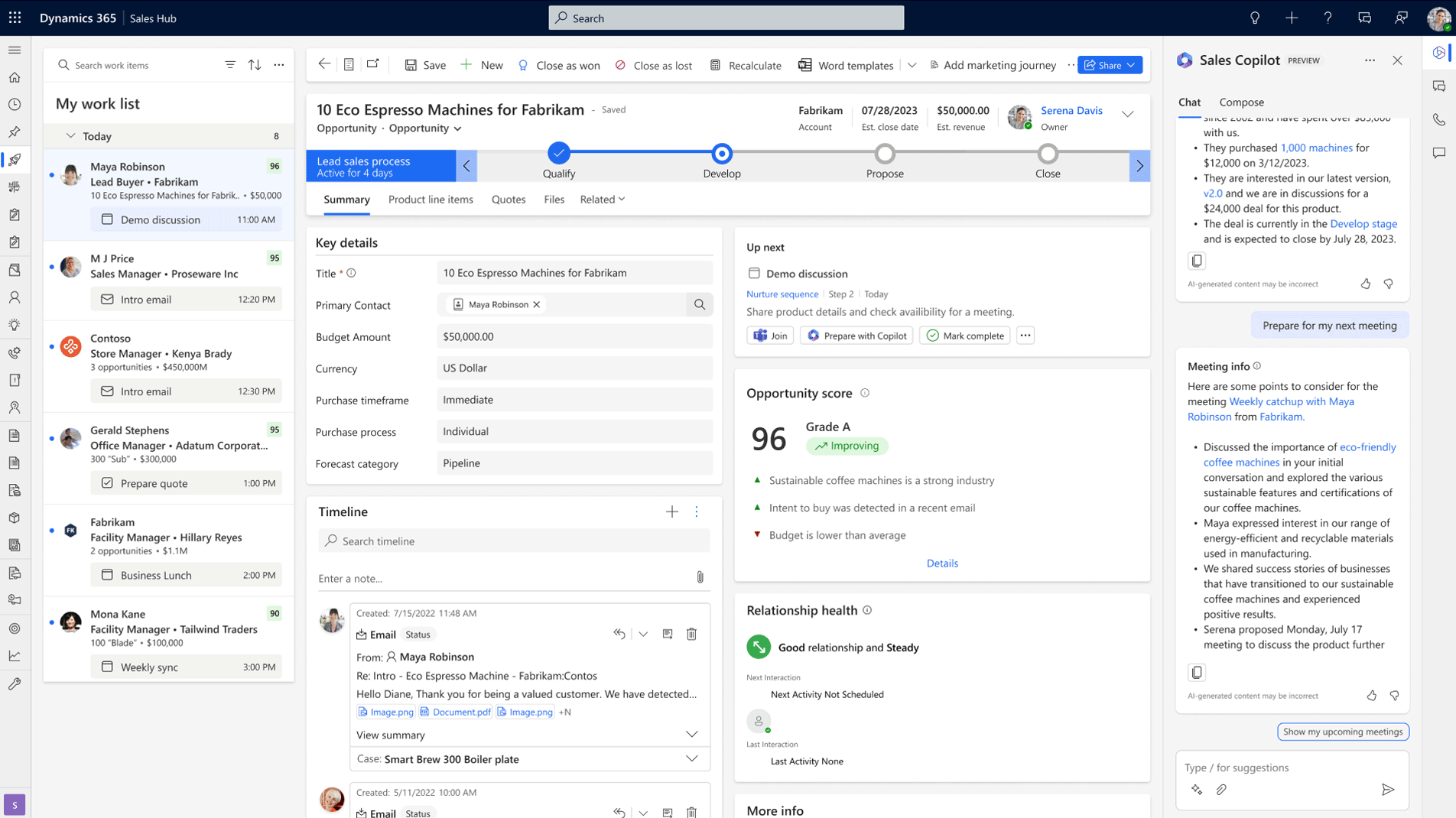
This is where the Dynamics 365 upgrade becomes tangible for the people who use the CRM every day. The platform capabilities below are what change in your team's daily work once the upgrade is complete.
“The software is our working tool. With our previous solution, it was like having a stone hammer. We could accomplish our tasks, but the tool was outdated. With Business Central, if we decide to move into the Industrial 4.0 era, it's possible. We now have an up-to-date solution that meets our needs. We've really taken a step forward, and we can see all the possibilities we could do in the future.”
Pipeline visibility that updates itself
Deal stages update in real time and pipeline value calculates automatically, so your Monday morning sales meeting starts with accurate numbers instead of a 20-minute data reconciliation exercise. A sales dashboard that gives leadership this visibility without manual assembly is one of the first things your team notices after the Dynamics 365 upgrade.
Copilot AI doing the admin work reps hate
Your reps spend a chunk of every week writing follow-up emails, summarizing meeting notes, and updating deal records. Copilot handles all of that inside Dynamics 365. It drafts the email based on the conversation context, pulls the meeting summary from the Teams call with action items attached, and surfaces insights about which deals need attention before your rep has to go looking. That time comes back to your sales team, and it comes back as selling hours.
Sales accelerator and sequences
After a Dynamics 365 upgrade, the platform can tell your reps what to do next based on where each deal sits and automated email sequences keep prospects warm during longer B2B sales cycles without your rep manually tracking who needs a touchpoint this week. When the pipeline gets busy and follow-ups start competing with active deal work, the sequences run in the background so nothing goes cold.
Reporting your leadership can pull without asking for help
Embedded Power BI dashboards update as deals move through the pipeline, which means leadership sees current numbers whenever they open the platform. The best sales management software structures this reporting so pipeline health, win rates, and revenue trends are visible by role without manual assembly. Sales opportunity management after the Dynamics 365 upgrade supports multi-contact deals and complex pipeline structures that legacy versions couldn't handle, which is where the reporting depth really changes for B2B teams.
Why Canadian businesses specifically benefit from a Dynamics 365 upgrade
The benefits of a Dynamics 365 upgrade apply to every business running a legacy version, but Canadian companies gain a few things that are specific to operating in this market.
Azure Canada data residency
Upgrading to cloud Dynamics 365 on Azure Canada means your CRM data sits in data centres in Toronto and Quebec City. For Canadian businesses handling customer information under PIPEDA, this provides documented data residency that satisfies compliance requirements and simplifies vendor qualification conversations with enterprise clients who ask where their data is stored.
Bilingual capabilities that legacy versions can't match
Copilot AI works in both English and French. Sales insights, meeting summaries, and AI-generated communications function across both official languages on cloud Dynamics 365. Legacy versions support language packs but have no access to AI-powered bilingual features, which creates a limitation for businesses with teams in Quebec or clients who prefer to work in French.
The Canadian Microsoft Partner ecosystem has moved to cloud
Finding a Canadian partner with deep expertise in legacy on-premise Dynamics CRM is becoming harder each year as more firms focus their practice entirely on cloud implementations. Upgrading now means your business has a broader selection of qualified partners to choose from. A Microsoft consultant with Canadian B2B experience who understands the local business landscape and compliance requirements is easier to find today than it will be in two years as the legacy expertise pool continues to contract.
Your Dynamics 365 upgrade should reflect where your Canadian business is heading
Gestisoft helps Canadian businesses plan and execute Dynamics 365 upgrades that account for compliance, bilingual operations, and how your team works today
 Book a free consultation
How Gestisoft handles Dynamics 365 upgrades for Canadian businesses
Every legacy Dynamics environment tells a story. Custom fields somebody added in 2015 that nobody remembers the purpose of, and integrations built by a developer who left the company years ago that still fire every day even though nobody can explain what they do. The Dynamics 365 upgrade starts with reading that story and figuring out what belongs in the next chapter.
“Gestisoft had a knack for finding creative solutions. It wasn't easy, but the team never gave up and always managed to come up with solutions while trying to reduce costs as much as possible and bearing in mind the solution ecosystem's durability.”
That's what the upgrade engagement looks like in practice. We dig into the legacy environment and identify what's worth preserving and what should be retired. The new platform gets built around how your business operates today rather than replicating a configuration that was designed for how you operated five years ago.
We handle both CRM and ERP upgrades on the same platform, which means a Canadian business moving from Dynamics NAV to Business Central while also upgrading their CRM doesn't need to coordinate between two separate partners. The Dynamics 365 upgrade covers both sides of the business in one engagement with one team who understands how the pieces connect.
When your business is ready to plan a Dynamics 365 upgrade, talk to Gestisoft.
-
For lightly customized environments with clean data, a Dynamics upgrade typically takes 6-10 weeks. Mid-market businesses with complex customizations and large data sets should plan for 3-6 months. The biggest variable is how customized your legacy system is and how much data cleanup is needed before migration begins.
Explore more
- CRM specialist: what they do and how to hire the right one in Canada
- CRM expert: when your business needs one and how to find the right fit
- HubSpot competitors: alternatives for Canadian businesses ready to upgrade
- CRM software consultant: how to evaluate one for your business
- A practical guide to the Microsoft Dynamics 365 CRM business application
Liked what you just read? Sharing is caring.

May 25, 2026 by Shelley Sunjka by Shelley Sunjka Copywriter & Marketing Strategist
Armed with a psychology degree and an irrational obsession with okapis, I've spent the last decade helping bold brands tell better stories. I believe the best writing bends grammar rules on purpose and makes people feel something. When I'm not deep in words or nerding out on buyer behaviour, I'm probably convincing my kids that impromptu kitchen dance parties are totally normal.

