Key Takeaways
• The Professional tier fits teams that just need a clean pipeline. Enterprise unlocks forecasting, territories, and sequences. Premium adds predictive AI and a bigger pool of Copilot Credits.
• The entire environment must sit on one tier. Microsoft does not allow mixing Professional and Enterprise users inside the same instance, so the whole team is licensed at the highest tier any user needs.
• Gestisoft, a Canadian Microsoft Solutions Partner since 2004 and B Corp certified, has sized Dynamics 365 sales license deals for hundreds of Canadian SMB and mid-market teams.
A Dynamics 365 sales license decides what your sales team can actually do inside the CRM, and in Canada the live options range from CAD $88.20 per user per month for Professional to CAD $203.50 for Premium, with a separate Microsoft Relationship Sales track at a 10-seat minimum.
Sticker price is only part of the decision. Picking the wrong Dynamics 365 sales license costs you two ways: a rep stuck without forecasting or sequences, or a controller paying Premium rates for seats that will never touch predictive AI.
This guide walks every live tier in Canada, who each one fits, how switching works, and the five licensing mistakes we see most often.
The simplest way to see what a sales licence should do for a working pipeline is to hear it from a leader who runs one.
“With a CRM like Dynamics 365, I can easily identify where each contact is in the process and prioritize the necessary actions. This allows me to manage my time optimally and ensure personalized follow-up for each potential customer." - Jean-Christophe Lambert , Director, Growth and Business Development, Lithion Recycling”
That is the base promise of every Dynamics 365 sales license tier. The real question is what else you need on top, which is where most buyers trip.
Pick the Right Tier Before You Overpay
Avoid buying features your team will never touch, with a Microsoft Solutions Partner that has sized Dynamics 365 Sales licences for Canadian teams since 2004.
 Free Discovery Call
What Is a Dynamics 365 Sales License and What Does It Actually Buy You?
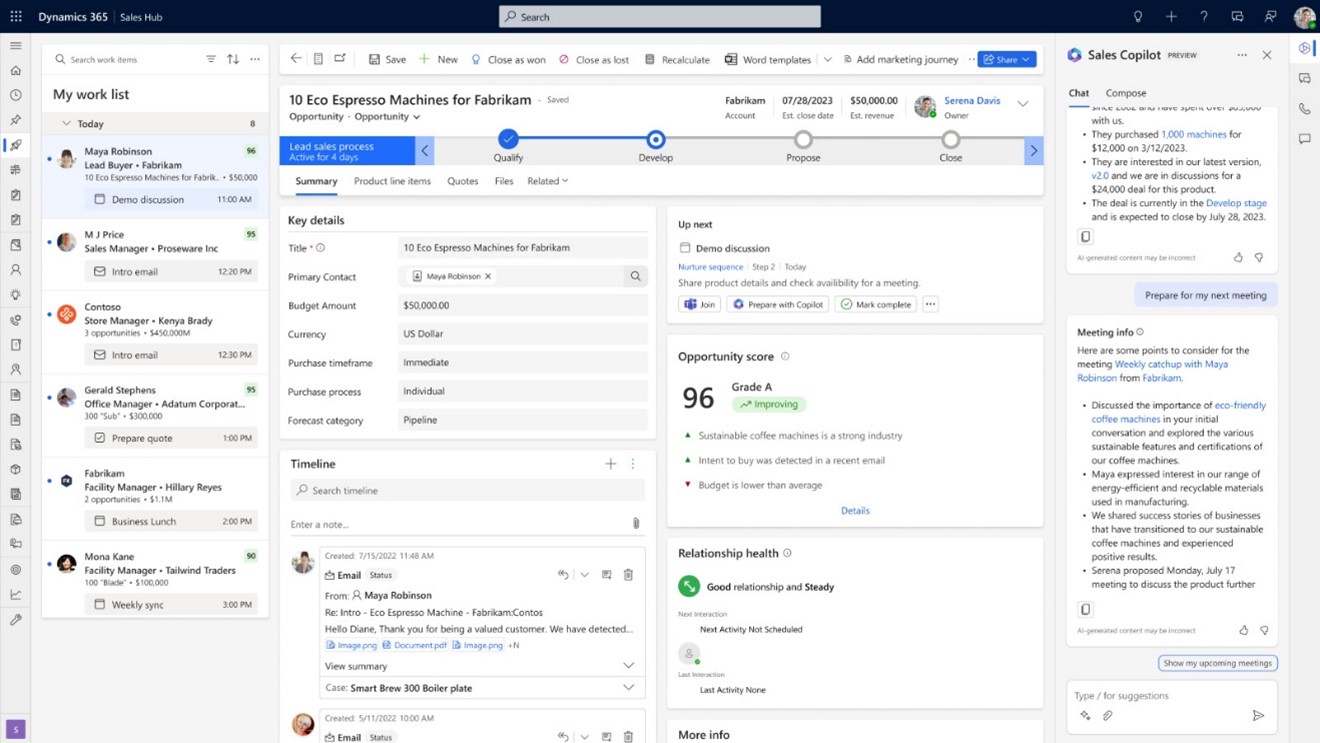
A Dynamics 365 sales license is a per-user monthly subscription that unlocks one of Microsoft's Sales apps. Each tier opens a different feature set, from basic pipeline tracking at the entry level to AI-driven predictive scoring at the top.
What Comes Inside Every Dynamics 365 Sales License
No matter the tier, users get:
- Dataverse, the database behind every Dynamics 365 app.
- Microsoft 365 integration into Outlook and Teams.
- The Sales mobile app.
- One of two Sales apps: Sales Hub (Enterprise and above) or Sales Professional (Pro only). Using the wrong one is a licensing violation even when the app opens.
Teams weighing broader Microsoft 365 consulting alongside the licence choice usually run both conversations together, because Outlook, Teams, and Copilot access cross both.
What's Not Included in a Dynamics 365 Sales License
Three things reliably surprise buyers at renewal:
- Power Apps and premium Power Automate connectors are licensed separately.
- Business Central is a separate product even though it integrates tightly with Sales.
- Copilot Credits included in your licence have a monthly cap.
If you are already weighing how to build a Power App or a Power Automate approval flow alongside Sales, factor those licences in before signing.
What Does Every Dynamics 365 Sales License Cost in Canada in 2026?
Here is every live Dynamics 365 sales license tier in Canada, with current CAD pricing straight from Microsoft. All figures are per user per month, billed annually, before tax.
Dynamics 365 Sales Professional (CAD $88.20)
The entry tier. Covers a pipeline, Outlook sync, basic quoting, the mobile app, and the Sales Qualification, Opportunity, and Research agents. Customization is capped (specific entity and process limits are set out in Microsoft's Dynamics 365 Licensing Guide), with no custom apps.
Fits: a 5 to 20 rep team with a simple pipeline and no forecasting needs beyond manual roll-ups.
Does not fit: teams needing territories, quotas, forecasting hierarchies, sequences, or Power Apps.
Dynamics 365 Sales Enterprise (CAD $142.50)
A common choice for Canadian growth teams. Removes the Pro caps and adds forecasting hierarchies, territory and quota management, Sales Accelerator with sequences, conversation intelligence capacity, Copilot in Sales, Outlook, and Teams, and a set of prebuilt agents.
Fits: teams of 10+ with a sales ops person configuring forecasting, reps running multi-step sequences, or an admin who needs more than Pro's custom entity cap.
Does not fit: a 6-person team with a flat pipeline. The CAD $54.30 gap only earns itself when someone uses the extra features.
Dynamics 365 Sales Premium (CAD $203.50)
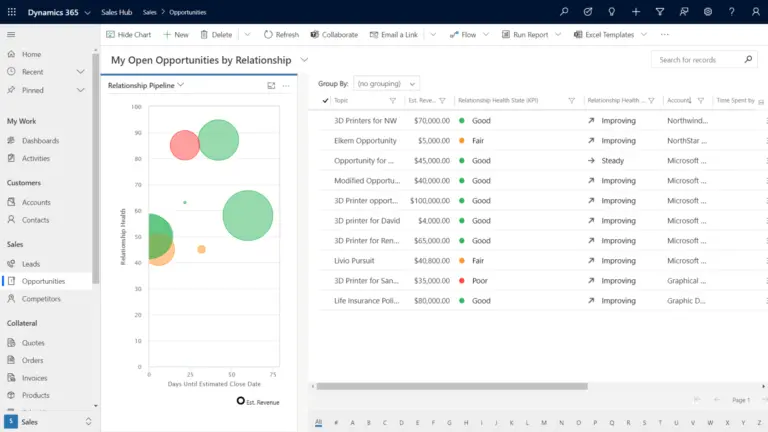
Everything Enterprise has, plus 1,000 Copilot Credits per user per month, Sales Insights (relationship analytics and health scores), AI-powered recommended actions and data enrichment, and advanced sales engagement. The AI layer is the whole reason to pick this tier.
Fits: teams with the data volume and sales rigour to use predictive scoring. Usually AEs working large accounts.
Does not fit: teams still on spreadsheet forecasting. Premium's AI will be aimed at nothing.
Microsoft Relationship Sales (Variable, 10-Seat Minimum)
Combines Dynamics 365 Sales Enterprise with LinkedIn Sales Navigator. 10-seat minimum. Priced individually by Microsoft.
Fits: enterprise B2B teams whose AEs already live inside LinkedIn Sales Navigator.
Does not fit: inside reps whose outreach is phone and email first.
Team Members Licence and the Free Trial
Team Members at CAD $10.90 per user per month is a read-only or light-use licence for non-sales staff. It cannot manage opportunities or forecasts. The free trial covers 30 days with Enterprise-level access in a sandbox, good for a decision, not production.
Copilot Credits Add-On
Only the Premium tier ships with an included credit entitlement, providing 1,000 Copilot Credits per user per month. The Enterprise tier includes zero Copilot Credits out of the box, confirmed on Microsoft's Canadian Sales pricing page.
Teams building custom agents in Copilot Studio or running heavy CRM automation can hit tenant caps quickly. Overage is handled through Copilot Credit Commit Units (prepaid annual pools, where Microsoft offers savings against standard rates) or by linking an Azure subscription for pay-as-you-go billing.
If you lean on Microsoft 365 Copilot for business or autonomous agents, check the credit math before assuming standard licences cover your consumption.
Sequences are one of the clearest features gated behind the Enterprise tier, so here is a short walkthrough of what they actually look like in action before you decide which Dynamics 365 sales license you need:
Which Dynamics 365 Sales License Fits Your Team?
Pick by situation, not by feature checklist. The four most common patterns we see on Canadian sales teams.
1- You Are a 5 to 15 Rep Team With a Clean Pipeline
Professional covers you. One sales manager, no sales ops role, no custom entities beyond leads and opportunities.
The forecast is a monthly conversation, not a hierarchy. The CAD $54.30 jump to Enterprise buys features you will not use.
2- You Need Forecasting, Territories, or Sequences
Enterprise. The three features together are what pulls teams off Pro.
Forecasting hierarchies roll numbers up by team, territory, or product line without exporting to Excel. Sequences run multi-step outreach automatically, which Pro cannot do.
3- You Are Hunting Enterprise Deals and Lean on LinkedIn
Microsoft Relationship Sales or Premium, depending on where your reps work.
If LinkedIn Sales Navigator is already in the stack, Relationship Sales bundles it with Enterprise Sales. If deals are won on account health signals rather than LinkedIn outreach, Premium gives the AI layer without the LinkedIn tie-in.
Dynamics 365 Customer Insights often sits alongside Premium for a 360-view of the account.
4- Your Team Mixes Hunters, Farmers, and Support
Tenant-wide tier. Microsoft does not allow mixing Professional and Enterprise Dynamics 365 sales license users inside the same environment.
Run Enterprise for your primary sales team and use Team Members licences for account management, operations, and support staff who only need to read data or complete basic tasks. Finance stops paying full rates for seats that never touch forecasting or sequences.
For larger buyers, our view on the best CRM for large companies covers the broader criteria.
The Trial Strategy Before You Commit the Whole Team to a Dynamics 365 Sales License
Here is one practical tactic we hand to clients before they commit a whole team to a tier.
Pro tip: Spin up a separate 30-day sandbox or trial environment with one Enterprise seat. Use it to test custom entity boundaries, map forecasting hierarchies, and build out sequences. Once you verify that your team has the sales ops capacity to actually manage those features, provision the production tenant at the correct tier. No messy mid-contract migration later.
Match the Tier to How Your Team Actually Sells
Get a licence sized to real workflows, not a feature list, from a B Corp certified Canadian partner that implements Dynamics 365 Sales every week.
 Free Discovery Call
How Much Does a Dynamics 365 Sales License Really Cost per Year?
Sticker price is the easy part. Three line items decide what you actually pay.
The base. For 20 reps on annual billing, your baseline licence cost scales entirely by tier.
- Professional: at CAD $88.20 per user per month, the base is CAD $21,168 a year.
- Enterprise: at CAD $142.50 per user per month, the base is CAD $34,200 a year.
- Premium: at CAD $203.50 per user per month, the base is CAD $48,840 a year.
The Business Central attach discount. If you are already a Business Central customer in Canada, Microsoft offers a reduced Dynamics 365 Sales Professional price when you add Sales to the same tenant. The savings are real, but only if the quote is written against the specific attach SKU.
Pro tip: Ask your Microsoft rep to put the Business Central attach SKU on the quote by name, "Dynamics 365 Sales Professional Attach to Qualifying Dynamics 365 Base Offer". A quote with a discounted price but no SKU name usually gets re-priced at list at renewal, because procurement cannot track what was never itemized.
Dataverse storage. Sales Insights analytics tables grow with your data and count against your tenant's file storage quota. Most teams never think about this until the overage charge lands.
Microsoft publishes the storage math on the Dataverse capacity page.
For reference, Business Central's Canadian prices are CAD $108.50 (Essentials), CAD $149.20 (Premium), and CAD $10.90 (Team Members) per user per month. On a 20-user team running both products, the full stack usually lands between CAD $60,000 and CAD $90,000 a year before implementation.
Ourbreakdown of Dynamics CRM cost across licensing, implementation, and ownership covers the implementation side.
What Nobody Tells You About Switching Your Dynamics 365 Sales License
Microsoft preserves your data on upgrade. That is true.
What they do not say: customizations built against Professional's caps can block Enterprise features until re-architected, and if you let the licence expire, you have 30 days before data is deleted (per Microsoft Learn).
The second item surprises people most. Teams that drop seats mid-year and let the trial-era org run out of entitlements have come back to a disabled environment.
The point you commit at contract. Once you install the Sales Professional app and configure it as the main sales app, moving to Sales Hub means removing the Pro app and installing Sales Hub cleanly.
Records stay. Form customizations, site maps, and app modules do not carry over automatically. Any custom app built on top of Sales Professional has to be re-pointed.
That is the irreversible step. Test it in a sandbox tenant before you flip production.
Can You Downgrade a Dynamics 365 Sales License?
In practice, no. Microsoft does not stop you from assigning a lower tier at renewal, but features built on the higher tier stop working.
Forecasting hierarchies configured on Enterprise will not run on Pro. Sales Accelerator sequences stop firing. Custom entities beyond Pro's cap stay in Dataverse but become unmanageable.
Teams that downgrade usually either rebuild on Pro or re-upgrade within one quarter.
The 5 Dynamics 365 Sales License Mistakes We See Every Month
Here are the patterns we see on Dynamics 365 sales license discovery calls.
1- Buying Enterprise for Reps Who Only Use the Pipeline View
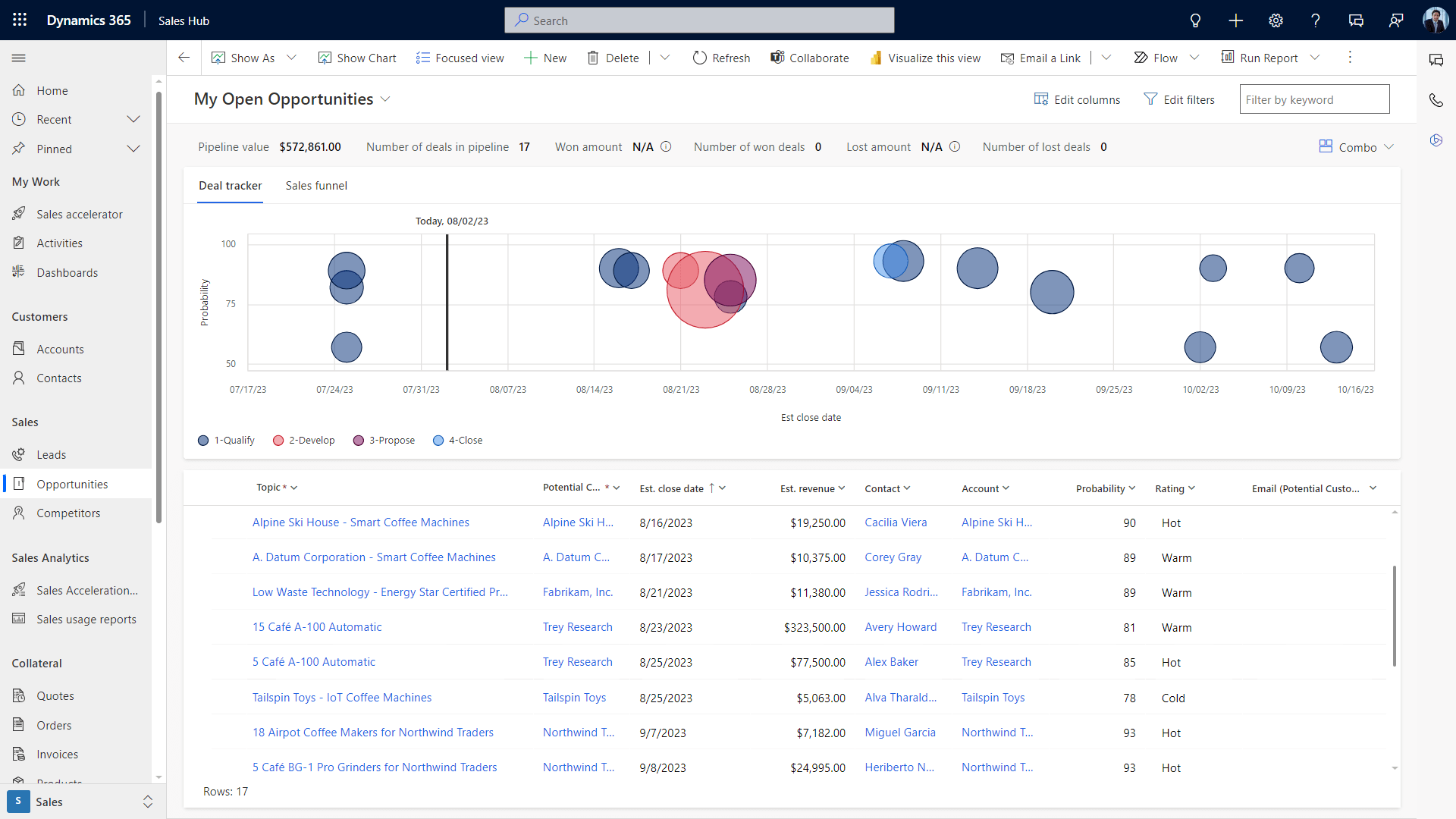
The pipeline view is in Professional too. If reps never open forecasting, run sequences, or touch territory management, you are paying extra CAD $54.30 per month for features nobody uses. On 20 reps, that is CAD $13,032 a year.
2- Buying Professional and Hitting the Custom Entity Cap at Month Three
A sales team buys Pro, ops starts building custom entities for subscription contracts and service agreements, the admin runs out of room, and the only fix is an Enterprise upgrade for everyone. Savings gone before renewal.
3- Paying Full Price When You Already Own Business Central
The attach discount exists. Most quotes come back at list price. Request the SKU by name (see the Pro Tip above).
4- Mixing Up Sales Hub and Sales Professional Apps
Both apps may appear in your environment. Using Sales Hub on a Professional licence (or vice versa) is a licensing violation per Microsoft's own documentation, so pick the right app at install and remove the other to stay compliant.
5- Forgetting the Dataverse Storage Line
Teams run 18 months, hit the storage cap, and watch overages wipe out the Pro savings. Check your tenant's current Dataverse usage first. If you also run Business Central alongside Sales, our guide on how to connect Power BI to Business Central walks through building the reporting layer that gives you that visibility.
Here’s is what a Canadian team structuring its process around CRM said:
“CRM has given us a great work structure and leverage for opportunity tracking." - Marie-Hélène Doucet , Solem”
That structure is where the Dynamics 365 sales license tier conversation starts. Teams using sequences and campaigns need Enterprise. Teams that just want a clean pipeline are well served by Pro.
When You Shouldn't Buy a Dynamics 365 Sales License Yet
Three cases where another move makes more sense first.
- Field-heavy team. If 70% of your reps are on the road fixing or installing, a sales CRM is the wrong starting product. A field service CRM, or the best field service management software for your industry, handles dispatch, work orders, and parts in ways Sales never will. Add Sales later for quoting.
- Marketing-led growth team. If your pipeline is mostly inbound and the need is lead scoring and nurture flows, Dynamics 365 Customer Insights comes before Sales.
- Still on a GP or spreadsheet-era back office. If financials run on Great Plains accounting software or Microsoft Dynamics GP software, the Sales CRM will show forecast numbers the back office cannot reconcile. Fix the ERP side first.
The CRM Maturity Guide
See where your team sits on the CRM adoption curve and the practical steps to get from spreadsheet forecasting to a pipeline you can trust.
 Free Access the Guide
FAQs
Can I Mix Dynamics 365 Sales Professional and Enterprise Licences on the Same Tenant?
Not inside the same instance. Microsoft requires every user in that instance to be licensed at the highest tier any one of them needs. You can run different tiers across separate instances in one tenant, and combine your main Sales tier with Team Members licences for read-only staff.
What Happens if My Dynamics 365 Sales License Expires?
Microsoft disables the environment and users cannot access it. Data is deleted after 30 days unless other related licences remain in the tenant, in which case the data is preserved.
Do I Get a Discount on Dynamics 365 Sales If I Already Have Business Central?
Yes. Microsoft offers a reduced-price Dynamics 365 Sales Professional attach when you are an existing Business Central customer. The discount only applies if the quote is written against the specific attach SKU, so ask for it by name at quote time.
Can I Buy a Single Dynamics 365 Sales Premium Licence and the Rest Enterprise?
Not inside the same instance. The whole environment must be licensed at the highest tier any user needs, so if even one rep needs Premium features, the full team is on Premium in that instance. Separate instances can run different tiers across one tenant.
What Is the Difference Between the Sales Hub App and the Sales Professional App?
Sales Hub is the Enterprise and Premium app. Sales Professional is the Pro app. Both can appear in a tenant, but each user may only use the one their licence covers. Using the wrong one is a licensing violation.
Is There a Free Trial for Dynamics 365 Sales?
Yes. Microsoft offers a 30-day trial with Enterprise-level access in a sandbox tenant. Good for a procurement decision and testing custom entity builds. Not meant for live operations.
Why Gestisoft Is the Right Partner for Your Dynamics 365 Sales License Decision
Gestisoft is a Canadian Microsoft Solutions Partner headquartered in Montreal, with offices in Toronto, Ottawa, and Québec City. A Microsoft Solutions Partner since 2004 and B Corp certified.
What we bring to a Dynamics 365 sales license decision:
- Bilingual delivery. English and French, so your sales lead and finance lead can both follow along.
- Full-stack visibility. We check Business Central attach eligibility, Microsoft 365 Copilot overlap, and Dataverse storage impact in one session.
- Honest tier sizing. If Professional saves you money, we say so, even if a flat Enterprise bill would be bigger.
- Canadian pricing in CAD. No conversions, no surprises at renewal.
- Local project experience. Our Microsoft Dynamics 365 CRM Implementation Partner credentials and Canada-wide implementation record mean we quote from real projects, not templates. For Alberta buyers, our CRM consultant in Calgary resources cover the same ground.
Most teams come to us with a quote and one question: is this the right Dynamics 365 sales license tier? Canadian SMBs that invest in digital tools generally outperform their peers (based on research by the Business Development Bank of Canada), but only if the tool is sized to how the team actually works.
Our job is to look at the sales process behind the quote, the Microsoft licences already on the tenant, and the features your team will actually use, and give a straight answer with the maths behind it.
If the right answer is Professional, you leave the call with Professional. If it is Enterprise, you leave with a clear picture of what the extra CAD $54.30 per user per month earns. No pressure, no padded quote.
Get Your Licence Right the First Time
Sit down with a Canadian Microsoft Solutions Partner that has priced Dynamics 365 Sales for hundreds of SMBs and still answers the phone in both official languages.
 Free Discovery Call
Liked what you just read? Sharing is caring.

November 10, 2026 by Muhammad Ali Iqbal by Muhammad Ali Iqbal SEO Content Strategist & Copywriter
Driven by a passion for search engine optimization, strategic content, and conversion-focused writing. A copywriter and content strategist who lives for content that ranks, engages, and delivers real business results.