

Key Takeaways
• Most tools sold under this label are really field service management apps with a contact list glued on. The two are not the same.
• The system pays back when disconnected tools slow down dispatch, billing, or renewals, not when you still have one tech and a wall calendar.
• As a Microsoft Solutions Partner since 2004 and B Corp certified consultancy, Gestisoft deploys bilingual field service CRM with CRA-compliant invoicing, provincial compliance, and Canadian Azure hosting built in.
A field service CRM joins your customer record, service history, scheduling, and mobile work orders into one system. It gives dispatchers a live view of who is where, what the customer called about last time, and what parts are on which truck. Plain CRMs track leads. This kind of tool runs service jobs.
That is the short answer. The long one lives in how the tool shows up on a Tuesday morning when the phone starts ringing. The real difference between a plain CRM and a field service CRM shows up in daily use.
“With a CRM like Dynamics 365, I can easily identify where each contact is in the process and prioritize the necessary actions. This allows me to manage my time optimally and ensure personalized follow-up for each potential customer.”
That is exactly what a dispatcher needs. A view that shows where each customer sits in the queue, so the next truck rolls to the right job first.
Pick a Field Service CRM That Fits Your Shop
As a Microsoft Solutions Partner since 2004, Gestisoft helps Canadian service teams match the right tool to how they actually work.
 Free Discovery Call
Here is what most buyers do not realize. The gap between a plain CRM and the real thing is a different schema, built around work orders and assets, not deals and contacts. Buy the wrong one, and your dispatcher ends up copy-pasting notes between tabs every morning. That is the problem the purchase was meant to fix.
What Is a Field Service CRM and How Is It Different From a Regular CRM?
A field service CRM is built around work orders, assets, and locations instead of leads, deals, and opportunities. That one design choice is what makes it different from any sales CRM you have used before.
Field Service CRM vs. FSM Software: Where They Overlap
An FSM app and the CRM-first alternative look alike from the outside. Both schedule jobs, both have a mobile app, both track technicians. The difference is where the customer lives.
In an FSM app, the customer is a contact attached to a job. In the CRM-centric version, the customer is the centre of gravity, and jobs hang off the account.
Ask "how many visits did we make to that building this year, and what did we charge."
The account view answers in two clicks. A simpler scheduling app often cannot answer at all without a report builder. Microsoft Learn's Field Service documentation walks through the product capabilities and work order lifecycle.
Why Service Companies Can't Rely on a Plain CRM Alone
A plain CRM knows leads, opportunities, and quotes. It does not know work orders, dispatch windows, parts inventory, or SLA clocks.
The moment a sales rep closes a service contract and hands it to operations, a plain CRM goes dark. The service-focused version keeps the lights on through the whole relationship, from first call to last invoice.
For a parallel on how CRM features map to a related vertical, our breakdown of CRM for manufacturing covers the capability set manufacturers look for.
What Makes a Field Service CRM Actually Useful? 7 Capabilities That Matter Most
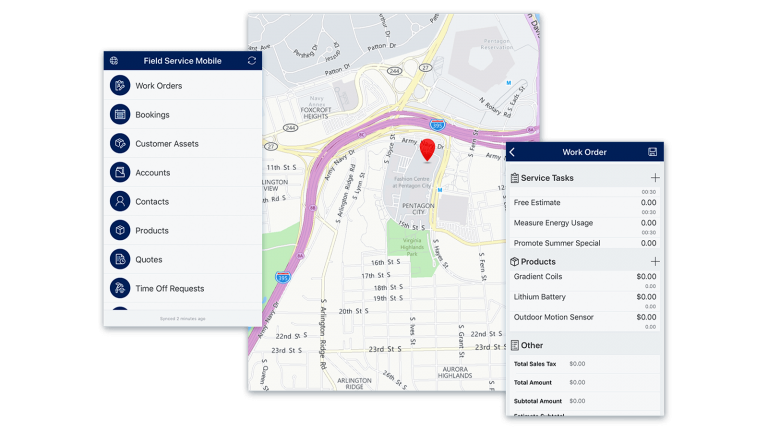
The seven capabilities that make a field service CRM worth buying are unified customer records, a live dispatch board, service agreement tracking, offline mobile work orders, automated follow-up, service revenue reporting, and clean ERP integration.
Every vendor claims the same features. These seven are what actually move the needle in real deployments.
1. One Unified Customer Record
Service history, account details, equipment at the site, open issues, and past invoices… all on one screen. If your tech needs to open three tabs to answer "what did we last do here," the system is costing you money.
2. Dispatch Board Tied to Live Customer Context
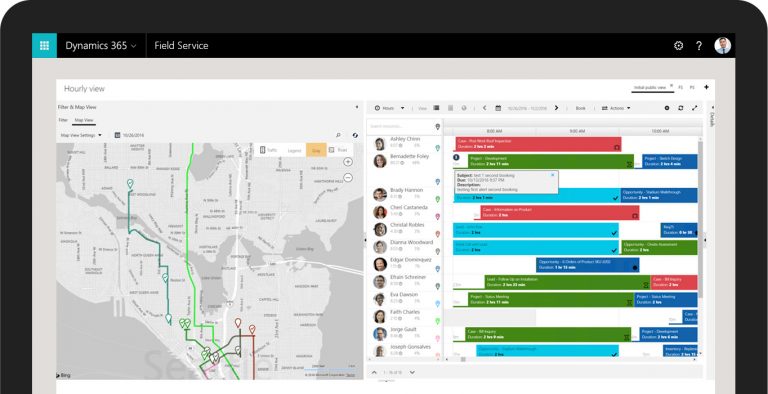
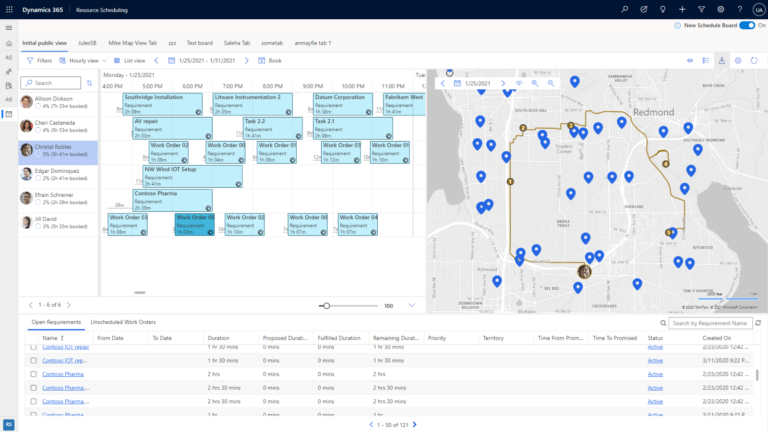
A real dispatch board shows tech location, parts on truck, SLA clock, and customer priority in one view. Not three. For a deeper look at scheduling automation, our guide on resource scheduling optimization covers how Dynamics 365 handles this.
3. Service Agreement and Warranty Tracking at the Account Level
Renewal dates, warranty expiries, PM schedules (preventive maintenance, meaning scheduled service to prevent breakdowns), and recurring billing all tied to the customer, not sitting in an orphan spreadsheet. There is a deeper breakdown of what a service agreement module should include and how to set one up in our full field service agreement guide.
4. Mobile Work Order With Offline Sync
A tech in a basement, parking garage, or remote site needs the work order to work without a signal. When signal returns, it syncs. If this breaks, nothing else matters.
Pro tip:
Pilot with your second-best technician, not your best one. Your best adapts to anything you give him. Your second-best shows you where the mobile app actually breaks for average field use, and that is the data that decides your rollout.
5. Automated Follow-Up After Close
Job closes, invoice goes out, satisfaction check-in fires automatically. No manager chasing. No tech remembering. Every job turns into retention data.
6. Service Revenue Reporting You Can Actually Use
Truck-roll cost (what it costs to send a tech out), first-time fix rate (jobs resolved on visit one), average margin by service type, repeat visits by customer. If your dashboard cannot answer these, you are flying blind.
7. Clean Integration With ERP and Accounting
Your platform must talk to your ERP so invoicing, parts inventory, and GL postings happen automatically. Our guide on Business Central CRM integration explains the layer that makes this work without double entry. If your business also moves product, our complete guide on ERP for distribution business covers the ERP side.
Notice what is missing. We did not say "AI-powered scheduling" or "predictive maintenance." Our walkthrough of AI in Dynamics 365 Field Service covers how Copilot shows up across work orders, scheduling, and equipment monitoring. But those are layers on top of the seven. If the seven are not solid, AI will not save you.
When Does a Service Business Actually Need a Field Service CRM?
A service business needs this when it hits five or more technicians, runs recurring service agreements, or has a dispatcher who cannot answer basic questions without opening three systems. Below that, a scheduling app and clean spreadsheets usually do the job.
Signs You've Outgrown a Scheduling App Plus Spreadsheets
- Your dispatcher opens three tabs every morning to figure out who is nearest to the 10 a.m. callout.
- Service agreements expire without renewal reminders.
- Monthly reports take two days because the data lives across three systems.
- Techs show up at a site without the full history and have to call back to the office twice before anyone can tell them what was fixed last time.
If two or more of these sound like a Monday at your shop, it is time.
When a Field Service CRM Would Be Overkill
You have one or two techs.Your dispatcher is also the owner. She knows every customer by name, service agreements fit on a page, and invoicing goes out same-day in QuickBooks.
If this is you, keep what you have. A field service CRM at this size adds overhead you do not need yet. Revisit when you hit five or six techs, or when your dispatcher asks for a report she cannot pull herself.
Find Out Where Your Field Service Operation Stands
The Field Service Maturity Guide helps you place your team on a clear maturity path and shows the next step to move forward.
 Free Access the Guide
How Much Does a Field Service CRM Cost in Canada?
A field service CRM in Canada runs CAD $142.50 per user per month for the full Microsoft Dynamics 365 Field Service licence, billed annually. Implementation typically costs two to four times the first year of licensing.
Per Microsoft's Canadian pricing page, the Field Service Contractor licence is CAD $67.80 per user per month for subcontractors or part-time techs. The Resource Scheduling Optimization add-in is CAD $40.70 per resource per month.
A small service team on standard setup goes live in six to twelve weeks. A mid-sized operation with multiple branches, custom templates, and ERP integration takes four to six months. Our breakdown on the ROI of Microsoft Dynamics 365 Field Service covers payback timing.
Here is the decision that is hard to reverse. If you pick a platform where service agreements and warranty tracking are a separate module bolted on top instead of built into the core data model, you will pay for that choice every renewal cycle. Switching later means a full data migration.
Before signing, ask the vendor to show how a service agreement attaches to a customer account, and whether the renewal date drives automated workflows out of the box or needs a configurator. That answer tells you everything.
Size the Right Field Service CRM for Your Budget
As a B Corp certified consultancy, Gestisoft gives you an honest cost picture scoped to your service team, not an inflated quote.
 Free Discovery Call
What Are the Common Mistakes to Avoid When Choosing a Field Service CRM?
The three most common mistakes buyers make are chasing features instead of fit, treating service agreements as an afterthought, and leaving dispatchers out of the demo. All three are preventable with a day of homework.
1- Buying Features, Not Fit
The feature list looks great. The demo looks great. Six months in, dispatchers are still exporting to Excel because the capability shown was a custom build, not standard. Ask to see every feature live in the base product.
2- Treating Service Agreements as an Afterthought
Service agreements and recurring maintenance contracts are where margin lives. If the vendor cannot show a renewal workflow in the first demo, agreements are not core to their product. Walk away.
3- Not Involving Dispatchers in the Demo
The decision gets made by owners and IT. The daily user is the dispatcher. If she does not sit in on the demo and tell you whether she can live in the system eight hours a day, you are buying blind. Our guide on creating field service work orders in Dynamics 365 walks the work order lifecycle most demos gloss over.
Pro tip:
Load your ten most frustrating customers first, not your biggest. The system should surface patterns in their history, like repeat visits, same unit, same complaint. If it does not surface those patterns in minutes, the search and history views were not built for how techs actually look things up on-site.
The pattern of missed follow-ups is almost universal before the switch. One of our CRM clients summed up the before-state well.
“Before, we'd forget tasks and lose opportunities. Now, with our CRM, we can track every prospect and every sale in a precise and organized way.”
That is the real cost. Not the software fee. The service calls never scheduled, the renewal reminders never fired, the follow-ups that never happened.
What Canadian Service Companies Should Watch For Before Buying a Field Service CRM
Canadian service companies need three things US-first vendors overlook: bilingual work order forms, CRA-compliant mobile invoicing, and provincial compliance fields for WSIB, CNESST, and OHS. Each one is a deal-breaker if you only find out after signing.
Bilingual Work Order Forms (EN and FR)
Québec service calls often need work orders in French, with signatures and acceptance language that comply with Bill 96. If your platform only generates forms in English, your Québec techs will keep a parallel paper system. Ask to see a French work order generated end to end before you sign.
CRA-Compliant Invoicing From Mobile
A tech closes the job and generates the invoice. The invoice needs to carry GST/HST or QST correctly for the province of service, at mobile invoicing, not during next-day office reconciliation. Otherwise your AR team spends their week fixing invoices. Reference Canada Revenue Agency's sales tax rules by province during vendor demos.
Provincial Compliance and Data Residency
WSIB in Ontario, CNESST in Québec, OHS requirements across other provinces, and Canadian data residency all affect setup. Azure hosting in Canada Central or Canada East solves data residency for Microsoft-based platforms. If a vendor cannot name their data residency location, that answers the question.
Here is what Copilot inside Dynamics 365 feels like for a daily user.
How to Pick the Right Field Service CRM for Your Team
Pick the right field service CRM by scoring vendors on four tests: your five must-have capabilities, their integration layer, their Canadian deployment experience, and the strength of their partner.
Run every option through these tests. Skip any and the risk goes up fast.
Define Your Must-Have Field Service CRM Capabilities First
Write the five capabilities that would, if missing, be a dealbreaker. Not the twenty that would be nice. Score every vendor against those five and ignore everything else in the demo.
Pressure-Test the Integration Layer
Ask every vendor: "How does your system write invoices back to our accounting system?" If the answer is "we export a CSV" or "we have an API your developer can use," that is not integration. That is monthly homework for your controller.
A real system has pre-built, bidirectional connectors to your ERP. If you are evaluating against industrial manufacturing ERP needs, this question matters double.
Ask About Canadian Deployment Experience
A US vendor can sell you a licence. A partner who has deployed in Canada knows Bill 96, GST/HST, CNESST, and the WSIB forms your techs fill out on their phone. For regional support, there are good options like a CRM consultant in Calgary or a CRM consultant in Edmonton.
Look at the Partner, Not Just the Product
The product matters. The partner matters more. Microsoft Dynamics 365 Field Service with a weak partner is worse than a smaller product with a strong one. Ask for three Canadian references. Call all three. Ask about go-live, support, and the one thing that did not go to plan.
For equipment service teams, our guide on Dynamics 365 Field Service for industrial machinery covers the equipment-centric capabilities industrial teams rely on. For dispatch efficiency, our route optimization software guide is a useful side-read.
If you want a direct comparison of vendor products, we broke down the best field service management software landscape separately. If you are still weighing a lighter-weight field service management app, the capability list above is the test to run.
Get a Field Service CRM That Fits How Canada Works
With bilingual delivery across Montreal, Toronto, Ottawa, and Québec City, Gestisoft deploys service solutions built for Canadian teams.
 Free Discovery Call
FAQs
Is a field service CRM the same as field service management software?
No. An FSM app focuses on scheduling, mobile work orders, and dispatch. A field service CRM adds the full customer record, service history, agreements, and relationship data on top. Mid-sized and growing operations usually need that depth to retain customers and manage renewals.
What size of service company needs a field service CRM?
Usually five or more technicians, or any company running recurring service agreements, PM schedules, and multi-location customers. Smaller operations with one or two techs can hold off until they hit the five-tech mark.
How long does it take to implement a field service CRM?
For a small team on standard config, six to twelve weeks. For a mid-sized operation with multiple branches, custom templates, and ERP integration, four to six months. Timelines slip from unclean data, not software. Clean your customer master and equipment list before kickoff.
Does Microsoft Dynamics 365 Field Service work for small businesses in Canada?
Yes, with the right partner. The platform scales from 5-10 techs up to enterprise. The cost is in the implementation, so smaller teams need a partner who scopes to size and does not oversell.
Can it work with QuickBooks or Sage?
Yes, with the right connector. The question is whether the vendor has a pre-built, maintained integration or whether you need to build it. Many Canadian service companies starting on QuickBooks eventually upgrade to Business Central so CRM and ERP share one data model.
What is the biggest hidden cost of a field service CRM?
Change management. The software is half the project. Dispatchers, techs, and schedulers need training, process documentation, and a quiet period to adjust. Budget a month of productivity dip and a dedicated internal champion.
Does it handle bilingual work orders for Québec?
The good ones do. Microsoft Dynamics 365 Field Service supports French and English work orders, forms, and mobile UI. Confirm in a demo before signing, with a real Québec scenario, not a translated screen.
Why Choose Gestisoft as Your Field Service CRM Partner?
Gestisoft deploys field service CRM solutions for Canadian service companies as a Microsoft Solutions Partner since 2004 and a B Corp certified consultancy, with bilingual delivery across Montreal, Toronto, Ottawa, and Québec City.
Our team deploys Dynamics 365 Field Service, Business Central, and the full Microsoft stack. We host on Canadian Azure regions and scope projects to fit your size.
We have helped companies like Lithion Recycling structure growth and business development on Dynamics 365 Sales, and Solem replace a disorganized planning tool with a CRM their whole team actually uses.
If you are weighing a field service CRM for your service team and want honest scoping instead of an inflated quote, let's talk.
Liked what you just read? Sharing is caring.

November 12, 2026 by Muhammad Ali Iqbal by Muhammad Ali Iqbal SEO Content Strategist & Copywriter
Driven by a passion for search engine optimization, strategic content, and conversion-focused writing. A copywriter and content strategist who lives for content that ranks, engages, and delivers real business results.
