
Key Takeaways
• In Canada in 2026-27, the real cost of an FSM app is the second visit it does not prevent, one avoided callback roughly covers a tech's monthly licence (see the fleet-size pricing breakdown).
• The platform underneath (Dynamics 365, Salesforce, Jobber) locks you into pricing, licensing tiers and data structures that are painful to reverse 18 months in, so buy for the fleet you expect in two years.
• Gestisoft, a Microsoft Dynamics Partner since 1997 with 220+ Dynamics 365 projects per year, rolls out Dynamics 365 Field Service around Canadian realities (CAD pricing, CASL, Québec French, provincial compliance).
A field service management app only earns its keep when the tech standing on a customer's driveway at 7:12am actually opens it, finds the next job, pulls up the service history, and clears the ticket before coffee. Anything less is a licence you pay for while techs go back to text messages.
Picture 7:12am in Mississauga. Your lead tech is in the truck trying to pull up the next address, but last night's basement killed the sync and the app shows yesterday's schedule. He calls the office. Dispatch is still printing. The customer is 20 minutes into a 15-minute window.
That gap, between what the app promises and what the tech does with it, is the whole buying decision.
This article is built around 7 real buyer questions service owners ask on sales calls. Each H2 (in quotes) is one of them, answered in the first sentence so you can jump to yours.
Two Gestisoft clients make the point. The feel of a mobile-first system is the same whether a tech is scanning a part in a van or a clerk is scanning a pallet on the dock.
“I don't want to say it's idiot-proof, but it's idiot-proof. If you scan the wrong thing, it will tell you you're scanning the wrong thing.”
The second names the pre-system reality every Canadian service owner knows.
“We had several systems, nothing was connected. Papers, PDFs, Excel files... it was long and tedious.”
That is the floor you climb out of. The rest of this article is how to pick an app that gets you off it.
Get the Field Service App Pick Right the First Time
Get a straight read on which app fits your fleet, province and current stack from a Microsoft Dynamics Partner doing this since 1997.
 Free Discovery Call
1- "What Does a Field Service Management App Actually Do All Day?"
A field service management app is the phone or tablet layer that connects a technician on site to the dispatcher, parts desk, customer, and back-office in real time, so a job can be scheduled, worked, documented, and invoiced without anyone retyping anything.
Four live threads run at once: the dispatcher pushing jobs to the right tech, tech capturing arrival, work, parts, photos, and signature, parts desk seeing what came off the truck, and office pulling the signed work order to invoice.
A proper one does this with a single data model. A loose one bolts a mobile view onto a scheduling tool, and the cracks show the first time a signal drops.
What the Tech Sees When They Tap the Field Service Management App
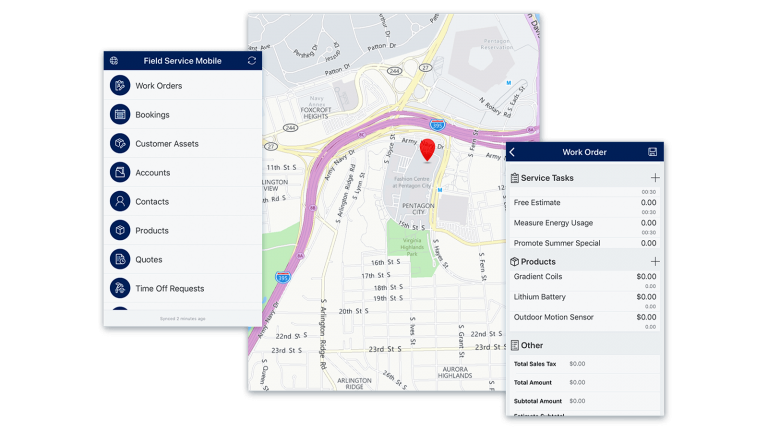
The home screen should load the next three jobs with address, customer, equipment ID, and a one-tap route. Below that: parts search, a photo button on top, and the ability to add time without leaving the ticket. If the tech has to scroll past yesterday's work to find today's, they will stop using the app by week three.
What the Dispatcher Sees on the Other End
A board that updates as techs move. Delays bubble up as colour changes, not emails. A drag between techs sends both a push notification, and that re-shuffle also updates the customer SMS and parts reserve.
The Second Visit Is the Real Scoreboard
The feature list sells the app. The second visit decides whether it pays back. A Microsoft case study on a 2,000-person North American beverage distributor on Dynamics 365 Field Service reports streamlining 180,000 manual steps and reversing a US $9 million yearly loss into a US $30 million return over three years. The lever was not the dashboard. It was the second visit the mobile app helped them stop making.
On a typical Canadian fleet, one avoided callback can cover a tech's monthly licence. That is the math that funds the rollout, not the demo.
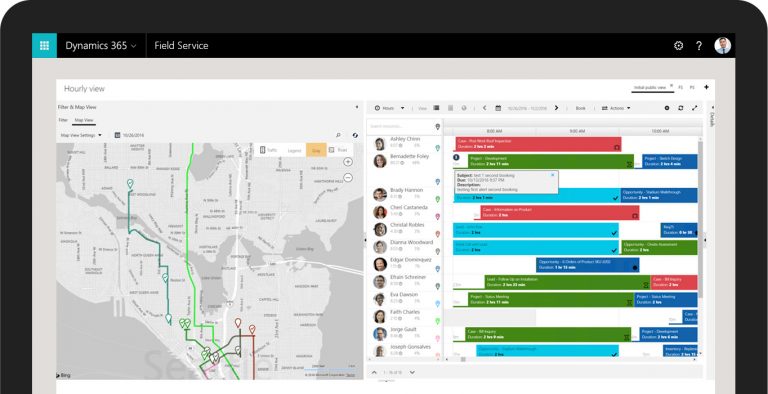
2- "Which Features Make or Break a Field Service Management App?"
A field service management app wins or loses on five features: offline work, work order detail, parts lookup, photo-and-signature capture, and real-time sync. Everything else is sauce.
Vendor pitch decks lead with AR headsets, IoT alerts, Copilot summaries, and predictive scheduling. Those are useful once the foundation holds. If it does not, those features sit unused while your techs email photos to the office.
Non-Negotiable Features in a Field Service Management App
- Offline-first mode. The tech must open, update, and close a work order in a basement, elevator shaft, or rural road, then sync cleanly when the signal returns. Gestisoft's IT runbook for Dynamics 365 Field Service offline mode covers this in practice.
- Full work order on one screen. Service history, equipment nameplate, warranty status, prior notes, and the task list, without tab-switching.
- Parts lookup that matches the truck. It should know what is on this van today, what the warehouse has, and what the vendor can ship same-day.
- Photo and signature capture. Pinned to the top. Nameplate first, problem second, completed work third, signature last.
- Real-time sync both ways. Dispatcher changes reach the tech in seconds; tech updates reach dispatch, customer SMS, and invoicing without re-keying.
Nice to Have, Not Make-or-Break
Predictive scheduling with Copilot. IoT asset alerts. Remote expert through AI-enhanced field service. Agent-driven re-booking. These sell the long roadmap. They do not fix a rollout that lost the techs in month one.
When you compare the best field service management software options, do it for your current fleet, not a prospective one. The gap between what a 15-truck shop needs and what a 500-truck enterprise needs is big enough to pick a different app.
Pro tip:
Lock the app's home screen to the next three jobs, not the full day or week. Techs scroll past their next job when the full calendar loads first, and two minutes per stop adds up to a lost call before noon. Most apps let an admin set this per role, and almost no one does.
3- "How Do You Pick a Field Service Management App Without Getting Locked In?"
You pick a field service management app by picking the platform underneath it first, because the app is a view and the platform is where every price change, data structure, and licensing tier lives for five years.
Four platforms dominate the Canadian market in 2026-27: Microsoft Dynamics 365 Field Service (deep integration with Business Central, Microsoft 365, Teams, Power Automate), Salesforce Field Service (USD-priced, part of Service Cloud), ServiceTitan (home services), and Jobber (small crews, limited at scale).
The Platform Behind Your Field Service Management App Matters More Than the App Itself
The app you demo today is the thinnest layer in the stack. The platform decides who you integrate with, what your field service CRM looks like, how pricing moves when you add 20 techs, and how painful it is to migrate.
Example: a refrigeration shop on Jobber doubles its fleet and switches to Dynamics 365 Field Service. The app change is a two-week retrain. The data migration (customers, equipment history, warranties) is three months. The licensing tier shift between Business Central Essentials and Premium is the piece buyers do not price in up front.
The Point of No Return in Any Field Service Platform
The decision that is painful to reverse 18 months in is the licensing tier and chart of accounts you set on day one. A tier that cannot hold your two-year growth means migrating data instead of adding techs. A chart of accounts without a service-industry lens leaves your margin reports broken.
Lock that in writing before you sign. If a partner will not commit to the two-year licensing cost in CAD, keep looking.
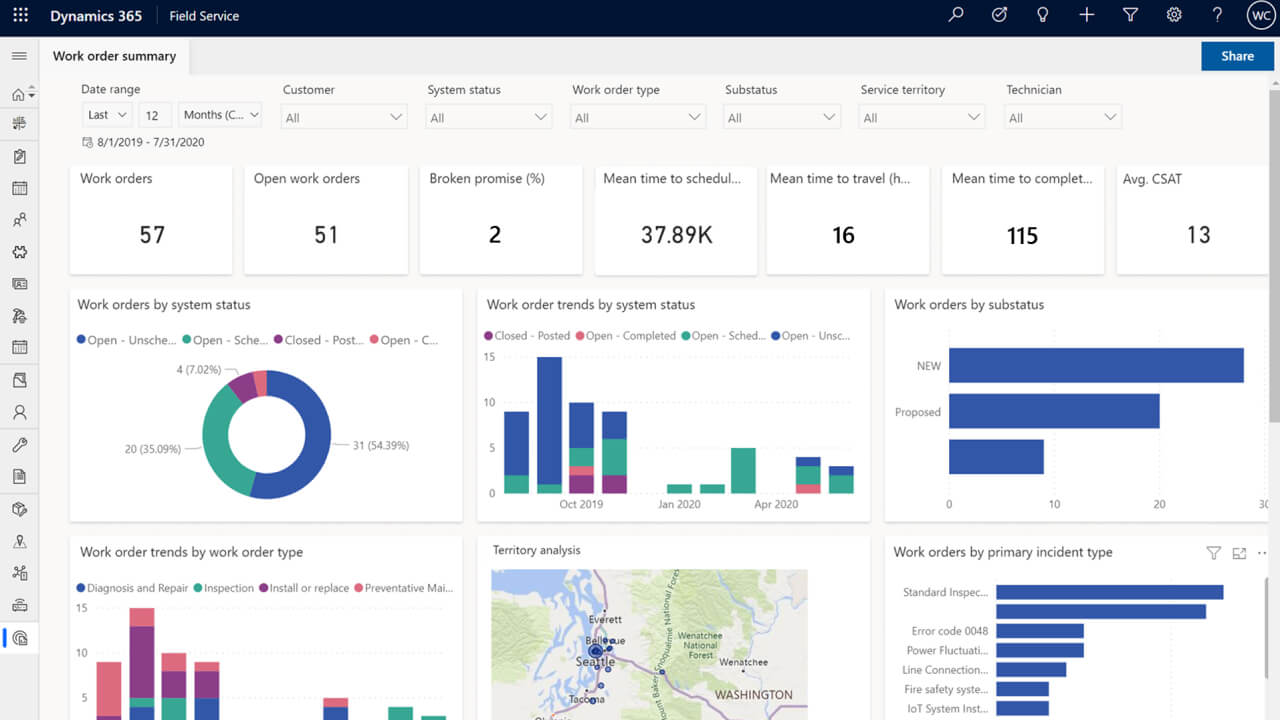
4- "Does a Field Service Management App Really Schedule the Day for You?"
Modern field service management apps schedule the day for you to a point, with rules you set, when the data is clean. "Fully automated scheduling" the way vendors demo it only works when technicians, skills, locations, parts, and job templates are mapped first.
The lift is real when it works. Microsoft reports that City Facilities Management, running Dynamics 365 Field Service, transitioned from manual scheduling to automating over 52% of all jobs through Resource Scheduling Optimization. This shift helped them push same-day work order completion to 83% while dropping their total days-to-complete metrics by 17%.
Your input data needs to be clean: every tech tagged with skills and territories, every job type tied to a reusable template (what Dynamics 365 calls an incident type) with required skills and duration, every location with accurate travel time, every work order with a priority, SLA, and promise window.
Skip any of those and the "automatic" scheduler ships trucks to the wrong jobs, or your dispatcher overrides it all morning. Either way, the app looks broken when the data is the problem.
For a full breakdown of dispatch tools on a bad morning, Gestisoft tested six options in their field service dispatch software comparison.
See a Field Service App Techs Actually Open
Walk through a Dynamics 365 Field Service rollout with 110+ Microsoft-certified specialists on the call.
 Free Discovery Call
5- "Will Your Techs Actually Open the Field Service Management App on Day 60?"
Most field service management app rollouts lose their techs between week two and week six, which is why the day-60 open rate is the only adoption metric that matters. If daily opens stay well below your fleet by then, the rollout is drifting.
Why Most Field Service Management App Rollouts Lose Techs by Week 3
Techs decide whether the app lives or dies in the first fourteen days. A slow sync, confusing login, parts list missing their truck's inventory, or a form with three screens before closing a ticket, and they default back to texting the office. Most vendors have no plan for those fourteen days. The partner you pick should have day-one, day-seven, and day-fourteen check-ins built in, with named people on both sides.
The Ride-Along Test
Before you sign anything, spend half a day riding along with your best tech using the proposed app from the parking lot in. Not a demo, a real shift.
Friction surfaces inside two hours: the glove-tap failure, the basement sync, the parts search that misses the truck, the signature flow that times out, and the three-tap workflow for the one thing techs do thirty times a day. If you cannot do a half-day, do two hours.
If you cannot do that, pick a different partner.
Pro tip:
The first photo the app forces a tech to capture on arrival should be the equipment nameplate, not the problem. The nameplate is what the parts desk needs to quote the right part; the problem photo helps the ticket, not the reorder. Flip the default and first-time fix rate moves inside a quarter.
Signals Your Rollout Is Losing Techs
- Office admins are still printing the day's schedule.
- Parts orders come in by text, not through the app.
- Work orders close in bulk at end of day instead of on site.
- Service history on the tablet is 24+ hours stale on routine jobs.
One is a flag. Two is a problem. Three is a quiet rollback.
To see AI-assisted troubleshooting with a tech in front of broken equipment, watch a short demo.
6- "How Much Does a Field Service Management App Cost in Canada?"
A field service management app in Canada runs between CAD $30 and CAD $180 per technician per month, driven by platform, licensing tier, and whether you pay in CAD or USD. Gestisoft's fleet-size pricing article breaks the per-truck math down by crew size.
Price alone does not tell the story. Three Canadian specifics shape the real cost.
CAD Versus USD Swing
Salesforce and Jobber list natively in USD. A 15% CAD swing over 18 months adds roughly $20 to $30 per tech per month without anyone touching the contract. Dynamics 365 Field Service is sold in CAD through Microsoft Canada and partners like Gestisoft: CAD $142.50 per user per month for a technician licence and CAD $67.80 for a contractor licence, both paid yearly.
CASL Compliance for Customer SMS
Any app that sends automated appointment reminders or arrival notifications needs CASL-compliant consent handling. Maximum penalties can reach $10 million for businesses, but the real risk is software fit: not every US-built app handles these consent states out of the box, so some force you to bolt it on through a third-party gateway at added cost.
Bilingual (English and Québec French) Interface
If you have a bilingual team, the app needs real French, not a machine translation that confuses "pièce" (part) with "chambre" (room). Québec French support is uneven across vendors.
The Honest Cost Picture
Beyond the licence, the real total includes implementation, data migration, integration to your field service CRM or back-office, change management, and support. Across the Canadian service firms Gestisoft has worked with, first-year cost often lands at two to three times the sticker.
If you run both a service fleet and a distribution business, the integration with an ERP for distribution business matters as much as the field service management app features, because parts, inventory, and invoicing live there, not in the app.
7- "When Is a Field Service Management App the Wrong Thing to Buy First?"
A field service management app is the wrong first buy when your core problem is not out in the field but in the office, the books, or the warehouse. The app would only mask the mess for a few months while adding a licence line.
Your Financials Are Not Clean
If your month-end close is a scramble, margins are a guess, and receivables run beyond 90 days, the fix is a working industrial manufacturing ERP or a tightened finance stack first. A field service management app on broken books gives you faster broken books.
Your Dispatch Is Really a People Problem
If your dispatcher is overwhelmed because of role gaps or ownership confusion, software will not fix the organisation chart. Fix the roles first.
Your Service Work Is a Side Business
If service is under 10% of your revenue and is run reactively by one or two people, a lightweight scheduler and a shared spreadsheet are often enough. A firm with fewer than five techs and a working office stack probably does not need a full FSM app yet. The Canadian-specific buying considerations piece covers more when-not-to-buy signals.
The Field Service Maturity Guide
Understand your maturity level with your field service system and the steps to progress to the next stage.
 Free Access the Guide
Why Gestisoft Is the Field Service Management App Partner Canadian Teams Trust
Gestisoft has been a Microsoft Dynamics Partner since 1997, working almost exclusively with Canadian service, distribution, and professional-services firms. For a field service management app rollout, that shows up three ways.
Canadian Specifics Built Into the Delivery
CAD pricing, CASL compliance, Québec French support, provincial compliance (Ontario refrigerant certification, RBQ for Québec contractors), and bilingual office reality are built into how Gestisoft ships.
Technical Bench
110+ Microsoft-certified specialists across Montréal, Toronto, Ottawa, and Québec City, with leads who have shipped Dynamics 365 Field Service into Canadian HVAC, refrigeration, and industrial service firms.
Rollout Mechanics That Assume Tech Adoption Is the Hard Part
Day-one, day-seven, and day-fourteen check-ins. The ride-along test built into onboarding. A Customer Success team that owns the first 90 days. A path to AI-enhanced field service when Copilot is ready, plus SOW clauses your contract should include before you sign.
Skip the Rollout Mistakes Techs Hate Most
Lean on a Canadian Microsoft Partner with a 95% renewal rate in 2024 to map your rollout before you sign anything.
 Free Discovery Call
FAQs
Is a Field Service Management App the Same as Field Service Management Software?
No. The software is the full platform (back-end, dispatcher console, reporting); the app is the mobile layer techs use. A good FSM app is a view into a bigger system, so if a vendor pitches the app without the platform behind it, that is a flag.
Does a Field Service Management App Work Offline?
A proper FSM app works offline for the full work-order lifecycle: open, update, close, capture photos and signatures, log parts and time. The sync queues data safely and resolves conflicts when the signal returns. Lighter tools only cache a read-only view, which breaks the moment a tech closes a ticket in a basement.
What Is the Best Field Service Management App for a Small Team (Under 10 Techs)?
For a crew under 10 with no plan to grow past 15, a lightweight tool like Jobber or a Business Central Essentials setup with a service add-on is often enough. For a crew expected to grow past 25 in two years, buying smaller now usually means a painful migration later.
Can a Field Service Management App Replace QuickBooks or an ERP?
No. It handles scheduling, work orders, parts, and the tech's mobile workflow, then feeds data into your accounting or ERP (invoices, receivables, inventory). The best rollouts integrate the app with the back-office stack rather than replace it.
Does Dynamics 365 Field Service Have an App for iPhone and Android?
Yes. The Dynamics 365 Field Service mobile app is published for iOS and Android, with offline mode, work order management, photo and signature capture, and real-time dispatcher sync. Microsoft's Dynamics 365 Field Service mobile app documentation covers the setup.
Liked what you just read? Sharing is caring.

November 12, 2026 by Muhammad Ali Iqbal by Muhammad Ali Iqbal SEO Content Strategist & Copywriter
Driven by a passion for search engine optimization, strategic content, and conversion-focused writing. A copywriter and content strategist who lives for content that ranks, engages, and delivers real business results.

