Key Takeaways
• A personal email signup blocks you from inviting teammates, extending the trial, or hosting it in a Canadian tenant.
• Sample data is visible only to the account that signed up, so reps you invite see empty dashboards until records are re-assigned.
• Configurations don't carry over the way most buyers expect when you convert to paid, which is why 220+ Canadian teams a year lean on Gestisoft for the handoff.
The Dynamics 365 for Sales trial gives you 30 days of free access to Microsoft's sales CRM, with sample data, Copilot features, and a working pipeline you can test with your own team. You can extend it once for another 30 days, but only if you signed up with a work email on a managed Microsoft 365 tenant, not a personal account.
That's the clean version. In practice, trials get messy fast.
Imagine this… It's 9 p.m. on day 29. You're building the opportunity view for Friday's leadership demo, and your sales manager just emailed to say his dashboard is blank. The trial expires in 48 hours and no one else on your team can log in because you used your Gmail to start it.
This guide is for you.
Teams who get the trial right usually start the same way: load a small slice of real pipeline, test the workflow, decide fast. That's how Lithion Recycling moved from a decision to a working CRM.
“Initially, it was difficult for us to clearly explain to Gestisoft the customizations we needed, as we didn’t yet understand all the platform’s possibilities. We honestly didn’t know what we were going to do. Some things have changed over time. Their fast implementing approach enabled us to start with basic assumptions and we put them into the CRM. Two months after implementation, we looked to see if it really made sense in our day-to-day work." - Jean-Christophe Lambert , Director, Growth and Business Development, Lithion Recycling”
The same discipline keeps your 30 days from slipping away.
Start Your Trial the Right Way
Gestisoft delivers 220+ Dynamics projects per year, so we help you skip common trial mistakes and run a 30-day evaluation that actually convinces your team.
 Free Discovery Call
Below are the questions buyers actually ask when they're running a Dynamics 365 for Sales trial, answered in the order they come up.
1- "What Does the Dynamics 365 for Sales Trial Actually Include?"
The Dynamics 365 for Sales trial gives you a working copy of Dynamics 365 Sales with sample data, the full sales pipeline, forecasting, and most of the Sales Insights features Microsoft sells in the paid Enterprise edition.
What's Inside the Sales Hub
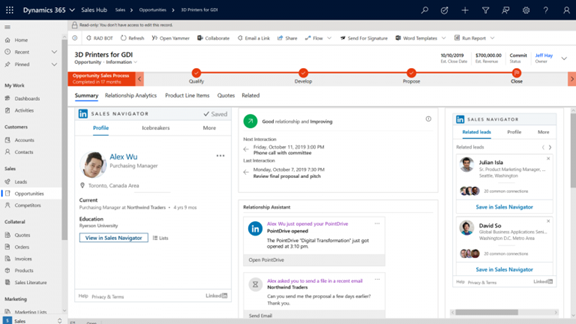
The Sales Hub app is where your reps spend their day. It covers:
- Leads, opportunities, accounts, contacts, and activities.
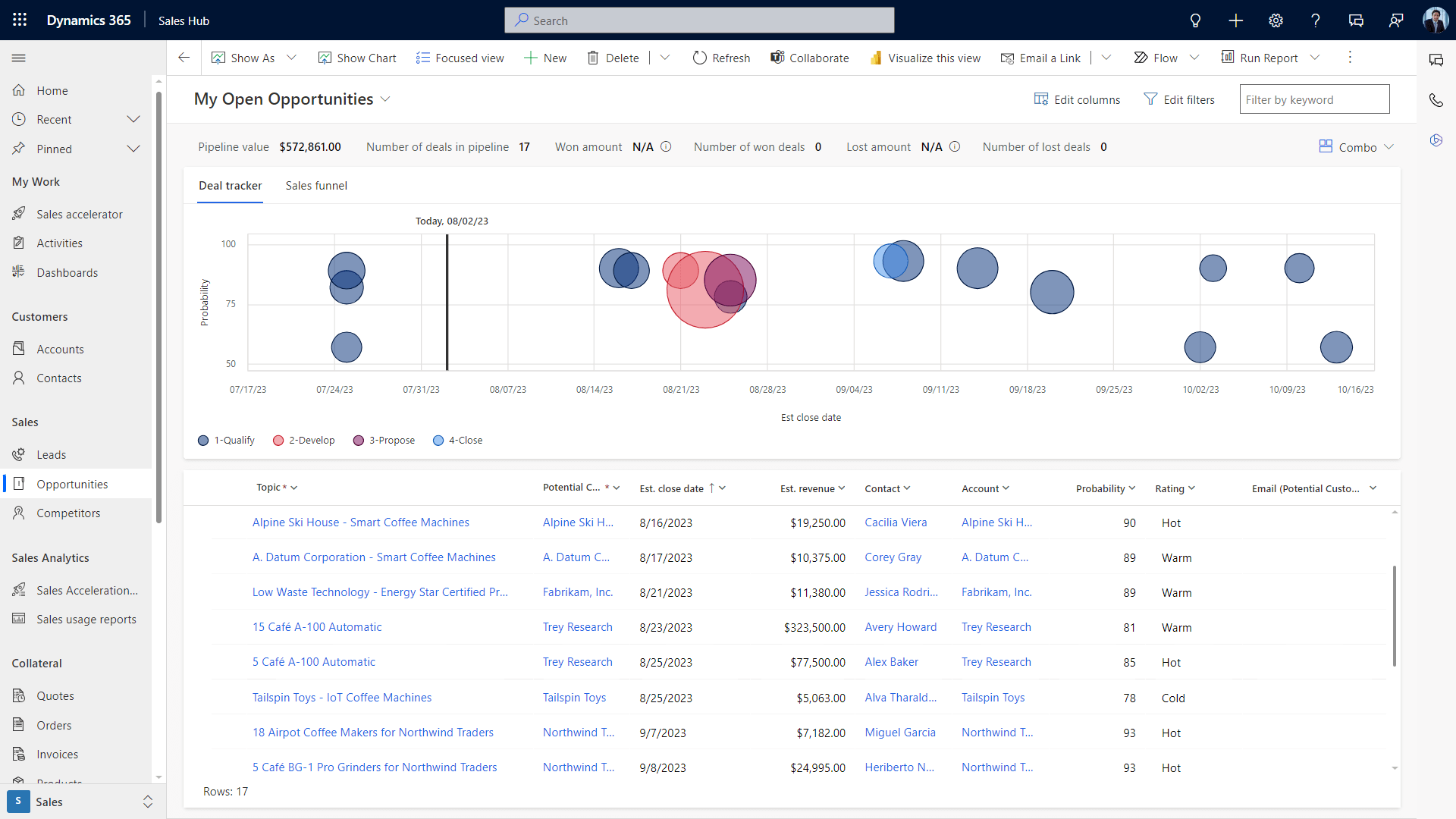
- Dashboards that roll everything up.
- Sales forecasting and pipeline management.
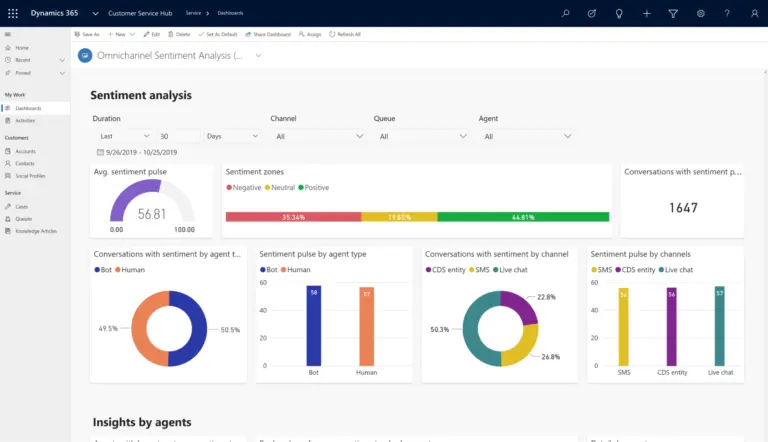
- Sales Insights bundle (with monthly usage caps): conversation intelligence, predictive scoring, AI-powered assistant.
- Sales accelerator queue, Microsoft's next-best-action list for reps.
- Emerging autonomous agents, such as the Sales Development agent, currently in preview and available only to tenants opted into Microsoft 365 Targeted release.
What You Don't Get
A few things that look included on paper but aren't:
- No full-tenant production rights or unlimited API calls.
- No guarantee that every advanced Copilot feature works in your region yet.
- A simplified sitemap in the trial app, meaning tutorials written for the paid version won't always match the menu paths exactly.
The Canadian Tenant Setting Most Buyers Miss
The Dynamics 365 for Sales trial defaults to a US-hosted tenant unless you pair it with an existing Canadian Microsoft 365 tenant boundary first.
For a bilingual Québec team, that single setup decision determines whether your production data stays on Canadian soil, which matters under the cross-border data transfer guidelines from the Office of the Privacy Commissioner of Canada. Fix it before signup, not after.
Which Dynamics 365 for Sales Trial Edition Are You Testing?
Microsoft runs the Dynamics 365 for Sales trial on the Sales Enterprise feature set by default, which sits in the middle of the lineup.
Here's the quick view:
- Sales Professional strips out the Sales Insights block (no sales accelerator, no predictive scoring, no conversation intelligence). Better fit for a team that just needs leads, opportunities, and clean reporting. The Sales Professional edition runs for less per seat if AI isn't what you're buying for.
- Sales Enterprise is what the trial defaults to. Full pipeline, forecasting, Copilot assistant, sales accelerator.
- Sales Premium adds the full Copilot credit allocation and advanced relationship intelligence.
In the Dynamics 365 for Sales trial you can poke at all three. But your paid Dynamics 365 Sales license decides what your reps actually use on day 31. For a full view of what you'll pay, our Dynamics CRM cost breakdown covers it end to end.
2- "How Do You Sign Up for the Dynamics 365 for Sales Trial Without the 3 Setup Mistakes?"
You start the signup from Microsoft's free trial page, click "Try for free" on the Sales tile, and enter your email, country, phone number, and credit card.
The three mistakes to avoid: wrong email, wrong tenant pairing, and skipping role setup for teammates.
The credit card doesn't get charged during the 30 days, but it's attached, so put it on a card you control. The email choice is the one that quietly decides what your trial can and can't do.
Why a Personal Email Breaks Your Dynamics 365 for Sales Trial
If you sign up with Gmail, Outlook.com, or Yahoo, Microsoft creates a trial tenant for you but locks you out of the Power Platform admin center.
That means:
- No teammate invites to the trial app.
- No 30-day extension when you need another week.
- No security role configuration the way your production environment will have.
For a Canadian team, it also blocks you from aligning the trial tenant with Canadian data residency later.
The fix: sign up with a Microsoft 365 work email on a tenant your IT admin owns. If you don't have one yet, check your Office 365 pricing options and spin up the lightest Business Basic seat first, then start the Dynamics 365 for Sales trial from inside that tenant.
Pro tip:
Before you invite a single teammate to the Dynamics 365 for Sales trial, open the Leads view, select the sample records, and re-assign them to the person you're about to invite. Microsoft puts all sample data under the account that signed up, so a rep logging in for the first time sees an empty dashboard and thinks the trial is broken. Sixty seconds of re-assignment saves the "is this thing even working" email thread on day 1.
Add teammates from the Microsoft 365 admin center, give them a trial license, then assign them a security role inside Dynamics (Salesperson for most reps, System Customizer for whoever is configuring).
3- "How Long Does the Dynamics 365 for Sales Trial Last, and Can You Extend It?"
The Dynamics 365 for Sales trial lasts 30 days. You can extend it once, for another 30 days, through the Power Platform admin center, but only if you signed up with a work email on a managed tenant.
Here's the rhythm most teams follow:
- Day 1 to 7: load a small slice of real data (5 to 10 live opportunities, not 500) and get your reps logging in.
- Day 8 to 20: run live sales cycles through the system (new leads, qualifying calls, opportunity updates, dashboard reviews).
- Day 21 to 28: build the business case (screenshots, a short Loom, the "here's what my pipeline looks like today vs on spreadsheets" story).
If you need more time, open the Power Platform admin center, go to the Environments page, select your trial environment, and click Extend. You get one 30-day extension per trial.
After that, your options are:
- Convert to paid.
- Let the environment expire (Microsoft auto-deletes it).
- Sign up for a fresh trial from a different work email.
Teams on personal accounts can't extend. If that's you, your window is 30 days and done.
Here’s a quick Gestisoft walkthrough of AMP Sales, their fast-start Dynamics 365 setup for SMBs
4- "Which Dynamics 365 for Sales Trial Features Should You Test First?"
You can test everything, but you shouldn't. Pick the three features that will decide your buying case and park the rest.
Based on what usually matters most during a Dynamics 365 for Sales trial, here's a shortlist worth running in week 1:
1- Lead-to-Opportunity Conversion Flow
This is the core daily workflow for every rep. If this doesn't feel natural, nothing else matters.
Run a real lead through qualification, create the opportunity, update stages, and close won. The difference between a lead and an opportunity in Dynamics is clearer than most other CRMs, which helps rep adoption.
2- The Sales Dashboard
Dashboards decide whether your sales manager keeps using the CRM after week 3.
Build one that shows pipeline by stage, forecasted revenue, and activities per rep. Our deeper write-up on a sales dashboard that actually improves performance walks through the fields that matter.
3- The Sales Accelerator
The Sales Accelerator is Microsoft's prioritized call list for reps.
If your team hates it in week 1, they'll hate it in year 3. If they lean in, you've just answered the "will my reps adopt it" question.
Features to Postpone
Not everything deserves your 30 days. Push these to after conversion:
- Forecast model configuration.
- Custom security roles.
- Workflow automation beyond the simplest 2-step flow.
These change often during a trial, and the work doesn't carry over. Spend the 30 days testing adoption, not building infrastructure.
Get the Features Worth Testing First
With a 95% client renewal rate in 2024, Gestisoft tells you which Dynamics 365 Sales features will land in your demo and which to park until after go-live.
 Free Discovery Call
5- "What Doesn't Work (or Works Differently) in the Dynamics 365 for Sales Trial?"
Three things will trip you up: the sample-data visibility rule, the one-trial-per-app limit, and feature parity gaps for Canadian tenants.
The Sample Data Trap
Here's what nobody writes about Dynamics 365 for Sales trial sample data: it's visible only to the account that signed up.
Reps you invite log in, see a blank dashboard, and conclude the trial doesn't work. The sample leads, opportunities, and accounts are all tagged to your user record, not shared with the team.
Microsoft doesn't surface this at signup. You have to re-assign records or load your own.
One Trial Per App, Separate Tenants
Each app's trial runs on its own tenant and URL.
If you want to trial Sales and Customer Service in parallel, that's two tenants, two logins, two configurations. There's no "trial everything" bundle.
Regional Feature Gaps
Conversation intelligence (the Copilot feature that records and analyzes sales calls) only works for work accounts with a Microsoft tenant. Personal account trials see an "unsupported" message.
Some Sales Insights features are region-limited, so a Canadian team testing in a US-hosted trial tenant may see different capabilities than they'll have in production.
No Reset Button
You also can't reset a trial. If you make a mess of configurations and want to start fresh, you wait for expiry or spin up a new trial from a different email.
If your trial is already heading toward a mess, our write-up on common CRM implementation challenges covers the ones that bite before go-live and how to defuse them in advance.
6- "How Do You Convert the Dynamics 365 for Sales Trial Into a Paid Environment?"
You buy a license either directly through admin.microsoft.com with a card, through a Microsoft volume agreement, or through a partner. Then you convert your trial environment to production (or deploy your tested configurations to a fresh production environment) and clean up your test data.
The Buying Path by Team Size
The route depends on your organization’s size:
- Under 300 users: usually buy direct with a credit card from admin.microsoft.com.
- Over 300 users: typically go through a volume agreement or a Microsoft 365 consulting partner who handles the licensing block alongside the implementation.
What Doesn't Carry Over
Yes, you can convert the Dynamics 365 for Sales trial to paid, but your configurations don't carry over the way most buyers expect.
Microsoft recommends creating a fresh environment for production and re-adding only the configurations you want to keep. Your sample data has to be removed. Your custom workflows need re-testing. Your security roles may need to be rebuilt.
Plan for a short re-configuration window between buying and going live.
Expert insight:
The forecast model trap. If you configure a forecast model inside the trial and later convert to paid, the forecast won't backfill the trial-period data into your production environment. Your forecast chart starts from Day 1 of the paid tenant, not Day 1 of the trial. For a sales leader walking into their first production review asking, "where's my pipeline history", that's a bad moment. The workaround we tell every client: configure the forecast model after you convert, not inside the trial. The 30 days are for testing whether forecasting works for your process, not for building the live model.
If this feels like a lot, it is.
Teams that take the shortcut often end up with a messy production environment and spend their first month post-launch cleaning it up. For a cleaner path, our write-up on CRM implementation in 7 days shows how a trial-to-production handoff works when a partner runs it, so you don't have to piece it together in-house.
7- "When Is the Dynamics 365 for Sales Trial the Wrong Starting Point?"
Honest answer: the Dynamics 365 for Sales trial is the wrong starting point when you need buy-in from leadership before you can show value, or when your team isn't ready to run live sales cycles for 30 days.
The trial assumes two things that aren't always true:
- You have 2 to 5 reps willing to put real leads into a new system for a month.
- You can afford to lose 30 days if the trial doesn't lead anywhere.
If You're a Solo Ops Lead Without Buy-In
Running a Dynamics 365 for Sales trial alone will drain your energy and prove nothing to leadership.
In that case, a guided demo with a partner is faster and lands harder with the people writing the check.
If Your Pipeline Is a Mess
Duplicate contacts, half-updated opportunities, no stage definitions—the trial will inherit all of it.
Clean the pipeline first in the system you have, then run the trial once you have 20 to 30 clean records to work with.
If You're a Manufacturer Chasing Productivity
If you're evaluating CRM to lift sales productivity (not just replace a spreadsheet), the Dynamics 365 for Sales trial on its own won't give you a productivity jump.
Based on research from BDC, the most productive companies invest almost twice as much in ICT per employee, so the real lift comes from pairing new tools with process and habit change. The workflow, process, and rep habits matter more than the software you point them at. That's the harder conversation, and it starts before the trial does.
6 Steps to Higher Sales Productivity
A free ebook for manufacturing leaders on how to use CRM to drive measurable sales productivity gains.
 Free Access the Guide
FAQs
Is the Dynamics 365 for Sales trial actually free?
Yes, for 30 days. Microsoft asks for a credit card at signup but doesn't charge it unless you convert to paid at the end. If you let the trial expire, no charge happens and the environment is auto-deleted.
Can I use a personal Gmail or Outlook.com account for the trial?
Technically yes, but you lose almost everything that makes the trial useful: no teammate invites, no 30-day extension, no Admin Center access. Use a Microsoft 365 work email on a tenant you own.
What happens to my data when the trial expires?
Microsoft deletes the environment automatically after expiry. If you want to keep configurations or test data, convert to a paid license before day 30 (or day 60 if you extended once).
Can I run trials for Dynamics 365 Sales and Customer Service at the same time?
Yes, but each one runs on its own tenant with its own URL and sign-in. You can use the same email to start multiple trials, but the data and configurations don't share.
How much does Dynamics 365 Sales cost after the trial?
Based on the current Microsoft Canada pricing page, Sales Professional is CAD $88.20 per user per month, Sales Enterprise is CAD $142.50, and Sales Premium is CAD $203.50, paid yearly, before implementation fees or tax. For the full picture, see our Dynamics CRM cost breakdown.
Why Gestisoft Is the Right Partner for Your Dynamics 365 for Sales Trial
Gestisoft has been building and converting Dynamics trials for Canadian businesses since 1997.
We have delivered Microsoft Dynamics projects for Canadian clients for over 25 years. Our team of 110+ specialists runs 220+ projects a year across Canada (and North America). Our client renewal rate in 2024 was 95%.
We're a B Corp certified Microsoft Solutions Partner, and we've worked with teams like Lithion Recycling to take a trial from first login to a live CRM in weeks, not quarters. Here's how they describe the day-to-day impact after rollout:
“With a CRM like Dynamics 365, I can easily identify where each contact is in the process and prioritize the necessary actions. This allows me to manage my time optimally and ensure personalized follow-up for each potential customer." - Jean-Christophe Lambert , Director, Growth and Business Development, Lithion Recycling”
If you want someone to help you run the 30 days without wasting them, we're happy to be that someone.
Get Your Trial Set Up Right
Gestisoft is a B Corp certified Microsoft Solutions Partner that helps Canadian teams turn a 30-day trial into a working, bilingual CRM their reps will actually use.
 Free Discovery Call
Liked what you just read? Sharing is caring.

November 12, 2026 by Muhammad Ali Iqbal by Muhammad Ali Iqbal SEO Content Strategist & Copywriter
Driven by a passion for search engine optimization, strategic content, and conversion-focused writing. A copywriter and content strategist who lives for content that ranks, engages, and delivers real business results.