
CRM tools examples tend to blur together because every platform claims the same capabilities. Pipeline management, email tracking, dashboards, AI, customer service, and a host of other integrations. The marketing pages all sound identical until you get past the demo and discover that the tools your team needs most are either underpowered or buried behind a configuration process nobody knows how to operate.
The harder question for most B2B companies isn't which CRM to buy. It's which tools inside the CRM will change how their team operates on a Tuesday afternoon when a deal has stalled and the forecast is due. The platform you choose is the container and the tools inside it are what drive pipeline visibility and accurate forecasting across the sales team.
Two companies can buy the same CRM licence and get completely different results depending on which tools they configure and how well those tools match the way their team sells. That gap between potential and performance is almost always a configuration question, and it's the reason CRM tools examples are worth evaluating by capability rather than by platform.
CRM tools work harder when they're configured around your sales process
Gestisoft helps Canadian businesses choose and implement the CRM tools that match how their teams operate.
 Free discovery call
1. CRM tools examples for managing your sales pipeline
Pipeline management is the tool most people picture when they hear "CRM," and it's the capability that earns or loses the trust of your sales manager within the first few weeks of any implementation. The gap between a basic Kanban board and a pipeline tool configured around your sales stages with weighted probabilities that feed accurate forecasts is enormous, and that gap is where most CRM tools examples in this category diverge.
What good looks like: A pipeline tool where deal stages match how your team sells so a rep can move a deal forward with the right follow-up tasks triggered automatically. Your sales manager can see pipeline health, deal movement, and forecast accuracy in one view without exporting anything to a spreadsheet.
Platform examples:
Dynamics 365 Sales connects pipeline data to financial information through Business Central and layers Copilot AI on top for deal insights and risk flagging. Your manager sees margin alongside deal value rather than just a revenue number, which changes the quality of every forecasting conversation. For B2B companies already in the Microsoft ecosystem, the pipeline lives inside Outlook and Teams rather than requiring a separate login.
Salesforce Sales Cloud offers the deepest customisation of any pipeline tool on the market. You can build virtually any pipeline structure, approval workflow, or automation rule the business needs. That flexibility comes with a trade-off though as most Salesforce implementations require a dedicated administrator to manage the configuration over time, and complexity tends to compound as the business adds custom objects and workflows year after year.
Pipedrive takes the opposite approach. The platform is built for small to mid-sized sales teams that want a visual pipeline they can start using the same day it's set up. Adoption is fast because the interface is clean and the learning curve is minimal.The limitation shows up when a business outgrows what Pipedrive can do, which is why companies evaluating Pipedrive competitors tend to end up looking at platforms with deeper reporting and ERP connectivity.
2. CRM tools examples for contact and account management
Contact and account management is the foundation everything else in a CRM sits on top of. If your customer records are incomplete or scattered across systems, every other CRM tool underperforms because the data feeding it can't be trusted. This is the least glamorous category of CRM tools examples and the one that determines whether everything built on top of it works properly.
What good looks like: Every interaction with a client is visible in one record, so emails, calls, meetings, support tickets, and invoices all connected to the same account. Your sales rep picks up the phone and already knows what happened in the last service call and when the contract renews, without toggling between platforms or asking a colleague to forward an email chain.
Platform examples:
Dynamics 365 provides a unified customer record that spans sales, service, and finance when connected to Business Central. That means the account record your rep sees includes pipeline data, support history, and financial information in one view. For B2B companies where the sales relationship and the service relationship overlap heavily, that connected record eliminates the "let me check with another department" delay that frustrates clients and slows internal decision-making.
HubSpot keeps contact management clean and intuitive, which is a big part of why adoption tends to be high with smaller teams. The timeline view pulls emails, calls, meetings, and form submissions into a single chronological feed per contact. Where Hubspot runs into limits is at the account level for complex B2B relationships where multiple deals and service interactions need to connect to a single parent company record with financial visibility underneath.
Zoho CRM offers solid contact and account management at a price point that makes it accessible for SMBs getting started with their first proper CRM. Duplicate detection and record merging work well out of the box, and the customisation options are broad enough to structure records around how your business categorises clients. The platform is strongest when used as a self-contained system rather than one that needs to connect deeply to ERP or financial data on the back end.
3. CRM tools examples for email tracking and sales automation
Deals go cold when follow-ups get missed, and follow-ups get missed when they depend entirely on a rep remembering to send them. Email tracking and sales automation tools solve that problem by making the CRM responsible for the repetitive touchpoints so your team can focus on the conversations that require a human being on the other end. This category of CRM tools examples has the most immediate impact on pipeline velocity because it targets the exact moment where most deals lose momentum.
What good looks like: A rep sends a proposal and the CRM tracks when it's opened. If no response comes within 48 hours, a follow-up task appears automatically. Sequences handle the routine outreach cadence while the rep focuses on the prospects who are actively engaged and moving toward a decision.
Platform examples:
Dynamics 365 with Copilot ties email tracking directly to the deal record, so every interaction is visible in the context of the opportunity rather than buried in someone's inbox. Copilot adds a layer on top by drafting follow-up emails based on previous conversation context, which a rep can review, edit, and send in under a minute rather than starting from a blank screen. The automation sits inside the same environment as pipeline and forecasting data, which means a stalled follow-up sequence shows up in the manager's dashboard as a deal risk rather than going unnoticed.
ActiveCampaign is built around sophisticated automation workflows that are surprisingly accessible for teams without a dedicated marketing ops person. The platform shines when email is the primary sales channel and the nurture sequence is doing most of the heavy lifting before a rep gets involved. Where ActiveCampaign falls short is on the CRM side, because the pipeline management and reporting tools don't carry the same depth as platforms where sales functionality is the core product.
Salesforce offers extensive automation through its Flow builder, which can trigger email sequences, task assignments, and record updates based on virtually any combination of conditions. The power is significant but so is the learning curve. Most businesses need someone with Salesforce-specific skills to build and maintain the automation rules, which adds an ongoing cost that lighter platforms don't carry.
4. CRM tools examples for reporting and dashboards
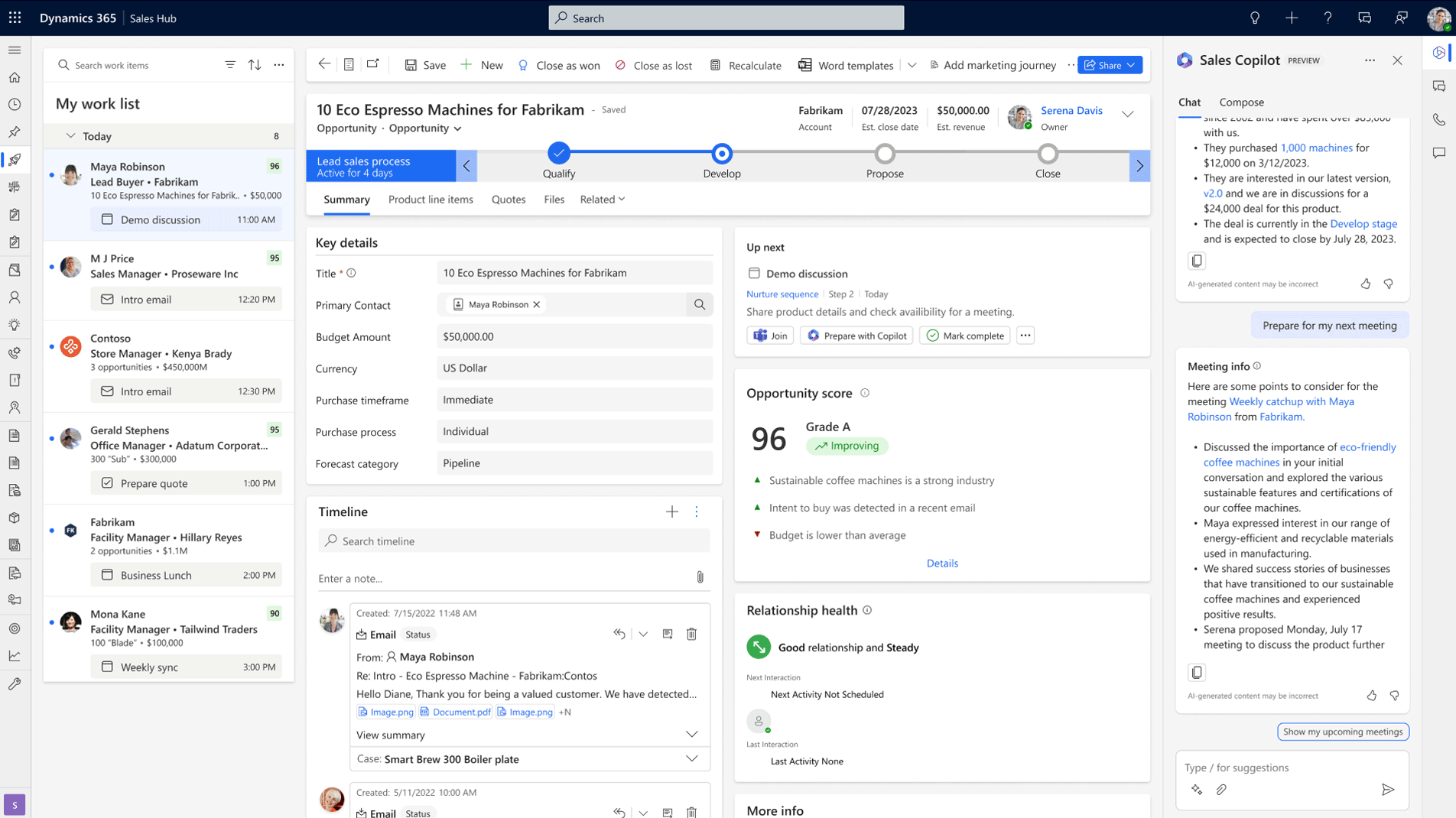
A CRM that collects data without helping anyone act on it is an expensive database. Reporting and sales dashboard tools are what turn raw pipeline data into something your sales manager can use to coach reps and your VP can use to plan resource allocation across the team. This category of CRM tools examples determines whether your CRM earns its place as a daily operating tool or sits in the background while the real decisions happen in spreadsheets.
What good looks like: Your sales manager opens one CRM dashboard on Monday morning and sees pipeline by stage, deals at risk, and forecast against target without clicking into a single deal record. Your VP sees revenue trends and conversion rates without scheduling a meeting to get the numbers. The data is live, the views are configured for each role, and nobody had to build anything manually to get there.
Platform examples:
Dynamics 365 with Power BI is the strongest combination for CRM tools examples in this category because the reporting layer is native to the platform rather than added on. Power BI connects directly to Dynamics 365 data and, when Business Central is in the picture, pulls financial reporting into the same dashboard as pipeline and activity data. Your executive team sees margin-weighted pipeline alongside revenue performance in one view, which is the kind of connected reporting most B2B leadership teams want but rarely get from a standalone CRM.
Salesforce has strong reporting capabilities built into the platform, with customisable report types and dashboard components that can be configured to show granular sales data across teams and territories. The trade-off is that getting the reporting layer configured to match how your business operates takes deliberate effort and usually requires someone with Salesforce-specific skills to build and maintain. Out-of-the-box defaults won't get you far.
HubSpot delivers clean, visually intuitive dashboards that smaller teams can start using quickly without much configuration overhead. The free and starter tiers cover basic pipeline and activity reporting well. Where HubSpot runs into limits is at the executive level, where deeper analytical capability and financial context become important. Businesses that hit that ceiling often find themselves evaluating HubSpot competitors with stronger reporting and ERP connectivity.
CRM tools configured around your business change how your team works
Gestisoft implements Dynamics 365 with dashboards, automation, and pipeline tools built around your sales process.
 Free discovery call
5. CRM tools examples for AI and intelligent automation
AI is the newest addition to the CRM tools examples conversation and the one where the gap between platforms is widest. Every vendor has added AI branding to their marketing pages, but the practical capabilities vary dramatically depending on how deeply the AI connects to your actual business data. The useful applications right now are narrower than the hype suggests, though the ones that work well are changing how sales teams operate day to day.
What good looks like: Your CRM flags deals that are stalling before your manager spots the pattern, then suggests a next step based on what's worked in similar situations. A follow-up email that would take a rep ten minutes to draft from scratch appears as an AI-generated starting point they can review and send in under a minute. The important caveat is that AI tools only perform as well as the data underneath them, so a well-configured CRM with clean pipeline data gets dramatically more value from AI than one where reps are logging activity inconsistently.
Platform examples:
Dynamics 365 Copilot is integrated across sales, service, and operations, and pulls from your Microsoft 365 data alongside your CRM records. Copilot can summarise a meeting in Teams and connect the summary to the deal record in Dynamics 365, then draft a follow-up based on what was discussed. For businesses running Business Central on the ERP side, the AI layer has access to financial context that standalone CRM AI tools can't see.
Salesforce Einstein is the most mature AI offering in the CRM market and performs strongest with large datasets where the pattern recognition has enough volume to work with. Lead scoring and opportunity insights are well-developed, and the recent addition of Einstein GPT adds generative capabilities on top of the predictive analytics. The investment required to get full value from Einstein tends to be higher than other platforms, both in licensing and in the data quality work needed to feed it properly.
Zoho Zia makes AI accessible at a price point that smaller teams can justify. The capabilities are delivered through an interface that doesn't require a data science background to interpret. Zia won't match the depth of Copilot or Einstein for complex B2B operations, but for mid-market companies that want AI-assisted selling without an enterprise-scale investment, it fills the gap well.
6. CRM tools examples for customer service and support
For B2B companies where the relationship extends well beyond the initial sale, service tools carry as much weight as pipeline management. Ticket management, case routing, SLA tracking, and omnichannel support are the capabilities that determine whether your post-sale experience strengthens the client relationship or erodes it one unresolved issue at a time. This category of CRM tools examples tends to get evaluated separately from sales tools, which is a mistake for any business where retention drives recurring revenue.
What good looks like: A client emails about an issue and a case is created automatically, routed to the right agent based on the issue type and the client's account history. That agent can see the full sales relationship and any open commercial activity on the account without asking the client to repeat themselves or chasing a colleague for context. Resolution times are tracked against SLAs, and patterns are visible so leadership can fix root causes rather than just closing the same types of tickets over and over.
Platform examples:
Dynamics 365 Customer Serviceshares the same platform and customer record as Dynamics 365 Sales, which is what makes it particularly strong for B2B companies. The service agent sees everything the sales team sees, and vice versa. A CRM specialist configuring Dynamics 365 for both sales and service can build a view where account managers are automatically alerted when a client they're responsible for has open support cases, which means retention risks surface inside the pipeline view rather than in a quarterly review that comes too late.
Zendesk is one of the most established names in customer support software and handles high-volume, ticket-based support exceptionally well. The self-service portal options reduce the number of requests that reach an agent, and the ticketing workflow is clean enough that most teams can be productive within days of setup. Where Zendesk runs into limits for B2B companies is that it's a support tool rather than a full CRM, so the sales context around a client relationship lives somewhere else entirely.
Freshdesk offers solid ticket management and case routing at a price point that growing teams can justify without a lengthy budget conversation. The platform covers the core service workflows well and integrates with a range of other business tools. It works best for companies that need professional support infrastructure without the complexity or cost of an enterprise platform, particularly when the support volume is growing but hasn't reached the scale where Zendesk or Dynamics 365 become necessary.
7. CRM tools examples for integration and connected data
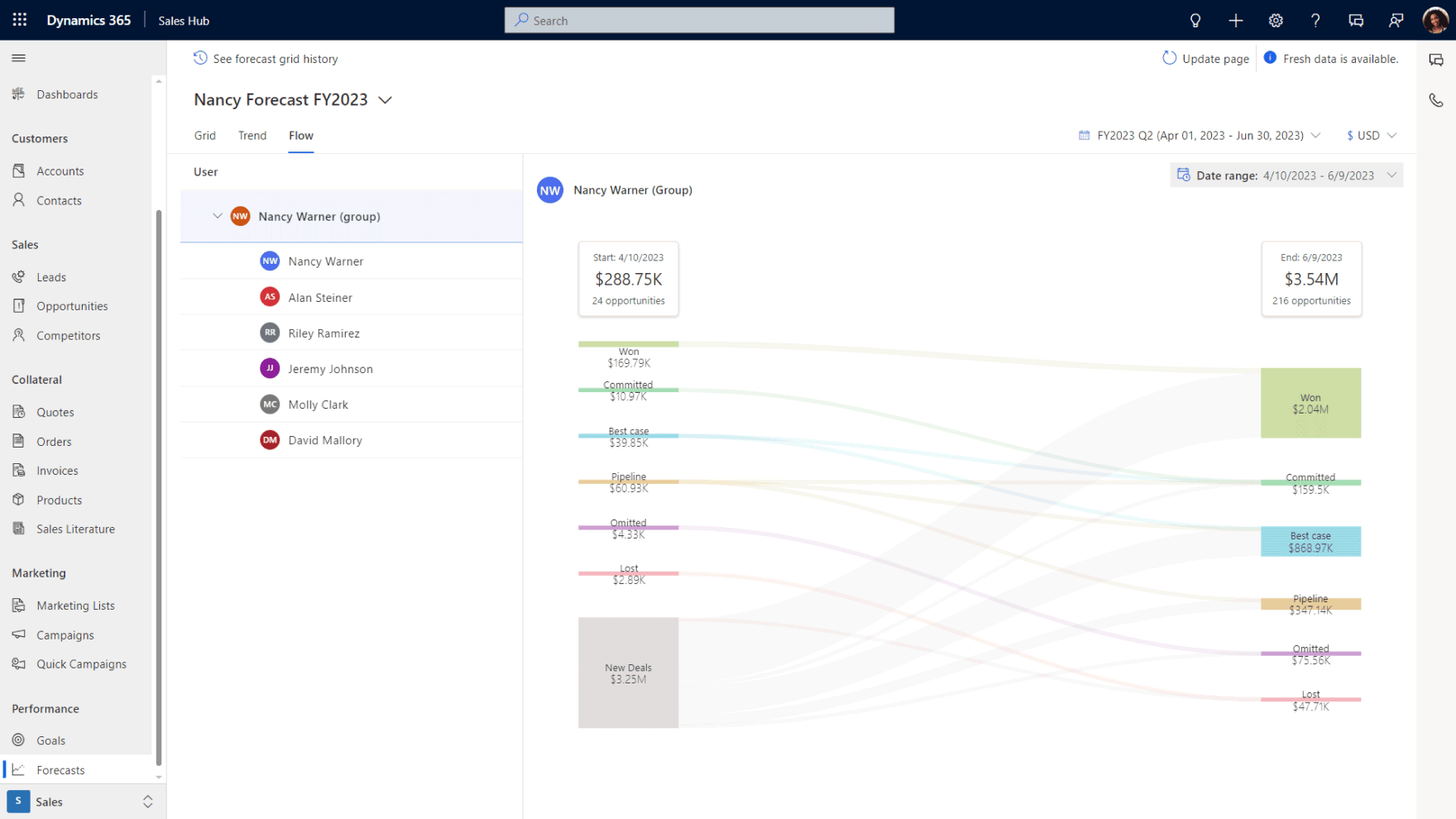
Integration tools determine whether your CRM becomes the single source of truth for your business or just another silo sitting alongside the five you already have. Connecting your CRM to email, calendar, ERP, accounting, and marketing platforms sounds like a technical concern, but the business impact shows up in every department. This is the category of CRM tools examples where the gap between platforms creates the biggest long-term cost differences, because integrations that break or lag behind real-time create data quality problems that compound over months.
What good looks like: Your sales team closes a deal and the order flows into your ERP without a handoff spreadsheet, while your service team can see whether a client has an open invoice before scheduling a visit. The data moves between systems automatically, and the people who need visibility into different parts of the business get it from one connected environment rather than logging into four separate platforms and hoping the numbers match.
Platform examples:
Dynamics 365 paired with Business Central is one of the best CRM tools examples in this category because the CRM-ERP connection is native to the platform rather than built through middleware. Sales data and financial data exist in the same environment from the start, which means your Microsoft consultant configures one connected system during implementation rather than wiring two separate products together after the fact. For Canadian B2B companies where the front office and back office need to share data constantly, that native connection eliminates an entire layer of integration risk.
Salesforce offers one of the largest integration marketplaces in the CRM industry through AppExchange, with connectors available for virtually any business application. The breadth is impressive, though most integrations require middleware platforms like MuleSoft or Zapier to function, which adds a maintenance layer between your CRM and whatever it's connecting to. For businesses with the internal resources to manage that integration architecture, it works well. For those without a dedicated integration team, the connectors can become a source of ongoing friction.
HubSpot integrates natively with a strong set of marketing and sales tools, and the marketplace covers most common business applications. The platform works well when the integration needs stay within the marketing and sales stack. Where HubSpot runs into limits is on the ERP and financial data side, because connecting it to accounting or operational systems typically requires third-party middleware that introduces the same data sync challenges the CRM was supposed to eliminate.
How to match these CRM tools examples to the problems your team has right now
Seven capability categories is a lot to absorb, and the temptation is to evaluate all of them at once but that's how CRM projects get overloaded before they start. A more practical approach is to identify the one or two capabilities that would solve the most painful problem your team has today and let those drive the platform decision.
If deals are stalling because follow-ups get missed, email tracking and automation tools are the priority. For sales managers who can't see pipeline health without building a spreadsheet every Monday, dashboards and reporting are the gaps worth closing first. The same logic applies to businesses whose sales and finance teams spend hours reconciling data between disconnected systems, where integration tools should sit at the top of the evaluation.
Once you've identified which capabilities matter most, the next question is whether you need those tools from separate platforms stitched together or from one connected environment. A CRM software consultant who understands your industry can help you map capabilities to platforms based on how your business operates. That mapping exercise is usually worth more than the time spent comparing feature lists, because two platforms that look identical on paper can deliver very different results depending on how they handle the specific capability your team needs most.
The businesses that get the most from their CRM investment tend to be the ones that start with a focused set of capabilities configured well rather than activating everything the platform offers on day one. You can always expand into additional CRM tools examples as the business grows into them. Starting with too many creates the same adoption problem that made the last CRM fail.
The CRM tools your team needs depend on how your business operates
Gestisoft evaluates your workflows before recommending tools, then configures Dynamics 365 around how your team works.
 Free discovery call
How Gestisoft configures these CRM tools examples around how your team operates
Dynamics 365 appeared in every capability category above because it's one of the few platforms where pipeline management, email automation, dashboards, AI, customer service, and ERP integration all exist natively in the same environment. That consolidation is a significant advantage on paper. In practice, it only delivers value when someone configures those tools around how your team sells and operates.
That configuration work is what Gestisoft does differently. Before any CRM tools get activated, the Gestisoft team works with your sales leadership to understand which capabilities will solve the problems your team has today and which ones can wait until the business grows into them. Pipeline stages get built around your buyer journey and dashboards get configured for the specific roles that will use them daily. The automation layer follows the same principle, applied to the follow-up patterns that match your sales cycle rather than a generic sequence pulled from a template.
Where Gestisoft changes the equation for Canadian B2B companies is the depth across both CRM and ERP. Most CRM implementation consultants configure the sales-facing tools and stop there. Gestisoft works across Dynamics 365 CRM and Business Central, which means integration isn't a separate project handled by a different partner. It's part of the same engagement, configured by the same team who understands how your sales data connects to your financial and operational data.
The other thing worth knowing is that any of these CRM tools examples that get configured today won't be the right configuration forever. Sales processes shift as teams grow and new capabilities become relevant that weren't a priority during the initial setup. Gestisoft stays involved through a dedicated Customer Success Manager who treats the CRM as living infrastructure rather than a finished project. When the business outgrows the original pipeline structure or leadership starts asking questions the current dashboards can't answer, the CSM is the person who makes sure the tools evolve alongside the business rather than falling behind it.
Talk to Gestisoft about configuring the right CRM tools for how your business operates.
-
The most valuable CRM tools examples for small businesses focus on pipeline and contact management, along with email automation. Platforms like Pipedrive and HubSpot offer these capabilities at accessible price points with minimal setup overhead. For businesses already in the Microsoft ecosystem, Dynamics 365 provides the same core tools with the added benefit of scaling into service, reporting, and ERP connectivity as the company grows.
Liked what you just read? Sharing is caring.

April 20, 2026 by Shelley Sunjka by Shelley Sunjka Copywriter & Marketing Strategist
Armed with a psychology degree and an irrational obsession with okapis, I've spent the last decade helping bold brands tell better stories. I believe the best writing bends grammar rules on purpose and makes people feel something. When I'm not deep in words or nerding out on buyer behaviour, I'm probably convincing my kids that impromptu kitchen dance parties are totally normal.


