

Plenty of companies pay to build a custom tool that does roughly what the software already sitting in their Microsoft subscription does once somebody switches it on. This happens more than anyone in the industry likes to admit. The phrase "artificial intelligence automation agency" has become a catch-all for firms that promise to automate your operations with AI, and plenty of them do excellent work. The trouble starts when a business hires one to build from zero without checking whether the foundation is already poured.
An artificial intelligence automation agency designs systems that run business processes on their own. Things like answering routine customer questions, sorting incoming requests to the right team, pulling data out of documents, predicting which deals are worth chasing, and pushing leads through a sales pipeline without a person babysitting every step. Some agencies tackle one stubborn process and others rebuild how an entire operation runs.
The appetite for this is enormous. Analysts expect the AI automation market to climb toward $33 billion USD by the end of the decade, and Canadian businesses in manufacturing, professional services, finance, and B2B sales are all asking the same question.
How do we get this working without hiring a team of AI engineers we can't afford and don't know how to manage?
A surprising amount of the automation those agencies sell is built into tools you're very likely paying for right now. The real decision in front of you is do you need a custom system built from scratch, or do you need someone who knows how to configure what you already own?
An artificial intelligence automation agency should evaluate what you already own before proposing what you need to build
Gestisoft helps Canadian businesses identify which AI automation capabilities are already available inside their Microsoft environment and which ones require additional configuration.
 Free discovery call
What an artificial intelligence automation agency typically builds versus what the Microsoft ecosystem already includes
Look at the menu most custom agencies offer and you'll see the same five items everywhere.
- Chatbots that field customer questions.
- Workflow automation that moves a task from one stage to the next.
- Document processing pipelines that read invoices or contracts and pull out the data.
- Predictive dashboards that forecast where the numbers are heading.
- Routing systems that decide who should handle what.
None of this is snake oil. For a business running on a platform with no AI of its own, paying an artificial intelligence automation agency to build these things is money well spent, because somebody has to build them and they won't appear on their own.
Now hold that same list up against a Microsoft environment and watch how much of it is already accounted for.
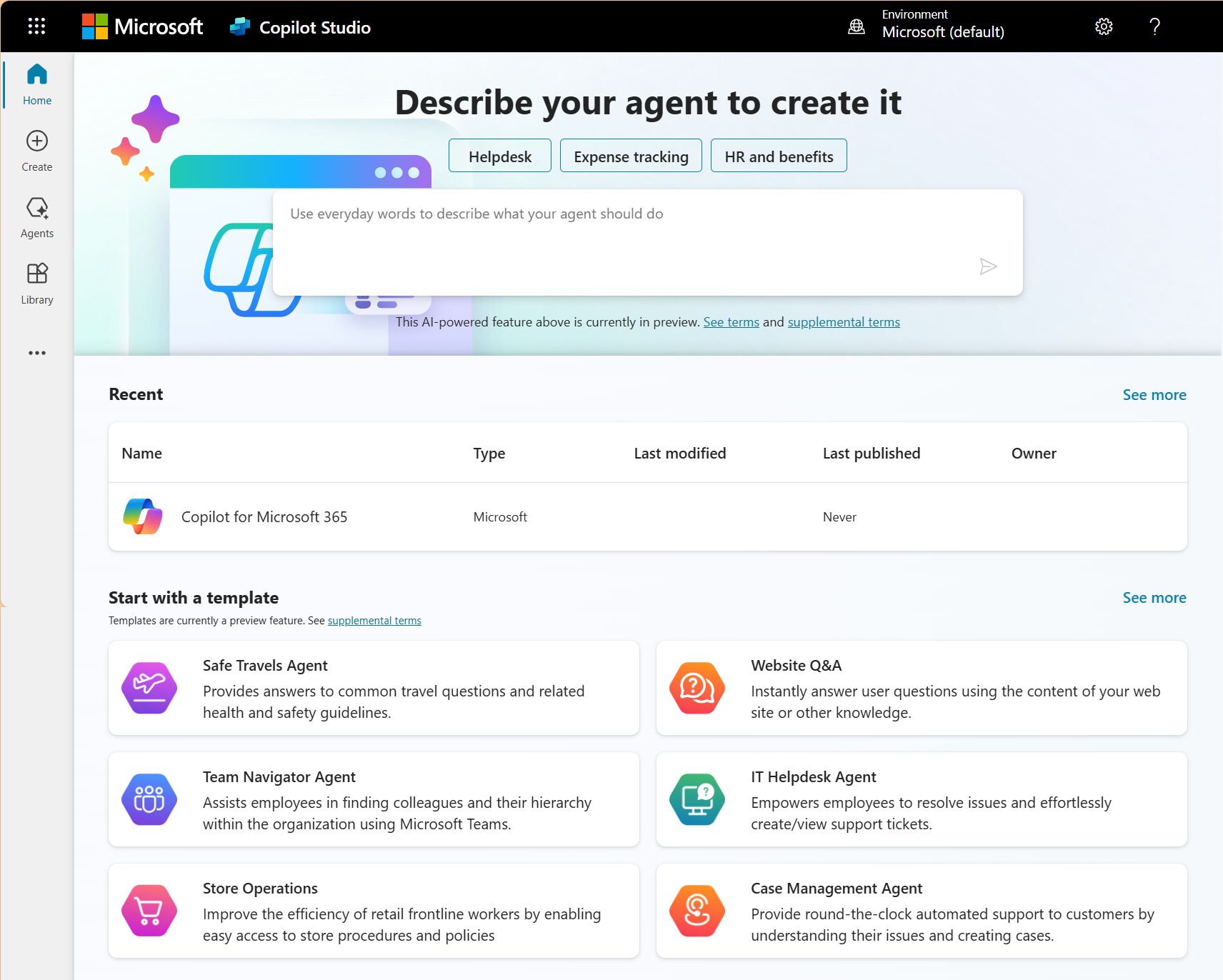
- Want a chatbot or an autonomous agent? That's Copilot Studio.
- Need workflow automation? Power Automate ships with more than 1,000 ready-made connectors to wire your systems together.
- Document processing happens inside Copilot across Word, Outlook, and SharePoint.
- Predictive analytics runs through Copilot in Excel and Power BI.
- Intelligent routing comes built into Copilot for Sales Management and Copilot for Customer Service inside Dynamics 365.
The five-item menu a custom shop quotes you for is, in large part, already itemized on a licence you renew every year. Most of it is a configuration job rather than a build. You're setting up tools to automate repetitive tasks with Copilot in Dynamics 365 instead of commissioning brand new software to do it.
That said, "already accounted for" is not the same as "identical." A chatbot built from scratch for a niche industry workflow can do things Copilot Studio won't handle straight out of the box and a predictive model trained exclusively on your own proprietary data can outperform Copilot's more general-purpose analytics on the one narrow problem it was built for.
So the question is which capabilities the platform handles well enough for your needs and which ones call for something built by hand.
The reason this matters comes down to the invoice. A custom AI automation build from a specialized agency commonly runs anywhere from $50,000 to north of $250,000 for a single workflow. Configuring the equivalent inside your Microsoft stack costs a fraction of that, because you're not paying anyone to build the infrastructure or licence the AI models.
The decision is whether you're funding a brand-new house or finishing a room in the one you've owned all along. Getting that distinction right before you sign anything is what separates a smart AI investment from an expensive one, and a Microsoft Partner offering Microsoft 365 consulting services can map it for you before a dollar moves.
How an artificial intelligence automation agency on the Microsoft stack deploys AI differently than a custom dev shop
The way a custom agency builds and the way a Microsoft Partner configures are two different jobs that happen to produce a similar-looking result.
A custom shop runs a software project. There's a requirements phase, an architecture phase, months of development, a testing cycle, and then a launch, followed by the long process of maintaining everything they built. You should plan for four to eight months before a single workflow goes live, as well as budget for the hosting and the upkeep that follows. You're commissioning software, and software has to be developed and looked after.
A Microsoft Partner working as an artificial intelligence automation agency skips most of that, because the heavy machinery already exists. The platform and AI models are there. The job is mapping how your business works into those pieces, configuring Copilot Studio agents to match your processes, building the Power Automate flows that carry the work along, and getting your team comfortable using all of it. That kind of engagement tends to run four to twelve weeks rather than the better part of a year, which is the sort of timeline a seasoned Microsoft consultant can hold to because they're assembling proven parts instead of inventing new ones.
The difference that outlasts the launch is who owns the upkeep. When an agency builds you a custom system, that system is yours to maintain forever. So when the code needs patching and the models need retraining, the bill for all of that keeps arriving long after the project closes. A Microsoft deployment hands those headaches to your Microsoft Copilot consultant.
For a Canadian business that wants AI automation working soon at a cost they can predict, that distinction tends to decide the whole thing. A custom build carries development risk and a maintenance commitment that never really ends. Configuring what you already license carries neither.
When a Canadian business needs a custom artificial intelligence automation agency
For all the cases where the Microsoft stack covers the job, there are real situations where it doesn't, and that’s where a custom artificial intelligence automation agency has real value.
Proprietary models that have to be trained from scratch
If your business needs AI trained on data so specific that a general-purpose model can't make sense of it, you're past what Copilot was built for. A pharmaceutical company modelling how compounds interact, or a manufacturer optimizing a production process that exists nowhere else on earth, needs a model built from the ground up on its own data. That's specialized machine learning engineering, and it's precisely the kind of work a custom artificial intelligence automation agency exists to deliver. The same applies in reverse, which is why Copilot consultants worth hiring will point you toward custom development when your problem can be better solved outside the platform.
A business that doesn't run on Microsoft
The whole argument for configuring rather than building rests on you already running Microsoft. If your business operates primarily on Salesforce, Google Workspace, or SAP, the Microsoft automation stack doesn't reach into those tools with anything like the same depth, and trying to force it to creates the parallel-system problem you were trying to avoid. A business in that position is better served by a custom agency or a partner who specializes in whatever platform actually holds its data, and weighing how tools like Copilot vs Claude or Copilot vs Gemini stack up for that environment is a sensible first step.
Automation that has to run at the edge
Some automation can't wait for a round trip to the cloud. A sensor on a factory floor flagging a fault as it happens, or equipment that has to react in a fraction of a second, needs intelligence running on the device itself rather than in an Azure datacentre. That edge layer often calls for custom development through an artificial intelligence automation agency even when the reporting and analytics behind it run happily through Microsoft.
One custom need doesn't justify a custom everything
The mistake that costs businesses the most is when they find one case for needing custom work and they let that one exception talk them into building the entire operation from scratch. The lead-scoring agent and the document processing all get bundled into a six-figure custom project when only one edge case needs it. The rest could have run on the platform they already license. A custom agency is the right call for the slice of your operation that operates outside Microsoft. It's rarely the right call for all of it. Scope the custom work to the problem that requires it and configure the rest on the stack you already own.
Most of the AI automation you need already exists in your Microsoft ecosystem
Gestisoft maps what your Microsoft environment already supports and identifies where additional configuration delivers the outcomes your business needs.
 Book a free consultation
What to evaluate when choosing an artificial intelligence automation agency in Canada
Four questions separate an artificial intelligence automation agency that fits your business from one that hands you a system you'll struggle to maintain.
- Does the agency work inside the platform you already run? An agency building on Python, AWS, and custom APIs can deliver capable automation, but it operates outside your Microsoft environment as a separate system to maintain. A Microsoft Partner builds the automation where your data already is, so it connects to your business instead of running parallel to it. For a Canadian business, that difference also shapes how your Canadian CRM data flows into the automation rather than being copied across to a second platform.
- How does the automation connect to your CRM, ERP, email, and documents? If the answer leans on middleware and custom connectors, ask whether the Microsoft-native route (Power Automate connectors, Copilot Studio agents, Dynamics 365 integration) reaches the same outcome.
- Who maintains it after launch? A custom build is yours to retrain and host indefinitely. A Microsoft deployment updates itself and improves on Microsoft's schedule, maintained through the licensing you already pay for rather than a standing line item for developer time.
- What does it cost over two years? Put the custom build plus two years of maintenance next to the Microsoft configuration plus two years of licensing. For a business already paying for Microsoft 365, the platform route usually wins on total cost because the expensive infrastructure is already covered. Going in clear-eyed about the challenges with Microsoft Copilot keeps that cost estimate realistic.
How Copilot Studio and Power Automate function as your artificial intelligence automation agency inside the Microsoft ecosystem
Copilot Studio is the brain and Power Automate is the nervous system that carries the signal where it needs to go.
Start with Copilot Studio, which builds agents that handle a whole job. For example, when you set up AI agents in HR and an employee messages it to ask how many vacation days carry over into the new year, the agent reads the answer straight from the policy documents in SharePoint, replies in plain language, and if the question turns out to be a thorny one about a leave-of-absence edge case, it hands the employee off to a real person on the HR team instead of guessing. The same pattern reshapes itself for other corners of the business. Point it at your Dynamics 365 data and it becomes a Copilot for Sales agent that scores inbound leads and sends each one to the right rep. Every agent works from your real business data and stays inside the guardrails you set.
Power Automate handles what happens next. When a deal closes in Dynamics 365, you don't want someone manually kicking off the invoice and updating the project tracker one tab at a time. Power Automate watches for the trigger and runs the whole chain itself, reaching into Business Central for the invoicing, posting to the right Teams channel, and refreshing SharePoint without a person in the loop. A customer support form works the same way. The submission comes in, gets sorted by category, lands as a case in Dynamics 365, and an acknowledgement goes out through Outlook before anyone has read it. More than 1,000 connectors mean the chain reaches well past Microsoft's own apps when it needs to.
Put the two together and you have the intelligence layer and the orchestration layer working as one. That combination is the thing a custom artificial intelligence automation agency would otherwise build from nothing, except here it runs on infrastructure you already own and a licence you already renew. Most businesses never switch on more than a fraction of this. The top 5 Microsoft Copilot features that transform business productivity are sitting dormant in licences companies have renewed three years running without touching them.
For a business running in both official languages, these tools handle English and French out of the same setup. You don't build the workflow twice the way a custom system often forces you to. A Quebec employee asks the HR agent a question in French and gets a French answer from the same agent that just helped someone in Ontario in English.
Copilot Studio and Power Automate deliver artificial intelligence automation agency capabilities
Gestisoft configures both tools for Canadian businesses so AI automation connects to real workflows.
 Book a free consultation
How Gestisoft operates as an artificial intelligence automation agency for Canadian businesses on the Microsoft ecosystem
Most artificial intelligence automation agencies that bill for custom development make more money the more they build. Telling a client "you already own most of this, you just need it configured" is a smaller invoice, which is exactly why so few firms say it and convince you that you need a shiny new custom development. Gestisoft does things differently.
The work starts before anything gets switched on. Gestisoft maps how your business runs against what your Microsoft licence already covers, and the point of that exercise is to find where automation returns the most for the least. Sometimes the answer is a Copilot deployment that's been dormant in your subscription for two years. Sometimes it's a set of Copilot Studio agents handling the lead qualification your reps have been doing by hand. The recommendation follows the business case, and occasionally the business case says you need less than you walked in expecting to buy.
Gestisoft sets up most of what a Canadian B2B business needs automated, which in practice means a team spending less of its day on the work nobody enjoys. None of it sits in a separate tool you have to learn, because all of it connects to the data already in your environment, the same way CRM in Outlook puts your customer records where your team already spends its day instead of in a separate window they have to remember to open.
After launch, Gestisoft's Customer Success Manager watches how the automation performs against real operational data and tunes it from there, so the system sharpens through use. Adjusting a configured platform takes an afternoon. The same change to a custom build means going back to the developers who wrote it, on their timeline and their rate.
What separates Gestisoft from most Microsoft Partners is our range. The same team handles your CRM and your ERP, which means when a closed deal in Dynamics 365 needs to set off an invoice in Business Central, that's one team who understands both ends of the handoff. For AI automation that crosses from the sales side into the financial side, that single point of ownership is the difference between automation that works and automation that stalls at the seam between two systems.
-
An artificial intelligence automation agency designs and deploys AI-powered systems that run business processes on their own. The work spans autonomous agents, workflow automation, document processing, predictive analytics, and intelligent routing. Some firms build custom AI from scratch. Others work as an artificial intelligence automation agency that configures these capabilities inside platforms a business already runs, like Microsoft 365 and Dynamics 365.
Liked what you just read? Sharing is caring.

June 12, 2026 by Shelley Sunjka by Shelley Sunjka Copywriter & Marketing Strategist
Armed with a psychology degree and an irrational obsession with okapis, I've spent the last decade helping bold brands tell better stories. I believe the best writing bends grammar rules on purpose and makes people feel something. When I'm not deep in words or nerding out on buyer behaviour, I'm probably convincing my kids that impromptu kitchen dance parties are totally normal.

