
If your warehouse is running on spreadsheets, disconnected shipping tools, and manual inventory updates, you are not just dealing with “inefficiency.” You are dealing with a system design problem: your inventory, orders, picking, and shipping are not operating from one source of truth.
That is exactly what an ERP WMS approach is meant to solve. In simple terms, ERP WMS means connecting your enterprise resource planning (ERP) platform (where you manage inventory value, purchasing, sales orders, finance, and planning) with warehouse execution (where you receive, put away, pick, pack, count, and ship). When it is done correctly, your warehouse stops being a bottleneck and becomes a controlled, measurable part of your supply chain.
For distributors, this is especially important because orders come from everywhere and fulfillment needs to follow—without breaking margins or customer expectations. Gestisoft’s distribution positioning highlights the same reality: inventory visibility, shipping coordination, and warehouse operations often become pressure points without a connected ERP foundation.
What is ERP WMS?
ERP WMS is a setup where:
- ERP manages the business backbone: items, costing, purchasing, sales orders, financials, planning, and reporting.
- WMS (Warehouse Management System) manages warehouse operations: receiving, put-away, picking, packing, shipping, replenishment, and cycle counts.
In practice, ERP WMS can take two main forms:
- ERP-native warehousing: the ERP includes warehouse and inventory management capabilities as part of its core suite.
- ERP + specialized WMS: the ERP integrates with a dedicated WMS product for advanced workflows, high automation, or multi-site complexity.
For many growing distributors, the goal is not “most advanced WMS on earth.” The goal is reliability, traceability, and speed with fewer systems to reconcile.
Ready to adopt an ERP WMS to simplify your distribution workflows?
Contact us for a free consultation and to discover Dynamics 365 Business Central.
 Free discovery call
Why ERP WMS matters in 2026 and beyond?
Warehousing challenges are not only operational—they become commercial:
- Inventory errors create customer service issues and returns.
- Picking delays create shipping delays.
- Disconnected tools create duplicate data entry and prevent real-time visibility.
- Spreadsheets fall behind when business moves quickly, which leads to reactive decisions.
That is why modern supply chain operations increasingly prioritize integration and real-time data. Microsoft’s own Business Central supply chain management positioning emphasizes end-to-end tools like inventory management, order processing, and demand forecasting—plus integration with Power BI and Microsoft Teams to improve insight and collaboration.
ERP WMS vs. inventory management: what’s the difference?
People often use “inventory management” and “WMS” interchangeably, but they are not the same.
Inventory management (usually ERP-led) focuses on:
- Item masters, units of measure
- On-hand quantities and valuation
- Purchase orders, sales orders
- Reorder points and planning inputs
- Costing, margins, and financial impact
WMS focuses on execution inside the warehouse:
- Where stock is (bin/location control)
- How stock moves (receiving → put-away → pick → pack → ship)
- Who did what (operator traceability)
- Task management and mobility (scanners, mobile workflows)
- Accuracy and throughput metrics
ERP WMSis the bridge between these. You want inventory value and availability to be consistent with what is physically happening in the warehouse—without delays, rekeying, or reconciliation.

How ERP WMS works in the real world?
To understand ERP WMS, it helps to map it to a typical distributor day when working with a warehouse supply chain management system:
1) Purchasing and inbound receiving
- Purchase orders exist in the ERP.
- When goods arrive, receiving confirms quantity and condition.
- Stock is put away into warehouse locations/bins.
2) Order management and picking
- Sales orders flow into the ERP.
- Warehouse tasks are generated: pick instructions, routes, priorities.
- Pick confirmation updates availability and prevents overselling.
3) Packing and shipping
- Packing confirms what will ship (and what won’t).
- Shipping documents and labels are generated.
- Carrier tracking information is captured.
Gestisoft’s consumer goods distribution offer highlights common operational requirements like connecting ERP to carriers (to reduce shipping errors and improve parcel tracking) and using mobile tools and barcode scanning to automate key warehouse tasks.

Core ERP WMS capabilities to plan for
Even if you later integrate a specialized WMS, your ERP WMS foundation should cover these essentials.
Inventory visibility and control
- Real-time inventory tracking across products and sites (critical for multi-channel fulfillment)
- Serialized/lot tracking (when required)
- Stock status management (available, quarantined, damaged)
Receiving, put-away, and internal moves
- Receiving against purchase orders
- Put-away rules (where stock should go)
- Internal transfers between zones or warehouses
Picking, packing, and shipping execution
- Pick/pack workflows and confirmations
- Ability to scale from basic to more advanced warehouse automation
- Shipping workflow integration with carriers
Gestisoft’s packaged ERP offer specifically outlines a progression from paper-based warehouse management (Essential) to basic warehouse automation with bar coding and advanced shipping features like pick & pack and carriers integration (Growth), and then to advanced warehouse automation and multiple warehouses (Scale).
Reporting and operational dashboards
- Warehouse capacity utilization, inventory turnover, and shipment timelines are examples of metrics highlighted that can overcome any disadvantages of warehouse management system.
- The key is having data you trust—because it comes from a connected process.
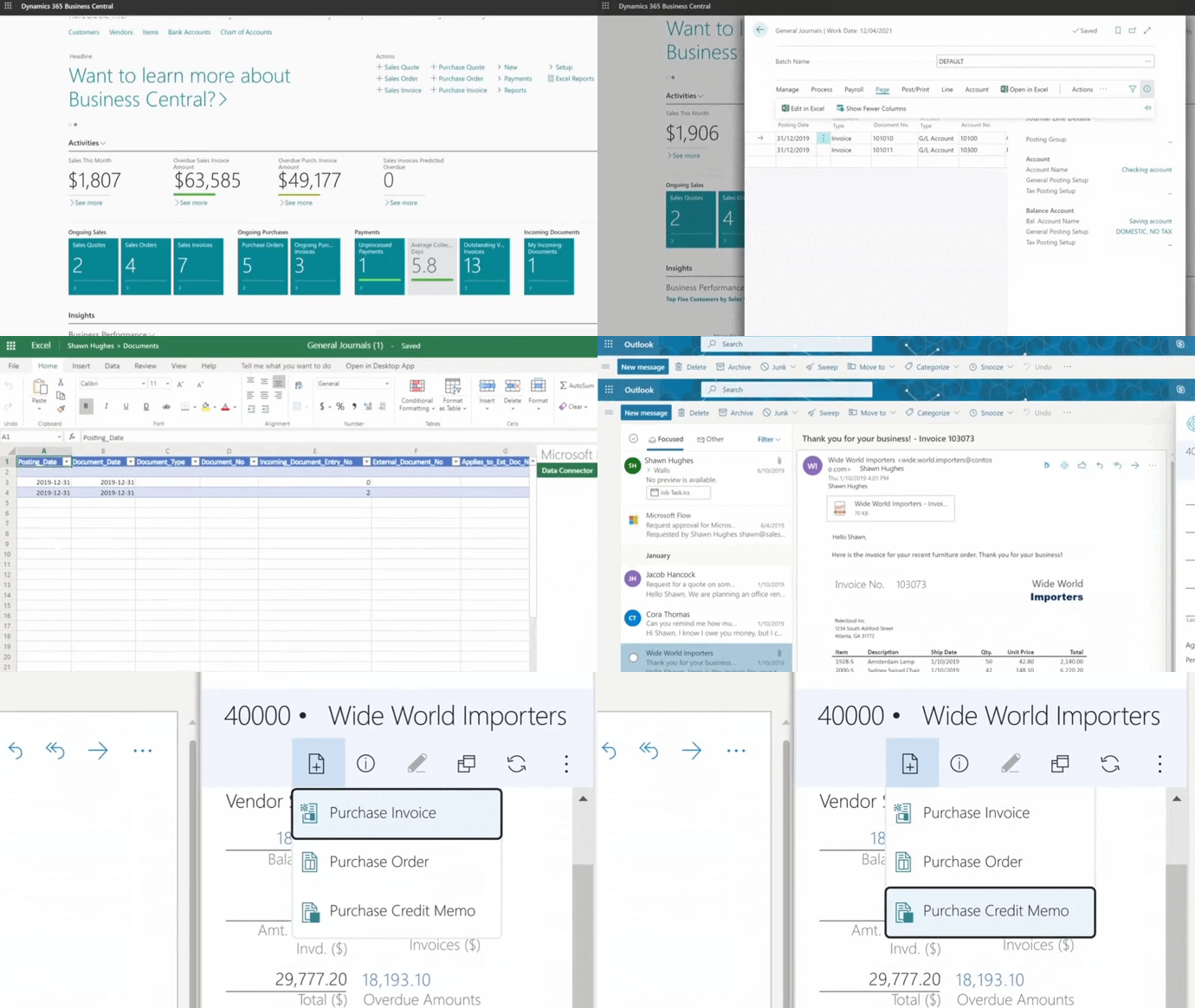
ERP WMS with Microsoft Dynamics 365 Business Central
If your ERP WMS strategy is built around Business Central, the supply chain scope matters. Microsoft positions Business Central supply chain management as covering procurement/production through distribution/logistics, including inventory management, order processing, and demand forecasting.
A major advantage in an ERP WMS approach is integration with the Microsoft ecosystem:
- Power BIfor deeper supply chain insight
- Microsoft Teams for operational collaboration and decision-making using real-time information
For distribution operations, Gestisoft positions Business Central around real-time inventory tracking, integrated supply chain visibility, and dashboard-driven decision support.
ERP WMS benefits you can expect
A well-implemented ERP WMS typically delivers value in four areas:
- Inventory accuracy and fewer fulfillment errors: When receiving, picking, and shipping confirmations update the ERP automatically, you reduce “phantom inventory” and the costly cycle of corrections.
- Faster fulfillment with fewer manual steps: Warehouse teams stop wasting time retyping data across systems. Gestisoft’s distribution messaging stresses eliminating manual steps and reducing mistakes by connecting tools and processes.
- Stronger service levels: Better picking accuracy and real-time order status improves customer communication and reduces delays.
- Better decisions with real-time data: Gestisoft emphasizes real-time dashboards and reporting to make faster, smarter decisions.
ERP WMS software cost: what really drives the budget?
Cost is one of the top reasons ERP WMS projects stall or fail—not because the project is “too expensive,” but because the scope and cost drivers are not understood.
Here are the main cost categories to plan for:
1) Licensing
Gestisoft’s Business Central distribution page lists pricing for:
- Business Central Essentials: $108.50 per licence / per month
- Business Central Premium: $149.20 per licence / per month
(Your final licensing mix depends on roles and required capabilities.)
2) Implementation (fixed-fee vs time & materials)
If you want cost predictability, fixed-fee packaging can help. Gestisoft’s consumer goods packaged ERP offerlists:
- Essential: $37,500 fixed fee (3 months)
- Growth: $52,500 fixed fee (4 months)
- Scale: $69,500 starting at (5 months)
The same page also clarifies exclusions: project management fees (calculated at 20% of offer price), Business Central licenses, and any required add-on licenses.
3) Warehouse execution scope
Your cost changes materially based on whether you implement:
- Paper-based processes first
- Barcode scanning and mobile workflows
- Advanced pick/pack and carrier integration
- Multi-warehouse complexity
Gestisoft’s tiered packages reflect that maturity curve (paper-based → barcode automation → advanced warehouse automation).
When you need ERP WMS vs a standalone WMS?
A common mistake is assuming you must buy a separate WMS product to “do warehousing properly.” In reality:
ERP-native warehousing is often enough when:
- You have one main warehouse (or limited complexity)
- You need better inventory accuracy, not robotics-level optimization
- You want fewer systems and simpler governance
- Your priority is predictable implementation and change management
ERP + specialized WMS becomes necessary when:
- You have high-volume, high-SKU complexity
- You need advanced automation, labor management, or sophisticated wave planning
- You run multiple warehouses with different processes
- You require very specific industry compliance workflows
Even in the second case, ERP WMS still matters—because the ERP remains the financial and operational system of record. Your best outcomes come from designing integration and master data correctly.
Speak with our professionals today and get all the clarity you need
Book your free consultation and learn more about Business Central.
 Free discovery call
Implementation roadmap for an ERP WMS project
A practical ERP WMS delivery plan usually follows these phases:
1) Define warehouse outcomes (not just features)
Examples:
- Reduce pick errors
- Cut time from order release to shipment
- Improve inventory visibility across sites
- Standardize shipping workflows
Gestisoft’s consumer goods distribution content highlights common pains like inventory confusion across products/sites, shipping tool sprawl, and warehouse bottlenecks—use these as outcome prompts.
2) Standardize master data
- Items, barcodes, units of measure
- Locations/bins and replenishment rules
- Customer shipping requirements
3) Design end-to-end process flow
- Receiving → put-away
- Picking → packing
- Shipping confirmation → invoicing alignment
4) Enable mobility and scanning where it matters most
Barcode scanning typically delivers immediate accuracy gains when rolled out thoughtfully (receiving and picking are common “first wins”). Gestisoft explicitly references mobile tools and barcode scanning for automating key tasks.
5) Train, pilot, then scale
A warehouse is not a “deploy once and forget” environment. You want controlled rollout: one site, one team, one process wave—then expand.

Common ERP WMS pitfalls and how to avoid them
Pitfall 1: Designing a perfect WMS but ignoring adoption
Warehouse teams live in speed and exceptions. If your process adds friction, it will be bypassed.
Fix: Design for frontline workflows first (receiving, picking, shipping), then expand.
Pitfall 2: Integrating tools without standardizing data
If item masters and locations are inconsistent, integration just moves bad data faster.
Fix: Enforce data governance early.
Pitfall 3: Underestimating shipping workflow complexity
Carrier rules, label generation, and tracking visibility can become a project within a project—especially when multiple sales channels exist. Gestisoft stresses avoiding “juggling too many systems” for shipping and connecting ERP to carriers to reduce errors.
Fix: Map shipping requirements by channel, carrier, and customer type before configuration.
Pitfall 4: Treating ERP WMS as only an IT initiative
ERP WMS is operations + finance + customer service working together.
Fix: Run joint process reviews and use dashboards to align on shared KPIs. Gestisoft’s Business Central distribution page highlights real-time dashboards for logistics/distribution decisions.
Why work with Gestisoft on an ERP WMS project?
If you are a consumer goods distributor looking for an inventory management company, you need an ERP WMS approach that is built for real operational pressure—tight margins, evolving product lines, multi-channel orders, and high fulfillment expectations.
Gestisoft offers:
- A structured, fixed-fee packaged approach for consumer goods distributors
- A maturity curve that scales from paper-based warehousing to barcode automation and advanced warehouse automation
- Distribution-focused positioning around real-time inventory, integrated visibility, and decision-ready dashboards
Liked what you just read? Sharing is caring.

January 16, 2026 by Kooldeep Sahye by Kooldeep Sahye Inbound Marketing Manager
Specializing in SEO-driven pipeline growth, I combine keyword strategy, content optimization, and inbound tactics to turn organic search into a reliable source of qualified leads. I work at the intersection of traditional SEO and AI search — optimizing for LLMs and AI Overviews alongside Google — pairing data-informed strategy with sharp, story-led copywriting.
