

ERP manufacturing modules get sold like checklists: twelve boxes on the quote, every one labelled essential, every one priced separately. The reality on a Canadian shop floor is different. Most growing manufacturers need six or seven modules to run cleanly on day one and can add the rest when the business genuinely needs them.
This guide is the field-tested version. It explains what each ERP manufacturing module actually does in plain terms, which ones a Canadian SMB needs first, which ones you can safely skip at launch, and how Microsoft Dynamics 365 Business Central covers them in a single platform.
Stop Paying for Modules Your Team Will Never Open
See which Business Central modules Canadian manufacturers deploy on day one, and what they phase in later. One call clarifies your roadmap.
 Book a free consultation
What Are ERP Manufacturing Modules?
ERP manufacturing modules are the functional building blocks of a manufacturing ERP system. Each one handles a specific business area, and they share one database so production, finance, inventory, and warehouse see the same numbers in real time.
That shared database is the whole point. The accounting team's cost of goods, the planner's open work orders, and the warehouse supervisor's stock on hand are one record viewed from three roles.
Modules also exist for licensing reasons. Most vendors price by module, so a finance-only user does not pay for shop floor execution they will never open. That makes "which ERP manufacturing modules do I need?" a budget question, not just a feature question.
For a deeper view of how a complete manufacturing ERP system is structured around these modules, the broader pillar covers categories and benefits in detail.

The Essential ERP Manufacturing Modules for Every Manufacturer
These are the modules that do the actual work of running a manufacturing business. Without them, the system is just expensive accounting software in a fancier wrapper.
ERP Manufacturing Modules for Production Planning
The production planning module is where work orders, schedules, and capacity plans live. It tells the floor what to build, when, in what quantity, and against which sales order.
Most Canadian manufacturers running schedules in spreadsheets lose time here. A planner adjusts a delivery date, then chases the change through six emails because the spreadsheet does not talk to inventory, sales, or purchasing. The production planning ERP module fixes that by linking the schedule to the live order book, the bill of materials, and current stock.
Look for forward and backward scheduling, finite capacity options, and the ability to release a planned order straight to the shop floor without re-keying it. Anything less is a planning tool, not a planning module.
Inventory and Materials Requirements Planning
This is the engine that turns demand into supply. The inventory module tracks every item, lot, serial, and movement. It is the foundation of any manufacturing inventory control software, and the MRP layer runs the math that says what to make, what to buy, and when.
A clean MRP run takes a sales forecast, the open order book, and your safety stock rules, and produces a clear list of purchase orders to send and work orders to release. That is the real difference between ERP and MRP: MRP is the calculation, and ERP is the system that connects the calculation to finance, warehouse, sales, and procurement.
A modern inventory module covers item master data, multi-location stock, lot and serial traceability, and real-time valuation. It links costing straight to the general ledger so an inventory adjustment lands automatically on the financial statements.
For a complete view of how this works in practice, our guide on ERP software inventory management covers the features, benefits, and best practices that turn inventory from a back-office task into a source of profit.
Bill of Materials and Routing
The BOM is the recipe. The routing is the order of operations. Together, they define how a finished product is built, from raw component to packaged unit.
A BOM module should handle multi-level structures, phantom items, alternates, and versioning. Routings should let you assign work centres, set standard times per operation, and store engineering instructions or drawings. If your products change often, ask the vendor how revisions are managed without breaking history on prior production runs.
This is where engineer-to-order and discrete manufacturers diverge. A repetitive discrete shop wants stable BOMs and tight version control. An ETO shop wants the BOM born inside the sales quote, not built before the order arrives.
Shop Floor Execution and Quality
The shop floor module captures what is happening at each work centre in real time. Quality is the layer that decides whether what was produced can ship.
Shop floor execution covers labour tracking, machine status, production output, scrap, and downtime reasons. The data feeds straight back into cost accounting, so a five-minute downtime on a CNC cell shows up in the cost of that job the same day, not two weeks later at month-end.
Quality management handles inspection plans, non-conformance records, and corrective actions. For ISO 9001 certified manufacturers, this module is often the difference between a clean audit and an open corrective action.

ERP Manufacturing Modules That Connect Production to Finance and Supply
Production cannot exist in a silo. These ERP manufacturing modules connect the floor to finance, suppliers, and customers, which are the parts of the business that fund production and consume its output.
Finance and Cost Accounting
The finance module is the backbone of every ERP. In a manufacturing context, it does two jobs: keep the books, and assign cost to every unit produced.
Standard accounting covers general ledger, accounts payable, accounts receivable, fixed assets, and bank reconciliation. Cost accounting goes further. It captures material cost, labour cost, and applied overhead at the work order level, then rolls it into a true cost per item that finance can use for margin reporting.
For Canadian SMBs, this module also handles GST, HST, QST, and PST, multi-currency for cross-border trade, and CRA-aligned reporting. Those decide whether month-end is a one-day reconciliation or a three-day spreadsheet hunt.
Procurement and Vendor Management
Purchasing is where most working capital gets committed. The procurement module manages requisitions, purchase orders, vendor records, approval workflows, and receiving against orders.
In a manufacturing operation, procurement is tightly coupled to MRP. A planned purchase from the MRP run should flow directly into a draft purchase order ready for review. Without that link, buyers re-key everything by hand and stockouts become routine.
Features worth checking include vendor scorecards, multi-currency pricing, and document capture for incoming invoices. A receiving error caught at the dock costs hours. The same error caught at month-end can cost weeks.
ERP Manufacturing Modules for Warehouse Management
The warehouse management module turns physical inventory into trusted, scannable, locatable stock. It covers receiving, putaway, picking, packing, shipping, and cycle counting, with mobile scanning at every step. This is where inventory and warehouse operations meet on a single shared record.
A real WMS module catches errors at the point of action. If a picker scans the wrong item or the wrong bin, the device stops them on the spot, before the wrong box leaves the dock.
That is exactly what Elemental Container, the North American distribution arm of Tournaire Group, observed after going live on Business Central with Gestisoft. Mobile scanning caught errors in the moment, not at month-end.
For a deeper view of how warehouse functionality fits inside an ERP versus a standalone system, our guide on ERP WMS walks through the trade-offs and which setup makes sense at different growth stages.
A short walkthrough of how these modules sit inside the Business Central interface, including how role-based access controls who sees what, is worth two minutes before reading further.
Optional ERP Manufacturing Modules to Consider Next
These modules are not core, but they punch above their weight for the right business. They are usually worth adding to the shortlist, not to day-one scope.
Project Management and ETO Modules
The project module is essential if you build engineer-to-order or made-to-order products. It treats each customer order as its own project with its own budget, BOM, schedule, and cost capture.
A pure manufacturing module is built for repeatable production. An ETO manufacturing shop needs the project module to track work that does not exist in a catalogue until the order lands.
Field Service and After-Sales Modules
If you sell installed or serviced equipment, the field service module connects work orders, technician dispatch, and service contracts to the production records of the unit being serviced. It closes the loop between what you built and what you maintain.
Embedded Analytics and Power BI Modules
A reporting module is fine. An embedded analytics layer like Power BI inside the ERP is the difference between exporting CSVs at midnight and a live inventory management dashboard the leadership team can read at a glance. For most growing manufacturers, this is a year-one add, not a five-year one.
Map Your Module List to a Canadian Business Central Setup
A Gestisoft specialist walks through your shortlist, your tax setup, and your bilingual needs in one working session.
 Free discovery call
Which ERP Manufacturing Modules Can You Skip at Launch?
Not every ERP manufacturing module belongs in your first phase. These are the ones vendors push hardest in the demo, and small or mid-sized Canadian manufacturers rarely need on day one.
Full HCM and Payroll Modules
Most Canadian SMB manufacturers already run payroll through a Canadian-specific provider like Nethris, ADP Canada, or Ceridian. A full HCM module inside the ERP adds licence cost and integration risk. Keep payroll where it already works and feed the totals back into the general ledger.
Heavy Product Configurator Modules
A full product configurator is powerful, expensive, and overkill unless your products are genuinely configurable to order. If your sales team can quote with a price list and a few options, a configurator module is solving a problem you do not have yet.
Fleet and Transport Management Modules
If you ship through 3PL carriers, fleet management lives at the carrier level, not inside your ERP. Unless you operate your own trucks and dispatch your own routes, this module is rarely worth the licence on day one.
How to Choose the Right ERP Manufacturing Modules for Your Business
A good shortlist starts with three questions... The questions below are how Canadian operations decide what to roll out first and what to phase in later.
Match Modules to Your Manufacturing Type
Discrete, process, and engineer-to-order manufacturers each need a different mix of ERP manufacturing modules.
A discrete manufacturing ERP shop building repeatable assemblies leans on BOMs, routings, and shop floor execution. A process manufacturer running batches needs formula management, batch traceability, and yield tracking. An ETO shop needs the project module front and centre.
Naming your manufacturing type out loud before the demo saves you from buying a feature set built for a different shop.
Phase Modules Based on Pain, Not Vendor Pressure
The fastest implementations start with the ERP manufacturing modules that fix the most painful problem first. If your warehouse is the bottleneck, lead with inventory and WMS. If month-end takes a week, lead with finance and cost accounting. If you are missing delivery dates, lead with production planning and MRP.
Vendor pressure pushes you toward "everything live on day one." Real practice favours a clear phase one of four to six modules, with the rest staged into phase two once the team is comfortable.
Plan for Integration With Your Existing Tools
Few manufacturers replace every tool when they implement an ERP. CAD, payroll, EDI portals, and customer-facing apps often stay where they are. The module list has to account for that. If your shortlist still includes a standalone tool, our best inventory control software breakdown helps decide whether to keep it or absorb it.
Ask each vendor how each integration is delivered, who maintains it, and what happens when the connected tool releases a major version. For a structured walkthrough of the criteria that should drive this decision, our guide on how to choose an ERP software using 10 criteria lays out the questions to put on the table before signing anything.
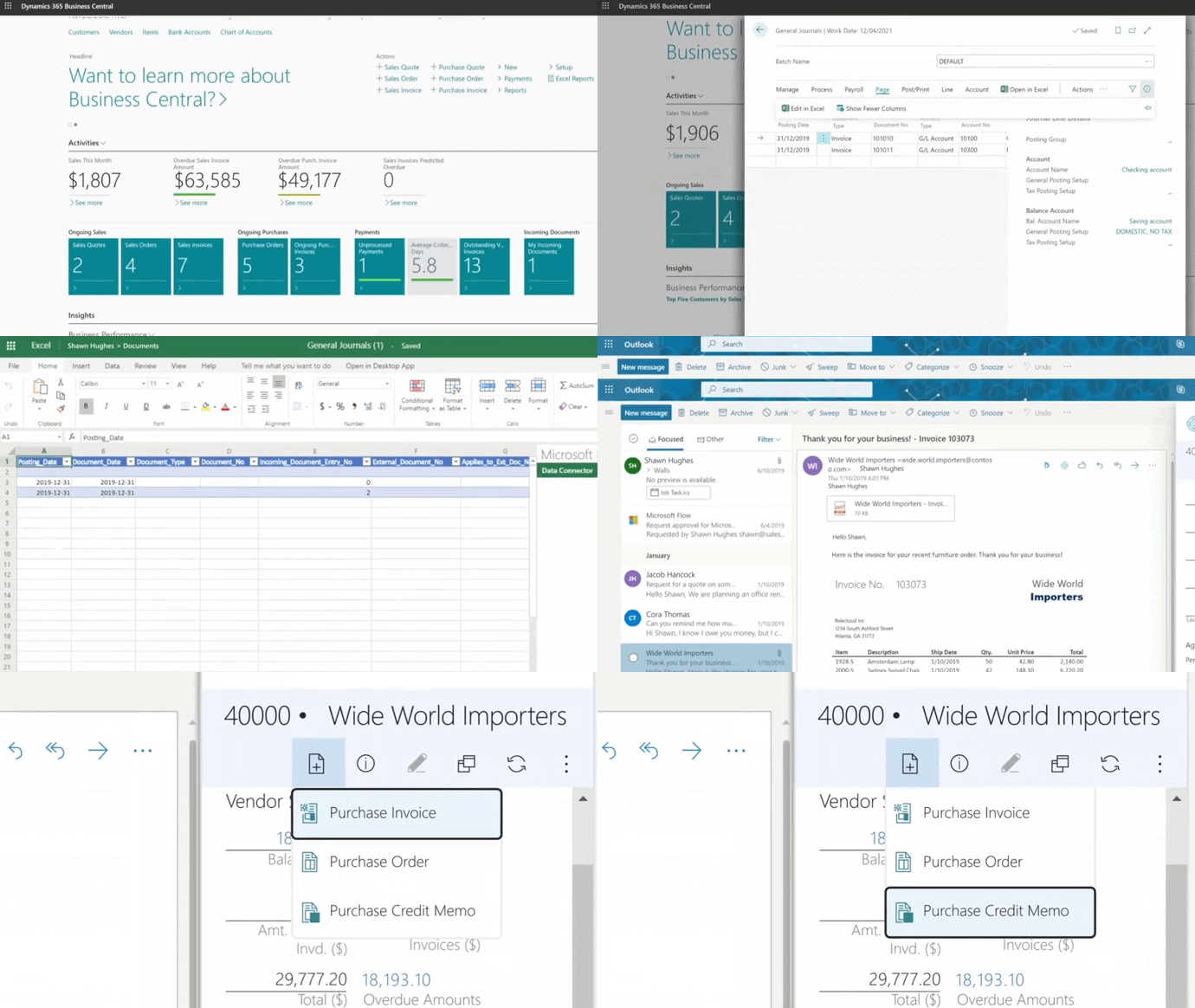
ERP Manufacturing Modules for Canadian Manufacturers
Most ERP manufacturing modules are sold from the United States and arrive in Canada with US defaults. A Canadian implementation is not just a flag change. It touches the finance, payroll, inventory, and reporting modules in concrete ways.
Bilingual Module Access for EN and FR Teams
If you operate in Québec or hire across both languages, every module that touches a daily user needs to render in English and French. Business Central handles this at the user level, so a planner in Montréal sees the production planning module in French while a controller in Toronto sees finance in English, against the same database.
Multi-Province Sales Tax and CRA Reporting
The finance module needs to handle GST, HST, QST, and PST cleanly. That means tax groups per province, tax-on-tax behaviour for QST, and CRA-aligned reports that map to a T2 corporate return without a custom export. If your vendor cannot show this in the demo, that is a flag.
Multi-Currency Setup for CAD and Cross-Border Trade
Many Canadian manufacturers buy in USD and sell in CAD, or the reverse. Inventory valuation, vendor pricing, and customer pricing all need multi-currency support natively. Without it, every PO and SO becomes a manual FX exercise that breaks at month-end.
The Importance of ERP Software for the Manufacturing Industry
A short, plain-English read on why a standard ERP is not the same as a manufacturing ERP, and what to look for before you sign.

-
A typical manufacturing ERP has between eight and fifteen modules. Six or seven of them, finance, inventory, MRP, BOM and routing, shop floor, warehouse, and procurement, are needed on day one for most Canadian SMBs. The rest are added in later phases.
Why Choose Gestisoft for Your ERP Manufacturing Modules
Choosing a vendor is half the decision. Choosing an implementation partner is the other half. Gestisoft has been a Microsoft Partner since 2004, with nearly thirty years in business and B Corp certification, delivering Business Central across Canada and North America in English and French.
The team works with Canadian manufacturers, distributors, fashion brands, and municipalities. The result is a partner that understands which ERP manufacturing modules fit which kind of operation, which combinations are worth phasing, and how to set up Canadian tax, multi-currency, and bilingual layers from the start.
Here’s a recent example: Elemental Container, the North American distribution subsidiary of Tournaire Group, moved off Sage X3 to Business Central with Gestisoft on time and on budget. Phase 1 brought finance, inventory, warehouse execution, tariff management, and order processing live in a single go. After scanning went live in the warehouse, the team described it in their own words:
“I don't want to say it's idiot-proof, but it's idiot-proof. If you scan the wrong thing, it will tell you you're scanning the wrong thing.”
For the full story of how the rollout was delivered and what changed on the floor, the Elemental Container customer story covers the full Phase 1 build, including the manufacturing modules planned for Phase 2.
If you are picking ERP manufacturing modules for a real project, a short call usually gets you further than more reading.
Talk to a Canadian Microsoft Partner About Your ERP Build
Bring your module list, or the problem you are trying to fix. Gestisoft will tell you what fits, what does not, and what to phase.
 Free discovery call
Liked what you just read? Sharing is caring.

July 06, 2026 by Muhammad Ali Iqbal by Muhammad Ali Iqbal SEO Content Strategist & Copywriter
Driven by a passion for search engine optimization, strategic content, and conversion-focused writing. A copywriter and content strategist who lives for content that ranks, engages, and delivers real business results.
