
ETO manufacturing means building custom products based on each customer's specific needs. Every order starts as a concept. Your team designs, engineers, and builds it from scratch.
This approach works well for complex, high-value products. But it also brings unique challenges. Long lead times, hard-to-predict costs, and constant design changes make ETO hard to manage without the right tools.
This guide explains what ETO manufacturing is, how it works, and how a modern ERP like Microsoft Dynamics 365 Business Central helps you stay in control from quote to delivery.
Build ETO Manufacturing on a Solid ERP Foundation
Align sales, engineering, production, and finance in one system. Explore how Dynamics 365 Business Central, implemented by Gestisoft, supports your ETO projects from quote to final delivery.
 Free discovery call
What Is ETO Manufacturing and How It Works
ETO manufacturing starts when a customer comes to you with a problem. You work together to design a solution that fits their exact needs. This is different from standard production where you already know what you are building.
In ETO manufacturing, engineering happens after the order arrives. Your team creates drawings, builds bills of materials (BOMs), and plans production for each unique project. A bill of materials is a complete list of all parts, components, and materials needed to build a product. In ETO work, BOMs are created fresh for each job and often change as the design develops.
Common ETO products include:
- Custom industrial machinery
- Process equipment and skids
- Specialized material handling systems
- Heavy mobile equipment
- Custom control panels
- Unique packaging lines
Each project is different. Each one requires close collaboration between your sales team, engineers, production staff, and the customer.
ETO Manufacturing vs Make to Order and Configure to Order
Many manufacturers confuse ETO with other production models. Here is how they differ:
- Make to order (MTO): You already have a design. When a customer orders, you build it. The design stays the same. Engineering involvement is minimal.
- Configure to order (CTO): You offer a base product with options. Customers pick features from a menu. You assemble standard modules in different ways. Engineering is light.
- Engineer to order (ETO): The design does not fully exist yet. Engineering creates or heavily modifies it for each order. Every project needs significant engineering hours.
Understanding which model you use matters. It tells you what kind of systems and processes you need. Each model requires different planning, different cost structures, and different software support.

Where ETO Manufacturing Fits in Your Business Model
You know you are doing ETO manufacturing when:
- Every project requires new or heavily modified drawings.
- Engineering hours are a major part of your project cost.
- Customers review and approve designs in multiple rounds.
- Your bills of materials change during the build.
- Lead times stretch for weeks or months.
ETO makes sense when your products are high value, low volume, and complex. It works well when:
- Customers need equipment that integrates into their existing processes.
- Regulatory or safety standards require custom engineering.
- No standard product can solve the customer's problem.
- You can charge enough to cover engineering and production costs.
Some manufacturers run a hybrid model. Most orders might follow standard designs, but certain customers need full custom work. You need systems that can handle both approaches without forcing you to maintain separate processes.
ETO Manufacturing Risk and Reward
ETO manufacturing can bring higher margins… Custom products command premium prices. Strong customer relationships come from working closely on each design. You build defensible expertise that competitors cannot easily copy.
But ETO also brings risks... Design rework and changing requirements often lead to significant cost and time overruns in ETO environments. Long lead times make cash flow harder to manage. Heavy dependence on a few key engineers or project managers creates bottlenecks. Customer changes can push timelines and budgets off track.
The right ERP reduces operational risk. It cannot remove complexity entirely. But it can give you visibility, control, and better data to make decisions throughout each project.
When your team works from one system, you see problems early enough to fix them. An experienced ERP software consultant helps you set up processes that protect margins while staying flexible enough for custom work.
ETO Manufacturing Challenges You Can't Ignore
ETO manufacturing creates stress across your entire operation. Here is what teams face in each department:
Sales and estimating:
- Hard to price one-off jobs with no reference data.
- Quotes take too long because you wait for engineering input.
- You lose deals because competitors quote faster.
Engineering:
- Customers request constant design changes.
- You build BOMs manually and update them over and over.
- Time spent on administrative work instead of design.
Production:
- You start building while the design is still changing.
- Rework and delays happen when late changes come through.
- Hard to schedule work when project timelines keep shifting.
Procurement:
- Long-lead parts arrive late because specs changed.
- You pay rush fees to expedite critical components.
- Difficult to track what was ordered for which project.
Finance:
- You cannot see project margin until the job is finished.
- Revenue recognition and work-in-progress tracking are messy.
- No clear picture of which projects make money and which lose it.
These challenges compound when departments work in different systems. Sales quotes in one tool. Engineering designs in CAD. Production tracks jobs in spreadsheets. Finance uses basic accounting software. Nothing connects. Information gets lost or outdated.
ETO Manufacturing KPIs to Watch
Smart manufacturers track a few key numbers to stay on top of ETO projects:
- Quote accuracy: Compare your estimated margin to actual margin at project close. Track the variance to improve future estimates.
- Engineering hours per project: Track how much engineering time each job takes. This helps you estimate future work better and spot when projects go off track.
- On-time delivery: Measure how often you deliver on the promised date. Consistent delays hurt customer trust and reputation.
- Rework hours: Count how much time you spend fixing mistakes or handling design changes. High rework signals poor communication or weak change management.
- Cash tied up in work-in-progress: ETO projects can take months. Track how much cash sits in unfinished work. High WIP means you need better milestone billing or faster project cycles.
Tracking these inside your ERP matters. When the data lives in one system, you can see trends across projects and make better decisions about which work to take and how to price it.
The Importance of ERP Software for the Manufacturing Industry
Discover the key differences between standard ERP and manufacturing-focused ERP systems. Learn how the right platform supports complex workflows, project costing, and real-time visibility for custom manufacturers.
How ERP Supports ETO Manufacturing from Quote to Cash
Spreadsheets and basic accounting software cannot keep up with ETO manufacturing. They were not built for project-based work. You need a system that:
- Works by project, not just by item or part number.
- Connects BOMs, routing, and project tasks in one place.
- Tracks actual costs in real time so you see margin as you go.
- Handles changes without breaking your data.
A manufacturing ERP built for project work gives you that foundation. It connects the dots between what sales quotes, what engineering designs, what production builds, and what finance bills.
When all departments work in the same system, everyone sees the same information. Sales knows when engineering finishes the design. Purchasing sees which long-lead items need to be ordered. Production knows when materials arrive. Finance sees actual costs against the budget throughout the project.
Good logistics management software integrated with your ERP also helps manage the flow of materials and finished goods, especially when ETO projects involve complex shipping, special handling, or site delivery requirements.
ETO Manufacturing with Dynamics 365 Business Central
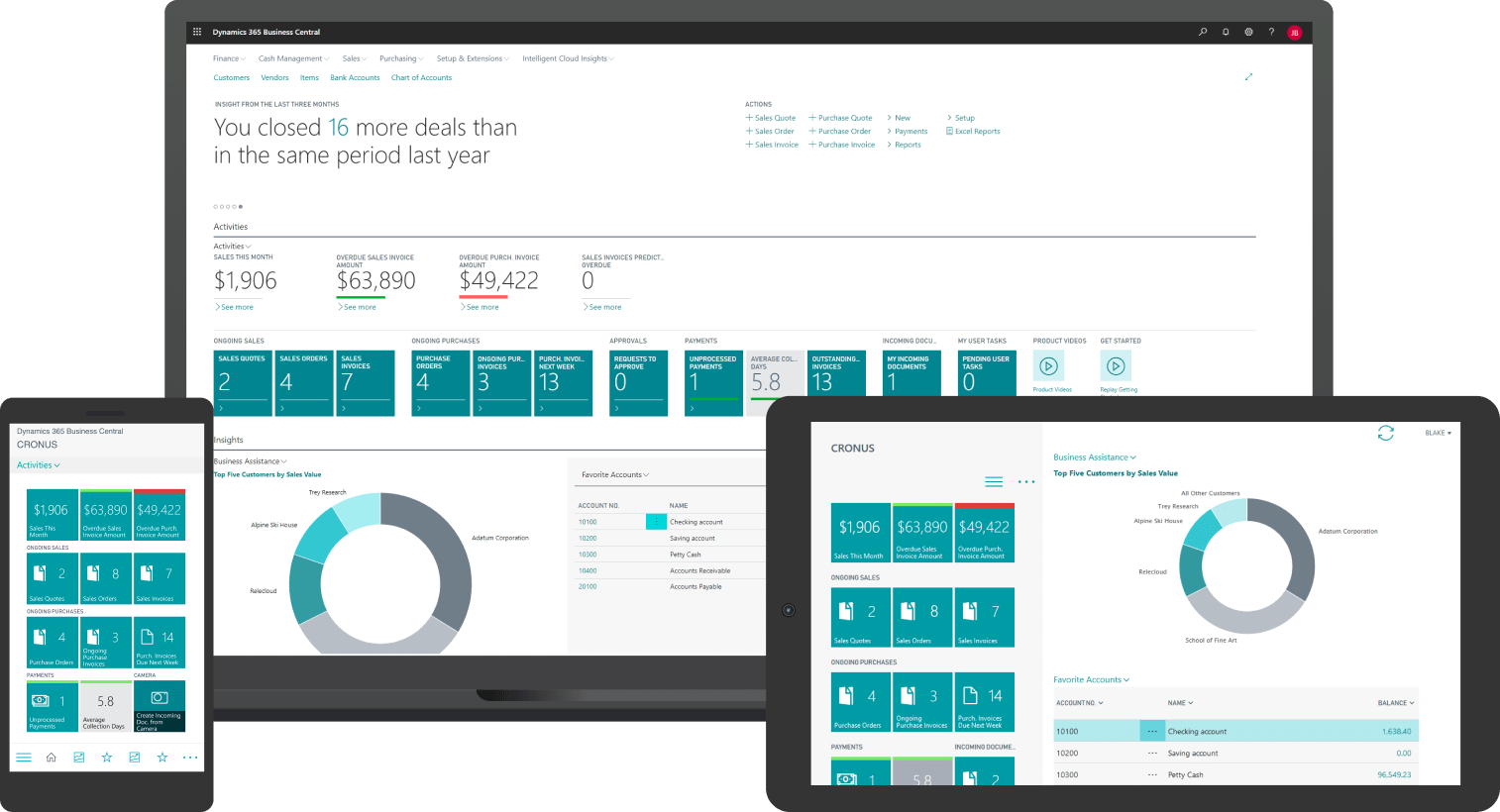
Microsoft Dynamics 365 Business Central is a cloud ERP built to support project-based manufacturing. Here is how it helps ETO manufacturers:
- Project and job management: Each ETO order becomes a project in Business Central. You track tasks, milestones, budgets, and actual costs in one place.
- Production orders linked to projects: When engineering releases a BOM, production orders tie directly to the project. Materials and labor post to the right job automatically.
- Time and material tracking by job: Your team logs time against specific projects. Material usage flows from production orders. You see real costs as they happen, not weeks later.
- Inventory and purchasing tied to projects: Long-lead items get flagged early. Purchase orders link to projects so you know what was bought for which job. No more hunting through spreadsheets to find order details.
Here is a simple example of how it works:
A customer needs a custom packaging line. Sales creates a quote and converts it to a project in Business Central. Engineering builds the design and creates the BOM inside the system.
The BOM links to the project. Purchasing sees long-lead components and orders them right away. Production creates work orders tied to the project. As the team logs hours and uses materials, actual costs post to the project.
Finance sees margin in real time and sends milestone invoices based on project progress. At the end, you have a complete record of what the job cost versus what you estimated.
Watch how project tracking works in Business Central…
ETO Manufacturing with Automation and Analytics
Even with custom work, you can automate routine tasks:
- Auto-generated tasks and reminders: Set up templates for common project phases. Business Central creates tasks and sends reminders automatically.
- Standard document templates: Use templates for quotes, purchase orders, and change orders. Your team fills in project details. The system handles formatting and approvals.
- Simple analytics for planning: Business Central includes built-in reports and dashboards. You see capacity, material availability, and project status without building custom tools. AI features like Copilot can help with forecasting and anomaly detection, but they work best when your data is clean and your processes are stable. Start with solid fundamentals, then add automation over time.
An experienced ERP implementation consultant helps you set up these automations in a way that fits your workflow without over-complicating your system.
ETO Manufacturing Improvement Roadmap in Four Steps
Moving from spreadsheet-driven ETO to ERP-managed projects takes planning. Here is a realistic path:
Step 1 – Map your current ETO manufacturing flow
Start by documenting how work moves through your shop today:
- How do quotes get built? Who is involved?
- When does engineering start? What triggers it?
- How do purchasing and production know what to order and build?
- Where does information get lost or delayed?
Write down the current process. Ask each department to confirm it. This baseline shows you where the biggest pain points are.
Step 2 – Standardize what you can
Before you bring ETO into ERP, create basic templates:
- RFQ forms that capture the information engineering needs.
- Quote formats with clear scope definitions.
- Design review checklists to reduce back-and-forth.
- Simple rules for when to accept or refuse an ETO job.
Standardizing does not mean removing flexibility. It means reducing unnecessary variation so your ERP can support the work instead of fighting it.
Step 3 – Bring your ETO manufacturing data into ERP
Start with one product line or one type of project:
- Set up items, BOMs, and routings in Business Central.
- Create project templates for common phases.
- Train your team to log time and materials against projects.
- Run one or two pilot projects through the new system.
Learn from the pilot. Adjust your setup. Then expand to more project types.
Step 4 – Add automation and analytics over time
After your basics work smoothly, layer in more capability:
- Better production scheduling tied to project timelines.
- Automated milestone billing.
- Dashboards that show margin, lead time, and capacity by project.
- Optional AI features when you have clean data and stable processes.
This phased approach reduces risk. You build confidence with each step instead of trying to change everything at once.
-
ETO manufacturing means building custom products designed for each customer order. Engineering creates or heavily modifies the design after the order arrives. Each project is unique.
Why Gestisoft for ETO Manufacturing and Business Central
Gestisoft focuses on Microsoft Dynamics 365 Business Central with deep experience in manufacturing. The team has over 25 years of experience implementing Business Central for manufacturers across Canada, including those managing complex, project-based production.
Here is what that means for an ETO manufacturer:
- Configured for project-based work: Gestisoft helps you set up Business Central to handle project management, job costing, and production orders tied to custom jobs. The system supports the way ETO manufacturers actually work.
- Realistic scope and phased implementation: ETO projects are complex enough. Your ERP implementation should not add unnecessary risks. We plan implementations in phases. You build a solid foundation first, then expand capability over time.
- Support that understands the full operation: ETO manufacturing touches every department. Our team understands how sales, engineering, operations, and finance work together. That cross-functional knowledge helps you avoid gaps and disconnects.
Gestisoft is a certified Microsoft partner and B Corp, recognized for transparent practices and customer focus. With local support backed by global platform strength, we help you implement Business Central in phases that fit your business and reduce risk.
Align ETO Manufacturing with the Right ERP Partner
Connect your engineer-to-order processes with Dynamics 365 Business Central, supported by Gestisoft's experienced ERP team. Take the next step toward more control and better visibility on every project.
 Free discovery call
Liked what you just read? Sharing is caring.

March 17, 2026 by Muhammad Ali Iqbal by Muhammad Ali Iqbal SEO Content Strategist & Copywriter
Driven by a passion for search engine optimization, strategic content, and conversion-focused writing. A copywriter and content strategist who lives for content that ranks, engages, and delivers real business results.
