

Business Central distribution is how Canadian wholesalers run inventory, orders, purchasing, and finance inside one Microsoft system instead of stitching together spreadsheets, accounting software, and a warehouse tool that don't talk to each other.
If you've ever printed a pick list from one screen, checked stock in another, and recorded the invoice in a third, you know the pain that pushes distributors toward a real ERP. This guide walks through what the system does, where it earns its keep for wholesale operations, how it handles Canadian needs like multi-province tax, and what to look for in a partner before you commit.
Build Your Business Central Distribution Roadmap
Walk through your real workflows with a Canadian Microsoft Partner and leave the call with a clear cost and timeline.
 Free discovery call
What Business Central Distribution Actually Does (Beyond the Sales Pitch)
Before you can decide if it fits your business, you need a clear picture of what the system actually replaces and how it ties your operations together.
In plain terms, Business Central distribution is Microsoft Dynamics 365 Business Central configured around how a wholesaler actually works. That means item cards built for SKUs with variants, warehouses set up with bins and zones, purchase orders linked to incoming receipts, sales orders that pull from real-time inventory, and finance modules that close the loop on every transaction without manual re-entry.
It replaces the patchwork most growing distributors live with: an accounting tool, a separate inventory spreadsheet, a CRM that nobody updates, and a warehouse process held together by someone who's been there for 12 years.
You can think of it as the operational backbone for distribution management software decisions, with finance, supply chain, and sales sitting on one data layer.
Why Distributors Outgrow Their Current System Before Switching to Business Central Distribution
Most companies don't switch because someone reads a blog. They switch because something broke.
Here's what usually pushes the decision:
- A bad inventory count cost the business a major customer or a shipment got sent twice.
- The accounting team is staying late every month to reconcile data that should have been automatic.
- A new warehouse or province opened and the old system can't handle it.
- An auditor flagged that there's no real audit trail across orders and finance.
- The team has hired around the software instead of fixing it, and headcount is now the workaround.
When two or three of these are true at the same time, Business Central distribution starts looking less like an upgrade and more like a relief. The same pattern shows up in our broader work on ERP distribution projects across Canada.
Here's a quick walkthrough of what Business Central looks like in action.
Core Features That Make Business Central Distribution Work for Wholesalers
The reason this system holds up for wholesale operations isn't any single feature. It's that the features connect.
When a sales rep takes an order, the inventory team sees the commitment. When the warehouse picks and ships, finance sees the receivable. When a vendor is late, purchasing knows before sales do. That connected flow is what people mean when they say "ERP." Below are the modules that matter most to distributors.
Inventory and Warehouse Control
This is where most distributors feel the first day-one win.
Business Central distribution handles multi-location inventory, bin-level tracking, lot and serial numbers, putaway templates, cross-docking, and warehouse zones. If you run any kind of pick-and-ship operation, this is the piece that replaces your scanner workarounds and your "we'll check the back shelf" moments.
For distributors with growing SKU complexity, the benefits of a warehouse management system inside Business Central include real-time stock visibility, automated replenishment triggers, and the ability to trust your numbers when a CFO asks "what's our inventory value right now?"
The broader topic of ERP software inventory management is where Business Central distribution earns most of its operational ROI.
Sales Orders, Pricing, and Customer Workflows
Sales order processing is the daily heartbeat of any wholesale operation.
A sales order in Business Central is tied to the customer card, pricing rules, inventory availability, and credit limits. Reps see what's in stock, what's on backorder, the customer's negotiated price, and whether the account is on hold. No phone calls between desks.
Customer-specific pricing, volume discounts, and contract pricing live inside the system. You stop running parallel pricing spreadsheets, and you stop arguing with customers about what was quoted three months ago.
For distributors with a sales team that lives in a CRM, the Business Central CRM integration keeps the order side and the relationship side in sync, so reps stop double-entering data.
Purchasing, Vendors, and Replenishment
If you carry inventory, you have a purchasing problem. Either you're carrying too much, or you're stocking out at the worst moments.
Business Central distribution gives you reorder points, planning worksheets, demand forecasting, and vendor performance tracking. You set the rules once and the system tells you what to buy and when. Purchase orders connect directly to incoming receipts, so when the truck arrives the warehouse posts the receipt and the cost flows straight into finance.
For distributors managing hundreds of SKUs across multiple vendors, this is the module that quietly saves the most cash by reducing both stockouts and overstock.
Finance and End-of-Month Reporting
Finance is where Business Central distribution stops feeling like an ops tool and starts feeling like a business platform.
Every transaction has a clear audit trail. Bank reconciliations run with Copilot assistance. Multi-currency, multi-entity, and consolidated reporting are built in. Month-end close shrinks because the data is already there, already reconciled, already coded to the right dimension.
Power BI plugs in for dashboards, and the Microsoft competitive advantage becomes obvious here. Your data, CRM, ERP, reports, and AI layer all sit on one Microsoft stack instead of five vendors you're paying separately.
See Exactly Why Distributors Move to the Cloud
Our eBook lays out the five concrete reasons distribution teams choose a cloud ERP like Business Central distribution over legacy systems, with costs and tradeoffs in plain language.

How Business Central Distribution Handles Canadian Tax and Bilingual Operations
Canadian distribution operations have a few wrinkles that generic ERP coverage tends to gloss over. Tax and language are the two biggest, and both show up on every invoice you send.
If you ship from a warehouse in Mississauga to a customer in Montreal, your invoice has different tax lines than if you ship within Ontario. If you sell to a customer in Alberta, the tax structure changes again. Distributors selling across provinces need a system that handles this automatically.
Multi-Province Tax on a Single Order
Business Central distribution handles GST, HST, PST, and QST as native tax groups. You configure them once against your provinces and your customer addresses, and the system applies the correct tax automatically on every line of every order.
A single order shipped to three different provinces calculates three different tax outcomes correctly. No manual override. No "let me check with accounting." Your reps quote, your customers get accurate invoices, and your CRA filings have the supporting detail when an auditor comes calling.
Bilingual Items, Documents, and Customers
For distributors operating in Quebec or selling into Quebec, bilingual capability isn't a nice-to-have. It's a regulatory requirement under Quebec's language laws for customer-facing documents.
Business Central distribution supports bilingual item descriptions, French and English document templates, and language-specific customer cards. The interface itself can run in either language. A warehouse picker in Montreal can work in French while a controller in Toronto works in English, on the same data, in the same system.
This is one practical reason Canadian distributors choose a Canadian Microsoft Partner for implementation instead of an offshore generalist. The bilingual configuration is detail work, and it's easier when the partner has done it before.
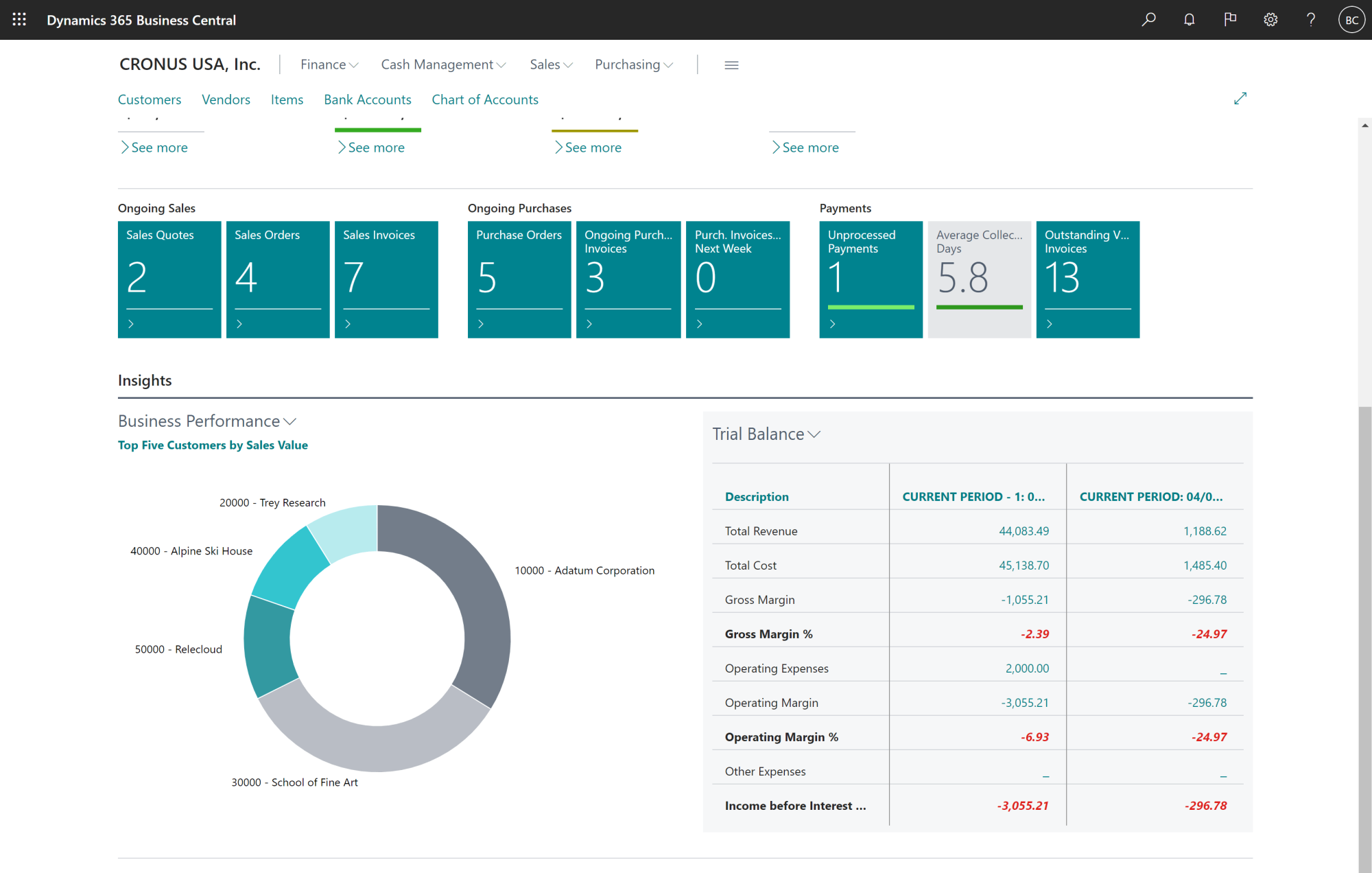
Signs You're Ready to Move to Business Central Distribution
Most distributors know something needs to change long before they act. The question is when the cost of staying becomes higher than the cost of switching. These are the patterns that usually tip the decision.
Your Spreadsheets Are Doing Work They Shouldn't Be
If your operations team has an Excel file with 40,000 rows that one person knows how to maintain, you have a single point of failure. When that person leaves or takes vacation, the business slows. Spreadsheets are great for analysis. They aren't an inventory system.
Inventory Counts Never Match What the System Says
If your physical counts and your system counts are routinely off by more than 2 to 3 percent, your team has stopped trusting the data. Once that happens, every decision downstream gets defensive: extra safety stock, manual checks, slow quotes.
Month-End Close Takes Longer Than the Month Itself
When close runs into the third week and the team is reconciling between systems instead of analyzing the business, you've outgrown your current finance setup. This is the most common trigger for distributors evaluating an ERP seriously.
You're Quoting in the Dark on Pricing and Margins
If your reps can't see the actual landed cost of an item when they quote, they're guessing on margin. Some quotes win the deal and lose the company money. You only find out at month-end when it's too late to do anything about it.
Business Central Distribution Becomes the Obvious Next Step
When two or three of these signs show up together, the math usually shifts. The cost of switching becomes smaller than the cost of another year of the same problems. That's the moment to start scoping the project, not when everything is already on fire.
For a wider view of the decision framework, our guide on how to choose an ERP system walks through the broader criteria beyond distribution-specific needs.
Map Your Operations to Business Central
We show you exactly which Business Central modules replace each tool you use today, where you'll save time in week one, and what to expect on day one of go-live.
 Free discovery call
What a Business Central Distribution Implementation Looks Like Step by Step
A realistic implementation for a mid-sized Canadian distributor usually runs three to six months. Smaller, simpler businesses can be faster. Multi-warehouse or heavily customized projects can be longer. Anyone promising six weeks without seeing your data is selling, not advising.
Here's how the phases usually break down:
Discovery and Analysis
The first phase is mapping your current state. Your team walks the partner through your warehouse, your order desk, your finance team, and your reporting. The output is a documented understanding of what you do today and what the future-state setup needs to deliver.
This is where good ERP consultancy services earn their fee. A partner that skips deep discovery and goes straight to configuration is a partner you'll be paying twice.
Configuration and Data Migration
This is the build phase. Item master, customer master, vendor master, pricing rules, warehouse setup, tax configuration, and chart of accounts all get loaded and configured. Historical data gets cleaned and migrated.
Data migration is where most projects stumble. If your current data is messy, this is the moment to clean it, not after go-live.
Testing and User Training
Before anyone goes live, key users run real scenarios in a test environment. The picker tries a real pick. The controller tries a real close. The sales rep tries a real quote. Issues that surface here are issues you don't take into production.
User training matters more than people think. The same project can succeed or fail depending on whether the team understands the why behind the workflow, not just the click sequence.
Go-Live and Hypercare
Day one is rarely smooth for anyone, anywhere. The goal isn't a perfect go-live. It's a controlled go-live with a partner sitting next to you for the first few weeks of edge cases. That hypercare period is what separates a working implementation from a stalled one.
A strong ERP Specialist stays close for at least 30 days post-go-live to fix what only shows up in real operations.
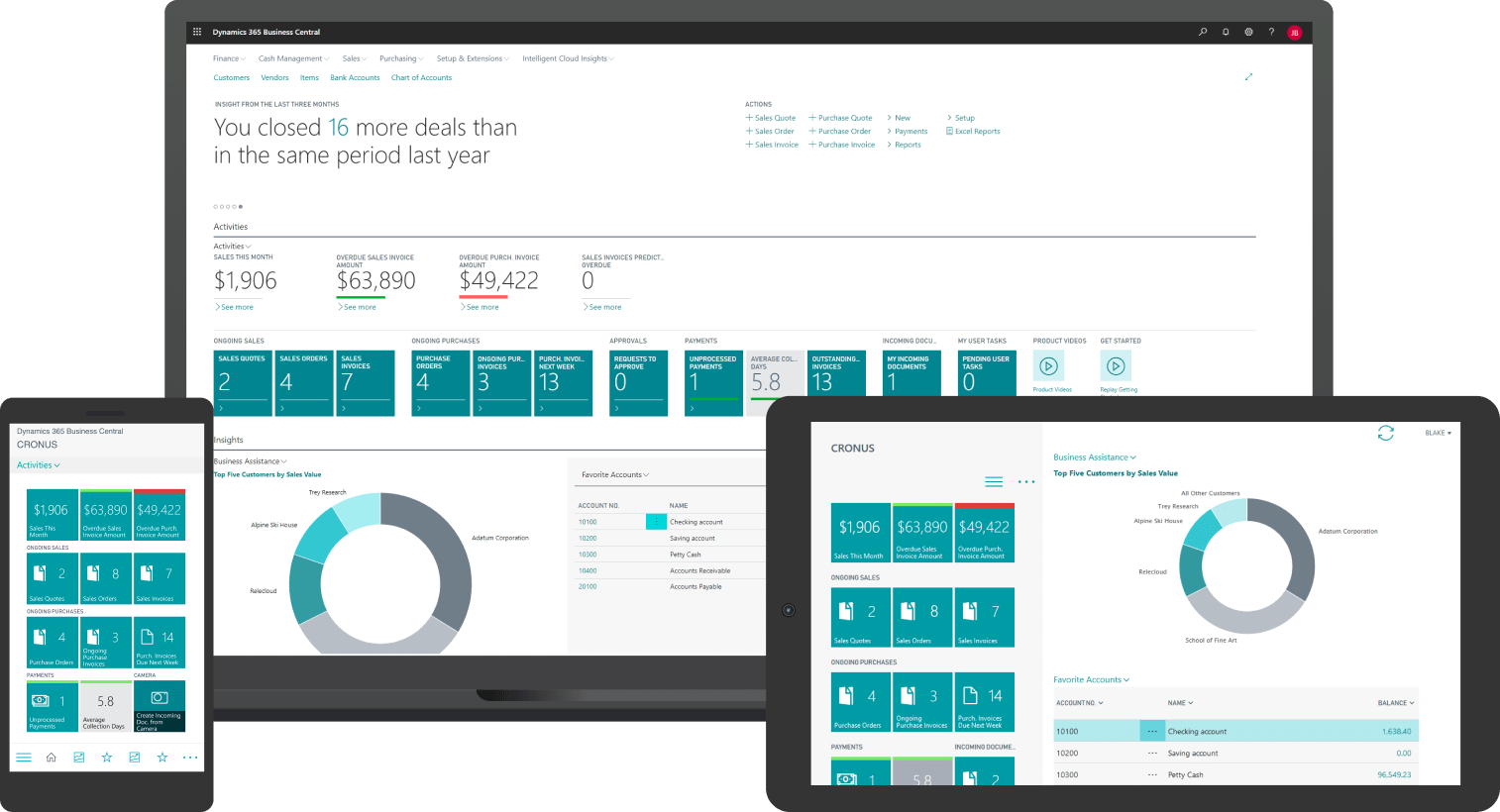
Common Mistakes Companies Make With Business Central Distribution Projects
Even with the right software, a project can underperform. The reasons are predictable:
- Treating it as an IT project instead of an operations project, so the people who actually use it daily aren't involved in design.
- Trying to replicate every quirk of the old system instead of using the new one properly.
- Underestimating data cleanup and leaving messy master data for the new system to inherit.
- Skipping user training to save budget, then watching adoption fall flat.
- Choosing a partner on price alone without checking if they've actually run distribution implementations before.
The same patterns show up across software for distributors projects regardless of platform. The product matters. The partner matters more.
-
Business Central distribution is Microsoft Dynamics 365 Business Central configured for wholesale and distribution operations. It manages inventory, warehouse, sales orders, purchasing, and finance on one cloud platform, replacing the disconnected tools most distributors use today.

Why Gestisoft for Your Business Central Distribution Project
Most partners can install Business Central. Fewer have actually run distribution implementations from end to end in both English and French, across multiple provinces.
Gestisoft is a Canadian Microsoft Partner serving clients across North America, with offices in Montreal, Quebec City, Toronto, and Ottawa. We've been implementing Microsoft Dynamics solutions since the early 2000s, and our team works across distribution and consumer goods, fashion and apparel, and manufacturing.
We're B Corp certified, Great Place to Work certified, and our work has been recognized through Canada's Most Admired Corporate Culture and Microsoft's own performance awards. The certifications aren't the point. They're a signal that the people you'll work with stay long enough to know your business and care enough to do it properly.
Dandurand, a fast-growing company that runs its operations on Business Central with Gestisoft as its partner, summed up what working with us looks like in practice:
“Gestisoft was able to adjust its approach to help us navigate a complex transition phase.”
(You can read the full Dandurand and Gestisoft story for the longer picture of how the partnership has evolved.)
That's the kind of partnership we aim for on every project: clear, adaptable, and built around your business rather than around our process.
If that's the kind of partnership you're looking for, here's the next step.
Start Your Business Central Distribution Project
Get a tailored implementation plan, realistic timeline, and honest budget from a partner who has done this for Canadian distributors.
 Free discovery call
Liked what you just read? Sharing is caring.

May 21, 2026 by Muhammad Ali Iqbal by Muhammad Ali Iqbal SEO Content Strategist & Copywriter
Driven by a passion for search engine optimization, strategic content, and conversion-focused writing. A copywriter and content strategist who lives for content that ranks, engages, and delivers real business results.
