

ERP Distribution is no longer a "nice to have" when you're juggling thousands of SKUs, multiple warehouses, and margins that feel thinner every quarter.
You know the pain: a customer calls asking about stock, and you're checking three different screens. A supplier changes their lead time, and nobody catches it until you're already short on a fast-moving item. Your sales team is quoting prices from last month's spreadsheet because the current one is buried in someone's email.
The breaking point isn't dramatic. It's the third time this month you've disappointed a key account because "the system didn't tell us." It's the realization that you're spending more time reconciling data than actually using it to make decisions. And it's the quiet fear that a competitor with better systems is already taking market share while you're stuck managing chaos.
Most wholesale distributors and industrial distribution companies reach out to us when they've already decided they need ERP Distribution software. The question isn't "if" anymore. It's "which platform, with which partner, and how do we not screw this up?"
This guide walks you through exactly that…the fit, the costs, and how to make a decision that actually works.
Get Clear on Your ERP Distribution Roadmap
You don’t need another feature-heavy demo. You need a walkthrough of your actual flows, pricing exceptions, credit holds, warehouse transfers, and guidance on what works.
 Free discovery call
What ERP Distribution Really Means for Your Business Today
If you Google "ERP Distribution," you'll find a lot of definitions. Most are technically correct and completely useless.
Here's what it actually means in practice: ERP Distribution is software built around the reality that you don't make anything, you move things. You buy in bulk, store it, break it down, and sell it in the quantities and configurations customers actually want. Your business lives or dies on three things: knowing what you have, getting it to the right place fast, and not losing money in the process.
ERP Distribution Versus Generic ERP: What Is the Difference?
A generic ERP, or worse, accounting software with an "inventory module", treats your operation like a simpler version of manufacturing or a bigger version of a small retail shop. Neither is true.
Manufacturing ERP is built around production schedules, bills of materials, and shop floor control. You don't care about any of that. You care whether the item is available to promise, what it's going to cost when it ships, and if the supplier is going to deliver on time.
Retail ERP focuses on point-of-sale, merchandising, and consumer-facing transactions. You're not ringing up individual consumers at a register. You're filling orders with 47 line items, half of which have customer-specific pricing, and two of which are backordered from different suppliers.
ERP Distribution software is purpose-built for your world. It expects you'll have multiple warehouses. It assumes pricing is complicated, contract pricing, volume breaks, rebates that get settled quarterly. It knows you're dealing with suppliers who might ship partial orders, and customers who want to know if you can get them 200 units by Thursday even though you only stock 80.
When a distributor tries to force a manufacturing ERP or a basic business app to do distribution work, they end up with one of two problems: either they spend a fortune on customization to make it fit, or they give up and work around the system with spreadsheets. Both options waste money and time.
Common ERP Distribution Myths Distributors Still Believe
Let's clear up a few things you've probably heard or told yourself:
"We're not big enough for ERP Distribution yet."
This one's dangerous because it feels responsible. The truth is, if you're at the point where you're manually managing pricing exceptions, or you've had a stockout on a key item because nobody knew the supplier was late, you're already past the point where ERP Distribution makes sense. Waiting doesn't make it easier. It just means you're losing margin and customers while you wait.
"ERP will force us to change everything at once."
Not if you work with a partner who understands phasing. Yes, you'll need to change some things, bad processes don't get better just because they're automated, but you don't have to flip every switch on day one. Start with the flows that hurt the most: order processing, inventory visibility, basic financials. Add warehouse mobility and advanced analytics after you've stabilized.
"We should wait until our processes are perfect."
Your processes will never be perfect, and if they were, you wouldn't need new software. The goal isn't perfection before you start. The goal is to get the core flows right, go live, and then optimize as you learn. Plenty of distributors have delayed ERP projects for years trying to document and perfect every edge case, only to realize the system would have handled most of those cases better than their workaround ever did.
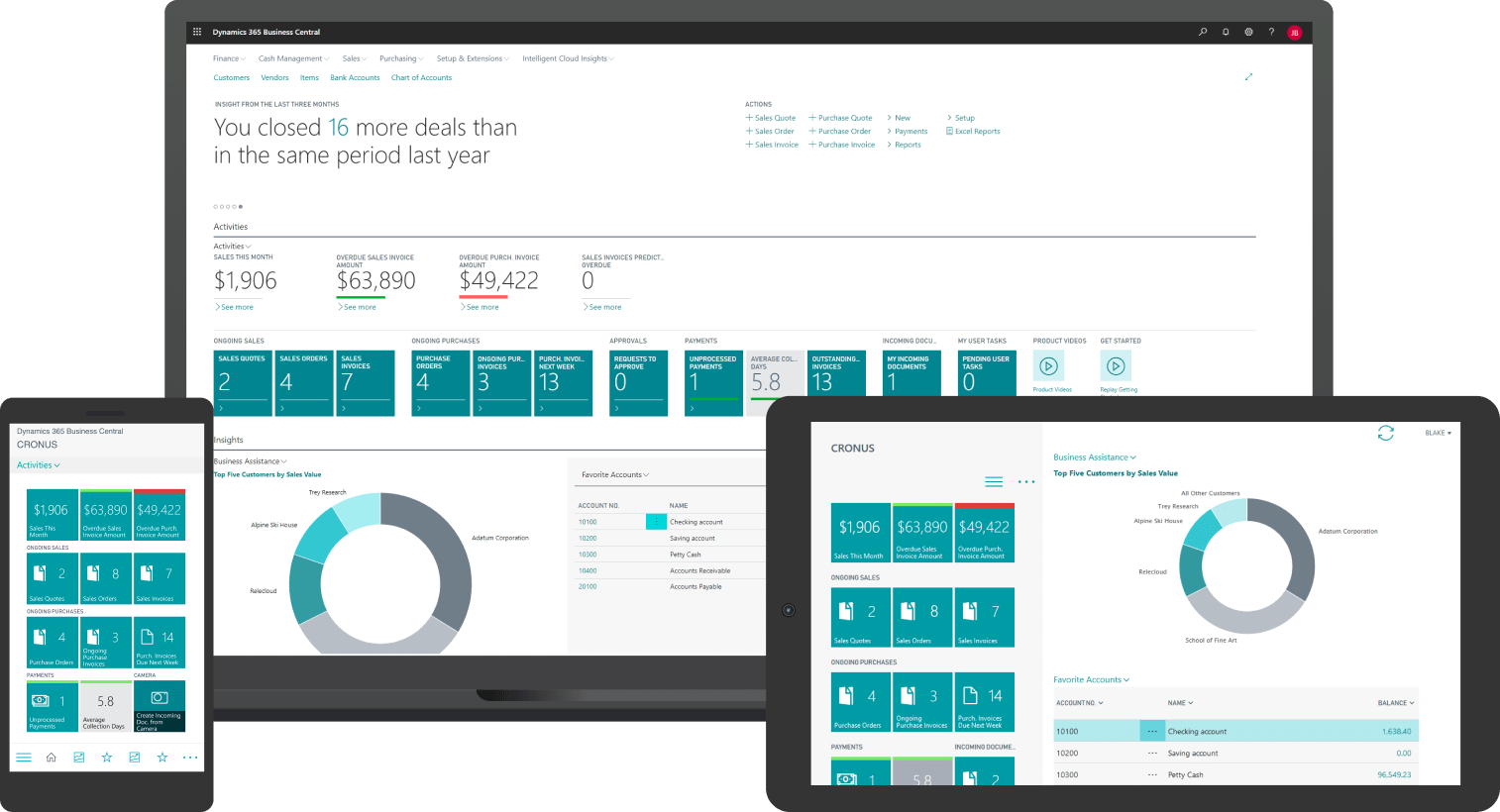
Is ERP Distribution on Dynamics 365 Business Central the Right Fit?
You're probably comparing a few options right now. Maybe you've sat through demos from ERP distribution software providers. They all claim to "support distribution." Some of them even do. But the question you're really asking is: "Is Business Central strong enough for what we actually do?"
Let's talk honestly about where Microsoft Dynamics 365 Business Central fits in the ERP Distribution landscape, and where it doesn't.
When ERP Distribution on Business Central Is a Smart Move
Business Central makes a lot of sense for wholesale distributors and industrial distribution companies in a specific range. Not every range, but a big and important one.
- If you typically handle 200 to 1,500 orders each day with 20 to 150 users, Business Central can easily manage that amount. You can see current inventory from different locations, track lots and serial numbers, have prices for specific customers, manage finances together, and link to e-commerce, EDI, and third-party logistics without needing a lot of custom work.
- If you run 1 to 5 warehouses and want to see and control everything, like transfers, stock levels, and reorder points based on local demand, Business Central can do this easily. You're not bolting on modules or waiting for a "multi-site upgrade."
- If your pricing is complex but not infinite, contract pricing, volume discounts, customer and item-specific deals, rebates, Business Central can manage that. You won't need to maintain pricing in spreadsheets and hope someone remembers to update the system.
Here's where the Microsoft competitive advantage really shows up: integration. Business Central sits inside the Microsoft ecosystem. If you're already using Microsoft 365, Power BI, or Teams, everything connects without friction.
Your sales team can check inventory from Outlook. Your warehouse manager can pull a real-time dashboard in Power BI. Your customer service team can create orders without leaving the system they already know.
And if you're a distributor in Canada, that local presence and understanding of regional tax rules (GST, HST, PST variations) and bilingual needs isn't a bolt-on feature. It's already part of the core platform.
When You Might Need Something Beyond ERP Distribution on Business Central
Business Central isn't the right answer for everyone, and it's better to know that now than six months into a project.
If you're running a very large, multi-country operation with 300+ users and deeply complex global logistics, think dozens of distribution centers across continents with heavy regulatory variance, you might need an enterprise-tier ERP platform built for that level of complexity from the ground up.
If you need highly specialized, deep industry functionality, like pharmaceutical track-and-trace with full serialization at the dose level, or chemical distribution with extensive hazmat and compliance workflows, you might be better served by a platform that's lived in that industry for 20+ years.
And if your primary need is ultra-advanced warehouse automation, robotics, complex wave picking across massive facilities, deep labor management and gamification, you might need a best-of-breed WMS that integrates with ERP Distribution software, rather than trying to make ERP do the work of specialized warehouse tech.
Most distributors we talk to are nowhere near these thresholds. But if you are, a good ERP Software Consultant will tell you the truth about fit, not just try to close a deal.
See how Business Central brings everything together, inventory, customers, cash flow, and financials, in this quick demo…
What ERP Distribution Features Do You Actually Need?
Most distributors either overbuy features they'll never use or underbuy and miss capabilities that would save them thousands of hours a year. The key is separating must-haves from nice-to-haves.
Core ERP Distribution Capabilities You Should Not Compromise On
- Multi-location inventory. If you have more than one warehouse, you need real-time visibility into what's where. A sales rep should see stock across all locations while talking to a customer and promise delivery from whichever location makes sense.
- Demand planning and replenishment logic. The system should calculate reorder points based on lead time, usage patterns, and safety stock. Manual reordering doesn't scale. Guessing leads to stockouts or cash tied up in dead inventory.
- Customer-specific pricing. Contract pricing, volume breaks, rebates… if your system can't apply the right price automatically at order entry, you'll either lose margin or slow down every order while someone checks a spreadsheet.
- Integrated financials. When orders, inventory, purchasing, and invoicing live in the same system as your GL and AR/AP, you eliminate reconciliation nightmares. Month-end close actually closes on time.
A good ERP Specialist will tell you what happens when distributors skip core functionality to save a few thousand upfront, then spend tens of thousands working around the gaps later.
Which Advanced ERP Distribution Features You Can Phase In Later
- Full WMS capabilities (directed putaway, wave picking, RF scanners) are powerful but not always day-one needs. Start with basic pick lists and location tracking, then add advanced warehouse features once core flows stabilize.
- Advanced rebate management can wait. If you're managing rebates in spreadsheets quarterly now, keep doing that for a few months while you dial in order processing and inventory.
- Deep BI dashboards are phase-two. Start with standard reports, inventory turns, fill rates, margin by customer. Once those numbers are accurate and people use them, then build custom dashboards.
Score Your ERP Distribution Options With 10 Key Criteria
Comparing ERP platforms is hard when every vendor says they do everything. This practical guide gives you 10 focused criteria to evaluate whether Business Central (or any system) actually fits your operation.

Understanding ERP Distribution Costs and ROI for Distributors
Let's talk money…
The fear: "This will be a six-figure black hole."
The reality: yes, projects cost real money, but with a realistic plan, ROI is measurable and often faster than expected.
Building a Realistic Budget for ERP Distribution on Business Central
- Licensing: Business Central runs $70–$100 per user per month. For 30 users, that's $2,000–$3,000 monthly.
- Implementation services: Discovery, configuration, data migration, testing, training, go-live support. Mid-sized distributor (30–50 users, moderate complexity)? Expect $50K–$120K. This is where ERP Consulting Companies come in to help you with setting up a realistic budget for your project.
- Integrations: EDI, e-commerce, 3PL connections - budget $5K–$15K per integration.
- Training: Often underestimated. Budget time for real training and some productivity dip in the first few weeks.
Thinking About ROI and Time to Value
- Inventory reduction: Distributors on old systems typically carry 15%–30% more inventory than needed. Better visibility usually trims 10%–20%. For $2M in inventory, that's $200K–$400K in freed cash.
- Faster processing: Manual re-keying and checking spreadsheets takes 10–15 minutes per order. Modern systems handle it in under two minutes. That's real labor savings across hundreds of weekly orders.
- Better margin control: Automated pricing means you stop quoting old costs or missing negotiated discounts. Even 1% margin improvement for a $10M distributor is $100K annually.
Most distributors see payback in 18–30 months.

How Do You Implement ERP Distribution Without Hurting Operations?
Distributors can't afford downtime. A day without processing orders means lost customers, possibly permanently.
ERP Distribution Go-Live: What to Get Right Before You Flip the Switch
Clean your data first: Messy item masters, duplicate customers, inconsistent pricing, those problems follow you into the new system and get worse. Plan 4–6 weeks of cleanup before migration.
Test real scenarios: Not just "can I enter an order." Test:
- Rush order when primary warehouse is out of stock
- Customer over credit limit trying to order
- Return with restocking fee
- End-of-month close
Pick the right timing: Not the week before busy season. Not during month-end. Not on a Monday. Pick a quiet Tuesday or Wednesday, a few weeks into a new month, and keep key people available for at least a week after.
Phasing ERP Distribution Features Instead of Doing Everything Day One
Start with core order-to-cash and procure-to-pay. Get order entry, inventory, purchasing, shipping, invoicing working smoothly. Stabilize for 30–60 days.
Then add the next layer: warehouse mobility, customer portals, rebate tracking, advanced analytics.
Benefits: less overwhelming for your team, lower technical risk. If a phase-two feature has issues, core operations still run.
Plan Your ERP Distribution Rollout With a Clear Roadmap
Timing, phasing, and risk management separate smooth implementations from painful ones. Let's review your operation, busy seasons, and structure a rollout that protects your business.
 Free discovery call
How Do You Turn Research Into a Clear Decision on ERP Distribution?
You've researched for weeks, maybe months. At some point, research has to become a decision.
Using Demos to Get Real Answers, Not Just a Tour
Most demos are useless, a sales rep clicks through features you'll never use.
Bring real scenarios:
- "Show me a rush order when my main warehouse is out of stock."
- "Show me customer-specific pricing with contract rates and volume discounts."
- "Show me what happens when an overdue customer tries to place an order."
Watch if they can handle it live or if everything needs "customization."
The goal: see if the software and the ERP Software Consultant actually understand distribution.
Internal Decisions to Make Before You Sign
Who owns this? Who makes decisions when you hit trade-offs between customizing to match today versus changing process to match best practice?
How much time can key people commit? Your warehouse manager, purchasing lead, sales head needs to be in discovery, testing, training. If they're maxed out, adjust the timeline.
Which processes will you change? Are you open to improving workflows, or will you insist the new system replicate every 10-year-old workaround?

How Do You Choose the Right Implementation Partner for ERP Distribution?
Two distributors buy the same software and get completely different results. The difference is the implementation partner.
Questions to Ask a Potential ERP Distribution Partner Before You Sign
1- How many distribution projects have you done recently?
Not ERP in general, distribution specifically. Ask for a number.
2- Describe a project that went sideways.
If they say "all our projects go perfectly," they're lying or inexperienced. You want to hear about data issues, scope changes, go-live bumps, and how they fixed them.
3- What happens after go-live?
Many ERP Consulting firms treat go-live as the finish line and disappear. The first 90 days after that are when you learn the system and figure out adjustments. Make sure they have a post-go-live plan.
4- How do you handle training?
"One session before go-live" isn't enough. Order entry needs hands-on scenario training. Executives need dashboard training. Make sure they understand that.
How to Tell If a Partner Understands ERP Distribution, Not Just Software
Good partners ask good questions:
- Your cut-off times for same-day shipping
- Your top 10 customers and what makes them difficult
- How you handle pricing exceptions
- Your busiest seasons and internal capacity during those periods
Bad partners just pitch features…
Good partners also challenge you. If you describe a workaround and they just say "we can automate that," they're not helping. A strong ERP consultancy services partner will say "here's a better way that saves time and reduces errors."
-
For a mid-sized distributor, expect 4–6 months from kickoff to go-live. Smaller, simpler operations can be faster. Larger or more complex setups take longer.

Why Choose Gestisoft for ERP Distribution on Business Central
Gestisoft specializes in Microsoft Dynamics 365 ERP Business Central for wholesale distributors and industrial distribution companies. We have helped distributors who have similar challenges as you: complicated pricing, multiple warehouses, low profits, and the need to connect with suppliers, customers, and logistics partners.
Our approach is practical... We'll tell you upfront if Business Central isn't the right fit. We phase implementations to reduce risk and keep your operations running. We focus on getting your core flows, order processing, inventory management, pricing, and financials working smoothly before adding advanced features.
And we don't disappear after go-live. We stay involved to make sure you're getting value, not just software. We help you optimize as you learn what works and what needs adjustment.
If you're ready to move from research to a real plan, let's talk.
Map Your ERP Distribution Project With the Right Partner
Let's review your current setup and confirm whether Business Central is the right fit, and outline a realistic roadmap that works around your busy seasons and protects your operations.
 Free discovery call
Liked what you just read? Sharing is caring.

April 15, 2026 by Muhammad Ali Iqbal by Muhammad Ali Iqbal SEO Content Strategist & Copywriter
Driven by a passion for search engine optimization, strategic content, and conversion-focused writing. A copywriter and content strategist who lives for content that ranks, engages, and delivers real business results.
