

Microsoft Copilot in Business Central is now a standard part of the platform. It ships with every Business Central Online license, and it covers everything from automated bank reconciliation to fully autonomous invoice processing.
Knowing it exists and knowing how to use it well are two different things.
Read on for what Copilot in Business Central does in 2026, how to configure it as a Canadian administrator, what the new agentic features mean for your finance and operations teams, and how to resolve the data residency questions that come up specifically for Canadian companies.
Ready to See Copilot in Action?
Book a free consultation, and our Business Central specialists help Canadian SMBs configure and adopt Copilot in Business Central in a way that fits your workflows, not just your software.
 Free discovery call
What Copilot in Business Central Does
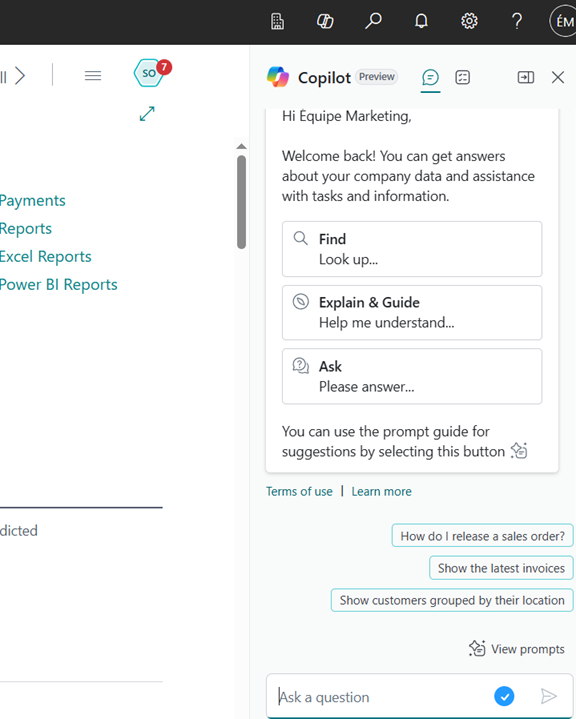
The application interface embeds it directly. It runs within each user's existing security permissions and never accesses data beyond what that user can already see. Your data does not train shared AI models.
There are two distinct layers to how Copilot works today.
The first is assistive Copilot. These are features that help users complete specific tasks faster:
- Drafting marketing text for inventory items
- Matching bank statement lines to ledger entries
- Analyzing list data through natural language queries
- Suggesting sales order lines
- Summarizing customer records
- Auto-filling contact details for new vendors or customers
The second is agentic Copilot, and this is where the 2025 Wave 2 release changed the picture significantly. Agentic features go beyond help into autonomous execution. The Payables Agent reads incoming invoices, matches vendors and general ledger accounts, and queues them for human approval, all without someone manually moving through each step. The Sales Order Agent monitors email inboxes and processes incoming customer orders directly into Business Central. Both agents execute multi-step workflows and hold for human sign-off at the approval stage.
This distinction has real implications for how you build your business case.
Assistive Copilot saves minutes per task across users.
Agentic Copilot saves full hours per day per role.
What Copilot in Business Central Delivers by Role
The most useful way to understand what Copilot in Business Central delivers is through who uses it and what it saves them.
Finance and Accounting
These teams get the most dramatic time savings. Bank reconciliation assistance in Copilot automatically matches statement lines to open ledger entries, flags exceptions, and cuts the manual matching that typically consumes the last two days before period close. Canadian SMBs that have implemented Business Central's financial automation features consistently report cutting their month-end close time by 30-50%. The Payables Agent then extends that further by handling accounts payable end-to-end, reading invoices, proposing matches, and preparing them for human approval without any manual triage.
Sales and Operations
These get three high-value capabilities from Copilot in Business Central. Sales Line Suggestions lets a rep describe what a customer needs in plain language, and Copilot proposes order lines based on that customer's purchase history and current inventory availability. The Sales Order Agent processes inbound customer orders from email directly into Business Central, so nothing sits in an inbox waiting for someone to enter it manually. When inventory runs short, Copilot in Business Central surfaces substitute item suggestions automatically, so a rep can keep a sale moving without leaving the order form.
Marketing and Product
This team can use this platform to generate product descriptions directly from item attributes, calibrated to the tone and format suited for Shopify, Amazon, or an internal product catalog.
The process starts from the item card: select the attributes you want Copilot to draw from, choose a tone (professional, casual, creative), and request a draft.
The output appears in seconds.
The user reviews it, makes edits, and publishes. For companies managing hundreds of SKUs, this removes one of the most time-consuming content bottlenecks in e-commerce operations without requiring a separate copywriting tool or workflow.
All users working in the system
All others benefit from Chat with Copilot and the enhanced semantic search known as "Tell Me." Both allow people to find records, open pages, and ask questions about their data in plain English.
A finance manager can ask "show me customers with overdue invoices over 60 days" and receive a filtered list without building a manual query.
A purchasing coordinator can ask "what did we pay Vendor X last quarter?" And get a direct answer rather than hunting through transaction history.
For new staff who haven't yet memorized where everything lives in Business Central, Copilot reduces the orientation period considerably. It also reduces the number of support tickets your IT team receives for basic navigation questions.
How to Configure Copilot in Business Central
Most Copilot features activate automatically when your environment is provisioned. There is no elaborate setup required. The configuration steps that exist carry weight, and two of them are important for Canadian organizations.
1. Prerequisites.
Copilot in Business Central is available only for Business Central Online. It does not function on-premises or in private cloud deployments. The administrator completing the setup needs SUPER permissions in Business Central, or an equivalent admin role through Microsoft Entra ID.
2. Step 1. Open the Copilot and Agent Capabilities Page
Press Alt + Q and type "Copilot & agent capabilities." The page lists every available Copilot and AI feature in Business Central, divided into Generally Available and Preview sections. Each feature displays its current status. From here, you activate or deactivate individual features and control which user roles have access to each one.
3. Step 2. Handle the Data Movement Toggle
This is the configuration step where Canadian admins need to pause. Some Copilot in Business Central features rely on an Azure OpenAI endpoint. If your Business Central environment is provisioned in a Canadian Azure region (Canada Central or Canada East) and that OpenAI endpoint sits outside Canada, Business Central will prompt you to allow data movement across geographies. For most companies, enabling this toggle is uncomplicated.
For organizations operating under strict provincial data residency requirements, particularly Québec's Law 25 or sector-specific regulations, this decision should go through your legal or compliance team before you enable it. Gestisoft helps Canadian clients work through this step as part of every Business Central implementation.
4. Step 3. Assign Role-Based Access
These features are not all relevant to every user. The Payables Agent is finance-facing; there is no reason to expose it to a warehouse operator. Business Central's permission management system lets you control access at the feature level by role. A phased rollout, starting with a pilot group in finance before expanding to sales and operations, reduces adoption pressure and lets you collect feedback before a full deployment.
5. Step 4. Accept the Privacy Notice at the Organizational Level
The first time you activate a feature, Business Central presents a privacy notice tied to Azure OpenAI. Administrators must set the status to "Agree for everyone" to make the feature active across the organization. This step applies to each feature individually.
“Anytime I have requests, I've never had a problem with Gestisoft's team. I always get quick answers, and we always manage to solve what we wanted to solve.”
Troubleshooting Copilot in Business Central
Even in a clean Business Central Online environment, a handful of issues come up consistently. Here is how to resolve the most common ones.
Copilot features are not appearing on a page.
Check the Copilot and Agent Capabilities page to confirm the feature is active. If it shows as active but still doesn't appear, open the Feature Management page, because some preview features require explicit activation. Also check personalization settings to see if a team member hid the feature when customizing their view.
"Sorry, Copilot is not activated for [feature name]" error.
The feature has not been agreed to at the organizational level. Return to the Copilot and Agent Capabilities page, select the feature, and confirm the privacy notice status reads "Agree for everyone."
A feature is missing from the Copilot and Agent Capabilities page entirely.
A capability absent from the list usually means your environment has an embedded ISV app that covers the same function. Microsoft's native Copilot in Business Central capabilities are not compatible with environments where an embedded app already handles that task. Contact your Business Central partner to assess the options.
Cross-geography data movement errors.
When Copilot features return errors tied to the Azure OpenAI service, check the Allow Data Movement toggle on the Copilot and Agent Capabilities page. For Canadian environments, confirm which Azure region your Business Central instance uses and check that the specific feature you're activating doesn't require data to leave that region. Gestisoft's team handles this routinely during Business Central configuration work for Canadian clients.
Chat with Copilot returning incomplete answers. Copilot Chat in Business Central is constrained to data that the current user has permission to access. When a user reports that Chat is missing data they expect to see, check their permission sets and confirm that Chat with Copilot in Business Central is activated for their role on the capabilities page.
What Copilot in Business Central Cannot Do
Understanding the boundaries is as important as understanding the capabilities, especially for organizations running an AI readiness assessment before a rollout. There is a pattern in how AI features get oversold, and Copilot in Business Central is not immune to it. Knowing exactly where the guardrails are makes deployment planning more honest and adoption smoother.
Copilot in Business Central does not execute transactions on its own. It assists, suggests, and drafts, but a human user approves and posts. The Payables Agent is the most autonomous feature currently available, and it even places invoices in a review queue rather than posting them directly. The human validates every time.
It cannot access data beyond the current user's permissions. It inherits those permissions exactly. There is no elevated access created when Copilot runs a query, which means a sales rep using Chat with Copilot cannot pull financial data they would not normally see in the application itself.
Copilot also does not share your organization's data with other tenants or use it to train shared AI models. Microsoft's responsible AI commitments are explicit on this point.
It is only available for Business Central Online. Organizations still running Business Central on-premises or on Dynamics NAV do not have access to Copilot in Business Central. That is a meaningful reason to evaluate a cloud migration path if Copilot capabilities are part of your technology planning.
Considering a Move to Business Central Online?
If your organization is still running on-premises and wants access to Copilot in Business Central, Gestisoft helps Canadian businesses plan and execute the migration. Book a free consultation to begin yours today.
 Book a free consultation
How Gestisoft Approaches Copilot in Business Central for Canadian SMBs
Gestisoft is a certified Microsoft Partner headquartered in Québec, with Business Central implementation experience across English and French Canada. Configuration is now part of every new Business Central engagement we deliver.
This means we help clients identify which capabilities align with their highest-friction workflows, configure role-based access to match their team structure, address the data residency questions specific to their province and industry, and build the internal adoption plan that turns activated features into daily habits.
The data residency conversation comes up on almost every Canadian engagement. Most clients are surprised to learn that some features require a data movement toggle. They also discover that the right answer depends on their industry, their province, and how their Microsoft tenant is configured. Getting that wrong at the start creates compliance exposure. Getting it right from the beginning is a clear, one-time configuration decision with the right guidance, and it is one of the most concrete ways a Canadian Microsoft Partner adds value over a generic deployment approach.
We also help clients build the change management side of the rollout. Activating Copilot in Business Central is the easy part. Getting a finance team to trust the bank reconciliation suggestions, or getting a purchasing coordinator to rely on the Autofill feature for new vendor records, requires a short period of supervised use and calibration. We build that into every implementation so the features get used rather than ignored.
For organizations that already run Business Central and want to assess the value they're getting from Copilot, we offer a focused configuration review. Reach out to the team to set one up.
-
Yes. Core features, including Chat, bank reconciliation assistance, and marketing text suggestions, are included with all Business Central Online licenses at no additional cost. Microsoft has noted that fair-use quotas or future pricing adjustments are possible, but as of 2026, there is no separate fee.
Explore More
- Chat with Copilot in Business Central: your complete guide — A deep dive into the conversational AI feature inside Business Central for finding records, analyzing data, and working through the system.
- AI in ERP: from Copilot to autonomous agents in Business Central — How artificial intelligence is reshaping ERP systems, with Copilot in Business Central as the leading example.
- Analysis Mode in Business Central: instant data insights — The list analysis feature that works alongside Copilot in Business Central for ad hoc data exploration.
- Business Central CRM integration: the complete guide — How Business Central connects with Dynamics 365 Sales and the role Copilot plays across both systems.
- Microsoft Dynamics 365 Business Central Specialist in Canada — Gestisoft's Business Central practice for Canadian businesses.
Liked what you just read? Sharing is caring.

May 21, 2026 by Conni Guido by Conni Guido Copywriter and Brand Strategist
I started with a degree in Professional Communications and never looked back. Now, I'm a professional storyteller who believes every brand has a story to tell, and every good story should leave you wanting more. You can find me lost in a book club or a writing sprint, baking words into pies...probably both.

