

Most growing businesses follow the usual timeline of business systems: they start with simple Excel spreadsheets or even pen and paper, before adopting a more robust financial management system that can automate finances and streamline tax submissions. Accounting software such as QuickBooks can become crucial to a business’s financial structure and strategy.
However, for those looking to expand further, the journey doesn’t stop there. Growth is often accompanied by further operation complexity, such as increased customers, new locations and cross border income. It’s at this point where executives typically consider a QuickBooks to Business Central migration.
If you’re contemplating a QuickBooks to Business Central migration for your business, this guide will walk you through exactly what a QuickBooks to Business Central migration involves, how long it takes, what it costs, and how to approach it with equal amounts of caution and confidence.
Scaling beyond QuickBooks?
An experienced implementation partner such as Gestisoft can help Canadian businesses transform their operational systems with an integrated ERP Microsoft Dynamics 365 Business Central solution.
 Free discovery call
What is a QuickBooks to Business Central migration?
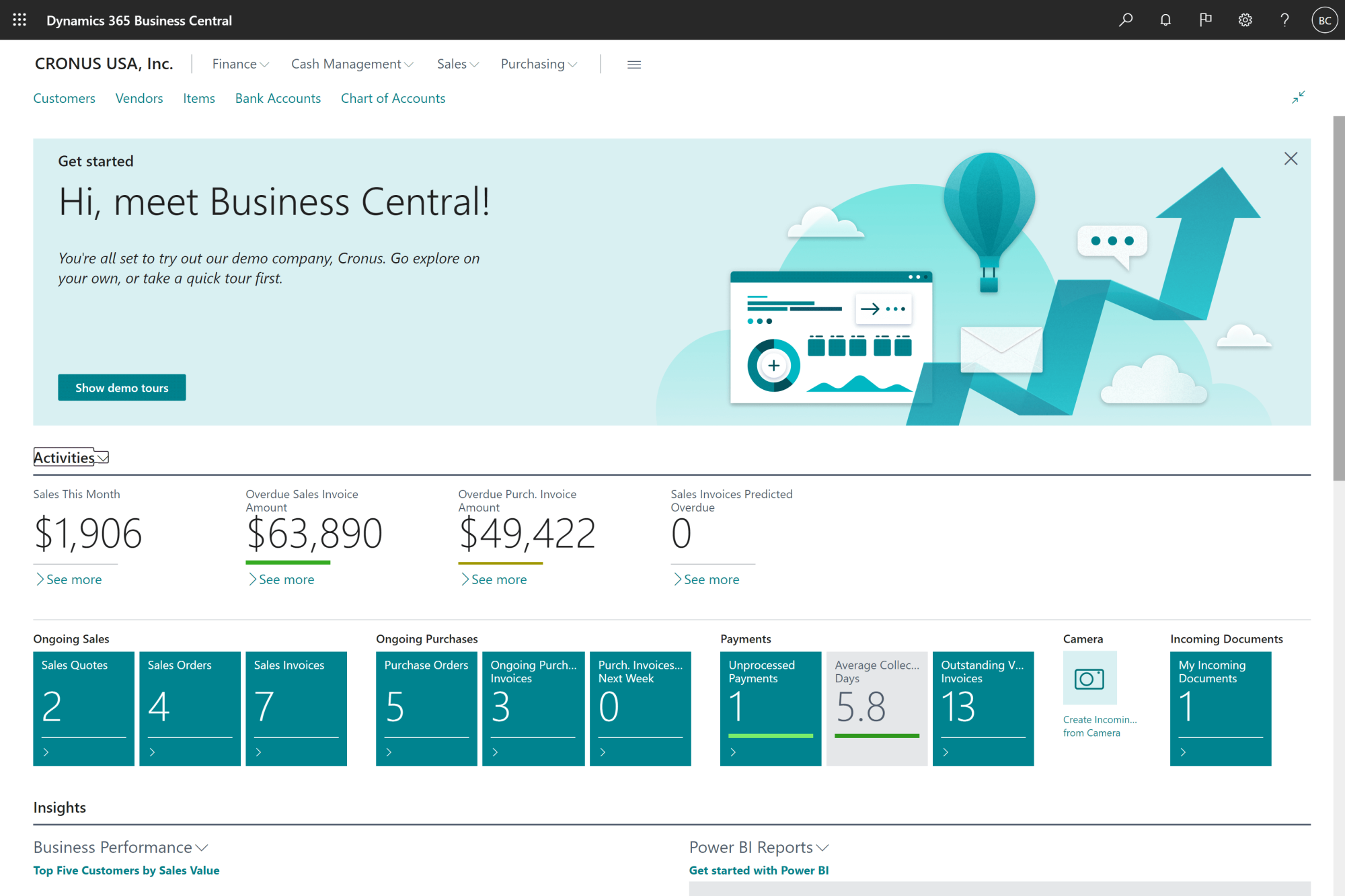
A QuickBooks to Business Central migration is the process of integrating your entire business operations, from financial data, workflows, and reporting structure, from QuickBooks to Microsoft Dynamics 365 Business Central.
Accounting softwares such as QuickBooks are the typically recommended entry software for small businesses looking to automate their financial system. But if a business decides to expand, an ERP (‘Enterprise Resource Planning’) system is often needed to support the accompanying complexity.
This is because, at its core, QuickBooks is fundamentally designed to manage financial records. However, Business Central is designed to unify your finance, inventory, sales, purchasing and supplier operations into one integrated business system.
A typical QuickBooks to Business Central migration involves:
- Restructuring financial data
- Aligning workflows across departments
- Redefining reporting and
- Future growth projecting
The goal is to link all departments into one central system to give a bird’s eye view of a business’s operations.
How do you know it’s time for a QuickBooks to Business Central migration?
Although there isn’t a single moment that can determine when a business requires a QuickBooks to Business Central migration, many factors can contribute over time.
Here are some common ones that indicate it might be time for your business to make the switch:
1. Your systems no longer talk to each other
If you have different systems spanning across departments, for instance, your QuickBooks financial management system isn’t integrated with your HR platform or CRM, it becomes increasingly challenging to communicate data efficiently between them. At this point, a QuickBooks to Business Central migration would help smooth the hypothetical business telephone lines between your departmental systems.
2. Reporting takes too long
Say your executive team at a mid-sized retail business is preparing for a quarterly strategy meeting. You’ve generated approximately $1.2M CAD in revenue over the last three months across both your Canadian and U.S. stores.
However, to produce a complete performance report, your finance team needs to pull sales data from QuickBooks alongside inventory data from a separate warehouse system. Your executive team ideally wants the report within the hour, but the reality means it could take 2–3 days to compile and verify.
If you’re at this stage in your business, a QuickBooks to Business Central migration would increase your decision making speed, allowing you to capitalize on more valuable business opportunities sooner.
3. Increased operational complexity
Another example: say your sales team has just secured a $180,000 CAD wholesale order with a new outdoor retailer based in Vancouver, consisting of 2,000 units of your premium hiking backpacks.
But before confirming the deal, they need to check:
- Whether inventory currently has 2,000 units available
- Whether existing orders have already allocated part of that stock
- Whether production can fulfil any shortfall within the retailer’s 3-week deadline
With QuickBooks, although finance can record the transaction, they can’t see real-time inventory levels without communicating with the warehouse team first.
But this delay risks slowing momentum down with a high-value client who has a competitor waiting on the other line. This common business scenario could lose your sales team the deal altogether. This is where a QuickBooks to Business Central migration becomes almost crucial to the sales process.
4. You’re expanding across locations or countries
As QuickBooks is an accounting software multi currency, it can support multiple currencies, which is typically useful for businesses venturing across country borders for the first time.
However, beyond the three currency mark, QuickBooks, although still capable of supporting many currencies, is unlikely to suffice for the sheer complexity of operations.
For instance, say you’ve had a profitable year and you’re now planning on opening two new stores across the United States and Central America: one in California and the other in Mexico City.
Although QuickBooks can record the financial transactions, your finance team may still find it a challenge to reconcile the following:
- Monthly payroll for employees across 3 different tax systems
- Local suppliers invoicing in different currencies
- Import/export duties
At this level of complexity, QuickBooks becomes increasingly difficult to manage efficiently. So if you’re looking to expand into multiple countries, this is a concrete sign a QuickBooks to Business Central migration would highly benefit your business.
As illustrated by the scenarios above, a QuickBooks to Business Central migration becomes less of a luxury but more so a business necessity; purely to handle the vast operational dynamism often accompanied by growing businesses at this scale.
The QuickBooks to Business Central migration Process
Now you know the indicators for the switch, what does a QuickBooks to Business Central migration look like in reality? A typical successful migration navigates the following structured approach:
1. Data review and cleanup
Before even touching Business Central, a full audit and clean-up of your current QuickBooks data is highly recommended. This will make the migration considerably easier when transferring to your new system.
2. Data mapping
Next, a business needs to accurately map and integrate their QuickBook’s data into their new Business Central ERP system. Crucially, this needs to be completed as accurately as possible to reduce the migration timeline and minimise any business disruptions.
3. System configuration
This is the personalization aspect. A business can configure their ERP Business Central system to whatever their preferred reporting, financials and data recording styles, and how it can be accessed across multiple departments.
4. Testing and validation
Validation of the Business Central and any final tests must be considered to remove any last-minute errors.
5. Go-live
Finally, the QuickBooks to Business Central migration will be complete and your Business Central ERP system will be accessible across your entire business.
So, the QuickBooks to Business Central migration process at first glance may look relatively straight forward, but in reality, it may be a challenge to fully configure your new system to fit your needs without the help of an implementation partner.
How long does a QuickBooks to Business Central migration take?
A successful QuickBooks to Business Central migration can be highly dependent on a range of factors. Typical ranges we’ve previously experienced include:
- Simple QuickBooks to Business Central migration: 3–6 weeks
- Mid-level QuickBooks to Business Central migration: 6–10 weeks
- Complex QuickBooks to Business Central migration: 10–16+ weeks
If minimising the time and financial costs of your QuickBooks to Business Central migration is the focus, here are the following factors to consider:
- Data quality: How organised is your current QuickBooks data?
- Number of users: More team members and employees brings more teaching as to how to use your new system effectively.
- Business complexity: Already operating in multiple locations? With more business complexities brings a longer time horizon of a successful QuickBooks to Business Central migration.
- Required integrations: Put simply: more departmental integration means a longer integration process.
The ideal goal for any business is to reduce the integration time with as few errors and delays as possible so your business can continue to operate with disruption.
How much does a QuickBooks to Business Central migration cost?
The money question (literally and metaphorically): what is the financial cost of a QuickBooks to Business Central migration? Again, this can vary depending on many factors.
Here’s the typical range from previous clients, in CAD:
- Small QuickBooks to Business Central migration: $10,000–$20,000
- Mid-sized QuickBooks to Business Central migration: $20,000–$40,000
- Complex QuickBooks to Business Central migration: $40,000+
Factors which impact cost typically include:
- Data volume: Larger data sets often incur higher costs due to the time commitment required to accurately map your QuickBooks data onto your new Business Central system.
- Customisation requirements: Each business and industry operates differently, and of course, you want an ERP system to match precisely how your teams work best. As such, customisations can take longer depending on what’s required for your business.
- Integration needs: A more robust personalised integration including automation and AI usage typically incurs a higher cost.
- Implementation support: Hiring an implementation partner can be costly yet is often highly advised and worth the fee.
To minimise any errors with your QuickBooks to Business Central migration, it’s usually worth investing in an implementation partner like Gestisoft to ensure seamless transfer whilst minimising any disruptions to your business.
What can go wrong during a QuickBooks to Business Central migration?
In spite of the benefits of a QuickBooks to Business Central migration, it’s important to address what can go wrong without the right guidance. Whilst a new system to support your growing business is exciting, it ideally needs to be done as error free as possible. Here are potential errors in the procedure:
1.Data issues
Data bugs and errors can be common if migration is done inaccurately. It’s crucial to ensure your data is fully integrated, otherwise corruption and mismatches are likely to ensue.
2.Reporting mismatches
Accurately mapping your QuickBooks to Business Central migration is absolutely crucial. If your data is reported mismatched, it could lead to significant disruptions to your business.
For instance, say after your QuickBooks to Business Central migration, your finance team generates a monthly report showing $850,000 CAD in revenue, but your sales dashboard shows closer to $910,000 CAD.
After investigation, you realise the mismatches: some USD transactions were converted using outdated exchange rates, certain customer records were duplicated, and a batch of invoices worth $60,000 CAD wasn’t mapped correctly.
Although rectifiable, these mismatches create confusion at the executive level, which could delay decision-making, and ultimately requires several days of manual reconciliation to resolve.
3.User adoption challenges
All your departmental teams will need to learn, adopt and fully utilise your new ERP Business Central system. This can be a lofty challenge without expert guidance and learning resources already at hand.
4.Operational disruption
Perhaps the most important factor: operational disruption. The ideal scenario is to minimize or completely remove any business disruptions to keep your employees and customers happy.
So, although exciting, the risks of a QuickBooks to Business Central migration must be carefully considered before transference can occur.
Why Businesses use an Implementation Partner
To minimise the risks of a QuickBooks to Business Central migration, it’s often advised to work with a trusted Business Central implementation partner.
A team of experts can help with the following:
- Structure the QuickBooks to Business Central migration correctly:
An experienced implementation partner can provide a roadmap outlining the full migration process from beginning to end. This gives your teams an idea of the time horizon and learning curve of implementation.
- Reduce risks during the QuickBooks to Business Central migration:
Migration comes with many risks, from data bugs to incorrect mapping due to human error. An implementation partner can be the bridge needed to avoid common pitfalls in migration.
- Speed up the QuickBooks to Business Central migration process:
Without help, the migration process can be slow and disruptive. Like with any domain, hiring an expert can significantly speed up the process and save many potential hours of confusion, overwhelm and frustration.
- Support teams during the QuickBooks to Business Central migration:
An implementation team will work directly alongside your teams to aid your QuickBooks to Business Central migration. Any queries, questions or concerns can be directly addressed in real time.
So, hiring an expert implementation partner can significantly help reduce errors, save time and help your teams adopt your new Business Central system.
Are you ready for your QuickBooks to Business Central migration?
A structured approach can significantly save you time, cost, and disruption.
 Free discovery call
Accounting Software vs ERP: Why businesses ultimately make the move
To clarify, the fundamental reason why businesses migrate to an ERP is to support the next stage in their business expansion journey.
An ERP system doesn’t just deal with the accounting; it provides businesses with an entire network often required to stay afloat in a competitive market:
- Integrated operations: across all departments, so data can be transferred and interpreted in real time.
- Real-time reporting: so executives have instant access to data to make important business decisions which could otherwise result in a loss in lucrative business opportunities.
- Scalability: for businesses who want to operate on a larger scale, often across multiple provinces, countries and the international stage.
- Automation: to save considerable time with reporting, accessing data and future strategies.
An ERP integration is often the next logical step for a business looking to grow on a bigger scale. An accounting software such as QuickBooks suffices up until a point, but beyond just financial reporting, a QuickBooks to Business Central migration is often the answer.
Conclusion to the QuickBooks to Business Central migration Guide
Ultimately, a business looking to scale across regions needs systems that can support this growth. Although accounting softwares like QuickBooks excel at financial management, an integrated ERP system is the typical solution to support all aspects of increased operational complexity.
An experienced implementation partner such as Gestisoft is often recommended for businesses to formulate a comprehensive QuickBooks to Business central migration roadmap. We’ve been helping Canadian businesses across all industries with integration such as QuickBooks to Business central for decades. We know how to personalize a Business Central ERP system to best suit a business’s needs.
Is your business ready for a QuickBooks to Business Central migration?
Create your comprehensive roadmap with our experienced migration partners.
 Book a free consultation
-
Yes, a QuickBooks to Business Central migration can be done using Microsoft tools or third-party solutions, but often requires a significant investment in time and resources to do so error free.
Liked what you just read? Sharing is caring.

April 07, 2026 by Kooldeep Sahye by Kooldeep Sahye Marketing Specialist
Fuelled by a passion for everything that has to do with search engine optimization, keywords and optimization of content. And an avid copywriter who thrives on storytelling and impactful content.
