

Running a small business often means you wear many hats. You handle orders, manage inventory, coordinate deliveries, and keep customers happy, all while trying to grow.
When logistics get messy, everything suffers. Late deliveries frustrate customers. Manual processes eat your time. Spreadsheets break down as order volumes climb.
You know there's a better way, but the software landscape feels overwhelming.
- Should you buy a shipping app?
- A route planner?
- Or something bigger?
This guide cuts through the noise. We'll show you what logistics software really means for small businesses, when simple tools work, and when you need an ERP system like Microsoft Dynamics 365 Business Central to connect all the dots.
Why Logistics Software For Small Business Matters More Than Ever
Customers expect fast, accurate deliveries. Margins stay tight. Your team is already stretched thin. Without the right tools, small mistakes cascade into big problems.
Here's what happens when logistics run on manual processes and disconnected systems:
- Missed deliveries and errors: When information lives in emails, texts, and spreadsheets, things slip through the cracks. Wrong addresses, forgotten orders, and duplicate shipments cost you money and trust.
- No real-time visibility: Customers ask "where's my order?" and you can't answer with confidence. Your team wastes time tracking down drivers or digging through emails.
- Inventory chaos: You pick and pack items, but your inventory system doesn't update. Stock counts go wrong. You oversell products you don't have or miss sales opportunities because numbers look low.
- Slow invoicing and cash flow problems: Deliveries happen, but invoices lag days or weeks behind. Your cash flow suffers, and you can't see which customers or routes actually make money.
Logistics software for small business solves these pain points by connecting your orders, inventory, deliveries, and finances in one place. The right system saves time, cuts errors, and gives you control over your operations, without adding complexity your small team can't handle.
Speak with an ERP expert
Walk through your current logistics process with a Gestisoft specialist and see how an ERP like Microsoft Dynamics 365 Business Central could streamline it.
 Free discovery call
Types Of Logistics Software For Small Business (And Where ERP Fits)
The term "logistics software" covers many tools. Understanding the differences helps you pick what fits your business stage and needs.
Shipping And Label Logistics Software For Small Business
These tools help you buy shipping labels, compare carrier rates, and track packages. Examples include ShipStation and Shippo.
Best for: Small businesses shipping parcels daily, usually in e-commerce.
What they do well: Fast label printing, carrier integration, basic tracking.
What they don't do: They don't connect to your accounting, inventory, or deeper business data. When you grow, you'll re-enter information across multiple systems, creating errors and wasting time.
Routing And Delivery Logistics Software For Small Business
These platforms plan delivery routes, send jobs to drivers, and collect proof of delivery. Examples include Routific, OptimoRoute, and Onfleet.
Best for: Local delivery businesses like meal kits, service companies, or small distributors with their own fleet.
What they do well: Optimize routes to save fuel and time, give drivers mobile apps, provide customer notifications.
What they don't do: Keep logistics data isolated from your inventory, sales, and financial systems. You still manage stock, orders, and invoicing separately.
TMS, WMS, And ERP-Based Logistics Software For Small Business
TMS (Transportation Management System): Focuses on freight, carrier selection, and shipment tracking across complex supply chains.
WMS (Warehouse Management System): Manages picking, packing, putaway, and inventory location within a warehouse.
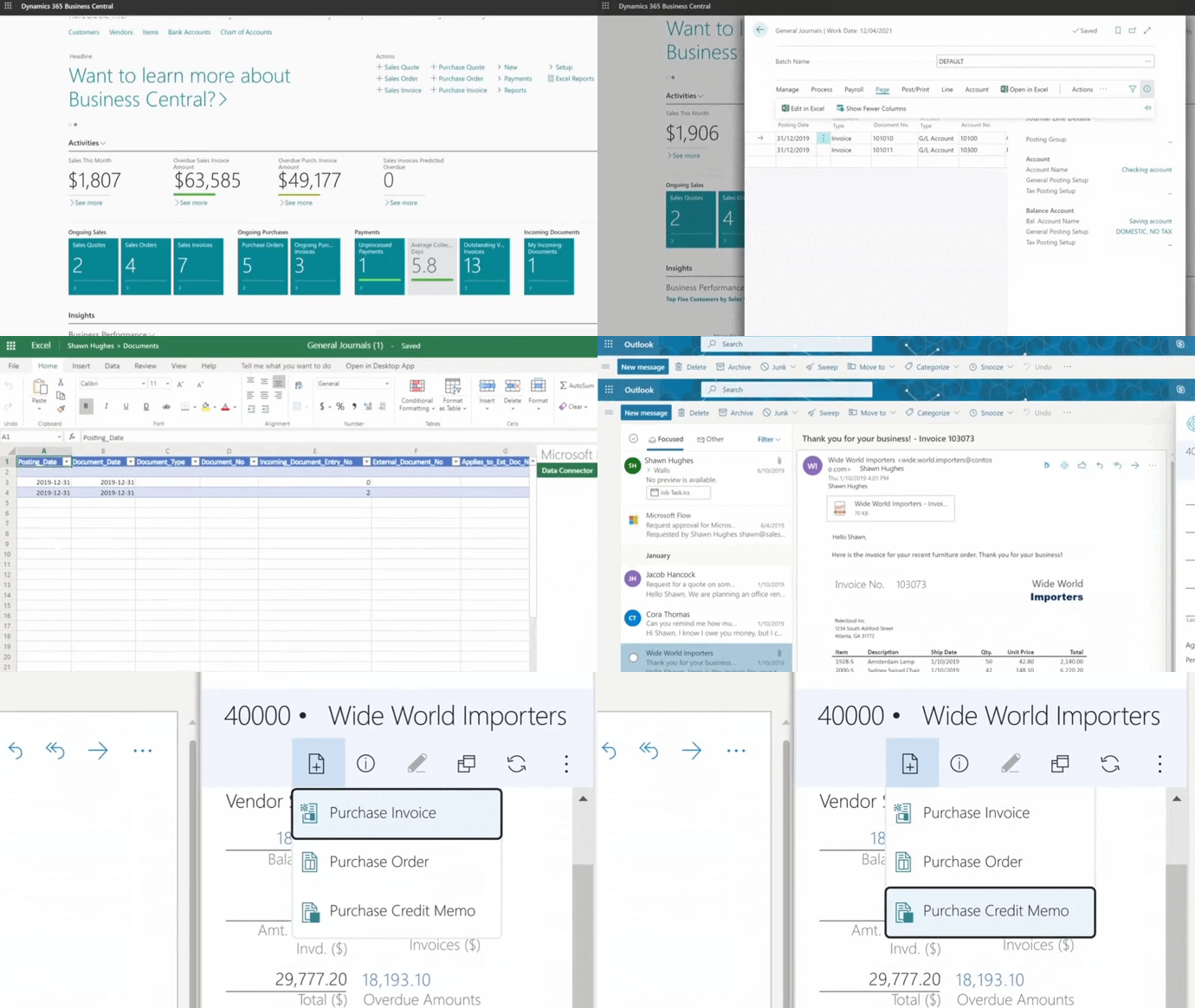
ERP (Enterprise Resource Planning): Connects finance, sales, purchasing, inventory, and logistics in one system. Microsoft Dynamics 365 Business Central is a modern, cloud-based ERP built for small and growing businesses.
Best for: Businesses outgrowing isolated apps, needing real-time financial and operational visibility, or managing inventory across multiple locations.
What they do well: Break down silos. Your order, inventory, shipping, and invoice all update automatically. You see the complete picture of costs, margins, and performance in real time.
When Standalone Logistics Software For Small Business Is Not Enough
Point solutions work well early on. But as you grow, gaps start to appear. Here are clear signs you've outgrown separate apps:
- You enter the same data in three or four places: Customer details, order info, and shipping addresses get typed into your e-commerce platform, then your shipping app, then your accounting software. Every re-entry invites errors.
- You can't see the real cost of an order or delivery route: Your shipping app shows carrier fees, but what about warehouse labor, packaging, and handling time? Without an integrated system, true profitability stays hidden.
- Stock counts go wrong after busy periods: Orders ship, but your inventory system doesn't reflect what left the building. You end up doing manual cycle counts or surprise customers with backorders.
- Invoices lag far behind deliveries: Your delivery app confirms drop-offs, but finance still waits for spreadsheets and manual data entry before sending invoices. This kills cash flow and slows your ability to pay suppliers or invest in growth.
- Reporting takes hours or days: Pulling a simple report, like "which customers are most profitable?" or "what routes cost the most?", means stitching together data from five systems. You spend more time on spreadsheets than strategy.
When you check three or more of these boxes, it's time to consider the best ERP software for distribution that brings logistics, inventory, sales, and finance under one roof. This doesn't mean throwing away your existing tools overnight. It means building a core system that reduces duplication and gives you one source of truth.
How Microsoft Dynamics 365 ERP Business Central Becomes Logistics Software For Small Business
Microsoft Dynamics 365 Business Central is a cloud ERP designed for small and mid-sized companies. As logistics software for small business, it's modular and flexible, built to grow with your operations.
Implementation timelines depend on your integration needs and feature requirements, but the phased approach lets you start with core capabilities and expand over time.
Here's how it handles logistics while connecting everything else your business needs.
Connecting Orders, Inventory, And Logistics Software For Small Business
When a customer places an order, Business Central captures it through your connected channels. Orders from integrated e-commerce platforms (like Shopify) flow automatically, while your sales team enters others directly.
Once in the system, this logistics software for small business checks real-time inventory across all locations and reserves stock automatically.
Your warehouse team sees pick lists on their screen or mobile device. As they pick and pack, inventory updates live. When the shipment goes out, the system records:
- What shipped
- When it left
- Which carrier and tracking number
- Delivery address and customer instructions
All this happens inside one platform. No spreadsheets. No re-entering data. Your sales, warehouse, and finance teams work from the same information at the same time. Fewer mistakes. Faster fulfillment.
Financial Clarity Through Logistics Software For Small Business
Logistics costs hide in many places: carrier fees, warehouse labor, packaging materials, fuel, and handling time. Most small businesses guess at these costs or ignore them until year-end.
Business Central tracks every cost automatically. You see:
- Cost per shipment or per route: Which delivery methods eat into margins and which ones are profitable.
- Margin by customer or product: Identify which customers are worth the logistics effort and which ones cost you money.
- Cash flow and invoicing tied to deliveries: Once a shipment confirms delivery, Business Central can trigger invoicing immediately. You get paid faster. Your accountant sees real-time receivables without waiting for end-of-month reconciliations.
This financial clarity helps you make smarter decisions.
- Should you raise prices for distant customers?
- Can you negotiate better carrier rates?
- Which products are worth stocking?
Business Central gives you the data to answer these questions with confidence.

Extending Business Central With Logistics Apps
Business Central isn't an island. If you need specialized logistics features, you can connect best-in-class apps without losing integration.
Here are some examples:
- Carrier and shipping integrations: Connect directly to Canada Post, Purolator, FedEx, UPS, and others to print labels and track shipments inside Business Central.
- Route optimization tools: Plug in route planning software if you manage local deliveries with your own fleet.
- Warehouse extensions: Add barcode scanning, mobile picking apps, or advanced warehouse layouts if you operate a larger facility.
Gestisoft helps you choose the right extensions and integrates them so your data flows seamlessly. You get the power of specialized tools without creating new silos.
How To Choose Logistics Software For Small Business Without Overspending
Buying logistics software for small business isn't about finding the cheapest option or the one with the most features. It's about matching the tool to your actual needs today, and making sure it can grow with you tomorrow.
Step 1: Map Your Process And Identify Pain Points
Before you look at any software, write down how logistics work in your business right now. How do orders come in? Who picks and packs items? How do you choose carriers? Where does information get lost or re-entered?
Then identify your top three pain points:
- Speed: Are manual tasks eating too much time?
- Errors: Do wrong addresses or inventory mistakes cost you money?
- Visibility: Can you answer "where's my order?" with confidence?
- Cash flow: Are invoices slow because logistics data doesn't connect to accounting?
The right logistics software for small business should directly solve at least two of these problems.
Step 2: Match Software Type And Check Integration
Match to your business model:
- Low-volume e-commerce: Start with shipping label software integrated with your platform.
- Growing local delivery business: Add route optimization and driver management tools.
- Multi-channel or multi-location: Consider an ERP like Microsoft Dynamics 365 Business Central that connects logistics, inventory, finance, and sales.
Check critical integrations before you commit:
- Does it connect to your e-commerce platform, accounting software, and carriers (Canada Post, Purolator, UPS, FedEx)? If the software creates a new data island, you'll end up with the same problems you're trying to solve.
- Can it grow with you? Will it handle twice or five times your current order volume without forcing you to migrate in 12–18 months?
Step 3: Run A Small Pilot Before Full Rollout
Never buy based only on a demo. Test with real data:
- Import sample customer and product data.
- Process 10–20 actual orders.
- Have daily users (warehouse staff, drivers, customer service) try it.
- Measure: Does it save time, reduce errors, improve visibility?
Red flags to watch for:
- Complexity your team can't handle: If it takes weeks of training to do basic tasks, it's not the right fit for a small business.
- Vendor lock-in with no exit plan: Make sure you can export your data and switch providers if needed.
- Poor support or vague answers: If the vendor can't clearly explain how their software solves your specific pain points, keep looking.
Green flags that signal a good choice:
- Fast time-to-value: You see benefits within weeks, not months.
- Clear ROI: You can measure time saved, errors reduced, or faster cash flow.
- Strong support and training: The vendor helps you succeed, not just sell you software.
By following these three steps, you'll choose logistics software for small business that fits your business today and supports your growth tomorrow, without overspending on features you don't need or tools that don't integrate.

Implementation Roadmap For Logistics Software For Small Business
Rolling out new software doesn't have to be overwhelming. A clear plan, clean data, and strong internal ownership make all the difference.
4-Week Starter Plan For ERP-Based Logistics Software For Small Business
- Week 1 – Prepare: Map your current logistics process and identify pain points. Clean your data: customer list, product list, carriers. Remove duplicates and fix errors now. Assign an internal owner to lead questions, testing, and training.
- Week 2 – Configure: Set up Business Central basics (company info, currencies, tax settings) and key logistics features (warehouses, carriers, shipping methods). Import clean data and set up integrations with your e-commerce platform and carriers.
- Week 3 – Pilot: Pick a small subset of orders to test. Have your internal owner and 2–3 key users process real orders. Track results and fix issues before rolling out to the entire team.
- Week 4 – Go live: Train all users, switch key workflows to Business Central, and turn off old spreadsheets for tested areas. Monitor closely for the first week and stay available to adjust workflows.
After 30 days, review what's working and phase in additional features or locations.
Common Mistakes With Logistics Software For Small Business
- No internal owner: If no one is responsible, the project drifts. Assign a champion early and give them time and authority to lead.
- Skipping data cleanup: Importing dirty data creates chaos from day one. Dedicate time in Week 1 to clean customer, product, and supplier data.
- Turning on too many features at once: Start with the core workflow that solves your biggest pain. Add features in stages as your team builds confidence.
Get your logistics ERP rollout plan
Share your goals and constraints, and we'll outline a tailored Business Central implementation roadmap for your logistics.
 Free discovery call
-
Logistics software for small business helps you manage orders, inventory, shipping, and deliveries in one place. It ranges from simple shipping apps to full ERP systems like Business Central that connect logistics with finance and sales. The right type depends on your order volume and how much integration you need.
Why Gestisoft For Logistics Software For Small Business
Gestisoft is a certified Microsoft partner helping small and mid-sized businesses across Canada implement Microsoft Dynamics 365 Business Central.
Our ERP specialists don't just install software… We understand your logistics challenges, map your workflows, and design solutions that fit your team and budget.
What makes us different:
- Combined expertise: We optimize both logistics operations and financial performance. Most vendors focus on one or the other.
- Industry experience: We've worked with distributors, manufacturers, e-commerce brands, and service companies. We know your sector's logistics pain points.
- Fast, practical rollouts: We get you live quickly with focused implementations, then add capabilities as you grow.
- Local support: With offices in Montreal, Toronto, Ottawa, and Quebec City, we're here when you need us.
Liked what you just read? Sharing is caring.

February 26, 2026 by Muhammad Ali Iqbal by Muhammad Ali Iqbal SEO Content Strategist & Copywriter
Driven by a passion for search engine optimization, strategic content, and conversion-focused writing. A copywriter and content strategist who lives for content that ranks, engages, and delivers real business results.
