
Most commercial HVAC operators in Canada hit a point where the software that once ran the whole shop starts working against them. The HVAC field service management software they bought in the lean years, usually Housecall Pro, Jobber, FieldEdge, or something similar, was designed for a residential contractor who does a single visit to fix a dead furnace then sends an invoice once the heat is back on. That covers a homeowner in February, but a maintenance contract spanning the rooftop units across a client's whole building portfolio is another matter.
By the time a company goes looking for HVAC field service management software that can keep pace, the workarounds have piled up. The service agreements that drive most of the revenue are tracked in a spreadsheet off to the side of the software. Refrigerant readings sit in a separate log, and completed work orders get keyed into accounting by hand because the field tool and the finance system have never connected. None of it is free. Every workaround has a cost, in hours lost to manual entry and in revenue that stays uninvoiced while the paperwork catches up. This is the exact disconnect a commercial field service integration is built to close.
What separates a residential-grade tool from one built for commercial work comes down to five operational layers the lighter platforms were never meant to carry. Knowing each one is how you choose your next platform.
Handle your commercial complexity with the right HVAC field service management software
Gestisoft helps Canadian commercial HVAC companies evaluate whether their current platform supports the service agreements and asset tracking their operations require.
 Book a free consultation
Residential tools versus commercial-grade HVAC field service management software
Residential field service tools earn their popularity. For a contractor running a few trucks on furnace repairs and one-off installs, residential HVAC software like Housecall Pro or Jobber is quick to set up, easy on the budget, and does exactly what that business needs. The trouble is that these tools are built for a different job. A commercial operation is asking them to do work they were never designed for.
What residential HVAC software does well
- Fast scheduling for one-off jobs, where a single visit gets booked, dispatched, and closed without any ongoing contract behind it.
- Simple invoicing, raising a bill per job with minimal setup.
- A low monthly cost that suits a small team watching every dollar.
- A short learning curve, so a two-person office is running on it within a week.
For a residential contractor, that covers the whole operation so the tool fits the business.
Where commercial HVAC operations need more from their software
A commercial HVAC operation runs on structures residential software has no place to put. This is where field service management software for HVAC has to go further:
- Asset hierarchies that track equipment by building, by system, and by individual unit, not by a single street address.
- Service agreement automation that turns 200 active contracts into scheduled work orders without anyone building them by hand.
- Refrigerant compliance tracking captured as structured data on every work order, ready for an audit on demand.
- Multi-location parts inventory spanning the warehouse, the branches, and every service vehicle in real time.
- Native ERP integration so a closed work order becomes an invoice without a re-typing step in between.
Those five are the operational layers a commercial-grade platform is built around. A residential tool can handle one or two with a spreadsheet on the side for a while but commercial field service software exists for the operations that need all five at once.

How HVAC field service management software should handle asset hierarchies across commercial building portfolios
Walk onto a commercial site and you're not dealing with one address and one furnace. A single rooftop unit belongs to a larger HVAC system, which serves a building, and the building is one property in a client's wider portfolio. HVAC field service management software built for residential jobs records the street address and stops there. Commercial work needs every tier of that structure tracked on its own, from the individual unit up to the portfolio, since that's the level the operations team makes its decisions at.
What the technician sees with HVAC field service management software
The payoff shows up the moment a technician arrives. Pull up the rooftop unit they came to service and the full repair history for that exact piece of equipment is there, with any open work orders on other units in the same building sitting beside it. This works because the software gives every unit its own field service entities record, so the equipment carries its history forward through every visit and the technician knows what happened last time before lifting a panel.
What the operations manager sees with commercial HVAC software
Step up to the portfolio view and the same structure answers bigger questions. An operations manager can see which units across every client site are nearing the end of their service life and which buildings have slipped enough preventive visits to put an agreement at risk. Equipment that keeps failing shows its pattern too, the repair-or-replace call that field service for industrial machinery turns on, where one expensive unit's full record settles the question.
Why residential HVAC software breaks down at scale
The contrast with residential software is sharpest at scale. A tool that logs jobs by customer address copes fine when the address has one furnace. Give it a building with 40 rooftop units, ask which of them were serviced last quarter, and the address tells you nothing. Commercial operations need the equipment itself to carry a history that builds over its full service life, because that's the only way the data survives past the individual visit.
Why service agreement automation separates commercial HVAC field service management software from residential tools
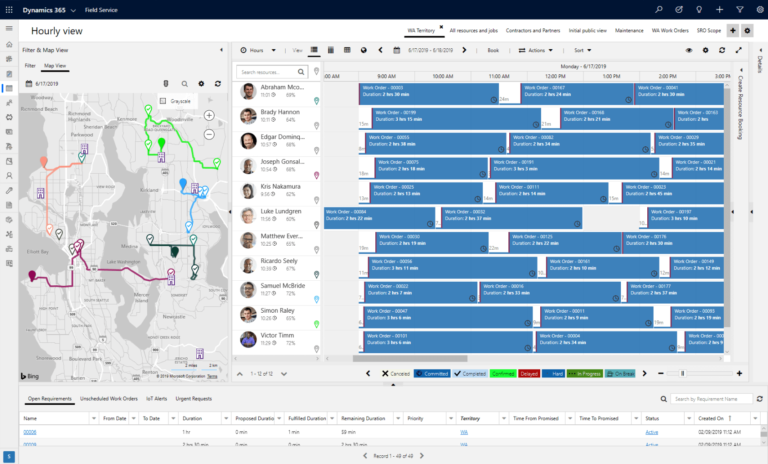
Service agreements are where commercial HVAC makes its money. A mid-sized Canadian operation might be carrying 200 of them at once, each with its own visit cadence, coverage terms, and renewal date. When the HVAC field service management software can't turn those contracts into scheduled work on its own, somebody on the operations team spends a chunk of every week building the visits by hand and chasing down whether last month's maintenance ever got done. That's payroll spent on data entry a system should handle, and it scales badly the moment the agreement count climbs.
Automating work orders from agreements with HVAC software
Automation closes that gap because the software reads the preventive maintenance schedule written into each field service agreement and generates the work orders itself. A quarterly filter change across 40 rooftop units at one building drops 40 work orders into the queue at the start of each quarter with no one touching a thing, and the operations manager moves straight to reviewing and dispatching them.
Tracking SLAs and response times using field service software
SLA tracking is the accountability half of the same system. An agreement that promises a four-hour emergency response means little if nobody is measuring whether the team hit four hours on the last callout. Commercial-grade software logs the response time on every emergency and keeps the running record, so when one account keeps slipping past its guaranteed window, the operations manager catches the pattern months before it surfaces as a complaint at renewal. Predictive maintenance built on connected field service data pushes that even earlier by flagging equipment likely to fail before the emergency call comes in at all.
One more thing changes once the agreement is in the system. The contract that sets out the visit schedule now generates the work orders for it and keeps every completed job matched to what gets billed.

What HVAC field service management software should track for Canadian refrigerant compliance
Any commercial HVAC operation in Canada working with regulated refrigerants is operating under environmental law and the federal framework set out in the Canadian Environmental Protection Act plus a layer of provincial requirements that change depending on where the job happens. The HVAC field service management software running the business has to carry what those rules expect. Every service event that touches refrigerant needs its own record, and a compliance-ready one captures four things:
- Refrigerant type. Which refrigerant went into the unit, since the regulations treat different refrigerants differently and a report has to show exactly what was handled on site.
- Quantity charged. How much refrigerant was added during the service, the figure that proves what entered the system and feeds the leak calculations a regulator can ask to see.
- Quantity recovered. How much was pulled out of the equipment, which has to be documented for safe disposal or reclamation and balances against what was charged.
- Equipment serial number. The specific unit the work was done on, so the whole refrigerant history ties back to one identifiable piece of equipment rather than a vague site address.
When a client or a regulator asks for a compliance report, that record is what the company hands over, and gaps in it are the company's problem.
How residential HVAC software falls short on refrigerant tracking
Most residential-grade software has nowhere proper to put any of this. A technician might key the refrigerant amount into the general comments box at the foot of the work order, or might skip it, since nothing in the tool asks for it. The numbers end up as loose notes scattered across hundreds of jobs. Then an audit arrives and the operations manager is reassembling figures from handwriting and memory, weeks after the technician who did the work has moved on to a hundred other calls.
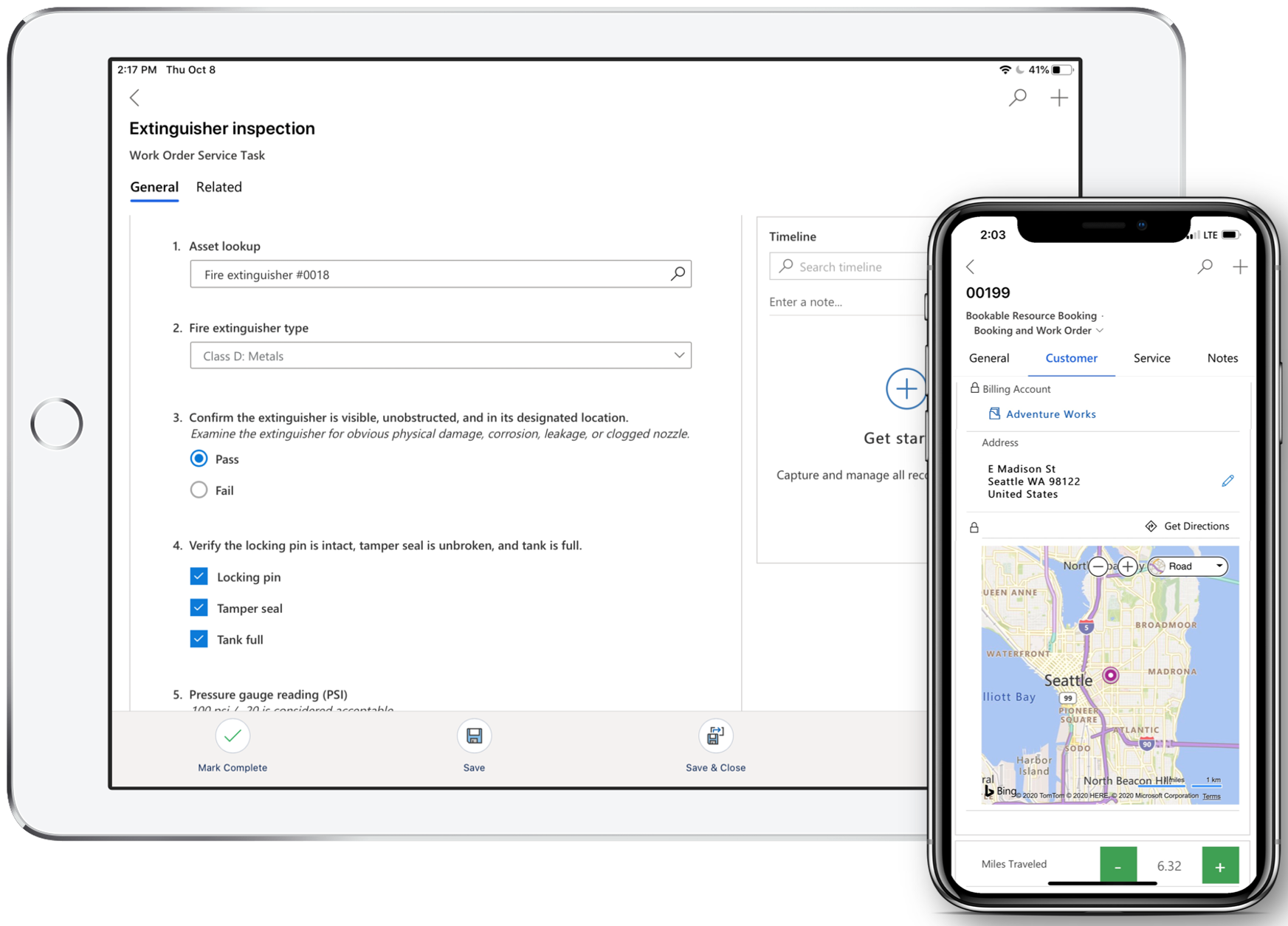
Commercial-grade HVAC field service management software treats refrigerant data as its own set of fields on the work order. During the service call the technician enters those same readings straight into the field service mobile app while the unit is in front of them. From there it sits as real data, searchable by equipment, by building, by client, or across whatever date range a report calls for.
What keeps that capture clean is the inspection step built into the work order. Field service inspections put the refrigerant fields directly into the technician's standard checklist, so they get filled in during the job as one of the steps, with no separate logbook running alongside. Reports then pull straight from those fields, which turns a refrigerant compliance summary into a search the operations manager runs in a couple of minutes.
Generate a refrigerant compliance report in minutes
Gestisoft configures Dynamics 365 Field Service for Canadian commercial HVAC companies so compliance documentation is built into every work order.
 Book a free consultation
How HVAC field service management software should handle parts inventory across warehouses and service vehicles
A technician opens up a rooftop unit, finds the compressor needs a part, and the part isn't on the truck. On residential-grade HVAC field service management software, that's a phone call to the warehouse and a second visit booked for next week. Commercial-grade software lets the technician check current stock across every warehouse and van from their phone, find which location holds the part, and arrange the pickup or transfer before leaving the site.
The capability underneath that is inventory tracked at every location, for example, the central warehouse, each branch, and the stock riding around in each service vehicle. Logging field service work orders does the inventory work as a byproduct. The moment a technician records a used part and closes the job, the stock count drops on its own, with no separate update to remember. Stock dropping below a set threshold triggers a reorder before anyone runs out, and because usage ties back to the specific unit it went into, the operations manager can spot equipment burning through parts at a rate that says something's wrong with the asset itself.
There's a scheduling dividend too. When the system knows which van holds which part, dispatch can send the technician who's already carrying what the job needs, which is where parts data feeds into resource scheduling optimization and stops the avoidable second trips before they get booked.
Most commercial operations run a parts spreadsheet off to the side of their HVAC field service software, maintained by hand and out of date by Tuesday. Folding inventory into the same system that holds the work orders and the asset records retires that spreadsheet for good. The operations manager reads stock, consumption, and service history off one screen, with no second platform to reconcile against at month end.
Why HVAC field service management software needs to connect to your back office financials
The priciest leak in a commercial HVAC operation runs along the seam between the field and the back office. A technician closes a work order on their phone with the labour hours, the parts fitted, and the travel time all on it. On a residential tool that information stays parked in the field software until somebody at a desk opens QuickBooks and types it back in to raise the invoice. Do that across a few hundred work orders a month and the damage stacks up with invoices going out late and finished work sitting uninvoiced while the cash it represents waits on someone to get there.
Commercial-grade HVAC field service management software wires the two sides together so a completed work order becomes an invoice on its own. The labour rates, the parts pricing, and the billing terms set in each agreement all apply automatically, so the back office checks the invoice and sends it. That same tight loop between field and office is what lets route optimization software pay off, because the travel time a smarter route saves only reaches the books when the field data flows through without a re-typing step in the middle.
How commercial HVAC software connects to your ERP
When the field platform connects natively to the company's ERP, the accounting stops lagging the work. Closing a single job sets three things moving at once:
- The invoice gets raised, with the labour rates and parts pricing already applied
- The parts used come off inventory as cost of goods
- The labour hours land against project costing
So the month's financial picture reflects what happened in the field that week, not what someone finds time to key in a week later.
The bottleneck that sends operations searching for HVAC field service management software
For a Canadian operation running QuickBooks next to a residential field tool, the gap between them is usually the one that finally sends them looking. Scheduling friction and asset tracking can be worked around for a while. A finance team rekeying hundreds of work orders a month is a standing cost that compounds, and it tends to be the bottleneck that starts the search for HVAC field service management software built to close the loop, the same way universal scheduling closes the gap between the dispatch board and the technician's day.
Connect your field operations to financials with the right HVAC field service management software
Gestisoft implements Dynamics 365 Field Service with Business Central integration for Canadian commercial HVAC companies.
 Free discovery call
How Gestisoft implements HVAC field service management software for Canadian commercial HVAC operations
A commercial HVAC operation runs on machinery a residential tool was never built to carry. Gestisoft builds that capability on Dynamics 365 Field Service, configuring the platform around how a commercial operation runs for Canadian operators who've outgrown the tool that got them started. The work begins by mapping the asset hierarchy down from the portfolio to the individual rooftop unit, building out the service agreements with their visit schedules, and setting up the inspection templates that capture refrigerant and compliance data as structured fields the technician fills in on site.
We start by mapping where the client's parts are stored. The central warehouse and the branches each become their own tracked location, and so does the stock moving around in every service van. We load the parts catalogue and set each reorder threshold against how fast that particular item moves, so the platform flags a part for reorder before a technician ever reaches an empty shelf. The per-vehicle counts go in during the same build, which means the operations team logs in on the first morning to stock they can dispatch against.
For operators already on Business Central, Gestisoft connects Field Service to your ERP so a closed work order moves into invoicing and financial reporting automatically. This means the ROI of Dynamics 365 Field Service shows up in books that track the field in real time. For operators on QuickBooks or anything else, the integration route gets mapped during discovery, before a contract is signed, so the financial connection is a planned piece of the project.
Two things tend to matter more to Canadian commercial operators than a feature list. The first is language. For HVAC companies with Quebec clients, the work order templates, the custom schedule board, the technician's mobile screens, and the customer-facing paperwork are all configured in English and French from the start. The second is what happens after go-live. Commercial HVAC swings hard between heating season and cooling season, and a configuration that fits in February gets tested differently in July, so Gestisoft's Customer Success Manager stays in it through the full cycle to adjust the build once the team has run it under real seasonal load.
The platform a commercial operator chooses ends up shaping how the business runs. Residential software keeps a company working one job at a time, one address and one invoice, even after the operation has grown into building portfolios and year-round service agreements. Gestisoft's job is closing the distance between the two, getting the system up to the scale the business is already working at.
-
HVAC field service management software is a platform that coordinates scheduling, dispatching, work order management, and invoicing for HVAC service operations. Commercial-grade platforms add asset management, service agreement automation, parts inventory tracking, and ERP integration to handle the operational complexity that residential tools do not address.
Explore more
- How to create a work order in Dynamics 365 Field Service
- The complete guide to inspections using Dynamics 365 Field Service
- How to personalize the Dynamics 365 Field Service mobile app
- Everything you need to know about universal scheduling in Dynamics 365 Field Service
- Resource scheduling optimization for Dynamics 365 Field Service
- What is the ROI of Dynamics 365 Field Service
Liked what you just read? Sharing is caring.

June 12, 2026 by Shelley Sunjka by Shelley Sunjka Copywriter & Marketing Strategist
Armed with a psychology degree and an irrational obsession with okapis, I've spent the last decade helping bold brands tell better stories. I believe the best writing bends grammar rules on purpose and makes people feel something. When I'm not deep in words or nerding out on buyer behaviour, I'm probably convincing my kids that impromptu kitchen dance parties are totally normal.


