

A distribution ERP is the system that holds a wholesale business together once spreadsheets and disconnected apps stop being enough. If you're researching this category, you probably aren't asking what the software does in general terms. You're asking whether you actually need one, what it should look like for a Canadian operation, and how to avoid the mistakes other distributors talk about.
This guide is built for that conversation. We'll cover what the system really is, when it's the right move, what it costs in Canada, and where projects go sideways.
Get a Clear Path to Your Distribution ERP
Walk away with a phased plan, honest scope, and a realistic timeline mapped to your warehouse, sales, and finance workflows.
 Free discovery call
What Is a Distribution ERP and What Does It Actually Do?
A distribution ERP is a single system that runs the parts of a wholesale business that have to work together: purchasing, inventory across one or many warehouses, order entry, picking and shipping, customer pricing, accounts payable and receivable, and the finance layer that ties everything to your books.
The shorter way to put it… the platform replaces the patchwork of QuickBooks, an inventory app, a spreadsheet for customer pricing, and the email thread where your sales rep checks stock with the warehouse.
A modern ERP distribution platform gives one source of truth for stock, one place to issue a quote, one place to invoice, and one set of numbers your accountant can close the month with.
How a Distribution ERP Is Different From a Regular ERP
A generic ERP can handle accounting and basic inventory for almost any business. The distribution version is the same foundation with the parts wholesalers actually live in built deeper.
In practice that means:
- Multi-warehouse stock visibility, not just one location and a count.
- Lot, serial, and bin tracking that survives audits.
- Customer-specific pricing, volume tiers, and contract pricing as defaults, not workarounds.
- Landed cost on imported goods so your true margin isn't hiding in a spreadsheet.
- Pick, pack, and ship workflows a warehouse operator can run on a scanner.
If a vendor is selling a generic platform and promising to customize it into something distribution-ready, that's a flag, not a feature.

Do You Really Need a Distribution ERP Right Now?
Some businesses search for this kind of software and discover they're not ready. Others wait two years longer than they should have and pay for it in lost margin. The real question is whether your operation has crossed the line where running blind costs more than fixing it.
Signs You're Ready for a Distribution ERP
You probably need one if:
- Sales reps quote stock that turns out not to be on the shelf.
- Month-end close takes more than a week and someone always finds a discrepancy.
- Customer pricing lives in a shared Excel file that two people are afraid to touch.
- You can't tell which products are actually profitable after freight, returns, and rebates.
- You've added a warehouse and nobody knows what's where.
- Your team copies the same order into three different systems.
Most distributors hit this wall between $5M and $15M in revenue, or when SKU counts climb past a few thousand. If most of that sounds familiar, the case for Excel versus ERP for inventory management becomes hard to argue.
When a WMS or Inventory App Is Enough (For Now)
Not every operational problem is an ERP problem.
If your books are clean, your sales process works, and the only place you're hurting is on the warehouse floor, a focused warehouse management system might do the job.
The same logic applies to a standalone inventory app for a single-location operation with a tight product range. The lines between ERP and WMS blur in marketing copy, but they solve different problems.
The decision comes down to this: if your pain is one workflow, fix one workflow. If your pain is that none of your workflows know about each other, you need a distribution ERP.
What a Distribution ERP Should Do for a Canadian Wholesaler
The functional checklist for any distribution software systems shortlist is long. We'll focus on the parts that matter most for a Canadian operation, where the local context changes what "good enough" looks like.
Inventory and Warehouse Operations
The inventory layer is where the system earns its keep or fails the audit. At minimum it needs:
- Real-time stock by location, bin, and lot.
- Cycle counting and full physical inventory with variance reporting.
- Reservations and back-order handling so promised stock stays promised.
- Receiving, put-away, picking, packing, and shipping a warehouse team can run on a mobile scanner.
- Returns processing that doesn't need finance approval for every credit.
If a demo glosses over how the system handles a partial shipment or a damaged return, slow them down and ask. That's where the unsexy reality of distribution lives.
Pricing, Margins, and Customer-Specific Deals
Wholesale pricing is rarely a single list. The platform needs:
- Customer-specific price lists and contract pricing.
- Volume break tiers and promotional pricing windows.
- Rebate programs and end-of-period accruals.
- Multi-currency for cross-border customers and suppliers.
The test in a demo: "Show me a customer with three contract prices, two volume tiers, and a quarterly rebate." If the salesperson has to call an engineer, you're going to live in that workaround later.
Finance, Tax, and Compliance Built for Canada
This is where many U.S.-built systems start to wobble. A Canadian operation needs:
- GST, HST, and QST handled natively, not bolted on.
- Bilingual interface for teams working in English and French.
- Canadian payroll integration paths that don't require duct tape.
- Data residency in Canadian regions if that matters for your customers or industry.
- Year-end reporting that doesn't require a consultant on speed dial.
Microsoft hosts Business Central in Canadian data centres, which removes one of the bigger headaches for distributors weighing cloud options. Sales tax, multi-currency, and bilingual operations are first-class features here, not afterthoughts.
Score Your Shortlist Against 10 Selection Criteria
A practical guide that walks you through 10 key criteria for choosing the right ERP, so you can evaluate options based on what actually predicts a successful project.

Which Type of Distribution ERP Fits Your Size of Business?
There is no single best system for every distributor. There's the one that fits where you are today and the one you're growing into. Most Canadian wholesalers fit into one of three profiles, and the right software is usually different for each.
Entry-Level Distribution ERP for First-Time Buyers
This is the operation under roughly $10M in revenue, one or two warehouses, fewer than 25 users, and a stretched finance team. You're moving off QuickBooks and spreadsheets, and the priority is getting a clean, connected system to live without a two-year project.
What matters here: fast implementation, predictable pricing, room to add modules, and a partner who won't push complexity you don't need. The trap to avoid is buying an enterprise platform "because we'll grow into it" and configuring features you'll never use.
Scaling Up for Growing Mid-Market Distributors
This is the operation between $10M and $100M, multiple warehouses, 25 to 150 users, and complexity that's outrunning the team. Pricing rules are layered, the warehouse needs barcode workflows, and finance wants better reporting.
What matters here: deep inventory and pricing functionality, strong reporting, and integrations with the shipping carriers, EDI partners, and e-commerce platforms you already run. This is the sweet spot where most ERP for distributors projects deliver the strongest return, and where Microsoft Dynamics 365 Business Central is most often the fit.
Complex Operations and Multi-Entity Setups
This is the operation over $100M, multi-entity, often multi-country, with hundreds of users and processes that are genuinely complex. You may have manufacturing in the mix, custom integrations, and a parent-subsidiary structure that needs proper consolidation.
What matters here: deep customization, multi-entity financials, advanced supply chain planning, and the ability to handle edge cases. Business Central stretches into the lower end of this profile. At the upper end, Dynamics 365 Finance and Operations may be the better answer.
Before sitting through a vendor demo, here's a quick look at the Business Central interface our distribution clients work in every day.
How to Evaluate a Distribution ERP Demo Without Getting Misled
Most demos are scripted. The clean workflow on screen is the one that works. The interesting question is what happens when your real-life mess hits the system.
Bring real data. A customer with three price lists, an order shipping from two warehouses, and a return on a serial-tracked item. Watch what happens.
Red Flags to Watch for in a Vendor
A few patterns to flag in demos:
- The salesperson can't explain how the system handles your tax setup without checking.
- Every question about distribution workflows ends with "we can customize that."
- Case studies are manufacturing or retail, not distribution.
- They can't name a similar distributor they've delivered to in months, with a real client name.
- The implementation team is different from the team selling you.
- They promise a fully automated rollout in 30 days.
Questions worth asking before you sign:
- "Walk me through a distributor your size you've delivered in the last 18 months."
- "What's your average implementation timeline, and the longest one you've done?"
- "Who will actually do the implementation? Can I meet them?"
- "What does support look like 12 months after go-live?"
- "Show me how the system handles a partial shipment, a backorder, and a return on a lot-tracked item."
If a vendor stumbles on those, the demo isn't the problem. The fit is. Strong ERP consultancy services welcome these questions because they answer them all the time.
Pressure-Test Your Distribution ERP Plan With an Expert
Bring your shortlist, your pain points, and your growth goals. Leave with clarity on scope, risks, and the right next move.
 Free discovery call
How Much Does a Distribution ERP Cost in Canada?
It depends. But ranges are useful.
For a Canadian SMB distributor moving from QuickBooks and spreadsheets to Microsoft Dynamics 365 Business Central, total first-year cost typically lands between $40,000 and $150,000. That covers licensing, implementation, data migration, training, and stabilization after go-live. Larger or more complex operations land higher. Enterprise platforms with deep customization climb past that range.
The big drivers:
- Licensing. Subscription based, per user per month. The smallest of the three cost categories for most distributors.
- Implementation. Usually the largest line. Discovery, configuration, data migration, integrations, and training. Scales with complexity, not just size.
- Customization and integrations. EDI, shipping carriers, e-commerce, third-party WMS, and custom workflows. Resist customizing what standard functionality already handles.
What we tell distributors in scoping: ask any partner to break the quote into licensing, services, and integrations as three separate lines. A single number gives you nothing to compare.
Realistic Implementation Timelines
For most Canadian SMB distributors, a Business Central rollout runs three to six months for a first phase covering finance, inventory, sales, and purchasing. Add a warehouse module, EDI, or e-commerce integration and you're at six to nine months. Multi-entity, multi-country projects can run a year or more.
If a vendor quotes 30 days for a real distribution rollout, you're either getting a stripped-down version or you'll discover the rest of the work after signing.
Common Mistakes That Wreck a Distribution ERP Project
A few patterns show up again and again when these projects go badly.
- Buying for who you used to be. Picking a system based on last year's volume, not the next three years.
- Letting features decide instead of fit. A long feature list isn't the same as a system that suits how your team actually works.
- Skipping the data cleanup. Garbage data in your old system becomes garbage data in your new one, only faster.
- Treating implementation as the vendor's problem. The vendor brings the system. You bring the business knowledge. Both have to show up.
- Customizing what you should configure. Every custom modification is a future upgrade tax. Use standard functionality wherever it gets you 80% of the way.
- Choosing a partner on price alone. The lowest quote almost always becomes the most expensive once change requests start.
A good ERP software consultant will flag these in scoping, not after the contract is signed.
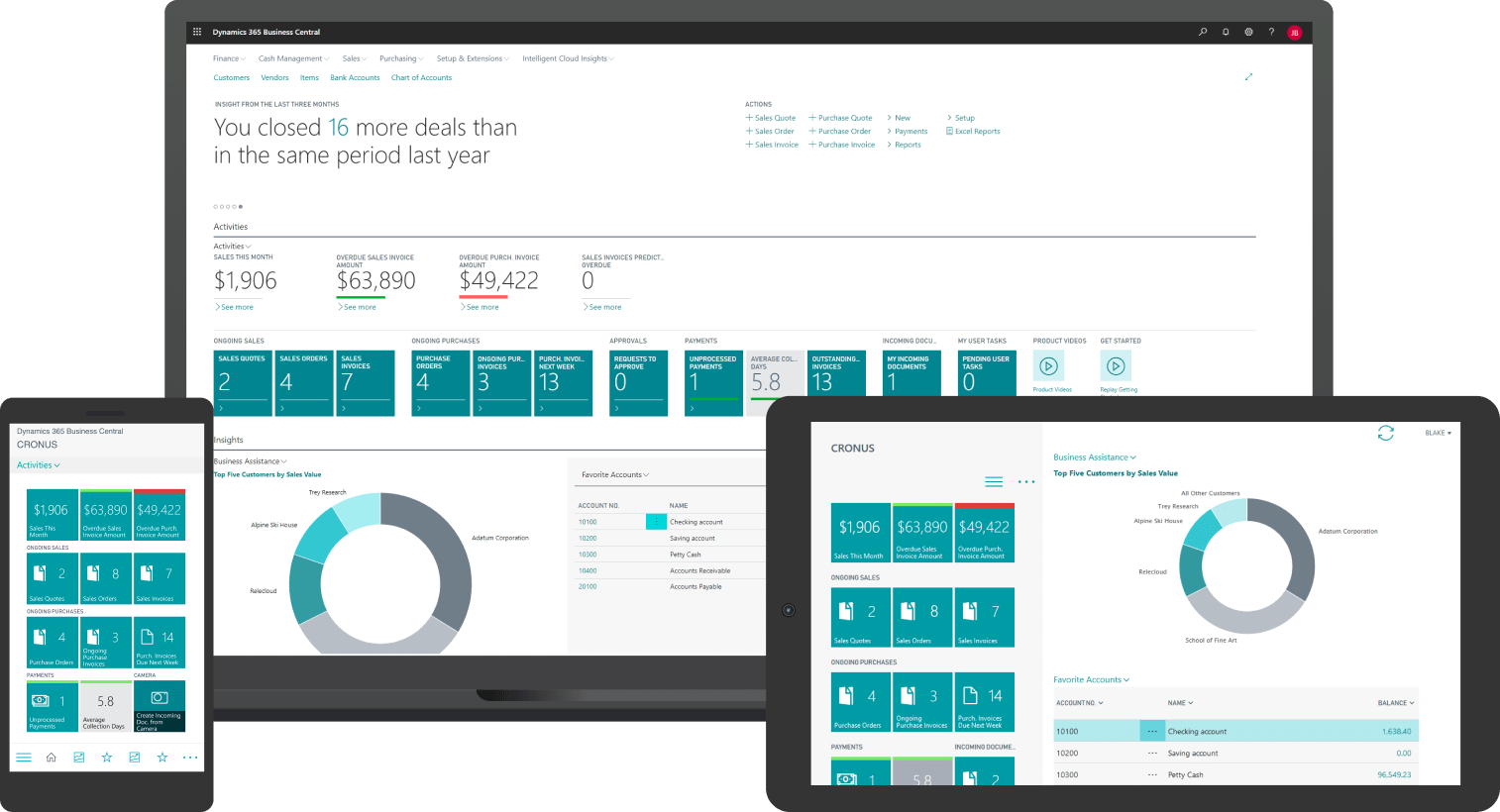
Why Microsoft Dynamics 365 Business Central Works as a Distribution ERP
Most Canadian SMB and mid-market distributors we work with land on Microsoft Dynamics 365 Business Central. It's not the right answer for every operation, but for distributors in the $5M to $100M range, it tends to balance functionality, cost, and scalability better than the alternatives.
The reasons that come up consistently:
- Core distribution workflows work out of the box: inventory, multi-warehouse, customer pricing, picking and shipping, finance, and AR/AP all in one system.
- It plays well with the Microsoft stack most teams already use. Outlook, Teams, Excel, Power BI, and Copilot are native.
- Canadian tax, multi-currency, and bilingual operations are first-class.
- It scales. The same platform that runs a $10M distributor supports a $100M one with more modules, not a re-platforming project.
- The Canadian partner ecosystem is mature. You're not stuck with one consultant.
Groupe UP, a Canadian distributor of construction and industrial products in operation since 1972, is one example. Their VP Finance described their previous setup as:
"...like having a stone hammer. We could accomplish our tasks, but the tool was outdated..."
After migration to Business Central, monthly closings that used to take half a day were significantly faster. Here’s the full Groupe UP customer story.
-
A regular ERP handles accounting and basic operations for almost any business. A distribution ERP is built deeper around wholesale workflows: multi-warehouse inventory, customer-specific pricing, picking and shipping, landed cost, and returns. Distributors who retrofit a generic platform usually pay for it in customization.

Why Canadian Distributors Choose Gestisoft as Their Distribution ERP Partner
Gestisoft is a Canadian Microsoft Solutions Partner that has been implementing Business Central and Dynamics 365 for Canadian businesses for more than two decades. Our team serves clients across North America, in both English and French.
A few things shape how we approach these projects:
- Certified Microsoft Solutions Partner and a B Corp. The certification covers the technical depth. The B Corp side reflects how we run the relationship.
- Great Place to Work Canada and Canada's Most Admired Corporate Cultures recipient. The team you meet in the sales call is the team you'll work with through go-live.
- We scope honestly. If a phased approach is right, we'll say so. If your operation isn't ready yet, we'll tell you that too.
Our distribution clients stay with us. Long after go-live, we're still the team they call.
Here's how one of them put it.
“As a customer since 2015, I would like to highlight the quality of support and expertise provided by Gestisoft for our Business Central application. Their competence is notable and has greatly contributed to the success of my business. I highly recommend them as a service provider for Business Central.”
If a conversation with our team is the right next step, we'd be glad to set one up.
Map Your Distribution ERP Roadmap With Gestisoft
Sit down with a senior Business Central consultant. Get a clear scope, phased timeline, and an honest view of what your project will actually look like.
 Free discovery call
Liked what you just read? Sharing is caring.

May 22, 2026 by Muhammad Ali Iqbal by Muhammad Ali Iqbal SEO Content Strategist & Copywriter
Driven by a passion for search engine optimization, strategic content, and conversion-focused writing. A copywriter and content strategist who lives for content that ranks, engages, and delivers real business results.
