

Copilot for manufacturing is the AI assistant layer that sits inside the Microsoft tools your factory already uses, helping operators, planners, and managers work faster with the data they already have. Big consulting firms write white papers about it. Most articles about it sound like brochures. This guide does not…
If you run a Canadian factory, you already know the pressure. Skilled tradespeople are retiring. Shift coverage is thin. Customers in the US want faster quotes since CUSMA tariff shifts started biting margins. Your team is still chasing data across spreadsheets, paper handovers, and three different systems.
Cut the Copilot Guesswork Out of Your Business
Our team maps the right Copilot use cases to your shop floor, your data, and your roles before you ever pay for a single licence.
 Free discovery call
6 Real Ways Copilot for Manufacturing Pays Off on the Factory Floor
These are the use cases we see actually moving the needle in Canadian factories running on Microsoft Dynamics 365 Business Central.
1. Shift Handovers and Capturing Tribal Knowledge
Your night shift lead writes a one-line note on a clipboard. The morning lead reads it, sort of. The third-shift veteran who knew why Line 4 always jams retires in March.
Copilot for manufacturing inside Microsoft Teams turns shift notes, chat threads, and meeting recordings into a searchable record. Anyone can ask, in plain English, "what happened on Line 4 last night?" and get a clean summary.
Tribal knowledge stops walking out the door with every retirement.
2. Predictive Maintenance and Machine Troubleshooting
Connect Copilot to your SharePoint library of manuals, past work orders, and machine logs. A maintenance tech standing in front of a stopped CNC can pull out a phone, describe the noise, and get a ranked list of likely causes drawn from your own repair history.
This is not science fiction. It runs on Microsoft 365 Copilot with SharePoint indexing. Setup takes weeks, not months, if your documents already live there.
3. Production Reporting Inside Business Central
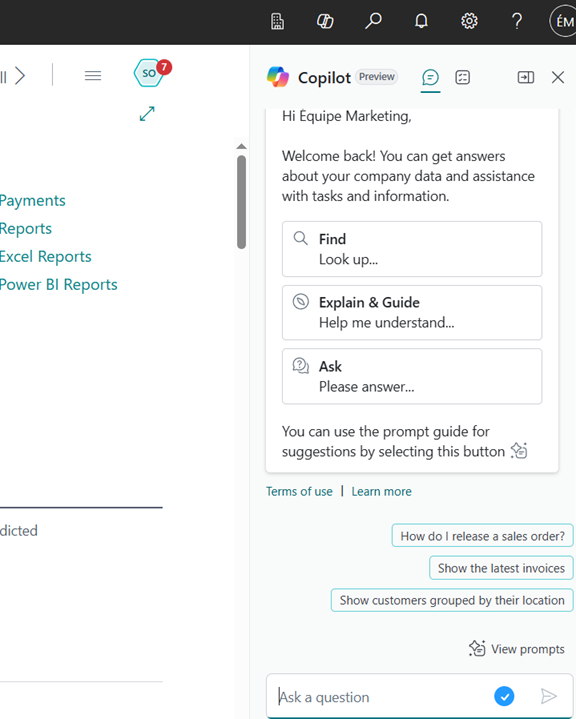
If you run Business Central, Copilot is built into the platform. Ask it, "show me production output for SKU 4421 last month versus the same month last year." You get a table back. No BI request, no analyst, no waiting.
For the bigger picture, our AI in ERP breakdown covers how Microsoft has woven generative AI through Business Central, from chat to autonomous agents handling sales orders and payables. ERP-level AI is no longer a separate purchase, which is the part most coverage misses.
4. Supplier and Quality Issue Triage
A quality complaint comes in by email. Copilot for manufacturing reads it, pulls the related sales order from Business Central, finds the supplier's last three lots, and drafts a response to the customer plus an inquiry to the supplier.
What used to be a 40-minute scavenger hunt becomes a five-minute review-and-send.
5. Sales Orders, BOMs, and Item Descriptions With Copilot for Manufacturing
Inside Business Central, Copilot can draft item descriptions from a few prompts, build sales orders from incoming customer emails through the Sales Order Agent, and explain a bill of materials in plain language to a new planner.
A junior planner who would have needed three months to learn the BOM structure can ask questions in English and get useful answers on day one.
6. Custom Agents Built in Copilot Studio
This is the most powerful and the most over-promised use case. With Copilot Studio, you can build an agent that watches a shared inbox, identifies purchase order acknowledgements, extracts promised dates, and updates Business Central.
The build takes real work. But once running, a well-scoped Copilot for manufacturing agent absorbs an hour or two of administrative time per day across your buyers. Our Microsoft Copilot consulting walkthrough goes deeper on where this approach pays off.
A short demo of what this looks like on a real machine troubleshooting workflow:
Where Copilot for Manufacturing Actually Lives in Your Microsoft Stack
Copilot is not one product. It is three. Knowing which one you need keeps you from buying the wrong licence or missing a free feature you already own.
Microsoft 365 Copilot
Microsoft 365 Copilot lives inside Outlook, Teams, Word, Excel, and SharePoint. This is the licence most people picture when they hear "Copilot." It is a separate per-user subscription billed monthly, layered on top of your existing Microsoft 365 licences.
Copilot in Business Central
Copilot in Business Central lives inside your ERP. If you use Business Central online, the core Copilot features are included at no extra cost. That covers chat, analysis assist, item description generation, and bank reconciliation help, among others. Microsoft confirms this directly in its documentation: Copilot in Business Central is included with your Business Central license at no extra cost.
Copilot Studio
Copilot Studio is the builder. You use it to create custom agents that automate workflows specific to your factory. Studio runs on a usage-based credit model rather than per-seat pricing.
For a Canadian manufacturer running Business Central, the practical sequence is almost always the same. Turn on Copilot in Business Central first since it is free. Pilot Microsoft 365 Copilot with a small group of knowledge workers. Only then explore Copilot Studio for one specific, high-pain workflow.
Mapping Copilot for Manufacturing to the Roles on Your Factory Floor
A use-case list is not a plan. What matters is which roles get value first. Here is how Copilot for manufacturing typically lands across the five core roles in a mid-sized Canadian factory.
How the Production Manager Uses Copilot for Manufacturing
Morning huddles get faster. The production manager asks Copilot to summarize last night's downtime events from Teams chat and Business Central logs. Five minutes instead of forty.
Weekly executive reporting becomes a draft, not a build. Copilot pulls the data, writes a first-pass narrative, and the manager edits.
The Production Planner and Scheduler
Planners spend their week answering "where is order 12345?" questions. Copilot inside Business Central answers those questions in seconds.
New planners ramp up faster because they can ask the system to explain BOMs, routings, and capacity in plain English instead of cross-referencing four screens.
The Maintenance Technician
This is the role with the biggest upside and the trickiest setup. The tech wants answers fast on the floor. That only works if SharePoint actually contains useful manuals, not folders full of dead PDFs from 2014.
When the data is clean, Copilot becomes a pocket expert. When the data is a mess, it becomes another tab nobody opens.
The Quality Engineer
Quality engineers live in spreadsheets and emails. Copilot in Excel helps spot outliers in production data, draft non-conformance reports, and build first-pass Pareto charts. For a Canadian manufacturer dealing with bilingual customer documentation, Copilot can also translate quality reports between English and French in seconds, which matters for any Quebec-based supplier dealing with national clients.
It does not replace your QMS. It speeds up the human work around it.
Finance and the Controller
Copilot in Business Central helps the controller reconcile bank statements faster, draft journal entry descriptions, and analyze ledger anomalies without exporting to Excel first. Our team's coverage of how to chat with Copilot in Business Central walks through what is available out of the box for finance teams.
See What Copilot Looks Like in Your Business
Our team will show you live demos of Copilot for Business Central and Microsoft 365, walking you through the exact workflows your team runs every day.
 Book a free consultation
What Copilot for Manufacturing Will Not Do (Be Honest With Yourself)
Every honest evaluation needs this section. Copilot for manufacturing is real, but it is not magic. Here is what it cannot do, no matter who is selling it to you.
It Will Not Fix Bad Master Data
If your item master is full of duplicates and your BOMs are only 60 percent accurate, Copilot will confidently summarize wrong data. Garbage in, confident garbage out.
It Will Not Replace an MES
If you need real-time machine signal capture, OEE calculation at the line, or shop-floor scheduling at one-minute granularity, Copilot is not that tool. You still need a manufacturing execution system. Copilot for manufacturing sits above it, not in place of it.
It Will Not Unify Scattered Spreadsheets
Copilot works best with structured data inside Microsoft 365, SharePoint, and Business Central. If your real data lives in random Excel files across five different OneDrive accounts, you need to centralize before you license.
It Will Not Run Your Factory Autonomously
Copilot is assistive. It drafts, it summarizes, it suggests. A person still confirms anything that touches a customer order, a payment, or a regulatory record. The "C" in Copilot is not for autopilot.
It Will Not Earn Its Money Without Adoption
The pattern is consistent across rollouts: roughly 60 percent of licensed users become regular Copilot users in the first 90 days. The other 40 percent open it twice and forget about it. License the role, not the seat count, or your real per-user cost on the productive half quietly doubles.
Get the AI ROI Picture Before You Commit
A quick guide on how Canadian businesses unlock real productivity gains from Microsoft 365 Copilot, with adoption benchmarks and pitfalls to skip.

The Real Cost of Copilot for Manufacturing in Canada
Here is the honest pricing picture for a Canadian factory in 2026. Pricing in this category has shifted twice in twelve months, so always confirm current numbers with a partner before you build a budget.
Microsoft 365 Copilot Licence Cost
Microsoft 365 Copilot list price sits at roughly 40 to 45 CAD per user per month on annual commitment. This is a per-user add-on that layers on top of your existing Microsoft 365 licences. License only the people who will actually use it, not your whole headcount.
Copilot in Business Central Is Included Free
Copilot in Business Central is included with your Business Central licence at no additional cost for assistive features. This is the most under-used free benefit in the Dynamics 365 lineup. If you already pay for Business Central online, you already own Copilot inside it.
Copilot Studio Agents and Credits
Copilot Studio agents run on a separate consumption model called Copilot Credits. Each agent action consumes credits based on complexity. A factory running a sales order agent across an active customer base typically spends a few hundred dollars a month, not thousands.
Implementation and Adoption Cost
Implementation is the line item most articles skip. For a 50-user Canadian manufacturer, an honest first-year rollout including training, light governance setup, two custom workflows, and adoption support typically runs in the 15,000 to 35,000 CAD range, depending on scope. That sits on top of licences.
Where the Payback Shows Up First
Payback shows up first in time saved on reporting, supplier follow-ups, and meeting prep. Hard productivity gains in those areas are what makes the budget approval defensible, not abstract "AI value" language.
Our Copilot ROI breakdown walks through the math for Canadian businesses, including realistic adoption rates and the hidden gotchas in licence stacking. Worth reading before you finalize a number for finance.
Where to Start With Copilot for Manufacturing: A 90-Day Plan
You do not need a transformation programme. You need one role, one workflow, and 90 days to prove value.
Days 1 to 30: Pick One Role and One Workflow
Choose a role where time savings are visible. Production manager weekly reporting and maintenance lead troubleshooting are both good first picks. Audit the data sources that workflow touches. Are the relevant SharePoint folders, Business Central data, and Teams channels actually usable? Clean what is broken before you start.
Days 31 to 60: Pilot With 5 to 10 Users
Licence only those users. Set two clear metrics: time saved per week, and adoption rate. Sit with them. Watch where Copilot for manufacturing surprises them and where it lets them down. Document both honestly.
Days 61 to 90: Decide, Expand, or Stop
If time savings are real and adoption is above 60 percent, expand the licence pool to the next role group. If adoption is lower, do not throw more licences at the problem. Find out why and fix the inputs first.
Most Canadian factories that follow this sequence are running productively on Copilot in a quarter. Most that buy 50 licences on day one without a pilot quietly stop using them by month four.
-
Copilot for manufacturing is Microsoft's AI assistant working inside the tools manufacturers already use, including Teams, Outlook, Excel, SharePoint, and Business Central. It helps people in production, maintenance, planning, quality, and finance roles work faster with data they already have.
Choosing a Copilot for Manufacturing Partner: Why Canadian Factories Pick Gestisoft
Gestisoft is a Microsoft Solutions Partner serving clients across Canada and North America, in both English and French. We implement Business Central, Dynamics 365 CRM, and Microsoft Copilot for manufacturers who want a partner that understands the shop floor, not just the software.
Our team has spent years deploying Copilot for manufacturing inside Canadian factories. We help you pick the right starting workflow, train the people who will actually use it, and avoid the licence-everyone-on-day-one mistake that quietly kills most rollouts.
One of our clients summarized the experience in their own words:
“The solution delivered to us has significantly improved our production visibility. We are now able to track our production in real time, and have more accurate data on the costs of each production run.”
If that is the kind of clarity you want on your own factory floor, the next step is a conversation.
Put Copilot to Work in Your Business
Our Canadian Microsoft team will help you pick the first workflow, scope the licences, and avoid the mistakes that stall most Copilot rollouts.
 Free discovery call
Liked what you just read? Sharing is caring.

June 16, 2026 by Muhammad Ali Iqbal by Muhammad Ali Iqbal SEO Content Strategist & Copywriter
Driven by a passion for search engine optimization, strategic content, and conversion-focused writing. A copywriter and content strategist who lives for content that ranks, engages, and delivers real business results.
