
Free field service software sounds like the perfect starting point. Your crew is small, your margins are tight, your dispatcher is already stretched, and the gap between a shared spreadsheet and a $100/user/month platform feels like a canyon you're not ready to cross.
For a team of five or six technicians running jobs out of one location, a free tool can handle scheduling and basic work order tracking without adding another line item to your overhead. That's a real upgrade from phone calls and sticky notes.
But it gets complicated quickly because most free field service software was built for home-service businesses, like a plumber with two vans or an HVAC company covering one city. The moment your operation starts looking more like a B2B field service organization, with complex assets and contract-based clients across multiple locations, the gaps in those free tools stop being minor inconveniences and start costing you money.
For growing Canadian field service operations, understanding exactly where free tools help and where they fall short is the difference between a smart starting point and a costly detour. The monthly subscription cost will be a small price to pay compared to the headache of migrating all your operational data out of a platform that can't keep up.
Your Field Service Operation Deserves a Clear Plan
Gestisoft helps Canadian businesses find the right field service setup for their size and goals, with no pressure to overbuy.
 Book a free consultation
What free field service software does (and where it works well)
At its most basic, free field service software is a tool that helps you schedule jobs, send technicians to the right location, track work orders from creation to close, and collect payment when the work is done. If that sounds like what you're currently doing with a combination of spreadsheets, group texts, and phone calls, then a free tool will work well, since they exist to replace that patchwork approach with something more organized.
Some tools are permanently free for small teams, not just trial periods with an expiration date. For a small operation running a handful of technicians out of a single location, a free tool is a legitimate step up from the way most small field service companies start out. The scheduling alone, even just the basic calendar-view drag-and-drop job assignment, removes a layer of manual coordination that eats up dispatcher time every single morning.
Before you sign up for anything, though, it helps to understand that the word "free" covers a few very different things in this space.
- A permanent free tier gives you a capped version of the product with limits on users or features.
- A time-limited trial gives you full access for 14 to 30 days and then asks for a credit card.
- Open-source software gives you the code at no cost, but the hosting, configuration, and ongoing maintenance land squarely on your team.
Plenty of tools marketed as free field service software are trials that expire, so checking which model you're looking at before you invest time in setup will save you frustration down the road.
As your team grows and scheduling demands get more complex, the jump from manual job assignment to something like resource scheduling optimization becomes more of an operational necessity. But at the five-to-ten technician stage, a solid free tool can carry a surprising amount of weight.
The features that separate a real free field service software tool from a dressed-up demo
Not all free field service software is built with the same intent. Some platforms offer a stripped-down but functional version of their paid product that can run a small field operation. Others are marketing funnels disguised as software. They’re designed to get you through onboarding and then lock every useful feature behind an upgrade. Before you hand over your email address and start building your workflow around a tool, here's what you need to evaluate.
Scheduling and dispatch that works in the real world
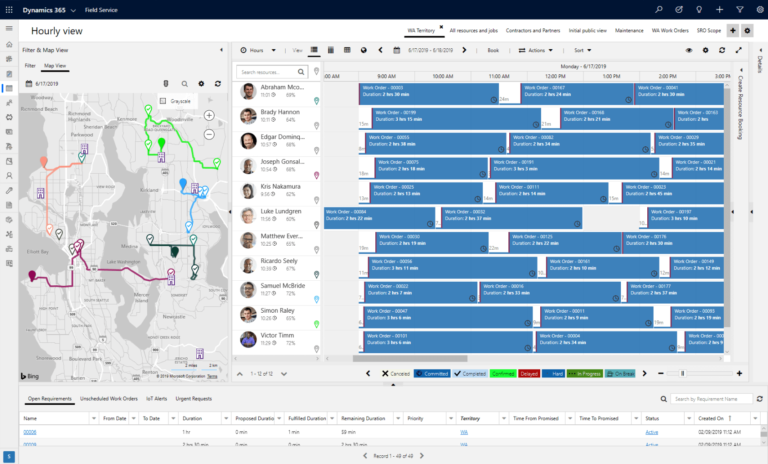
At minimum, you need a calendar view with drag-and-drop job assignment that shows technician availability alongside some form of conflict detection. That's the baseline, and most free field service software tools will offer some version of it. The differences show up in what happens when things go wrong, which in field service is every single day. If the tool can't flag a double-booking or alert your dispatcher when two jobs overlap on the same technician's calendar, your office staff will be catching those conflicts manually, usually after a customer has already been promised a time slot.
A calendar tells you when someone is available, but without a spatial view showing where your technicians are relative to the next job, your dispatcher is making routing decisions based on memory or a separate GPS app. That disconnect adds up in wasted drive time across a full week of jobs. Paid platforms take this further with AI-optimized routing and skills-based technician matching, but a good free tool should at least give you a visual sense of where your team is and where they're headed next.
Work order management from start to close
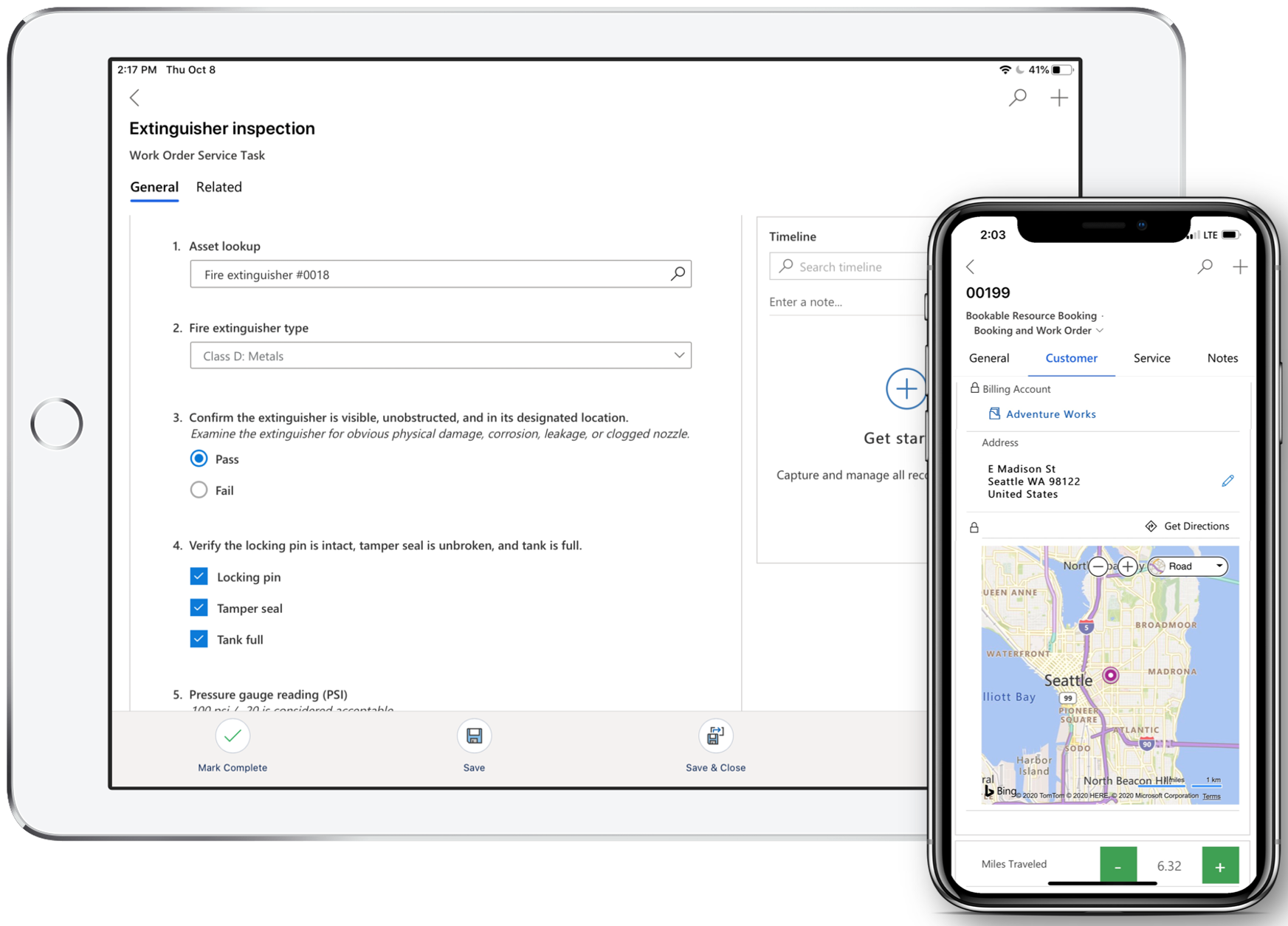
Every work order follows the same path from creation through assignment and tracking to close. Free field service software should handle that full loop without forcing you to jump between apps or keep a separate record somewhere else. Where a lot of free tools fall short is in what happens between "assigned" and "closed." If your technicians can't attach photos and customer signatures from the mobile app while they're on site, the work order becomes an office document rather than a useful field tool. That means someone back at the office is chasing technicians for job details after the fact and re-entering information that should have been captured in the moment.
The difference between a work order system that works and one that creates more admin comes down to how much of the job lifecycle the tool can capture without manual follow-up. Enterprise-grade systems like Dynamics 365 Field Service connect work orders directly to customer records and asset history alongside billing in a single view, but even at the free tier, you should be able to move a job from open to complete with all the relevant detail attached.
Mobile access that technicians will use
This one is non-negotiable. If your technicians can't pull up job details and update job status from their phone, you've got an office tool with a mobile login, not a field service app. The whole point of free field service software is getting information out of the office and into the hands of the people doing the work, so if the mobile experience is clunky or half-built, your team will stop using it within a week and you're back to phone calls.
You should test offline capability before you commit to anything. Canadian job sites include rural properties and industrial facilities where cell coverage drops out completely, and corporate basements are even worse. If the app doesn’t work without WiFi, your technicians will still be writing things down on paper and entering them later, which defeats the entire purpose. A good free field service software app should let technicians view their schedule and update work orders even when they're offline, then sync everything once they're back in range.
At the enterprise level, mobile experiences become fully customizable, with companies tailoring what technicians see on screen based on job type and role through platforms like the Dynamics 365 Field Service mobile app. At the free tier the bar is simpler. The app only needs to work reliably in the field without signal, and your technicians need to prefer opening it over calling the office.
Invoicing and getting paid faster
The best free field service software tools let technicians generate an invoice on-site the moment a job is complete and collect digital payment before they leave. That single capability changes your cash flow timeline from "send an invoice next week and hope they pay within 30 days" to "paid before the van pulls out of the parking lot." If the free tool you're evaluating locks invoicing behind a paywall, that's worth knowing upfront because integrating a separate invoicing app adds another system your team has to manage and another place where job data can fall through the gaps.
Connection to accounting tools like QuickBooks or Xero is a bonus at the free tier, and some platforms do offer basic integrations even on their unpaid plans. Where the real operational gain comes in is when your field service platform connects directly to a full ERP, so that completed work orders flow into financials, inventory adjustments, and customer billing without anyone re-entering data. That's paid-tier territory, but understanding the gap now helps you evaluate what you're giving up and what you'll eventually need as your operation grows.

Popular free field service software in 2026
There are only a handful of free field service software platforms that offer permanent free plans. Each of these tools has a legitimate free tier that you can use indefinitely with a small team, and each one takes a slightly different approach to what "field service" means in practice.
- Connecteam is free for up to 10 users and strongest on team communication and scheduling. It's a good fit for businesses where field workers need task management and internal comms alongside job tracking, though it's less specialized for traditional dispatch-heavy field service operations. If your workflow is more about coordinating mobile teams than routing technicians to reactive service calls, Connecteam handles that well.
- Odoo takes the open-source route, with the first app free. The real power comes when you start adding modules for CRM, inventory, and invoicing, but each additional module adds cost. If your team has developer resources and wants control over the codebase, Odoo gives you that flexibility. If you don't have that technical bench, the setup and maintenance overhead can eat into the savings pretty quickly.
- Dusk FSM is free for up to 10 staff and was built specifically for field service from the ground up. It covers scheduling, dispatch, mobile access, forms, and invoicing on the free plan, which makes it the most complete option for small Canadian teams running traditional field service workflows.
Every one of these tools was designed with small home-service businesses in mind. If you're running a B2B field service operation with complex asset management, contract tracking, or multi-location coordination, the feature gaps will surface quickly. These tools were built for a specific audience, and growing B2B operations simply fall outside that scope.
See Where Your Field Service Operation Stands Today
Gestisoft's team can assess your current setup and map out what you need, whether that's optimizing what you have or building something that scales.
 Book a free consultation
Where free field service software hits its ceiling for Canadian businesses
Free field service software can carry a small operation a long way, but every free platform has limits built into it. For Canadian B2B field service organizations, those limits tend to show up right around the point where the business is growing too fast to pause and switch systems.
User caps kill growth
Most free tools cap at 10 users. For seasonal businesses that scale crews up during busy months and back down again in the off-season, this creates a billing headache that goes beyond the per-user cost. You're either paying for seats nobody is using in January or scrambling to re-onboard people onto the platform every spring. Neither option is efficient, and both cost time your operations manager doesn't have.
No CRM integration
Free field service software tools manage jobs but they don't connect those jobs to your customer relationships or account history. Every time a technician finishes a job, the data from that visit stays locked inside the field service app. Your sales team can't see what service was performed last week when they're preparing for a renewal conversation and your account managers don't have visibility into recurring issues that could signal churn risk. For B2B field service organizations where customer lifetime value depends on long-term relationships, that disconnect between service delivery and sales intelligence costs real revenue over time.
No IoT or predictive maintenance
Connected sensors, asset monitoring, automated work order creation triggered by equipment data: this is where modern field service is heading, and none of it exists at the free tier. For businesses managing industrial equipment or large commercial HVAC installations, the difference between reactive and predictive maintenance is the difference between an emergency dispatch at 2am and a scheduled visit next Tuesday. Platforms built for predictive technology in connected field service can turn your field operation from a cost centre into a revenue-generating function, but that capability requires infrastructure that free tools simply weren't designed to support.
Reporting that stops at surface level
Free tools track completed jobs so they'll tell you how many work orders your team closed last month. What they won't tell you is how much time your technicians spend driving versus working or which job types are consistently running over estimate vs first-time fix rate. Without those numbers, you're making operational decisions based on gut feel and anecdotal feedback from your dispatchers. The gap between "we completed 200 jobs" and "we completed 200 jobs at a 74% first-time fix rate with an average travel time of 38 minutes" is the reporting intelligence you need to scale.
Canadian data compliance
Most free field service software companies are headquartered in the US or Australia. Your Canadian customer data and payment records are sitting on servers governed by foreign privacy laws, and most free platforms provide very little transparency about where that data is stored or who has access to it. If your business handles information covered by PIPEDA or provincial privacy legislation, this isn't a theoretical concern. Microsoft's Azure Canada datacenters in Toronto and Quebec City give Dynamics 365 users Canadian data residency by default, which is one of the reasons growing Canadian operations start looking at Dynamics 365 Field Service pricing once compliance becomes a priority.
The hidden price tag on free field service software
"Free" describes the licence. It doesn't describe what it costs to run your operations on it.
Every task that a paid platform automates is a task that someone on your team is doing manually on a free one. The cumulative weight of that manual work lands directly on your operating costs in ways that never appear on a software invoice. Most businesses don't calculate that cost until they're already looking for a replacement platform.
Beyond the daily operational drag, there are revenue losses that are harder to spot. Renewal opportunities slip through when you don't have capacity planning or preventive maintenance schedules feeding into your sales pipeline. And every time a customer calls the office to ask when the technician is arriving because your platform doesn't send automated updates, that's admin time pulled away from higher-value work.
The longer you run on a free platform, the more operational data accumulates there and the more costly and time consuming a migration becomes. Calculating the ROI of Dynamics 365 Field Service becomes a much easier conversation when you factor in that data migration alone can take weeks, and retraining your team on a new platform while still running active jobs is a disruption most operations underestimate. Starting on the right platform, even at a higher upfront cost, often saves money over a two-year window.

How free field service software compares to enterprise tools
Free field service software and enterprise platforms solve fundamentally different problems. Free tools help small teams get organized and enterprise platforms connect your field operations to the rest of your business.
AI-powered scheduling is where the difference hits hardest. Dynamics 365 Field Service uses Copilot and resource optimization algorithms to match technicians to jobs based on skills, location, availability, and parts inventory simultaneously, learning from patterns over time to improve future assignments. On a free tool, every single job assignment is a manual decision made by a dispatcher who may or may not have full visibility into what's happening across the team.
The CRM connection changes the entire value of field data. On a free platform, a completed work order is a closed ticket. On Dynamics 365, that same work order feeds directly into the customer's service history, surfaces for the account manager during renewal prep, and triggers follow-up workflows automatically. Field service stops being an isolated function and becomes part of how your company manages long-term customer relationships.
Connected assets and predictive technology in connected field service take things a step further. Equipment with IoT sensors can trigger work orders automatically before a failure happens, turning your field team from a reactive cost on the balance sheet into a proactive revenue function. None of that infrastructure exists at the free tier.
For businesses already running on Microsoft tools like Outlook, Teams, and Power BI, Dynamics 365 Field Service integrates directly into that ecosystem. There's no switching between disconnected apps because the full platform was designed to work as one connected system. And with Azure Canada datacenters in Toronto and Quebec City, your data stays in Canada by default.
Your field service operation is ready for the next step
Talk to Gestisoft about moving from a patched-together setup to a connected field service platform built for Canadian businesses.
 Free discovery call
How Gestisoft helps when Canadian businesses have outgrown free field service software
Gestisoft works with Canadian B2B companies that have reached the point where free tools or disconnected systems are holding back their field operations. As a Microsoft Solutions Partner, Gestisoft implements Dynamics 365 Field Service across English and French Canada.
The approach starts with understanding your business processes before any software conversation happens. A lot of companies come to Gestisoft after spending months trying to make a free or low-cost tool cover use cases it was never designed for. The first step is always mapping what your field operations need today and where they're heading over the next 12 to 18 months, so the platform you implement doesn't become the next thing you outgrow.
For teams making the jump from a free platform, the migration itself is part of the engagement. Getting your operational data and customer records out of a legacy system and into Dynamics 365 cleanly is something Gestisoft handles as part of implementation rather than leaving you to figure it out on your own.
Post-implementation support is the other piece that separates Gestisoft from a free tool experience. Free platforms come with community forums and knowledge bases, but Gestisoft provides ongoing optimization and technical support so your field service platform keeps pace as your operation evolves and your team grows into the more advanced capabilities like IoT integration and AI-powered scheduling.
-
Most free field service software platforms don't provide documentation about where Canadian customer data is stored or how it's processed. If your business collects personal information from Canadian clients (names, addresses, contact details, job site records), PIPEDA applies. Enterprise platforms like Dynamics 365 Field Service offer Canadian data residency through Azure datacenters in Toronto and Quebec City, along with compliance documentation that free tools rarely provide.
Explore More
- Your ultimate guide to D365 Field Service for industrial machinery
- Everything you need to know about universal scheduling in Dynamics 365 Field Service
- The complete guide to inspections using Dynamics 365 Field Service
- Unlocking efficiency: the comprehensive guide to field service integration
- Everything you need to know about field service agreements
Liked what you just read? Sharing is caring.

May 27, 2026 by Shelley Sunjka by Shelley Sunjka Copywriter & Marketing Strategist
Armed with a psychology degree and an irrational obsession with okapis, I've spent the last decade helping bold brands tell better stories. I believe the best writing bends grammar rules on purpose and makes people feel something. When I'm not deep in words or nerding out on buyer behaviour, I'm probably convincing my kids that impromptu kitchen dance parties are totally normal.

