

Field service teams have relied on remote expert support during on-site repairs and inspections for years, and Dynamics 365 Remote Assist was Microsoft's answer to that need. The platform gave technicians the ability to connect with remote specialists in real time using mixed reality video calls and spatial annotations, turning a complex repair into a guided walkthrough without flying someone across the country.
But Dynamics 365 Remote Assist has a deadline. Microsoft announced end of support for December 31, 2026, and new licences haven't been available since November 2025. For Canadian businesses currently running it, the clock is already ticking. For companies that were evaluating it for the first time, the door is closed.
The capabilities aren't disappearing entirely. Microsoft is folding the core remote collaboration functionality into Teams mobile with spatial annotations, which comes included with a Dynamics 365 Field Service licence. The transition path exists, but it requires planning, especially for teams that built workflows around HoloLens hardware that Microsoft is no longer manufacturing.
Waiting until the last quarter of 2026 to figure this out means gaps in technician support and potential compliance exposure from running unsupported software. Canadian businesses in regulated industries will feel that pressure earliest.
Your field service team deserves the right remote support tools
Gestisoft helps Canadian businesses evaluate their remote collaboration setup and plan a clear path forward.
 Book a free consultation
How Dynamics 365 Remote Assist works
Dynamics 365 Remote Assist connects on-site technicians with remote experts through live video calls enhanced with mixed reality annotations. A technician on-site shares their camera view, and an expert watching from a desktop through Microsoft Teams can draw arrows and place markers directly in the technician's physical space. The technician sees those annotations overlaid on the real equipment in front of them, which turns a verbal explanation into a visual one.
The platform was built on Microsoft Teams and ran on two types of hardware. HoloLens 2 delivered the full mixed reality experience, with hands-free operation so technicians could follow visual instructions while keeping both hands on the equipment. The mobile version offered a camera-based alternative for teams that didn't invest in HoloLens hardware, running on standard iOS and Android devices.
Where Dynamics 365 Remote Assist became more than a video calling tool was in its integration with Dynamics 365 Field Service. Technicians could pull up work order details directly inside the app and view their field service bookings without switching between applications. That connection between the remote collaboration layer and the operational backbone of the field service platform is what made it useful in a production environment.
The platform also doubled as a knowledge capture tool because calls could be recorded and photos and annotations could be saved, which turned individual repairs into reusable training material for the wider team.
The business problems Dynamics 365 Remote Assist was built to solve
The most immediate problem was first-time fix rates. When a technician can get real-time expert guidance while standing in front of the equipment, they're far more likely to resolve the issue without scheduling a return visit. Every avoided return trip saves fuel, labour hours, and the customer frustration that comes with waiting for a second appointment.
Instead of putting a senior specialist travelling every time a complex job came up at a remote site, that same expert could provide guidance from their desk through a shared camera view. For Canadian operations spread across large geographic distances, that alone justified the investment for a lot of companies.
Onboarding with Dynamics 365 Remote Assist meant that less experienced technicians could take on more complex jobs earlier in their careers because they had a direct visual line to someone who could walk them through unfamiliar procedures step by step. That compressed the ramp-up period and reduced the dependency on having your most experienced people physically present at every difficult job.
Remote inspections allowed inspectors to collaborate with off-site colleagues to assess and document asset conditions together in real time, with predictive technology in connected field service adding another layer of intelligence to how assets were monitored and maintained between visits.

The Dynamics 365 Remote Assist retirement timeline
The timeline has already started. New Dynamics 365 Remote Assist subscriptions couldn't be purchased or renewed after November 1, 2025, which means any Canadian business that wasn't already licenced is locked out. The Remote Assist mobile app was deprecated back in March 2025, with existing users directed toward Teams mobile with spatial annotations as the replacement.
The full end of support lands on December 31, 2026. After that date, Microsoft will stop providing security updates and technical support for Dynamics 365 Remote Assist entirely. The application may still function, but running it without updated security puts your organization in a position where a known vulnerability has no official fix coming.
For Canadian businesses in regulated industries, that's more than an IT inconvenience. Unsupported software can trigger audit findings and complicate cyber insurance renewals because insurers increasingly require organizations to demonstrate that their production software receives active security support. Running Dynamics 365 Remote Assist past December 2026 means accepting that risk with no mitigation path from Microsoft.
HoloLens 2 production stopped in late 2024 and Microsoft has not announced a successor device. That hardware dependency is now a dead end. The replacement path Microsoft is pointing toward is Teams mobile with spatial annotations, which comes included with a Dynamics 365 Field Service licence and doesn't require any specialized headset.
What replaces Dynamics 365 Remote Assist
Microsoft's own replacement is Teams mobile with spatial annotations. The functionality built into the Teams app gives field workers the ability to share their camera view on a video call and let remote experts annotate directly in their physical space. Only one person on the call needs a Dynamics 365 Field Service or Remote Assist licence for spatial annotations to work, which keeps the licensing cost contained for larger teams.
For most Canadian B2B field service operations, this covers the core Dynamics 365 Remote Assist use case. See-what-I-see video calls with real-time visual guidance means no separate app to manage and no HoloLens required. If your technicians were primarily using Remote Assist on mobile devices, the transition is close to a lateral move in terms of day-to-day functionality.
The gap shows up for businesses that built workflows around the full HoloLens experience. Hands-free operation, 3D holographic overlays, and the ability to work with both hands while following visual instructions in your field of view don't carry over to a phone-based experience. If your technicians relied on those capabilities for complex repairs or safety-critical procedures, Teams mobile won't fully replicate what they had.
Third-party AR platforms like TeamViewer Frontline and SightCall fill some of that space. They work across multiple device types and aren't tied to a single hardware vendor, which gives them a longevity advantage that Dynamics 365 Remote Assist ultimately lacked. For teams that need hands-free AR beyond what Teams mobile offers, these are worth evaluating before December 2026, because AI capabilities in Dynamics 365 Field Service can complement whichever remote collaboration tool you land on.
For Canadian businesses that weren't running Dynamics 365 Remote Assist and are now evaluating field service platforms for the first time, understanding what free field service software can and can't do is a useful starting point before committing to an enterprise licence.
Your transition plan starts with understanding your current setup
Gestisoft's team can audit your Dynamics 365 Remote Assist deployment, identify what your technicians need, and map the move to Dynamics 365 Field Service with spatial annotations built in.
 Book a free consultation
How Dynamics 365 Field Service carries forward remote collaboration
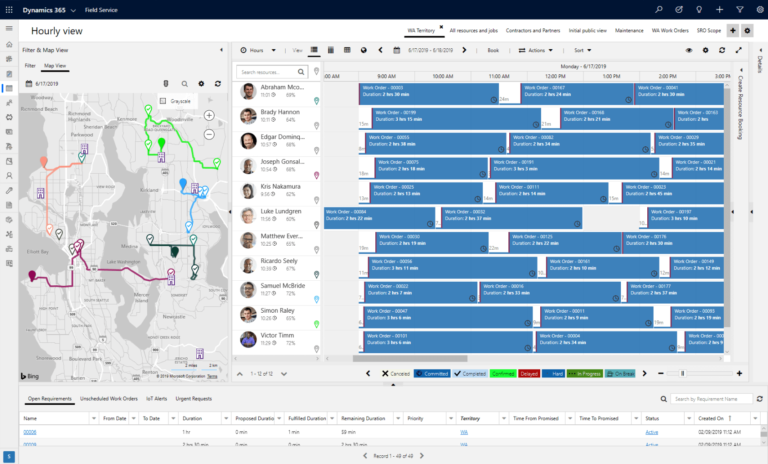
Dynamics 365 Field Service is the broader platform that Dynamics 365 Remote Assist was always designed to plug into. With Remote Assist retiring, Field Service becomes the single platform where scheduling, dispatch, mobile access, work orders, and remote collaboration all come together under one licence.
Spatial annotations come included with every Dynamics 365 Field Service licence at no additional cost. That means any team already running Field Service, or transitioning to it, gets the Teams mobile remote collaboration functionality without a separate line item. For Canadian businesses that were paying for standalone Remote Assist licences, consolidating onto Field Service often reduces total licensing spend while adding significant operational capability.
The platform goes well beyond remote support. AI-powered scheduling through Copilot matches technicians to jobs based on skills, location, and availability simultaneously, learning from patterns over time to improve future assignments. Connected assets with IoT sensors can trigger work orders automatically before equipment fails which turns your field operation from reactive dispatch into a preventive maintenance function. And every service interaction feeds directly into Dynamics 365 CRM, giving your sales and service teams shared visibility into the full customer relationship.
For businesses already running on the Dynamics 365 Field Service platform, the Remote Assist transition is less of a migration and more of an activation. The remote collaboration capability is already there, just waiting to be turned on.

Planning your Dynamics 365 Remote Assist transition before December 2026
Start by auditing your current Dynamics 365 Remote Assist usage. Identify how many people use it daily, on what hardware, and for what types of jobs. That inventory becomes the foundation of your transition plan because you can't migrate what you haven't mapped.
Once you have that picture, test Teams mobile spatial annotations with a small pilot group. If your team was primarily using Dynamics 365 Remote Assist on mobile devices, this is the most direct replacement and the pilot will confirm whether the experience meets your technician’s needs before you roll it out company-wide. Give the pilot enough time to surface edge cases rather than running it for a week and calling it done.
For teams that built workflows around the HoloLens hands-free operation, the evaluation is going to be more involved. You'll need to assess whether mobile-based annotations work for those specific use cases or whether a third-party AR platform fills the gap. This is the part of the transition that takes the longest to get right, so starting it early gives you room to test properly without the pressure of an approaching deadline.
If you're already within the Dynamics 365 ecosystem, consolidating onto Field Service is the most cost-effective path forward. Your data and service history carry over, and the Dynamics 365 Field Service pricing structure means you're picking up remote collaboration alongside scheduling, dispatch, and Copilot AI under a single licence rather than paying for standalone tools.
Review your Microsoft agreements and invoices before your next renewal. Dynamics 365 Remote Assist licences may still be appearing as active charges and your Microsoft consultant can adjust those so you're not paying for a product approaching end of life.
Your field service operation is ready for the next step
Talk to Gestisoft about consolidating your Dynamics 365 Remote Assist setup into Dynamics 365 Field Service before the December 2026 deadline.
 Book a free consultation
How Gestisoft helps Canadian businesses transition from Dynamics 365 Remote Assist
Gestisoft is already working with Canadian field service teams on their Dynamics 365 Remote Assist transitions. As a Microsoft implementation consultant operating across English and French Canada, Gestisoft has direct access to Microsoft's licensing roadmaps and technical migration resources that aren't available to businesses trying to manage this on their own.
Our access changes the economics of the transition because we can review your current Microsoft agreements, identify where Remote Assist licences can be consolidated into Field Service licensing, and in many cases reduce your total Microsoft spend while expanding what your technicians can do. Companies that handle this internally often miss those consolidation opportunities because the licensing structure across Dynamics 365 products isn't intuitive, and overpaying for the wrong licence mix is one of the most common mistakes during any Microsoft product retirement.
Gestisoft also handles the technical migration itself,from configuring spatial annotations in Teams mobile to integrating Dynamics 365 Remote Assist's remote collaboration capabilities into your existing Field Service environment so your technicians aren't learning a disconnected tool. The training is role-specific which means your dispatchers, field technicians, and remote experts each get onboarded based on how they'll use the platform every day.
For teams that need to evaluate third-party AR alternatives alongside Teams mobile, Gestisoft can help assess which solution fits your specific use cases and recommend the option that works for your technicians in the field, even when that means looking beyond the Microsoft ecosystem.
Talk to Gestisoft today about your Dynamics 365 Remote Assist transition
-
The application may continue to function, but Microsoft will stop providing security updates, bug fixes, and technical support. For Canadian businesses in regulated industries, running unsupported software can create compliance and cyber insurance issues. Microsoft recommends transitioning before the deadline.
Explore more
Liked what you just read? Sharing is caring.

May 27, 2026 by Shelley Sunjka by Shelley Sunjka Copywriter & Marketing Strategist
Armed with a psychology degree and an irrational obsession with okapis, I've spent the last decade helping bold brands tell better stories. I believe the best writing bends grammar rules on purpose and makes people feel something. When I'm not deep in words or nerding out on buyer behaviour, I'm probably convincing my kids that impromptu kitchen dance parties are totally normal.
