
Diagnostic ERP is the health check you run on your ERP system before you approve upgrades, add new modules, or commit to major process changes. Think of it as the inspection you do before buying a house or servicing your vehicle. You want to know what works, what's breaking, and what needs attention before you invest more time or money.
Most companies skip this step. They assume their ERP is fine until something breaks. A failed month-end close... A botched upgrade... A warehouse team that has quietly built an entire shadow system in spreadsheets because the ERP "doesn't work the way we need it to."
By the time these issues surface, the cost and frustration are much higher than they needed to be. An ERP health check gives you a clear, honest picture of where your ERP stands today so you can make decisions based on facts, not guesses or hope.
This guide walks you through what a diagnostic ERP is, when you need one, how it works, and how to assess your own system before you talk to anyone.
Get A Clear Diagnostic ERP Snapshot Of Your System
Discuss your current ERP situation with a Business Central expert and leave with a high-level view of where your system stands today.
 Free discovery call
What Is A Diagnostic ERP Health Check?
Many teams hear the word "diagnostic" and think audit, inspection, or blame. An ERP health check is simpler and more practical. It asks one straightforward question: how well does your ERP support the way your business actually works today?
What Is Included In A Diagnostic ERP?
An ERP assessment reviews five main areas: processes, data, technology, people, and strategy.
It looks at how your core workflows run in real life… Order-to-cash. Procure-to-pay. Record-to-report. Plan-to-produce. The goal is to compare what your ERP can do with what people actually do every day.
If your buyer enters the same supplier invoice twice because the approval workflow is unclear, that's a process issue. If your sales team doesn't trust inventory numbers and keeps their own stock sheet, that's a data and adoption issue. If your finance team exports everything to Excel because reports aren't set up properly, that's a configuration and reporting issue.
An ERP review captures these gaps without judgment. The focus is on understanding facts: what the system can handle, what it's currently doing, and where the friction lives.
How Diagnostic ERP Differs From A Classic IT Audit
An IT audit checks infrastructure, security, compliance, and backups. These are important, but they don't tell you if your ERP is helping or hurting your business.
A diagnostic ERP connects business outcomes to system setup. It asks whether the way Business Central is configured matches the way you actually sell, buy, produce, and report.
Here's a simple example... A company complains their ERP is slow. An IT audit checks server performance and network speed. Everything looks fine. An ERP health check digs deeper and finds the real issue: users manually create dozens of journal entries every day because the approval process was never configured properly. The ERP isn't slow. The process design is what slows everyone down.
That's the difference. An ERP assessment looks at how technology, people, and processes work together, not just whether the servers are running.
Self-Evaluation Guide For Your ERP System
Self-evaluate your current ERP system based on four factors: finances, reporting, inventory, and production.

When Do You Need A Diagnostic ERP Review?
Most organizations wait for a crisis before they review their ERP. A failed project… A frustrated executive... A resignation from the one person who "knows how everything works." You don't have to wait. Certain patterns are clear warning signs.
How To Know When Your ERP Needs A Diagnostic ERP Review
Month-end always means late nights and manual fixes in Excel. Sales and operations never agree on stock levels or order status. New hires need months to understand "how we do things in the system." Simple changes require long, risky projects that everyone dreads.
If your team spends more time working around the ERP than working in it, that's the clearest sign. If your controller has to rebuild reports manually every month because the ERP "doesn't give us what we need," that's another one.
Here's a real scenario... A mid-sized manufacturer runs Business Central but still tracks production in spreadsheets. When asked why, the production manager says the ERP "doesn't understand our shop floor." An ERP evaluation reveals the issue: Business Central's manufacturing module was never fully set up. The team was trained on finance and sales but not on production planning or MRP. The ERP could handle the work. No one knew how to use it.
This happens more often than most companies admit. You invest in an ERP, implement the basics, then never revisit whether you're using it properly.
Do You Need A Diagnostic ERP Before An Upgrade Or New Project?
Yes! If you're about to spend significant time or money on ERP changes, a system diagnostic is your safety net.
Before moving to the cloud or upgrading to a new version of Dynamics 365 Business Central. Before adding new modules like advanced warehouse management, manufacturing, or CRM. Before rolling out AI features or Copilot. Before integrating e-commerce, third-party logistics, or business intelligence tools.
Each of these projects assumes your current ERP foundation is solid. If your data is messy, your processes are poorly designed, or your users don't understand the system, those problems multiply when you add complexity.
An ERP health check gives you a clear "before" picture. You know what needs to be fixed, cleaned up, or simplified before you move forward. That reduces project risk, shortens timelines, and cuts costs.
For example, a company planning a six-figure upgrade might run an assessment and discover half their customizations are no longer needed because Business Central's standard features have evolved. They could cut the scope, finish faster, and save money. That's the value of assessing before you invest.
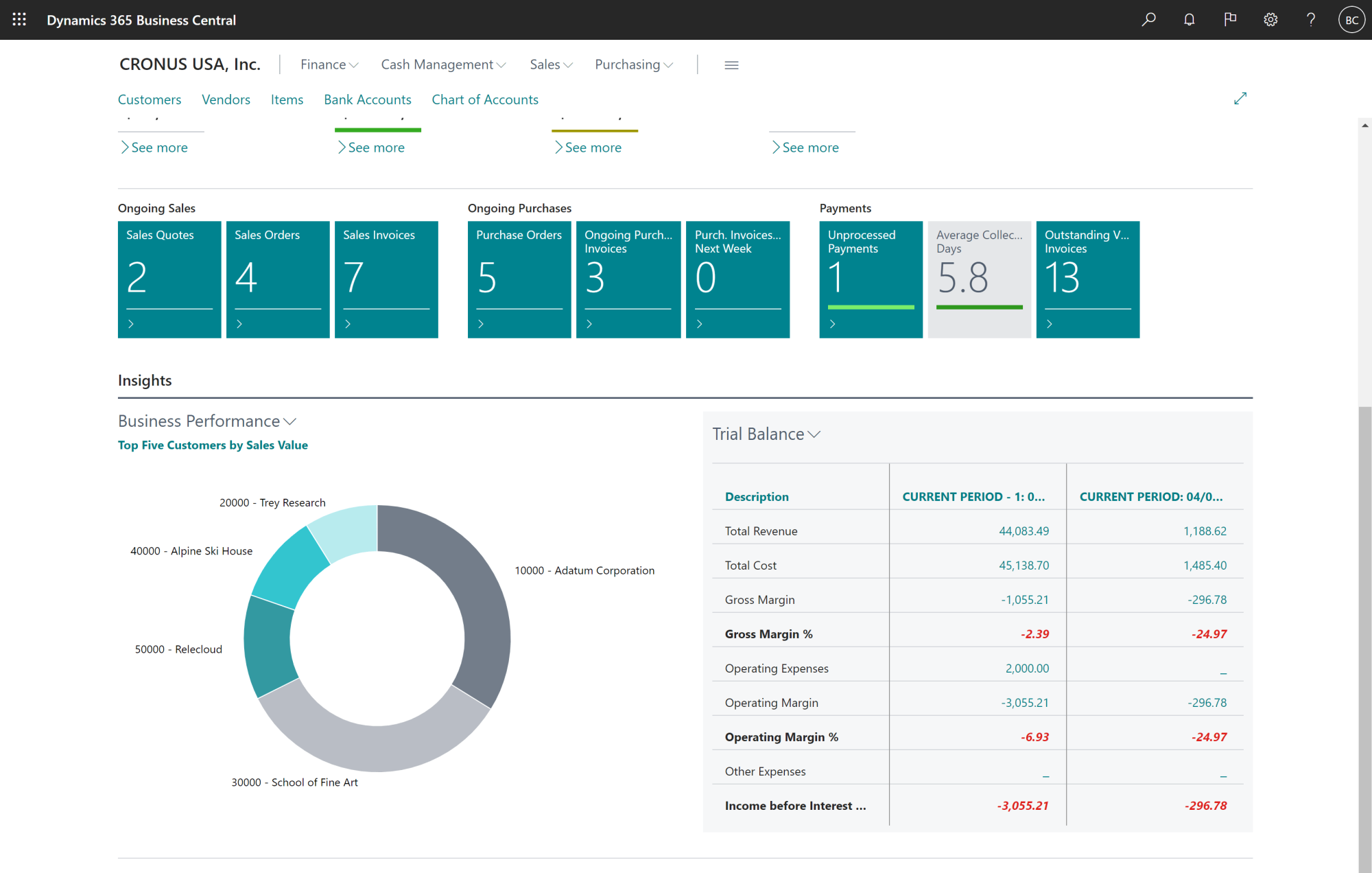
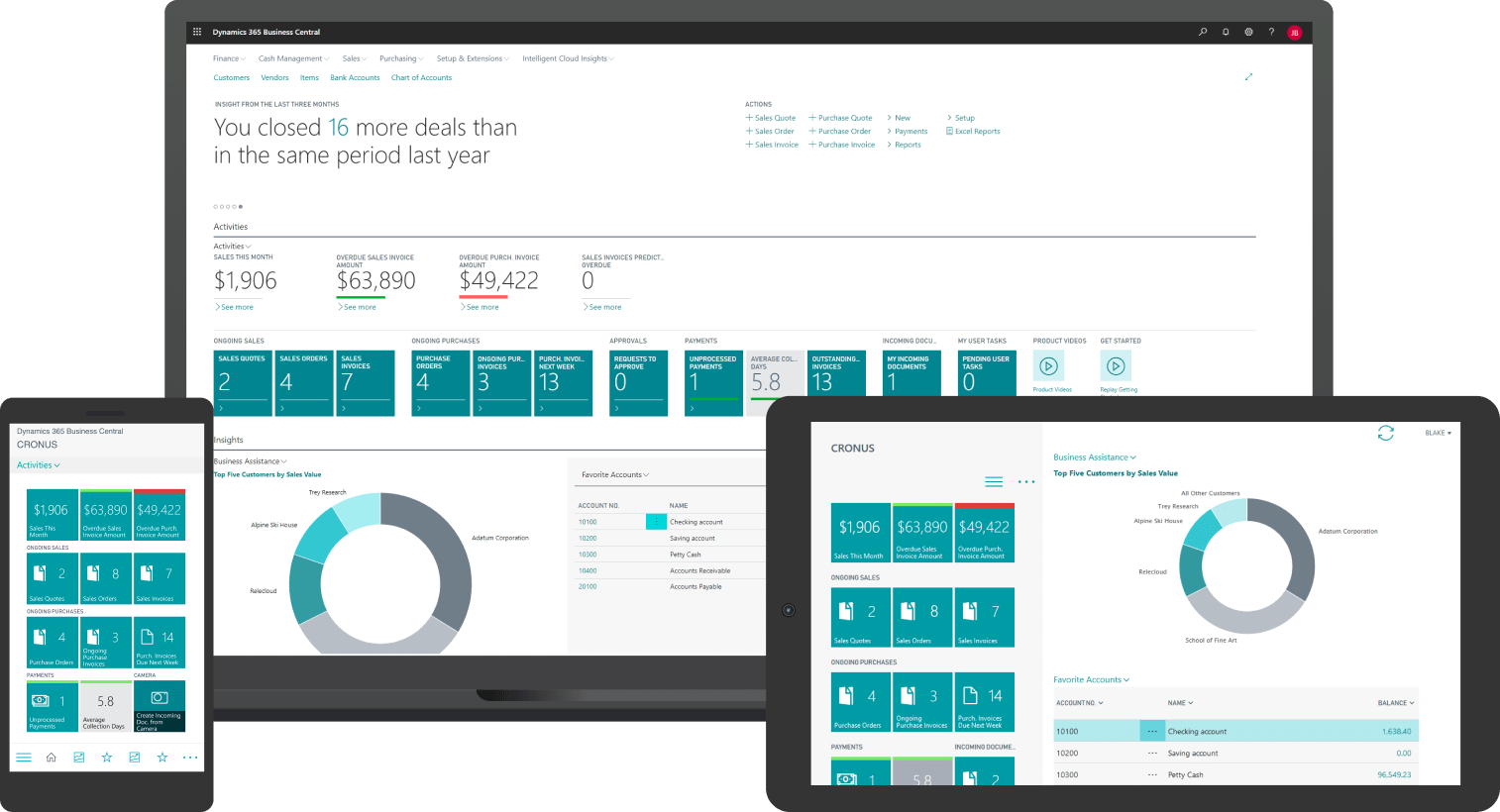
If you want a quick overview of what Microsoft Dynamics 365 ERP Business Central can do, you can watch Gestisoft's short introduction demo below while you explore this guide.
Diagnostic ERP Framework: How To Run A Structured ERP Health Check
To keep an ERP review simple and repeatable, it helps to use a clear framework. One practical way is to review five core pillars: processes, data, technology, people, and strategy.
Pillar 1: Business Processes And Everyday Work
Start with how orders, purchases, production, and finance actually flow through your business. Don't rely on documentation. Watch how people work.
A common issue: a buyer enters the same supplier invoice data twice because the approval workflow is unclear or the three-way match isn't configured properly. Another example: sales reps confirm orders by email because they don't trust the ERP's order confirmation process.
These aren't software bugs... They're design gaps. A system diagnostic captures them so you can fix them without replacing the entire system.
Pillar 2: Data Quality And Reporting
Master data is the foundation of every ERP. Customers, items, vendors, accounts, dimensions. If this data is inconsistent, duplicate, or incomplete, every report and decision built on it becomes unreliable.
An ERP health check looks for duplicate customer codes, inconsistent item descriptions, missing cost data, and manual adjustments that users make in reports because they don't trust the source.
For example, one distribution company might run the same financial report three different ways and get three different answers. An assessment could find the issue: dimension codes used inconsistently, and some transactions posted to the wrong accounts. Fixing the data restores trust in the system.
Pillar 3: Technology, Integrations, And Business Central Setup
Check your ERP version, support status, and performance. Are you on a supported version of Business Central? Are you using cloud or on-premise? Do you have integrations with CRM, warehouse systems, e-commerce, or finance tools?
For Business Central, one key question is whether you're using standard capabilities or relying on old customizations that block updates. Many companies customized heavily in the past. Business Central has since added those features as standard. But because no one reviewed the system, the customizations remain, creating upgrade risk and support costs.
An ERP evaluation maps your current architecture and flags risks: unsupported versions, fragile integrations, or customizations that can be replaced with standard features.
Pillar 4: People, Adoption, And ERP Ownership
Technology only works if people use it properly. An ERP assessment checks user adoption, training, and ownership.
Do users understand why processes are designed a certain way? Are there super users who can answer questions and support their teams? Is there an ERP owner who can make decisions and prioritize changes?
Here's a real scenario: only one person knows how to close the month, and they're always at risk of burnout or leaving. A health check highlights that risk and recommends cross-training, better documentation, or process simplification.
Pillar 5: Strategy, Risk, And ERP Roadmap
Your ERP should support your business plans, not limit them. Growth... New products…New channels... Acquisitions... International expansion…
An ERP review checks whether your current setup can handle those changes. It also highlights immediate risks: outdated versions, fragile customizations, single points of failure.
The outcome is a phased roadmap with clear "fix now," "plan next," and "consider later" categories. This gives leadership confidence that ERP investments are tied to business outcomes, not just IT projects.
Turn Your Diagnostic ERP Results Into A Roadmap
Review your findings with a Business Central specialist and translate them into a staged, realistic ERP roadmap.
 Free discovery call
How Does A Diagnostic ERP Process Work?
Every firm delivers an ERP assessment in its own style, but solid reviews usually follow a clear set of steps.
Step 1: Scoping Your Diagnostic ERP
Define which sites, entities, and processes you will review first. Don't try to diagnose everything at once. Start with the areas where pain and risk are highest.
For example, if finance struggles to close the month, focus on record-to-report. If operations constantly fight with sales over inventory, focus on order-to-cash and inventory management.
The scoping session also clarifies what you want from the review: a clear problem list, a phased roadmap, budget estimates, or a decision on whether to optimize or replace.
Step 2: Workshops, System Demos, And Evidence
Run short workshops with finance, sales, operations, and IT. Watch how users really work in the ERP. Ask them to show you, not tell you.
Compare what Business Central can do with what people are doing now. Capture screenshots, process notes, and simple metrics like how long month-end takes or how many manual adjustments happen each cycle.
This step is where an ERP specialist adds the most value. They know what Business Central can handle out of the box, so they can quickly spot where configuration, training, or process changes would solve the problem.
Step 3: Diagnostic ERP Findings, Scoring, And Roadmap
The outcome is not just a list of issues. You get simple scores across the five pillars, a list of issues ranked by business impact, and a phased roadmap.
The roadmap groups actions into clear categories:
- Fix now (high impact, low effort)
- Plan next (bigger projects that need budget and time)
- Consider later (strategic moves that depend on business direction)
This structure makes it easy for leadership to decide what to fund and when. During this phase, working with an ERP software consultant ensures recommendations are realistic and aligned with how Business Central actually works, not just theoretical best practices.
Diagnostic ERP Checklist: Quick Self-Assessment
If you want a quick sense of where you stand before involving a partner, a short checklist can be very revealing.
Diagnostic ERP Questions To Assess Your ERP System
Answer these questions honestly. If you say "no" to several, that's a strong signal to run an ERP health check with an expert.
- Can you close the month without rebuilding numbers in Excel?
- Do sales, finance, and operations trust the same inventory figures?
- Are your core reports generated directly from the ERP without manual rework?
- Do you know which customizations exist in your ERP and why they were built?
- Can you train a new user on your key processes in weeks, not months?
- Does your team follow the ERP's standard workflows, or do they work around them?
- Can you easily add a new product line, warehouse, or sales channel without a multi-month project?
- Do you have documentation that explains how your ERP is set up and why?
If you answered "no" to four or more of these, your ERP is likely creating more risk and friction than it should. A professional assessment will show you exactly where the issues are and what it will take to fix them.
-
No. Often, the outcome is to fix data, adjust processes, clean up customizations, and train users. Many companies get significant value from their existing Business Central setup once they address these issues.
In some cases, the review will confirm that planning a future migration is the safest move. But even then, you're making that decision based on evidence, not frustration.
Why Choose Gestisoft For Your Diagnostic ERP
Once you know you need an ERP assessment, the partner you choose will shape the quality of your roadmap and the risk of your next projects.
Business Central Specialists You Can Trust
Our ERP consultancy services focus on Microsoft Dynamics 365 ERP Business Central, so every Diagnostic ERP engagement builds on a platform we know in depth, from finance to inventory and production.
We handle implementations, migrations, optimization, and ongoing support. We understand how Business Central is designed to work and where companies typically underuse it.
Working with Microsoft Dynamics 365 ERP Business Central gives you a real Microsoft competitive advantage: frequent cloud updates, deep integration with the Microsoft stack, and a clear roadmap for new features like AI and Copilot.
Gestisoft is a certified Microsoft partner, a B Corp, and recognized as a Great Place to Work. We bring technical knowledge and real-world experience across manufacturing, distribution, regulatory bodies, and professional services.
Why Choose Gestisoft For Your Diagnostic ERP Review
We approach every ERP health check with realistic timelines, staged improvements, and a focus on what brings value now. We build on what you already have. We don't over-promise or push you toward solutions you don't need.
During an assessment, you sit down with an ERP specialist who understands both Business Central configuration and the day-to-day realities of finance, reporting, inventory, and production.
Here's what one client said about working with us:
“Gestisoft was very responsive and proactive in adapting to the internal challenges we faced and ensuring that we met our objectives. We were very impressed with the work of everyone involved in the project.”
If your ERP challenges sound familiar, let's talk about what a Diagnostic ERP could uncover for your business.
Start Your Diagnostic ERP With A Business Central Partner
Connect with Gestisoft to review your ERP challenges and design a Diagnostic ERP engagement that fits your pace, budget, and internal capacity.
 Free discovery call
Liked what you just read? Sharing is caring.

May 20, 2026 by Muhammad Ali Iqbal by Muhammad Ali Iqbal SEO Content Strategist & Copywriter
Driven by a passion for search engine optimization, strategic content, and conversion-focused writing. A copywriter and content strategist who lives for content that ranks, engages, and delivers real business results.
