

An ERP CRM system brings your back-office operations and your customer relationships onto connected data, so marketing, sales, and operations all work from the same picture. When these two systems run together, decisions get faster, campaigns line up with real inventory, and orders move through your business with fewer manual steps. This guide explains what an ERP CRM system is, how the two halves work together, the efficiency gains you can expect, and how to choose the right setup for your business.
Talk to a Gestisoft Expert
Wondering whether a combined ERP CRM system is right for your operations? Our Canadian Microsoft specialists can map it to your business in a free, no-pressure call.
 Book a free consultation
Key Takeaways:
- An ERP CRM system combines back-office operations (ERP) and front-office customer management (CRM) so both run on connected, real-time data.
- The core payoff is efficiency: aligned marketing and operations, inventory-aware campaigns, faster order processing, and fewer manual errors.
- The biggest wins tend to show up in supply-chain synchronization, customer-service response times, and consolidated financial reporting.
- Microsoft Dynamics 365 delivers this model as Business Central (ERP) plus Dynamics 365 Sales and Customer Service (CRM) on one platform.
- Choose based on real needs — evaluate current pain points, required features, growth plans, and total cost of ownership before committing.
What is an ERP CRM system?
An ERP CRM system is the pairing of two complementary platforms into one connected environment: an ERP (Enterprise Resource Planning) system that runs operations, and a CRM (Customer Relationship Management) system that runs customer relationships. Instead of operating in isolation, they share data — so a customer record in the CRM and an order or inventory record in the ERP describe the same reality.
The point isn't the software for its own sake; it's the connection. When your operational data and your customer data live on one connected system, every team sees a consistent, 360-degree view of both the customer journey and the company's resources. That shared view is what turns two separate tools into a single engine for efficiency.

The two halves: what CRM and ERP each do
To understand the combined system, it helps to be clear on what each side contributes.
A CRM manages and analyzes customer interactions across the customer lifecycle, with the goal of improving relationships, retention, and sales. Its core functions include:
- Contact management — storing and organizing customer information
- Interaction tracking — recording every customer touchpoint across channels
- Campaign management — planning and executing targeted marketing
- Sales performance — analyzing sales data and spotting trends
- Customer service — managing inquiries and service cases
An ERP integrates operational processes across departments — procurement, production, service, and inventory — and centralizes information for planning and decision-making. Its core functions include:
- Financial management — accounting, budgeting, and transactions
- Production planning — coordinating manufacturing and distribution
- Inventory management — tracking stock levels and warehouse operations in real time
- Purchase management — automating procurement and supplier relationships
- Human resources — employee data, payroll, recruitment, and performance

Here's a short demo of the Business Central ERP side in action:
How the two systems create efficiency together
When CRM and ERP work as one system, they bridge the gap between sales, marketing, and operations. Below are the efficiency gains that matter most — each with a concrete example.
Aligning objectives across marketing and operations
A combined system creates strategic alignment between marketing effort and operational capacity, so both work toward the same goals. Marketing decisions are made with real production and inventory capacity in view, which optimizes campaigns and reduces the risk of overproduction or excess stock.
Example: A sports-equipment company uses ERP data to time campaigns during periods of low production activity, boosting demand when it helps keep production flowing steadily through the year.
Increased campaign efficiency
With real-time access to production and inventory data, marketing teams launch campaigns that are both well-targeted and synchronized with current operations. Campaigns can be adjusted on the fly as production or inventory shifts, cutting wasted spend and lifting marketing ROI.
Example: A fashion company plans seasonal clearance campaigns using precise excess-stock data, so promotions line up with de-stocking needs.
Rapid feedback on sales data
An ERP CRM system delivers near-instant feedback on sales performance, so you can adjust marketing and production quickly. That continuous flow keeps output matched to demand, minimizing overproduction costs and capturing revenue opportunities.
Example: When a product is selling fast, production ramps up quickly to meet demand, protecting both customer satisfaction and revenue.
Improved customer satisfaction
Connected systems keep what the customer sees aligned with what the company can actually deliver. Customers get accurate information on availability and delivery times, which builds trust and loyalty.
Example: A customer ordering during an online promotion finds the product genuinely available and ready to ship, thanks to synchronized sales and logistics data.
Streamlined internal processes
Integration automates internal workflows, cutting delays and manual errors. Orders are processed and shipped faster, lowering operational costs.
Example: When an order comes in through e-commerce, the ERP immediately triggers preparation and shipping while the CRM logs the interaction for follow-up — no manual re-entry, fewer errors.
If connecting two existing systems is where you're headed, our walkthrough on how to integrate Business Central with Dynamics 365 CRM covers how that link works in practice.
See it in a real business
Bédard Ressources increased the efficiency of its accounting practices using Business Central — a concrete example of the operational gains a connected system delivers.

Ready to see these gains in your business?
Tell us where your teams lose time today, and we'll show you exactly where a connected ERP CRM system would tighten things up — in one free call.
 Book a free consultation
Where AI fits into a modern ERP CRM system
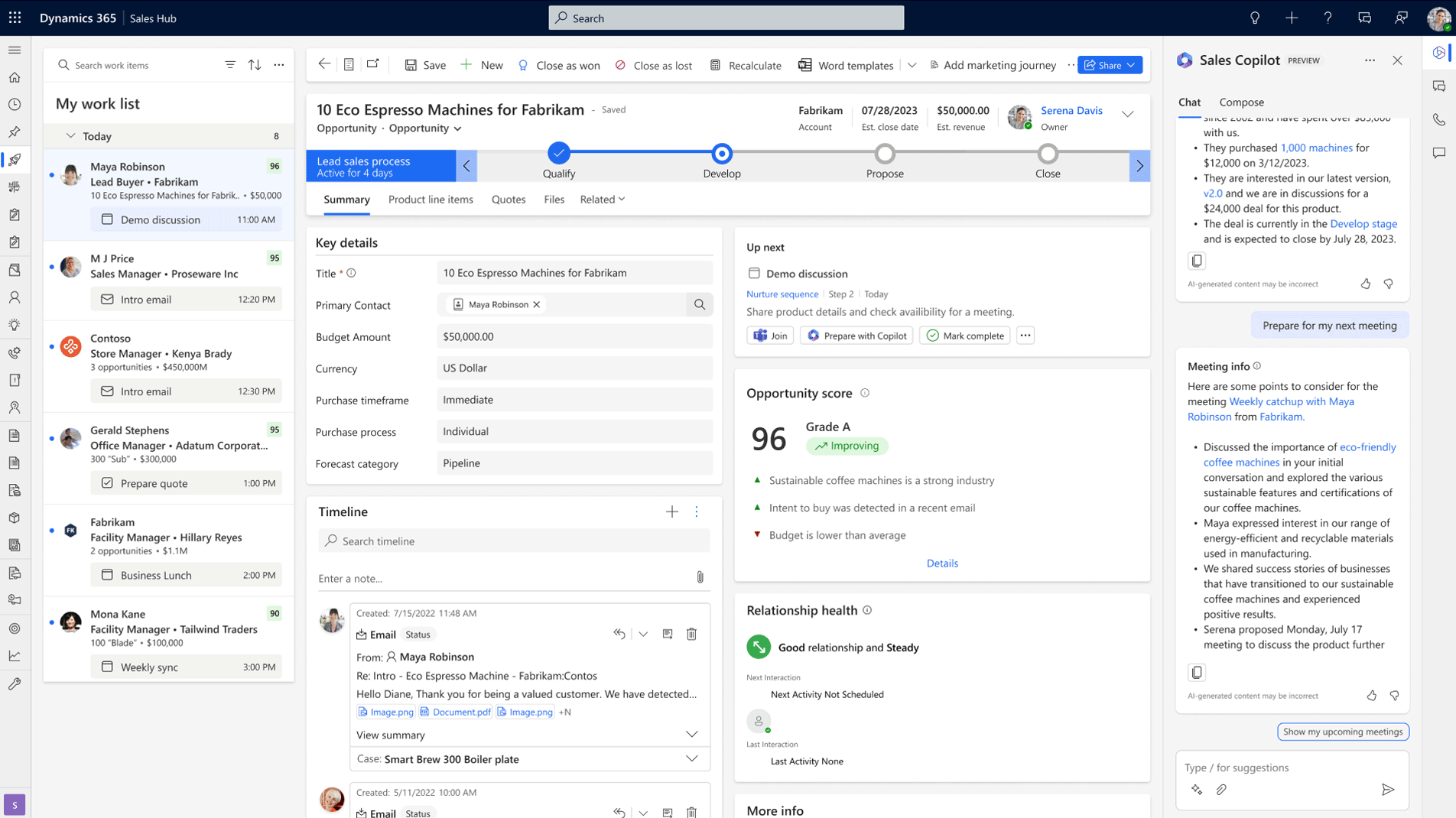
The newest reason to run ERP and CRM as one connected system is AI. When operational and customer data sit together, an AI assistant can reason across both — which is exactly what Microsoft Copilot now does inside Dynamics 365. On the CRM side, Copilot can draft customer emails, summarize opportunities, and prep meetings; on the ERP side, it assists with tasks like reconciliation and forecasting.
That cross-system intelligence is far harder to achieve when data is scattered across disconnected tools. If AI readiness is part of your thinking, our overview of AI in ERP systems is a useful companion. Here's Copilot working on the CRM side in Dynamics 365 Sales:
Choosing the right ERP CRM system
The right system starts with a clear-eyed look at your own needs. Every organization's requirements differ by size, industry, operational structure, and goals, so define them before you shop. Three questions to start with:
- What are the main challenges with your current systems?
- Which specific features do your business processes actually require?
- How do you expect your needs to evolve over the next few years?
Comparing platforms. The market offers several strong ERP platforms — SAP S/4HANA, Oracle NetSuite, and Microsoft Dynamics 365 Business Central among them. For companies that want operational management and connected CRM capabilities together, Business Central often stands out for a few reasons:
- Native integration with the Microsoft stack — Office 365, Teams, Outlook, and more
- Flexibility and scalability that suit SMEs and growing businesses alike
- Advanced reporting and analytics through Power BI
For a fuller framework, our guide on how to choose ERP software using 10 criteria walks through the evaluation step by step. And because Gestisoft is a certified Microsoft Partner based in Canada, we implement Business Central and Dynamics 365 in English and French with Canadian tax, payroll, and compliance built in.
Self-Evaluation Guide to Your ERP System
A practical checklist to pinpoint where your current system falls short — operationally and on the customer side — so you know exactly what to look for next.

Implementing an ERP CRM system
Choosing the system is only half the job; a smooth rollout depends on planning. A few practices that make the difference:
- Detailed planning — a project plan with clear milestones, owners, and deadlines
- Change management — communicate the benefits and train users to drive full adoption
- Ongoing support — keep technical help available to resolve post-deployment issues fast
Measuring success. Set clear criteria so you can judge whether the system is delivering. Useful indicators include user adoption rate, improvement in data accuracy, shorter sales cycles, and higher customer satisfaction.
ERP CRM system in practice: three scenarios
These scenarios show how a connected system solves specific, common problems.
Supply-chain optimization. A manufacturer keeps hitting production delays because sales and production aren't synchronized, leading to missed commitments and costly overproduction. With an ERP like Business Central connected to a CRM, sales demand aligns automatically with production capacity — CRM sales data flows straight into ERP planning for real-time adjustments. The result: shorter delivery times, lower inventory costs, and more reliable commitments.
Better customer service. A service company struggles to track requests, so response times slip. A CRM connected to the ERP puts interactions, service history, and billing data in one place, accessible in real time — so teams respond faster, resolve more issues on first contact, and strengthen loyalty.
Financial management and reporting. A multi-branch company wrestles with disparate systems that don't talk to each other. Unifying financial and operational data on Business Central enables fast, accurate consolidation of reports across branches, real-time financial insight, and better compliance.
-
It's the pairing of an ERP system (which runs operations like finance, inventory, and supply chain) with a CRM system (which runs customer relationships like sales, service, and marketing) so the two share connected data. The result is one consistent view of both operations and customers.
Conclusion
An ERP CRM system turns two separate tools into one engine for efficiency. By connecting operational and customer data, it aligns marketing with operations, speeds up processes, sharpens decision-making, and gives customers more reliable service. Platforms like Dynamics 365 Business Central and Dynamics 365 Sales make this model practical for Canadian SMBs — but the right choice always depends on your needs, your growth plans, and the total cost of ownership. Assess honestly, plan the rollout carefully, and choose the setup your teams will trust.
Not sure which setup is right for you?
Our Canadian Microsoft experts will help you compare your options and build a rollout plan that fits — clearly, and with no obligation.
 Free discovery call
Liked what you just read? Sharing is caring.

September 09, 2026 by Kooldeep Sahye by Kooldeep Sahye Inbound Marketing Manager
Specializing in SEO-driven pipeline growth, I combine keyword strategy, content optimization, and inbound tactics to turn organic search into a reliable source of qualified leads. I work at the intersection of traditional SEO and AI search — optimizing for LLMs and AI Overviews alongside Google — pairing data-informed strategy with sharp, story-led copywriting.