

Free accounting software can be a lifeline for early-stage charities. But “free” rarely means “fully nonprofit-ready.” Most free tiers are designed for small businesses and impose limits that hit charities hardest: restricted fund tracking, users, integrations, and board reporting depth.
This guide covers the best free options for charities in 2026, where they work well, where they become risky, and when to upgrade. For a broader view of features and implementation, see charity accounting software.
What “free” really means in charity accounting?
Free tiers vs nonprofit discounts
Some platforms are truly free at a base level. Others offer nonprofit pricing or time-limited trials. Either way, read the fine print.
Limits that affect charities most
Common constraints include:
- limited users (hard for volunteer teams)
- capped transactions
- reduced reporting
- no fund/dimension tracking
- weak integrations
Speak with our Business Central experts
Contact us for a free consultation and for additional information about Business Central.
 Free discovery call
Best free charity accounting software (2026 list)
Wave

Best for: very small charities needing core bookkeeping.
What’s free: invoicing, expense tracking, basic reports.
Charity fit: good starter system; nonprofit-specific depth is limited.
Limitations: restricted funds require manual structure.
Wave is consistently cited as a leading free option.
Zoho Books (free plan under thresholds)
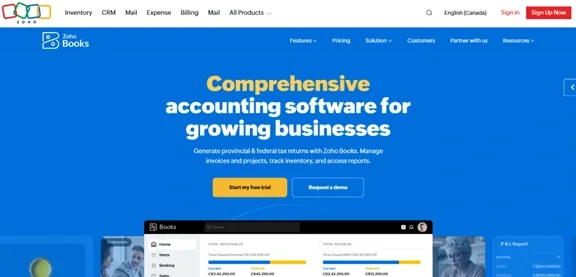
Best for: small charities wanting a modern interface with scaling options.
What’s free: basic bookkeeping and reporting under certain criteria.
Charity fit: stronger than many free tools, especially if you use Zoho apps.
Limitations: deep fund/grant governance still requires paid tiers.
GnuCash (open-source)

Best for: charities comfortable with offline, manual setups.
What’s free: full double-entry accounting.
Charity fit: workable for simple needs.
Limitations: no cloud collaboration, limited nonprofit reporting.
ZipBooks / other free-tier SMB tools

Best for: micro-charities needing invoices and basic tracking.
Limitations: minimal fund accounting.
Spreadsheet-plus approach (not software, but reality)
Some charities start with spreadsheets and free tools. It works only if transactions are low and restrictions are simple. Once complexity rises, risk rises faster than cost savings.
When free software works well for charities?
Free tools usually fit when:
- you’re early stage
- donations are low volume
- restricted funds are rare
- grants are simple or few
- reporting demands are light
Critical limitations of free tools (charity reality check)
Restricted fund tracking is shallow or absent
Many free tiers can’t enforce fund allocation rules. That forces manual journals — and mistakes.
Grant reporting is limited
If you can’t link expenses to grants and report budget usage cleanly, compliance becomes a spreadsheet project.
Audit trails are basic
Permissions and approval logs are often thin in free systems.
Manual work expands
Free tools often save money but create hidden time costs.
Integration gaps
Most free plans restrict integrations. Nonprofit tool guides treat integration breadth as a key differentiator.

Upgrade signals: when a charity outgrows free
Upgrade when:
- you allocate restricted funds weekly
- grants require structured compliance reporting
- board reporting takes too long
- approvals and controls are needed
- you expect major program growth
At that point, move to a paid option from best charity accounting software or follow the selection process in charity accounting software.
Safe migration path from free to scalable software
Clean your data first
- reconcile accounts
- standardize fund names
- close “temporary” donation categories
Redesign your fund/program structure
Avoid importing messy logic into a new system.
Choose timing carefully
Switch after a close or fiscal checkpoint to avoid dual systems.
Train users early
Restricted fund coding has to be understood across teams.
Ready to implement a charity accounting software?
Contact us for a free consultation and to find out more details about our Microsoft Dynamics 365 offers and solutions.
 Free discovery call
How Gestisoft supports charities moving from free tools to ERP?
Gestisoft helps charities:
- assess when free tools no longer fit
- design fund/program structures
- migrate data safely
- implement Business Central for scalable nonprofit finance
-
Wave is a common starting choice; Zoho Books and open-source tools can also work depending on needs.
Liked what you just read? Sharing is caring.

December 02, 2025 by Kooldeep Sahye by Kooldeep Sahye Inbound Marketing Manager
Specializing in SEO-driven pipeline growth, I combine keyword strategy, content optimization, and inbound tactics to turn organic search into a reliable source of qualified leads. I work at the intersection of traditional SEO and AI search — optimizing for LLMs and AI Overviews alongside Google — pairing data-informed strategy with sharp, story-led copywriting.