

Key Takeaways
• You need it when BOM accuracy, lot traceability, or on-time ship dates are costing you real money. You can wait if your BOMs still live in one person's head.
• Business Central Essentials runs CAD $108.50 per user per month in Canada, billed annually. Implementation ranges widely by sub-industry.
• Gestisoft is a Microsoft Solutions Partner for Business Central and a B Corp certified Canadian firm that has rolled out manufacturing ERP for Québec and Ontario makers since 1997.
An ERP for manufacturing industry is one system that runs your shop floor and your finance team off the same data. It holds your item master, bills of materials, routings, work orders, and GL. A good one lets you quote, release to the floor, track real material and labour, and post to the GL without anyone retyping anything.
Here is a Canadian stakes figure worth knowing. Based on ISED Canada's Key Small Business Statistics 2025, 47,237 manufacturers operate in Canada, and 94% of them have fewer than 100 employees.
Most still run on accounting software plus Excel. The 7pm scramble to rebuild tomorrow's schedule by hand, because yesterday's run under-produced, is where margin, ship dates, and audit trails quietly leak.
That is a problem Olivier Marotte at Groupe UP, a Québec construction and industrial products group, decided to close with Business Central and Gestisoft.
“With Business Central, if we decide to move into the Industrial 4.0 era, it's possible." - Olivier Marotte , VP Finance, Groupe UP”
If that is the direction you are also thinking about, the next step is a short, free conversation with a team that has been there.
Map Your Shop Floor to Business Central
See your BOMs and work orders run through Business Central with a Microsoft Solutions Partner for Business Central.
 Free Discovery Call
Where Does an ERP for Manufacturing Industry Pay Off First? 5 Real Scenarios
An ERP for manufacturing industry pays off first wherever margin, ship dates, or audit trails quietly leak: serialized builds, lot recalls, custom quoting, shared BOMs across plants, and landed cost. The five Canadian scenarios below are where we see it earn its keep soonest.
1- How an ERP for Manufacturing Industry Handles Serialized Discrete Builds
A metal shop or industrial manufacturing ERP buyer builds the same unit over and over, each with a serial number. Warranty claims come in by serial.
Right now, the serial lives on a paper traveller stapled to the box. The finished-goods receipt in QuickBooks has no idea which serial just shipped. When a customer calls about serial 44017, a floor supervisor digs through binders.
With a real ERP for manufacturing industry, the serial is captured on the work order, carried on the finished-goods receipt, and tied to the sales order that shipped it. The warranty question takes 20 seconds.
2- The Food Processor With CFIA Lot Traceability Pressure
Canadian food makers answer to the CFIA. Under the CFIA's Safe Food for Canadians traceability requirements, you need to trace a food one step back and one step forward through the supply chain. Spreadsheets struggle the moment a hot batch moves out the door.
An ERP for manufacturing industry built for food links every finished-goods lot to its raw material lots through the production journal, so the recall report is a one-click filter. The reader we talk to most here is a VP Operations who has already had one close call.
3- The ETO Shop Quoting a Custom Build in Under 48 Hours
Engineer-to-order shops lose jobs by Tuesday afternoon because the estimate takes until Wednesday. The estimator pulls old quotes, guesses on steel, and prays the margin holds.
If you want the deeper dive on this one, our full guide on engineer-to-order manufacturing software covers the ETO workflow and the Business Central features that handle quoting and job costing.
An ERP for manufacturing industry with proper project costing and routing templates lets the estimator copy the closest past job, swap in current material costs from the item master, and send the quote same-day. Seeing at a glance how a route uses capacity is where most ETO buyers trip up.
4- The Multi-Plant Operator Trying to Share One Item Master
Two plants, two Excel BOMs for the same finished good, two slightly different results. Procurement orders the wrong parts because MOQs sit in one spreadsheet. Finance posts the wrong standard cost. Nobody can explain why plant A's margin is 8% and plant B's is 3%.
A single ERP for manufacturing industry gives you one item master, one BOM per item, one standard cost roll, and real inter-company stock transfers. The cross-plant arguments go quiet because everyone is looking at the same number.
5- The Canadian Exporter Calculating Landed Cost on US and Asian Raw Materials
If you import steel, resin, electronics, or packaging from the US or Asia, duty, freight, brokerage, and FX swings land on your P&L a month after the raw material does.
Standard accounting software buries these in a catch-all account. By the time you see them, the product that used them is already quoted at last quarter's cost.
An ERP for manufacturing industry handles landed cost at the receipt level and pushes the real cost into the item's standard. That is how exporters keep margin honest.
Business Central's item charges feature is the mechanism most Canadian makers use. Side note, cloud based distribution software is close kin here, since many manufacturers also ship direct to retail.
Before the next section, a quick visual helps. If you have not seen Business Central run before, this short tutorial covers the interface, role centres, and how shop-floor, finance, and ops users each land on the data that matters to them.
When Should You Skip an ERP for Manufacturing Industry?
Skip an ERP for manufacturing industry if your BOMs still live in one person's head, you are under $2M in revenue with fewer than 20 SKUs, or you run one plant on one shift. In any of these cases, the pain of switching now outweighs what you will gain this year.
Here are the three signals we tell Canadian makers to listen for before signing anything.
Your BOMs Still Live in One Person's Head
If the shop supervisor is the only one who knows how a product is actually built, an ERP for manufacturing industry will give you a very expensive spreadsheet. The system is only as good as the master data you load into it.
Write the BOMs down first, with routings and standard times, and then shop.
You Are Under $2M in Revenue With Fewer Than 20 SKUs
At that size, QuickBooks or a solid ERP for SME can hold the line for another year or two. The pain of switching now outweighs the upside.
We tell these owners to wait, and we have told plenty.
You Are One Plant, One Shift, One Customer
If complexity is low and visibility is already good, you are solving a problem you do not have. Spend the money on sales instead.
If you are nodding on any of these, come back when the picture changes. If none of them fit, read on.
What Does an ERP for Manufacturing Industry Actually Do?
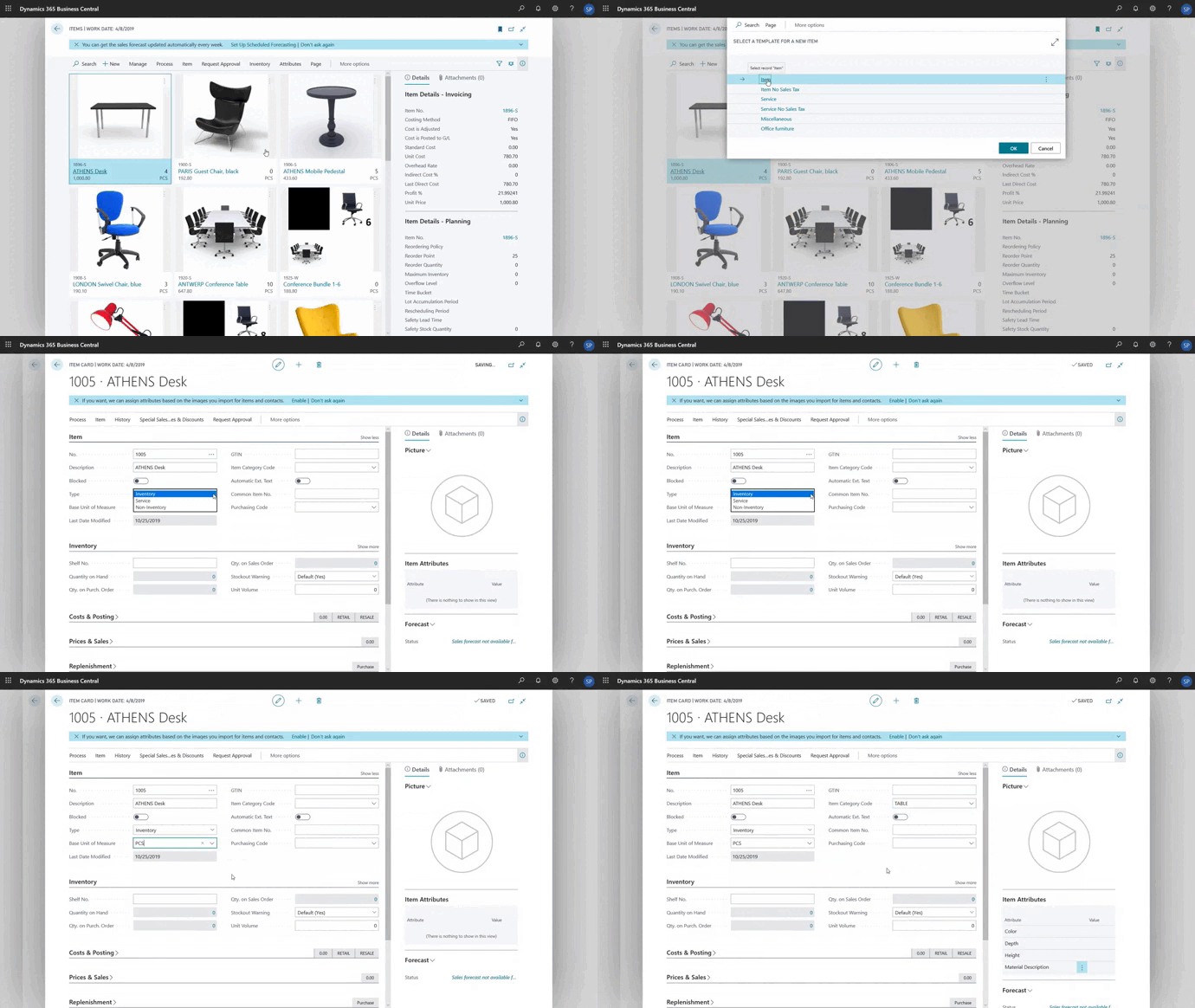
An ERP for manufacturing industry does five jobs that touch the whole plant: it owns the item master and BOM, schedules the floor, tracks real costs on live work orders, closes the loop with finance, and gives leadership one auditable version of the truth.
1- It Owns the Item Master and BOM
Every finished good has one bill of materials, one standard cost, one owner, and one audit trail of changes.
2- It Schedules the Floor
Work orders come out of the MRP run, carry routings and capacity, and get released when the material is actually in. The schedule is the system's output, not a parallel Excel file.
3- It Tracks Real Costs
Material issues, labour, and overhead post to the work order while the job is running, so finance sees variance within the day rather than at month-end.
4- It Closes the Loop With Finance
Finished-goods receipts flow to inventory, work-order issues backflush to WIP, three-way match on AP keeps vendor bills honest, and the ship posts to COGS. No one re-enters anything, which is why ERP support matters so much after go-live. The integrations only hold if someone is maintaining them.
5- It Gives One Truth to Leadership
When the owner asks what margin last Thursday's run earned, there is one answer, and it is auditable.
See a Manufacturing ERP Running Live
Watch Business Central handle real orders and lot numbers with a team serving Canadian manufacturers since 1997.
 Free Discovery Call
How Is an ERP for Manufacturing Industry Different From a Regular ERP?
An ERP for manufacturing industry adds BOMs, routings, work orders, MRP, capacity planning, costing methods, and lot or serial traceability on top of the finance and reporting pieces a regular ERP already has. In short, a regular ERP tracks money moving through departments while a manufacturing ERP tracks parts moving through processes.
That one difference changes how the software is built, priced, and implemented.
A finance-first ERP will have strong GL, AP, AR, and reporting. It can book a sale and a cost. What it will not do is break that cost down by material, labour, scrap, and overhead at the work order level, run MRP against real demand, schedule capacity, or carry a serial from receipt to ship.
Compare a manufacturing ERP to a straight distribution system and you see the same split. Our write-up on how ERP for distribution business works makes that clear, and our comparison on ERP vs MRP sits next to this piece if you want a direct read on where MRP ends and ERP begins.
Microsoft 365 consulting experience helps here too, because Business Central lives next to Teams, Outlook, Power BI, and Copilot. Your buyers, planners, and controllers already work in those tools, and keeping manufacturing data close to them is one of the quiet wins.
Still Weighing Cloud vs On-Premise?
Download our free eBook on the five reasons Canadian manufacturers are moving to a cloud ERP like Business Central.
 Free Access the Guide
What Does an ERP for Manufacturing Industry Cost in Canada?
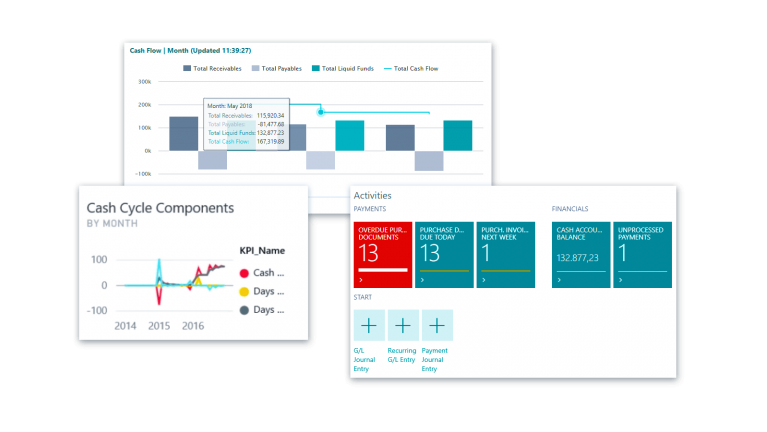
In Canada, Business Central starts at CAD $108.50 per user per month for Essentials and CAD $149.20 for Premium, which is the licence manufacturers need. Implementation is a separate line that varies widely by sub-industry, plant count, data readiness, and the integrations you plug in.
Most buyers mix the two up on the first vendor call.
Software, in Canadian dollars. Business Central is sold per user per month, billed annually.
Essentials is CAD $108.50 per user. Premium, which is the licence manufacturers need because it unlocks the manufacturing and service modules, is CAD $149.20 per user. A Team Members licence for read-only or light task users is CAD $10.90.
These figures come from Microsoft's live Business Central Canadian pricing page.
Implementation. Canadian SMB manufacturing rollouts land in a wide range depending on how many plants, how many SKUs, how clean the data is, and whether the ERP ties to EDI, shop-floor scanning, or Shopify. A clean, single-plant discrete manufacturer with tight BOMs can go live faster than a multi-plant food processor adding lot traceability from scratch.
Point of no return. The one decision that is hard to walk back after go-live is your costing method. Standard, FIFO, average, and specific all post differently to the GL, and switching after you have months of transactions is painful.
Pick it before you load your first production run, with your controller and your accountant in the same room.
Many Canadian makers go with standard cost for predictable products and average for commodities. That is a conversation to have with your partner before the chart of accounts is touched.
Pro tip: Budget 10% to 15% of your first-year software spend for a year-one support plan. In our Canadian projects, the manufacturers who skip it hit go-live cliff and bleed hours in the first quarter.
If budget is the first filter in your decision, our deep dive on ERP for SME walks through how smaller Canadian businesses approach the number without over-buying.
What Mistakes Should You Avoid With an ERP for Manufacturing Industry?
The four costliest mistakes with an ERP for manufacturing industry are picking software before cleaning your BOMs, chasing features instead of sub-industry fit, treating go-live as the finish line, and letting the chart of accounts drift during the project.
Most ERP projects fail on human decisions in the first ninety days, not on bad software.
What Nobody Tells You About Dirty BOMs
No ERP for manufacturing industry survives a dirty BOM or a stale item master. The real pre-work is not choosing software, it is cleaning the master data.
Vendors do not say this out loud because selling data cleanup is harder than selling licences. We say it because we have watched implementations stall at week eight when the first MRP run blew up on wrong unit-of-measure conversions.
Chasing Features Instead of Fit
The brochure with the most checkboxes is almost never the best fit. The one that handles your specific sub-industry well, and whose partner has your industry in their project list, is.
If you want a longer read, our view on ERP solutions for manufacturing covers how sub-industry shapes the shortlist. In short, match the ERP to how your floor actually runs, not to a feature matrix.
Treating Go-Live as the Finish Line
Go-live is week one of the real project. The team that moved from Dynamics GP or Sage to Business Central is still learning the new system in month three.
Microsoft Dynamics GP software is one of the common systems we help migrate from. The pattern is the same each time: the business keeps shifting after cutover and the system needs to shift with it.
Letting the Chart of Accounts Drift
Add accounts during the project and you have a nightmare at year-end. Lock it, document it, and keep approvals tight.
The One Question to Ask Every ERP for Manufacturing Industry Vendor
Forget the long questionnaire. The single question that tells you more than any demo is this.
Walk me through how your system handles a work order that under-produces by 7%, with a scrap reason, and how that posts to WIP and the GL by end of day.
A strong answer walks through the production journal entry, the WIP account impact, the variance posting, and the shop-floor confirmation in two or three minutes.
A weak answer talks about dashboards and offers to send a follow-up email.
One tells you the system was built for manufacturers. The other tells you it was built for accountants.
Pro tip: Clean three real BOMs the week before every vendor demo. Make the vendor load them live and run MRP against a 30-day forecast you supply. Most vendors cannot. The ones that can are the shortlist.
Why Pick Gestisoft as Your ERP for Manufacturing Industry Partner?
Gestisoft is a Microsoft Solutions Partner for Business Central and a B Corp certified Canadian consultancy that has rolled out ERP for manufacturing industry projects since 1997, with bilingual teams in Montréal, Toronto, Ottawa, and Québec City.
For readers outside Québec and Ontario, we handle out-of-province rollouts too, including Business Central implementation in Alberta.
What matters more than the credentials is what we see on the floor. From ERP in inventory management to lot traceability under CFIA scrutiny, we have set up Business Central for Canadian discrete and process manufacturers.
We have also migrated plants off Dynamics GP, Sage, and QuickBooks without losing a close.
Here is a quote we come back to often, from Chris Miller, Director of Operations at Elemental Container, a Canadian aluminum packaging manufacturer that worked with us on their rollout.
“I've implemented four ERP systems now and Yannick is amazing." - Chris Miller , Director of Operations, Elemental Container”
That is the kind of comment we want on year three, not year one
Get a Second Opinion on Your Manufacturing ERP Shortlist
Pressure-test your top two picks with a bilingual Gestisoft team across Montréal, Toronto, Ottawa, and Québec City.
 Free Discovery Call
FAQs
Is an ERP for Manufacturing Industry the Same Thing as an MRP?
No. MRP, or material requirements planning, is one function inside a manufacturing ERP. It calculates what to buy and what to make based on demand and current stock.
A full ERP for manufacturing industry wraps MRP in finance, HR, warehouse, sales, and reporting.
How Long Does an ERP for Manufacturing Industry Take to Implement in a Canadian SMB?
A clean single-plant discrete manufacturer with tight BOMs can go live faster than a multi-plant food processor adding lot traceability from scratch.
The honest answer in our Canadian projects is that scope and data readiness decide the timeline more than the software does.
What Is the Cheapest ERP for Manufacturing Industry We Can Start With?
For Canadian SMBs with manufacturing needs, Business Central Premium at CAD $149.20 per user per month is the usual starting point because it unlocks the manufacturing module without a separate add-on.
Cheaper tools exist but typically miss BOMs, routings, or lot traceability, which means you will replace them within two or three years.
Can We Run an ERP for Manufacturing Industry in the Cloud?
Yes, and most Canadian SMB manufacturers now do. Business Central is cloud-first on Microsoft Azure, and Microsoft's Azure regions list confirms Canada Central is in Toronto and Canada East is in Quebec. That keeps your data inside Canadian borders for compliance.
Does an ERP for Manufacturing Industry Handle Québec French Labels and Bilingual Shop-Floor Documents?
It should, and Business Central does out of the box with Québec French and English printed on the same work orders, pick tickets, and labels.
If you run a bilingual plant, confirm this on the demo in the vendor's own system.
What Is the Role of a Partner in an ERP for Manufacturing Industry Rollout?
A partner translates your floor into the system. They handle data cleanup, BOM loading, process mapping, costing method setup, user training, and post-go-live support.
The software vendor sells licences. The partner makes it work.
The Bottom Line
The bottom line is that the right ERP for manufacturing industry is the one that matches your sub-industry, your floor, and your Canadian context, and the right partner is the one that has done it before in your sector.
If you want a partner that has walked this road with Canadian manufacturers before, then let's talk.
Liked what you just read? Sharing is caring.

November 10, 2026 by Muhammad Ali Iqbal by Muhammad Ali Iqbal SEO Content Strategist & Copywriter
Driven by a passion for search engine optimization, strategic content, and conversion-focused writing. A copywriter and content strategist who lives for content that ranks, engages, and delivers real business results.
